
1. บทนำ
This user manual provides comprehensive instructions for the ASUS K31AN-IN006D Desktop PC. It covers setup, operation, maintenance, and troubleshooting to ensure optimal performance and longevity of your device. Please read this manual thoroughly before using your desktop PC.

รูปที่ 1 : ด้านหน้า view of the ASUS K31AN-IN006D Desktop PC.
2. เนื้อหาบรรจุภัณฑ์
ตรวจสอบว่ามีสินค้าครบตามรายการในบรรจุภัณฑ์ของคุณ หากมีสินค้าใดสูญหายหรือเสียหาย โปรดติดต่อผู้ค้าปลีกของคุณ
- ASUS K31AN-IN006D Desktop PC
3. การตั้งค่า
3.1 การเชื่อมต่ออุปกรณ์ต่อพ่วง
Before powering on your desktop PC, connect all necessary peripherals such as the monitor, keyboard, mouse, and network cable.
- เชื่อมต่อจอภาพ: Connect your monitor to the appropriate video output port (VGA, HDMI) on the rear panel of the desktop PC.
- เชื่อมต่อคีย์บอร์ดและเมาส์: Plug your USB keyboard and mouse into the available USB ports on the rear or front panel.
- เชื่อมต่อเครือข่าย (ทางเลือก): If using a wired network connection, connect an Ethernet cable from your router or modem to the LAN port on the rear panel.
- เชื่อมต่อพลังงาน: Connect the power cord to the power input on the rear panel of the desktop PC, then plug the other end into a power outlet.

Figure 2: Rear panel connectivity ports including USB, LAN, VGA, and HDMI.
3.2 การเปิดเครื่อง
After connecting all peripherals and power, press the power button located on the front panel of the desktop PC. The system will initiate the boot process.
4. ระบบปฏิบัติการ
The ASUS K31AN-IN006D Desktop PC comes pre-installed with DOS (Disk Operating System). Upon initial boot, you may need to install a preferred operating system such as Windows or Linux to utilize the full functionality of the hardware. Refer to the installation guide of your chosen operating system for detailed steps.
4.1 โอเวอร์แผงด้านหน้าview
The front panel provides convenient access to frequently used ports and drives.
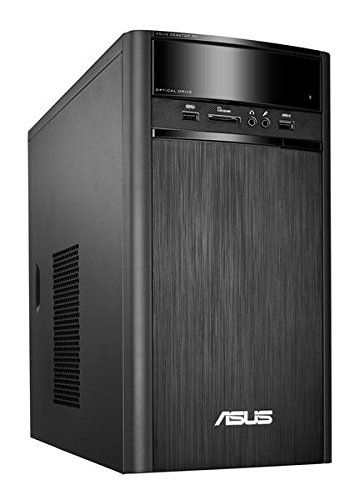
Figure 3: Front panel showing optical drive, USB ports, and audio jacks.
- ออปติคัลไดรฟ์ For reading and writing CDs/DVDs.
- พอร์ต USB: Connect USB devices such as flash drives or external hard drives.
- แจ็คเสียง: ช่องเสียบหูฟังและไมโครโฟนสำหรับรับและส่งสัญญาณเสียง
- เครื่องอ่านบัตร: สำหรับอ่านการ์ดหน่วยความจำรูปแบบต่างๆ
5. การบำรุงรักษา
Regular maintenance helps ensure the longevity and stable operation of your desktop PC.
- รักษาความสะอาด: Regularly clean the exterior of the PC with a soft, dry cloth. Use compressed air to clear dust from ventilation grilles to prevent overheating.
- ตรวจสอบให้แน่ใจว่ามีการระบายอากาศที่เหมาะสม: Place the desktop PC in a well-ventilated area, ensuring that air vents are not obstructed.
- การอัปเดตซอฟต์แวร์: Once an operating system is installed, regularly update it and your drivers to maintain security and performance.
- การสำรองข้อมูล: สำรองข้อมูลสำคัญไปยังไดรฟ์ภายนอกหรือที่เก็บข้อมูลบนคลาวด์เป็นระยะเพื่อป้องกันการสูญหายของข้อมูล
6 การแก้ไขปัญหา
This section addresses common issues you might encounter with your desktop PC.
- ไม่มีไฟฟ้า:
- Check if the power cord is securely connected to both the PC and the power outlet.
- ตรวจสอบให้แน่ใจว่าเต้ารับไฟฟ้าทำงานได้
- ไม่มีจอแสดงผล:
- Verify that the monitor is powered on and the video cable is securely connected to both the PC and the monitor.
- ตรวจสอบให้แน่ใจว่าได้เลือกแหล่งอินพุตที่ถูกต้องบนจอภาพของคุณ
- ระบบช้าลง:
- Check for excessive background programs or processes.
- ตรวจสอบให้แน่ใจว่ามีพื้นที่ว่างในฮาร์ดไดรฟ์เพียงพอ
- Consider running a disk cleanup or defragmentation tool (if applicable for your OS).
- ไม่ตรวจพบอุปกรณ์ต่อพ่วง:
- ลองเชื่อมต่ออุปกรณ์ต่อพ่วงกับพอร์ต USB อื่น
- Ensure necessary drivers are installed for the peripheral (after OS installation).
7. ข้อมูลจำเพาะ
Below are the technical specifications for the ASUS K31AN-IN006D Desktop PC.
| คุณสมบัติ | ข้อมูลจำเพาะ |
|---|---|
| ยี่ห้อ | เอซุส |
| ชื่อรุ่น | K31AN IN006D |
| ระบบปฏิบัติการ | ดอส |
| รุ่นซีพียู | Pentium J2900 |
| ความเร็วซีพียู | 2.41 กิกะเฮิรตซ์ |
| ขนาดหน่วยความจำ RAM ที่ติดตั้ง | 4GB |
| เทคโนโลยีหน่วยความจำ RAM | DDR3 |
| คำอธิบายฮาร์ดดิสก์ | Serial ATA (1TB 7200rpm) |
| โคโปรเซสเซอร์กราฟิก | กราฟิก Intel HD (รวม) |
| การเชื่อมต่อเครือข่าย | แบบมีสาย, Wi-Fi |
| ขนาดรายการ | 39 x 18 x 35 เซนติเมตร |
| น้ำหนักสินค้า | 5300 กรัม |
| ส่วนประกอบที่รวมอยู่ | เดสก์ท็อป |
8. การรับประกันและการสนับสนุน
The ASUS K31AN-IN006D Desktop PC comes with a การรับประกันจากผู้ผลิต 3 ปี from the date of purchase. For technical support, warranty claims, or service inquiries, please contact ASUS customer support through their official website or designated service centers. Keep your proof of purchase for warranty validation.
For the most up-to-date support information, visit the official ASUS support webเว็บไซต์.