
การแนะนำ
This manual provides detailed instructions for the setup, operation, and maintenance of your A4tech Bloody Light Strike B314 Gaming Keyboard. Please read this manual thoroughly before using the product to ensure optimal performance and longevity.
คุณสมบัติหลัก
- Bloody 4 Light Strike Mechanical Switches: Experience ultra-fast response times of 0.2ms with infrared optic switches, providing a competitive edge in gaming.
- เพิ่มความทนทาน: Designed for intensive use, featuring A,S,D,W silicon keys with a convex shape for improved control and longevity.
- Neon Glare System LED Backlighting: Customize your gaming environment with vibrant LED backlighting, making keys easy to locate in low-light conditions.
- ปุ่มตั้งโปรแกรมได้ 9 ปุ่ม: Personalize your gaming experience by assigning custom functions to 9 individually programmable keys.
- Double Secure Water-Resistance: The keyboard is electronically sealed with a water drain hole, protecting it from accidental spills and extending its lifespan.
เนื้อหาแพ็คเกจ
ตรวจสอบว่ามีรายการทั้งหมดอยู่ในแพ็คเกจ:
- Bloody Light Strike B314 Gaming Keyboard
- คู่มือการใช้งาน (เอกสารนี้)

Image: The retail packaging for the Bloody Light Strike B314 Gaming Keyboard, showing the keyboard with LED backlighting and key features highlighted.
คู่มือการติดตั้ง
- เชื่อมต่อคีย์บอร์ด: เสียบขั้วต่อ USB ของแป้นพิมพ์เข้ากับพอร์ต USB ที่มีอยู่ในคอมพิวเตอร์ของคุณ
- การติดตั้งไดร์เวอร์: The keyboard is typically plug-and-play. Your operating system should automatically detect and install the necessary drivers. If prompted, follow the on-screen instructions.
- การติดตั้งซอฟต์แวร์ (ทางเลือก): For advanced customization, including programming keys and managing backlighting, download and install the official Bloody software from the A4tech webเว็บไซต์.
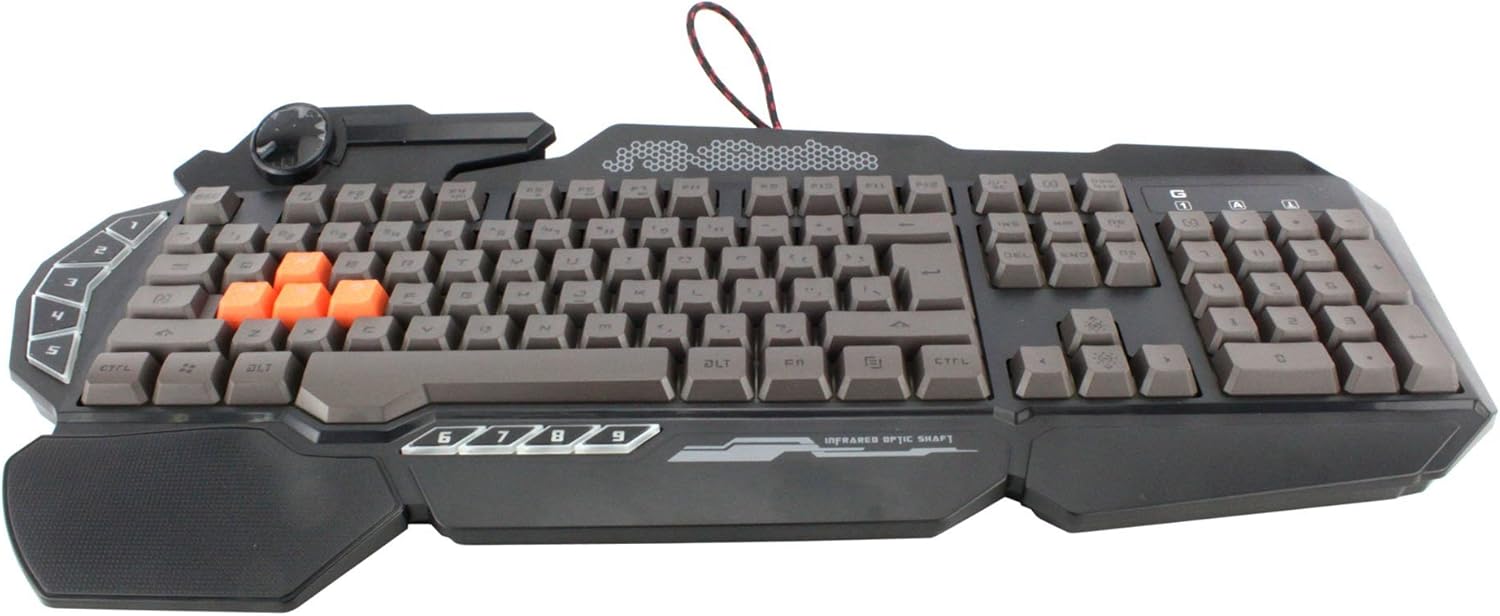
ภาพ: จากบนลงล่าง view of the Bloody Light Strike B314 Gaming Keyboard, showcasing the full QWERTY layout with orange WASD keys and dedicated macro keys on the left.
คำแนะนำการใช้งาน
การใช้งานพื้นฐาน
The Bloody B314 functions as a standard QWERTY keyboard for everyday typing and gaming. Its infrared mechanical switches provide a fast and responsive typing experience.
ปุ่มที่สามารถตั้งโปรแกรมได้
The keyboard features 9 programmable keys, typically located on the left side. To customize these keys:
- Install the official Bloody software from the A4tech webเว็บไซต์.
- Launch the software and navigate to the key customization section.
- Select the desired programmable key (e.g., G1-G9 or similar).
- Assign macros, key functions, or multimedia controls as needed.
- บันทึกโปรของคุณfile เพื่อใช้การเปลี่ยนแปลง
LED Backlighting Control
The Neon Glare System LED backlighting can be adjusted using function key combinations:
- Fn+F12: Cycle through different backlighting modes (e.g., static, breathing, off).
- Fn + ลูกศรขึ้น/ลง: ปรับความสว่างของแบ็คไลท์
- Fn + ลูกศรซ้าย/ขวา: Adjust backlight speed or direction (if applicable to the mode).
โหมดเกม
Activate Game Mode to disable the Windows key and prevent accidental interruptions during gameplay.
- Fn+F8: เปิด/ปิดโหมดเกม

ภาพ: มุมเอียง view of the Bloody Light Strike B314 Gaming Keyboard, highlighting the ergonomic wrist rest and the distinct orange WASD keys.
การซ่อมบำรุง
การทำความสะอาด
- ถอดแป้นพิมพ์ออกจากคอมพิวเตอร์ของคุณก่อนทำความสะอาด
- ใช้แบบนุ่มๆamp cloth to wipe the surface of the keyboard. Avoid harsh chemicals or abrasive materials.
- สำหรับฝุ่นละอองและเศษต่างๆ ระหว่างคีย์ ให้ใช้ลมอัด
- The water-resistant design helps protect against spills, but it is still recommended to clean up liquids promptly.
พื้นที่จัดเก็บ
เก็บแป้นพิมพ์ไว้ในที่แห้งและเย็น หลีกเลี่ยงแสงแดดโดยตรงและอุณหภูมิที่สูงหรือต่ำเกินไปเมื่อไม่ได้ใช้งานเป็นเวลานาน
การแก้ไขปัญหา
แป้นพิมพ์ไม่ตอบสนอง
- ตรวจสอบให้แน่ใจว่าสาย USB เสียบเข้ากับคีย์บอร์ดและคอมพิวเตอร์อย่างแน่นหนา
- ลองเสียบคีย์บอร์ดเข้ากับพอร์ต USB อื่น
- รีสตาร์ทเครื่องคอมพิวเตอร์ของคุณ
- ตรวจสอบว่าแป้นพิมพ์ได้รับการรู้จักใน Device Manager (Windows) หรือ System Information (macOS) ของคอมพิวเตอร์ของคุณหรือไม่
ไฟแบ็คไลท์ไม่ทำงาน
- Ensure the backlighting is not turned off using the Fn + F12 combination.
- Adjust brightness using Fn + Up Arrow.
- หากใช้โปรที่กำหนดเองfiles, ensure the backlighting settings are correctly configured in the Bloody software.
Programmable Keys Not Working
- Verify that the Bloody software is installed and running.
- Ensure your custom profiles are loaded and active within the software.
- Check for any software updates for the Bloody keyboard utility.
ข้อมูลจำเพาะ
| คุณสมบัติ | รายละเอียด |
|---|---|
| ยี่ห้อ | เอ4เทค |
| หมายเลขรุ่น | A4TKLA45173 |
| เทคโนโลยีการเชื่อมต่อ | อินฟราเรด |
| คำอธิบายแป้นพิมพ์ | เครื่องจักรกล |
| ประเภทสวิตซ์ | Mechanical (Light Strike Optic) |
| คุณสมบัติพิเศษ | Backlit, Programmable Keys, Water Resistant |
| สี | สีดำ |
| รองรับสีแบ็คไลท์ของคีย์บอร์ด | RGB (Neon Glare System) |
| จำนวนคีย์ | 104 |
| ปุ่มที่สามารถตั้งโปรแกรมได้ | 9 |
| ระดับความต้านทานต่อน้ำ | ทนน้ำ |
| น้ำหนักสินค้า | 2.9 ปอนด์ |
การรับประกันและการสนับสนุน
For warranty information and technical support, please refer to the official A4tech webหรือติดต่อฝ่ายบริการลูกค้าโดยตรง โปรดเก็บใบเสร็จรับเงินไว้เป็นหลักฐานการซื้อสำหรับการเรียกร้องการรับประกัน
Official A4tech Webเว็บไซต์: www.a4tech.com