
1. บทนำ
This manual provides essential information for the safe installation, operation, and maintenance of your CCEI Piccolo PIMT series power supply for pool projectors. The Piccolo PIMT series includes models such as PIMT31 (100W), PIMT33 (300W), and PIMT37 (600W), all operating at 230/12V. This device is designed to power pool projectors safely and efficiently.
Please read this manual thoroughly before installation and use to ensure proper function and to prevent potential hazards.
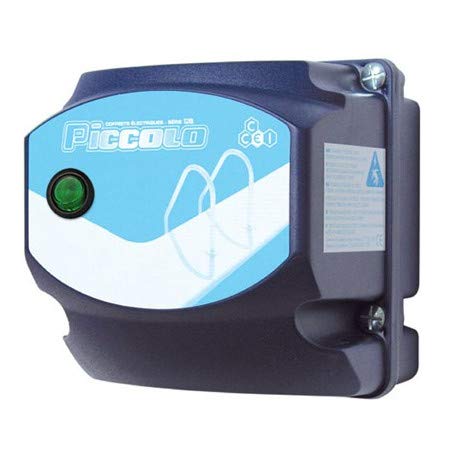
Figure 1: CCEI Piccolo PIMT Power Supply Unit, top view. This image shows the compact design and the rotary switch for operation.
2. คำแนะนำด้านความปลอดภัย
คำเตือน: Electrical installation must be performed by a qualified electrician in accordance with all local and national electrical codes.
- ควรตัดการเชื่อมต่อไฟฟ้าทุกครั้งก่อนดำเนินการติดตั้ง บำรุงรักษา หรือแก้ไขปัญหาใดๆ
- Ensure the power supply is installed in a dry, well-ventilated area, away from direct sunlight and excessive heat.
- The device is equipped with a waterproof on/off switch, but the main unit should not be submerged or exposed to direct water spray.
- The safety transformer complies with the NF EN61558 standard, ensuring safe operation when installed correctly.
- อย่าให้เกินวัตต์สูงสุดtage rating of the specific model (e.g., 100W for PIMT31, 300W for PIMT33, 600W for PIMT37).
- Use only original CCEI parts and accessories for replacement or repair.
3. การตั้งค่าและการติดตั้ง
The CCEI Piccolo PIMT power supply is designed for easy installation. Follow these steps carefully:
- การติดตั้ง: Select a suitable location for mounting the power supply unit. Use the provided mounting screws and plugs to securely attach the unit to a vertical surface. Ensure the location allows for adequate ventilation and access for wiring.
- Power Connection (230V AC Input):
- ตรวจสอบให้แน่ใจว่าได้ปิดสวิตช์ไฟหลักที่ตัวตัดวงจรแล้ว
- Connect the 230V AC input power cable to the designated terminals on the power supply unit. Refer to the wiring diagram inside the unit cover for correct polarity.
- ยึดการเชื่อมต่อทั้งหมดให้แน่นหนา
- Projector Connection (12V AC Output):
- Connect the 12V AC output cables from the power supply to your pool projector(s).
- Utilize the provided cable glands to ensure a watertight seal where cables enter and exit the unit.
- ตรวจสอบว่ามีวัตต์รวมtage of all connected projectors does not exceed the maximum capacity of your Piccolo PIMT model.
- การตรวจสอบขั้นสุดท้าย: Double-check all wiring connections for security and correctness. Ensure all covers are properly closed and sealed.

Figure 2: CCEI Piccolo PIMT Power Supply, showing connection points. This view highlights the input/output terminals and the waterproof switch.
4. คู่มือการใช้งาน
Once the power supply is correctly installed and wired, operating it is straightforward:
- เปิดเครื่อง: Restore power to the unit at the main circuit breaker.
- Activate Projectors: Use the waterproof on/off switch located on the unit to turn your pool projectors ON or OFF. Rotate the switch to the 'ON' position to activate the projectors.
- หมดแรง: To turn off the projectors, rotate the switch to the 'OFF' position. For extended periods of non-use or maintenance, it is recommended to disconnect power at the main circuit breaker.
5. การบำรุงรักษา
Regular maintenance ensures the longevity and safe operation of your CCEI Piccolo PIMT power supply.
- การทำความสะอาด: ทำความสะอาดภายนอกเครื่องเป็นระยะด้วยผ้านุ่มๆamp ใช้ผ้าเช็ดทำความสะอาด ห้ามใช้สารทำความสะอาดที่มีฤทธิ์กัดกร่อนหรือตัวทำละลาย ตรวจสอบให้แน่ใจว่าได้ปิดเครื่องก่อนทำความสะอาด
- การตรวจสอบ: Annually inspect all wiring connections for tightness and signs of corrosion or damage. Check cable glands for proper sealing.
- การระบายอากาศ : Ensure that the ventilation openings (if any) are clear of debris to prevent overheating.
- การตรวจสอบอย่างมืออาชีพ: It is recommended to have a qualified electrician inspect the unit and its connections every few years.
6 การแก้ไขปัญหา
If you encounter issues with your CCEI Piccolo PIMT power supply, refer to the following table:
| ปัญหา | สาเหตุที่เป็นไปได้ | สารละลาย |
|---|---|---|
| Projectors do not turn ON. |
|
|
| Unit makes unusual noise or smells burnt. |
|
|
| Intermittent projector operation. |
|
|
If the problem persists after attempting these solutions, contact CCEI customer support or a qualified electrician.
7. ข้อมูลจำเพาะ
| คุณสมบัติ | รายละเอียด |
|---|---|
| ผู้ผลิต | ซีซีอีไอ |
| ซีรี่ส์ซีรี่ย์ | Piccolo PIMT (PIMT31, PIMT33, PIMT37) |
| อินพุต Voltage | กระแสสลับ 230 โวลต์ |
| ปริมาณการส่งออกtage | กระแสสลับ 12 โวลต์ |
| Power Output (PIMT31) | 100วัตต์ |
| Power Output (PIMT33) | 300วัตต์ |
| Power Output (PIMT37) | 600วัตต์ |
| มาตรฐานความปลอดภัย | NF EN61558 |
| คุณสมบัติ | Waterproof On/Off Switch, Cable Glands, Mounting Screws |
| น้ำหนักสินค้า | 1.5 กก. |
| ASIN | B019YDRZ38 |
| วันที่พร้อมใช้งานครั้งแรก | 21 กุมภาพันธ์ 2020 |
8. การรับประกันและการสนับสนุน
CCEI products are manufactured to high-quality standards. For specific warranty information, please refer to the warranty card included with your product or visit the official CCEI webไซต์นี้ โปรดเก็บหลักฐานการซื้อไว้เพื่อใช้ยืนยันการรับประกัน
For technical support, spare parts, or service inquiries, please contact your authorized CCEI dealer or visit the CCEI official webเว็บไซต์สำหรับรายละเอียดการติดต่อ