
1. บทนำ
ขอบคุณสำหรับการซื้อasing the ipega PG-9057 Wireless Game Controller. This manual provides detailed instructions for setting up, operating, and maintaining your device. Please read this manual carefully before use to ensure optimal performance and longevity of your controller.
2. คุณสมบัติของผลิตภัณฑ์
- การเชื่อมต่อไร้สาย: Enjoy gaming freedom with wireless connection technology.
- ความเข้ากันได้กับหลายแพลตฟอร์ม: Supports Android devices (smartphones, tablets, TV boxes) and Windows PCs.
- High Durability Buttons: Equipped with high-quality, durable buttons for extended gaming sessions.
- การควบคุมที่แม่นยำ: Features a D-pad with pressure sensitivity and a 360-degree joystick with no dead zone for accurate input.
- การออกแบบตามหลักสรีรศาสตร์: Designed for comfortable grip and prolonged use.
- ที่วางโทรศัพท์แบบรวม: Conveniently mount your smartphone for mobile gaming.
3. เนื้อหาบรรจุภัณฑ์
กรุณาตรวจสอบเนื้อหาแพ็คเกจเมื่อแกะกล่อง:
- ipega PG-9057 จอยเกมไร้สาย
- สายชาร์จ USB
- คู่มือผู้ใช้ (มีฉบับภาษาญี่ปุ่นให้)
4. การตั้งค่า
4.1. การชาร์จคอนโทรลเลอร์
Before first use, fully charge the controller using the provided USB cable. Connect the small end of the USB cable to the controller's charging port and the other end to a USB power source (e.g., PC, USB wall adapter).
4.2. Device Compatibility Overview
The ipega PG-9057 controller supports various devices and connection methods as shown below:

This image displays the ipega PG-9057 Wireless Game Controller, highlighting its compatibility with various devices including smartphones, tablets, personal computers, and VR headsets.
4.3. Connection Methods and System Environment
The controller offers multiple connection options depending on your device and operating system. Refer to the table below for detailed compatibility.

This table outlines the system requirements and connection methods for the ipega PG-9057 controller, detailing compatibility with Android smartphones, tablets, and TV boxes via Bluetooth 4.0 or USB, and PCs via USB.
4.3.1. Bluetooth Connection (Android Devices)
- ตรวจสอบให้แน่ใจว่าได้ชาร์จคอนโทรลเลอร์แล้ว
- กดปุ่มค้างไว้ บ้าน ปุ่มและ A button simultaneously until the indicator light flashes rapidly. This puts the controller into pairing mode.
- บนอุปกรณ์ Android ของคุณ ให้ไปที่การตั้งค่าบลูทูธ แล้วเปิดใช้งานบลูทูธ
- ค้นหา available devices and select "ipega PG-9057" (or similar name) from the list.
- Once paired, the indicator light on the controller will become solid.
4.3.2. USB Wired Connection (Windows PC / Android Devices)
- Connect the controller to your Windows PC or Android device using the USB cable.
- The device should automatically recognize the controller. No special drivers are usually required for basic functionality.
5. คู่มือการใช้งาน
5.1. การควบคุมพื้นฐาน
The ipega PG-9057 features standard gamepad controls for intuitive gaming.

รายละเอียด view of the ipega PG-9057 controller's D-pad, joystick, and A/B/X/Y buttons, illustrating their high sensitivity and precise input capabilities.
- ดี-แพด: For directional input, offering pressure sensitivity.
- จอยสติ๊กซ้าย/ขวา: 360-degree movement with no dead zone for precise control.
- ปุ่ม A/B/X/Y: Standard action buttons with zero delay response.
- L1/R1, L2/R2 Triggers: Shoulder buttons and triggers for various in-game actions.
- ปุ่มเลือก/เริ่ม: สำหรับการนำทางเมนูและการดำเนินการต่างๆ ภายในเกม
- ปุ่มหน้าแรก: To power on/off the controller or return to the main menu.
5.2. Using with a Smartphone
The controller includes an integrated holder for smartphones, allowing for a portable gaming experience.
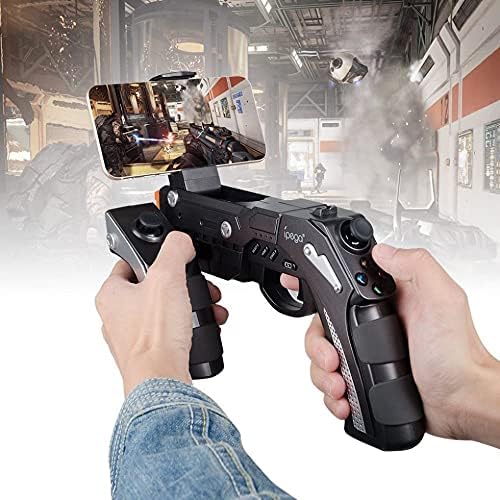
A user is shown holding the ipega PG-9057 Wireless Game Controller with a smartphone securely attached, actively engaged in mobile gaming.
- Extend the phone holder located on the top of the controller.
- วางสมาร์ทโฟนของคุณลงในที่วางอย่างระมัดระวัง ตรวจสอบให้แน่ใจว่ายึดแน่นดีแล้ว
- Connect the controller to your smartphone via Bluetooth as described in Section 4.3.1.
- Launch your desired game and configure controller settings if necessary.
6. การบำรุงรักษา
เพื่อให้มั่นใจถึงอายุการใช้งานที่ยาวนานและประสิทธิภาพสูงสุดของคอนโทรลเลอร์ ipega PG-9057 ของคุณ โปรดปฏิบัติตามคำแนะนำการบำรุงรักษาดังต่อไปนี้:
- การทำความสะอาด: ใช้ผ้านุ่มและแห้งเช็ดพื้นผิวของคอนโทรลเลอร์ ห้ามใช้สารเคมีรุนแรงหรือน้ำยาทำความสะอาดที่มีฤทธิ์กัดกร่อน
- พื้นที่จัดเก็บ: เก็บตัวควบคุมไว้ในที่แห้งและเย็น ห่างจากแสงแดดโดยตรงและอุณหภูมิที่สูงหรือต่ำมาก
- หลีกเลี่ยงการหยด: Protect the controller from drops and impacts, as this can damage internal components.
- การชาร์จ: อย่าชาร์จแบตเตอรี่มากเกินไป ถอดสายชาร์จออกเมื่อชาร์จคอนโทรลเลอร์เต็มแล้ว

The ipega PG-9057 Wireless Game Controller is shown, emphasizing its construction from high-quality, durable ABS material.
7 การแก้ไขปัญหา
หากคุณพบปัญหาเกี่ยวกับคอนโทรลเลอร์ โปรดดูวิธีแก้ไขปัญหาทั่วไปต่อไปนี้:
- ตัวควบคุมไม่ได้เชื่อมต่อ:
- ตรวจสอบให้แน่ใจว่าตัวควบคุมมีประจุไฟเต็ม
- Verify that Bluetooth is enabled on your device and the controller is in pairing mode.
- ลองรีสตาร์ททั้งตัวควบคุมและอุปกรณ์ของคุณ
- If using USB, ensure the cable is securely connected and try a different USB port.
- ปุ่มหรือจอยสติ๊กไม่ตอบสนอง:
- ตรวจสอบว่าตัวควบคุมเชื่อมต่อกับอุปกรณ์ของคุณอย่างถูกต้องหรือไม่
- รีสตาร์ทคอนโทรลเลอร์และเชื่อมต่อใหม่
- ตรวจสอบให้แน่ใจว่าเกมที่คุณเล่นรองรับคอนโทรลเลอร์ภายนอก
- ความล่าช้าหรือการหน่วงเวลาอินพุต:
- Ensure there are no obstructions or excessive distance between the controller and your device.
- ลดการรบกวนจากอุปกรณ์ไร้สายอื่น ๆ
- For critical gaming, consider using a wired USB connection if supported by your device.
8. ข้อมูลจำเพาะ
| ข้อมูลจำเพาะ | ค่า |
|---|---|
| ยี่ห้อ | ipega |
| แบบอย่าง | พีจี-9057 |
| อุปกรณ์ที่รองรับ | แอนดรอยด์, วินโดวส์ |
| ประเภทตัวควบคุม | เกมแพด |
| เทคโนโลยีการเชื่อมต่อ | ไร้สาย |
| คุณสมบัติ | ไร้สาย |
| รายการที่เข้ากันได้ | แอนดรอยด์, วินโดวส์ |
| วิธีการเชื่อมต่อ | ไร้สาย |
| คุณสมบัติพิเศษ | ไร้สาย |
| แพลตฟอร์มฮาร์ดแวร์ | กล่องรับสัญญาณทีวีดิจิตอล |
| แหล่งพลังงาน | ใช้พลังงานจากแบตเตอรี่ |
| Number of Package Items | 1 |
| ยูพีซี | 602747571722 |
| ASIN | B018TSBFE4 |
| GTIN | 602747571722 |
9. การรับประกันและการสนับสนุน
For warranty information and customer support, please refer to the documentation provided with your purchase or visit the official ipega webไซต์ เก็บหลักฐานการซื้อของคุณไว้เพื่อใช้ในกรณีเรียกร้องการรับประกัน