
การแนะนำ
Thank you for choosing the Baseus Encok W02 True Wireless Bluetooth Earbuds. This manual provides essential information for the proper setup, operation, and maintenance of your new earbuds. Please read it thoroughly before use to ensure optimal performance and longevity of the product.
สินค้าเกินview
The Baseus Encok W02 earbuds offer a true wireless audio experience with advanced features designed for comfort and superior sound quality. They are equipped with touch controls and noise cancellation technology.
คุณสมบัติหลัก:
- สเตอริโอไร้สายจริง (TWS): Enjoy a completely wireless audio experience with independent left and right earbuds.
- สวมใส่สบาย: Designed with three silicone ear tips for a secure and comfortable in-ear fit, reducing strain during extended use.
- คุณภาพเสียงที่เหนือกว่า: Multi-channel components and precise technology deliver excellent audio performance.
- การควบคุมแบบสัมผัส: Intuitive touch-sensitive surfaces for managing music playback and calls.
- ตัดเสียงรบกวน: Integrated noise cancellation feature for an immersive listening experience.
- การใช้งานที่ยืดหยุ่น: ใช้หูฟังทั้งสองข้างเพื่อเสียงสเตอริโอ หรือใช้หูฟังข้างเดียวก็ได้
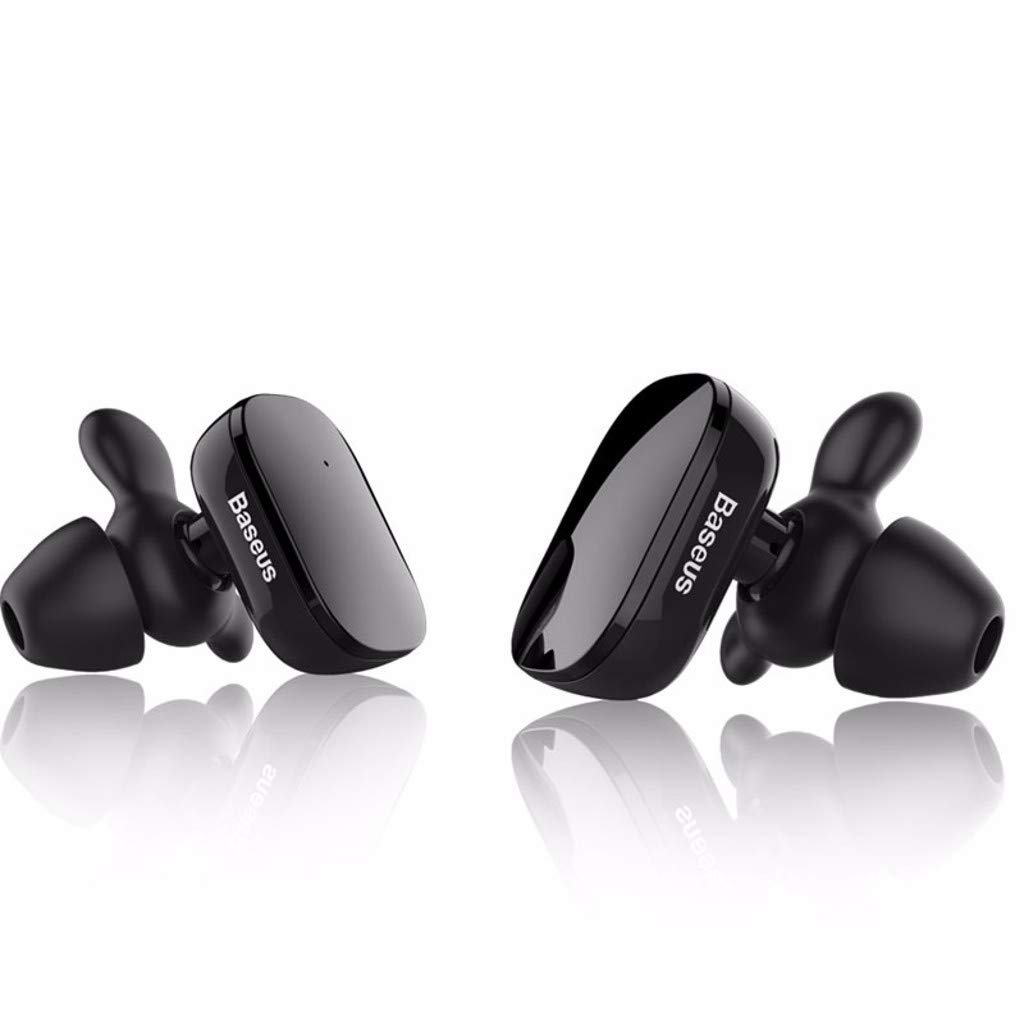
Image: The Baseus Encok W02 True Wireless Bluetooth Earbuds in white, showcasing their ergonomic design and compact form factor.

ภาพ: ระเบิด view illustrating the internal multi-channel components of the Baseus Encok W02 earbud, contributing to its sound quality.
การตั้งค่า
1. การแกะกล่องและการตรวจสอบเบื้องต้น
เมื่อเปิดบรรจุภัณฑ์ ให้แน่ใจว่ามีส่วนประกอบทั้งหมดครบถ้วน:
- Baseus Encok W02 True Wireless Bluetooth Earbuds (Left and Right)
- เคสชาร์จไฟ
- สายชาร์จ USB
- จุกหูฟังซิลิโคนหลายขนาด
- คู่มือการใช้งาน (เอกสารนี้)
2. การชาร์จหูฟังเอียร์บัด
ก่อนใช้งานครั้งแรก ควรชาร์จหูฟังและเคสชาร์จให้เต็ม
- ใส่หูฟังลงในกล่องชาร์จ ตรวจสอบให้แน่ใจว่าใส่หูฟังเข้าที่อย่างถูกต้อง
- เชื่อมต่อกล่องชาร์จเข้ากับแหล่งจ่ายไฟโดยใช้สาย USB ที่ให้มา
- The indicator lights on the case and/or earbuds will show the charging status. Refer to the LED indicator section for details.
- การชาร์จเต็มจะใช้เวลาประมาณ 1.5 ชั่วโมง

Image: Black Baseus Encok W02 earbuds placed within their compact charging case, ready for charging or storage.
3. การจับคู่กับอุปกรณ์บลูทูธ
Follow these steps to pair your earbuds with your smartphone or other Bluetooth-enabled device:
- ตรวจสอบให้แน่ใจว่าหูฟังชาร์จไฟเต็มแล้วและนำออกจากกล่องชาร์จแล้ว หูฟังจะเข้าสู่โหมดจับคู่โดยอัตโนมัติ
- บนอุปกรณ์ของคุณ ให้ไปที่การตั้งค่าบลูทูธ แล้วเปิดใช้งานบลูทูธ
- ค้นหา available devices. You should see "Baseus Encok W02" or a similar name appear in the list.
- Select the earbuds from the list to connect. Once connected, a voice prompt will confirm successful pairing.
- หากการจับคู่ล้มเหลว ให้ปิดหูฟัง ปิดใช้งานบลูทูธบนอุปกรณ์ของคุณ และทำตามขั้นตอนซ้ำอีกครั้ง
The earbuds support simultaneous connection to one mobile phone, and each earbud can also be used independently.
คำแนะนำการใช้งาน
The Baseus Encok W02 earbuds feature intuitive touch controls for easy management of audio and calls.
เปิด/ปิดเครื่อง
- เปิดเครื่อง: Remove the earbuds from the charging case. They will automatically power on. Alternatively, press and hold the touch area on both earbuds for approximately 3 seconds.
- หมดแรง: Place the earbuds back into the charging case. They will automatically power off. Alternatively, press and hold the touch area on both earbuds for approximately 5 seconds.
การเล่นเพลง
- เล่น/หยุดชั่วคราว: แตะบริเวณสัมผัสบนหูฟังข้างใดข้างหนึ่งหนึ่งครั้ง
- เพลงถัดไป: แตะสองครั้งบนพื้นที่สัมผัสบนหูฟังด้านขวา
- แทร็กก่อนหน้า: แตะสองครั้งบนพื้นที่สัมผัสบนหูฟังด้านซ้าย
การจัดการการโทร
- รับ/วางสาย: แตะบริเวณสัมผัสบนหูฟังข้างใดข้างหนึ่งหนึ่งครั้ง
- ปฏิเสธสาย: Press and hold the touch area on either earbud for approximately 2 seconds.
ผู้ช่วยเสียง
- เปิดใช้งาน Voice Assistant: แตะสามครั้งที่บริเวณสัมผัสบนหูฟังข้างใดข้างหนึ่ง
ใช้หูฟังเอียร์บัดเดียว
Either earbud can be used independently. Simply remove one earbud from the charging case, and it will automatically connect to the last paired device. The other earbud can remain in the case or be powered off.
การซ่อมบำรุง
Proper maintenance ensures the longevity and optimal performance of your Baseus Encok W02 earbuds.
การทำความสะอาด
- ทำความสะอาดหูฟังเป็นประจำ โดยเฉพาะจุกหูฟังและหน้าสัมผัสสำหรับชาร์จ ด้วยผ้าแห้งนุ่มที่ไม่เป็นขุย
- ห้ามใช้สารทำความสะอาดที่มีฤทธิ์กัดกร่อน แอลกอฮอล์ หรือตัวทำละลายเคมี
- ถอดปลายหูออกและทำความสะอาดแยกต่างหากโดยใช้สบู่ชนิดอ่อนและน้ำหากจำเป็น และตรวจสอบให้แน่ใจว่าแห้งสนิทก่อนจะใส่กลับเข้าไป
พื้นที่จัดเก็บ
- เมื่อไม่ใช้งาน ควรเก็บหูฟังไว้ในกล่องชาร์จเสมอ เพื่อป้องกันฝุ่นละออง สิ่งสกปรก และความเสียหายทางกายภาพ
- Store the charging case and earbuds in a cool, dry place, away from direct sunlight and extreme temperatures.
การดูแลแบตเตอรี่
- Avoid fully discharging the battery frequently. Charge the earbuds when the battery is low.
- If storing for an extended period, charge the earbuds and case to about 50% every few months to prevent deep discharge.
การแก้ไขปัญหา
If you encounter issues with your Baseus Encok W02 earbuds, refer to the following common solutions:
| ปัญหา | สาเหตุที่เป็นไปได้ | สารละลาย |
|---|---|---|
| หูฟังไม่จับคู่กับอุปกรณ์ | Bluetooth is off; earbuds are out of range; earbuds not in pairing mode; interference. | Ensure Bluetooth is enabled on your device. Place earbuds closer to the device (within 10m). Power cycle earbuds and device. Forget the device in Bluetooth settings and re-pair. |
| ไม่มีเสียงจากหูฟังข้างหนึ่งหรือทั้งสองข้าง | Earbuds not connected; low battery; volume too low; earbud blocked. | Check Bluetooth connection. Charge earbuds. Increase device volume. Clean earbud mesh. Try re-pairing both earbuds. |
| หูฟังไม่ชาร์จ | Poor contact with charging pins; faulty cable/charger; charging case low on battery. | Ensure earbuds are correctly seated in the case. Clean charging contacts on earbuds and case. Try a different USB cable or power adapter. Charge the charging case. |
| ระบบควบคุมแบบสัมผัสไม่ตอบสนอง | Earbuds are wet; software glitch; dirty touch surface. | Ensure earbuds are dry. Power cycle the earbuds. Clean the touch surface. |
Factory Reset (if applicable)
If issues persist, a factory reset may resolve them. (Note: Specific reset instructions are not provided in the product data. Typically, this involves holding a button on the case or earbuds for an extended period while they are in the case. Refer to the manufacturer's official support for precise steps if needed.)
ข้อมูลจำเพาะ
Detailed technical specifications for the Baseus Encok W02 True Wireless Bluetooth Earbuds:
| คุณสมบัติ | ข้อมูลจำเพาะ |
|---|---|
| ยี่ห้อ | เบสอุส |
| แบบอย่าง | Encok W02 (NGW02-01) |
| ตัวเลือกสี | สีดำ, สีขาว |
| ประเภทการสวมใส่ | In-ear (Bud) |
| วัสดุ | Silicone, ABS+, TPE+ |
| การเชื่อมต่อ | ไร้สาย (Bluetooth) |
| เวอร์ชันบลูทูธ | 4.2 |
| ระยะการส่งข้อมูล | สูงสุด 10 เมตร |
| ไมโครโฟน | ใช่ |
| การควบคุมเสียงรบกวน | ระบบตัดเสียงรบกวนแบบแอคทีฟ |
| ประเภทการควบคุม | ระบบควบคุมแบบสัมผัส, ระบบควบคุมด้วยเสียง |
| การควบคุมแบบมีสาย | ไม่รองรับ |
| ความไวต่อความรู้สึก | 105 ± 5เดซิเบล |
| การตอบสนองความถี่ | 20 - 20,000 Hz (20 - 20 kHz) |
| ความจุของแบตเตอรี่ | 2 x 60 mAh, 3.7V (Earbuds) |
| เวลาในการชาร์จ | ประมาณ 1.5 ชั่วโมง |
| เวลาสนทนา | ประมาณ 5 ชั่วโมง |
| เวลาการเล่น | ประมาณ 3 ชั่วโมง |
| เวลาสแตนด์บาย | ประมาณ 120 ชั่วโมง |
| ความต้านทานต่อน้ำ | ไม่ทนน้ำ |
| อุปกรณ์ที่รองรับ | โทรศัพท์มือถือ |
การรับประกันและการสนับสนุน
Baseus products are designed and manufactured to the highest quality standards. For information regarding warranty coverage, terms, and conditions, please refer to the warranty card included with your product or visit the official Baseus webเว็บไซต์.
For technical support, troubleshooting assistance beyond this manual, or to inquire about replacement parts, please contact Baseus customer service through their official channels. Keep your purchase receipt as proof of purchase for warranty claims.


