
1. สูงกว่าview
The HDWR HD-PS6C is a versatile 2-in-1 device that combines the functionality of a wireless barcode reader and a data collector. This integrated solution significantly enhances daily work comfort and convenience, making tasks easier and more efficient. It is designed for various applications requiring efficient 1D barcode scanning and data storage, such as inventory management, retail, and logistics.
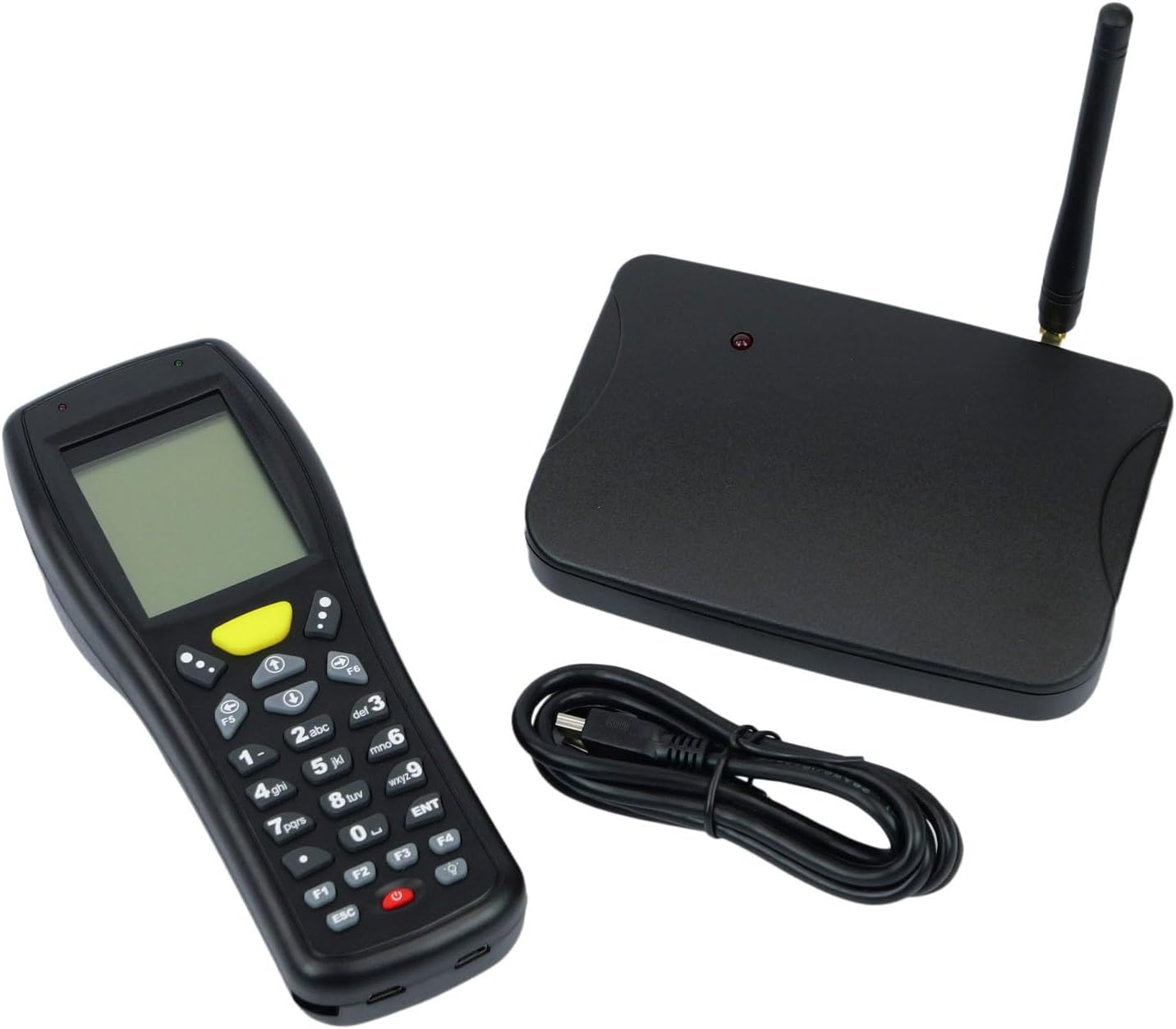
Image: The HDWR HD-PS6C wireless data collector shown with its wireless receiver and USB cable, illustrating the complete package.
2. คุณสมบัติหลัก
- Two-in-One Functionality: Combines a wireless barcode reader and a data collector in a single device.
- อินเทอร์เฟซที่เป็นมิตรกับผู้ใช้: Equipped with a clear screen and a practical keyboard for easy navigation and manual data entry, especially for damaged or unclear codes.
- โหมดสินค้าคงคลัง: Allows storage of up to 50,000 scanned codes in its integrated memory, ideal for extensive inventory tasks.
- ความเข้ากันได้ของบาร์โค้ด 1D: Supports a wide range of 1D barcode types including EAN13, EAN8, Code 39, Code 93, Code 128, Interleaved 2 of 5 (IT25), Codabar, UPCA, UPCE, and more.
- รองรับระบบปฏิบัติการหลากหลาย: Compatible with Windows XP/7/8/8.1/10, Android, and iOS operating systems.

Image: The HD-PS6C highlighting its dual functionality as a data collector and barcode scanner.

ภาพ: ภาพระยะใกล้ view of the integrated laser barcode scanner, capable of reading 1D codes.

Image: Visual representation of the wireless USB receiver, 50,000 code internal memory, and the clear screen with keyboard for easy navigation.
3. คู่มือการติดตั้ง
3.1. เนื้อหาบรรจุภัณฑ์
ก่อนเริ่มต้น โปรดตรวจสอบให้แน่ใจว่ามีรายการทั้งหมดอยู่ในบรรจุภัณฑ์:
- HDWR HD-PS6C Wireless Data Collector
- ตัวรับสัญญาณ USB ไร้สาย
- สาย USB
- แบตเตอรี่ AA 2 ก้อน (รวมอยู่ด้วย)
3.2. การติดตั้งแบตเตอรี่
- Locate the battery compartment on the back of the HD-PS6C device.
- เปิดฝาช่องใส่แบตเตอรี่
- ใส่แบตเตอรี่ AA ทั้ง 2 ก้อน โดยตรวจสอบให้แน่ใจว่าขั้วถูกต้อง (+/-)
- ปิดฝาช่องใส่แบตเตอรี่ให้แน่น
3.3 การเชื่อมต่อตัวรับสัญญาณไร้สาย
- Plug the wireless USB receiver into an available USB port on your computer or host device.
- The system should automatically detect and install the necessary drivers. If not, refer to the Troubleshooting section.
3.4. เปิดเครื่องครั้งแรก
- Press and hold the power button (usually red) on the HD-PS6C until the screen illuminates.
- The device will boot up and display the main menu or a default mode.
วิดีโอ: จบแล้วview of the HDWR HD-PS6C, showcasing its design, features, and how it sits on its charging/communication base. This video provides a visual introduction to the product.
4. คู่มือการใช้งาน
4.1. การนำทางพื้นฐาน
- Use the arrow keys (up, down, left, right) to navigate through menu options on the screen.
- Press the 'ENT' (Enter) key to select an option or confirm an action.
- Press the 'ESC' key to go back to the previous menu or cancel an operation.
- The numeric keypad can be used for manual data input.

ภาพ: ด้านหน้า view of the HDWR HD-PS6C, clearly showing the screen and the full alphanumeric keypad for navigation and data entry.
4.2. โหมดสินค้าคงคลัง
In Inventory Mode, the device stores scanned barcodes in its internal memory for later transfer.
- From the main menu, select 'Inventory Mode' (or similar option).
- Point the scanner window at a 1D barcode and press the scan button (often a large yellow button or a trigger).
- The scanned code will appear on the screen and be stored in memory.
- Repeat for all items. The device can store up to 50,000 codes.
4.3. การสแกนบาร์โค้ด
The HD-PS6C is designed to read various 1D barcodes:
- EAN13, EAN8
- Code 39, Code 93, Code 128
- Interleaved 2 of 5 (IT25)
- Codabar
- UPCA, UPCE
- And other standard 1D codes.
Ensure the barcode is clean and well-lit for optimal scanning performance.
4.4. Manual Data Entry
If a barcode is damaged or unreadable, you can manually enter the code:
- Navigate to the manual entry option within the device's menu.
- Use the numeric and alphanumeric keys on the keypad to type the barcode.
- Press 'ENT' to confirm and save the entry.
4.5. การโอนข้อมูล
To transfer collected data to your computer:
- Connect the HD-PS6C to your computer using the provided USB cable.
- On the device, select the 'Data Transfer' or 'Upload' option.
- Follow the on-screen prompts or software instructions on your computer to complete the transfer. Data is typically transferred as a text file.
5. การบำรุงรักษา
5.1. การทำความสะอาด
- เช็ดอุปกรณ์ด้วยผ้านุ่มแห้ง
- สำหรับสิ่งสกปรกที่ฝังแน่น ให้ใช้ d เล็กน้อยamp ใช้ผ้าชุบสบู่เหลวอ่อนๆ เช็ด แล้วเช็ดให้แห้งทันที
- ห้ามใช้สารเคมีรุนแรง ตัวทำละลาย หรือน้ำยาทำความสะอาดที่มีฤทธิ์กัดกร่อน
- Keep the scanner window clean and free of dust or smudges for accurate scanning.
5.2. การดูแลแบตเตอรี่
- เปลี่ยนแบตเตอรี่เมื่อไฟแสดงสถานะแบตเตอรี่เหลือน้อยปรากฏขึ้นบนหน้าจอ
- หากจะไม่ใช้อุปกรณ์เป็นเวลานาน ควรถอดแบตเตอรี่ออกเพื่อป้องกันการรั่วไหล
- ทิ้งแบตเตอรี่ที่ใช้แล้วตามระเบียบข้อบังคับของท้องถิ่น
6 การแก้ไขปัญหา
| ปัญหา | สาเหตุที่เป็นไปได้ | สารละลาย |
|---|---|---|
| อุปกรณ์ไม่เปิดเครื่อง | แบตเตอรี่เหลือน้อยหรือหมด ติดตั้งแบตเตอรี่ไม่ถูกต้อง | Replace batteries with new ones; ensure batteries are installed with correct polarity. |
| ไม่สามารถสแกนบาร์โค้ดได้ | Barcode is damaged or unclear; scanner window is dirty; incorrect scanning mode. | Try scanning a different barcode; clean the scanner window; ensure the device is in the correct scanning mode. Use manual entry if necessary. |
| Data transfer fails or device not recognized by PC. | Missing or incorrect drivers; loose USB connection; incompatible OS. | Ensure the wireless receiver is properly connected; try a different USB port or cable. For Windows, check Device Manager for driver issues. If drivers are missing, search for 'HDWR HD-PS6C drivers' online. Verify your OS is supported (Windows XP/7/8/8.1/10, Android, iOS). |
| หน้าจอว่างเปล่าหรือไม่ตอบสนอง | อุปกรณ์ค้าง; แบตเตอรี่เหลือน้อย | Try restarting the device by holding the power button. If unresponsive, remove and reinsert batteries. Check battery level. |
7. ข้อมูลจำเพาะทางเทคนิค
| คุณสมบัติ | รายละเอียด |
|---|---|
| หมายเลขรุ่น | HDPS6C |
| ยี่ห้อ | HDWR |
| เทคโนโลยีการเชื่อมต่อ | USB (Wireless 2.4G via receiver) |
| แหล่งพลังงาน | ใช้พลังงานจากแบตเตอรี่ (มีแบตเตอรี่ AA 2 ก้อนให้มาด้วย) |
| อุปกรณ์ที่รองรับ | คอมพิวเตอร์ตั้งโต๊ะ |
| ปฏิบัติการฉบับที่tage | 5 โวลต์ |
| อุณหภูมิการจัดเก็บสูงสุด | 50 องศาเซลเซียส |
| น้ำหนักสินค้า | 349 กรัม |
| ประเทศต้นกำเนิด | จีน |
8. การรับประกันและการสนับสนุน
The HDWR HD-PS6C comes with a รับประกัน 2 ปี นับจากวันที่ซื้อ การรับประกันนี้ครอบคลุมข้อบกพร่องจากการผลิตและการทำงานผิดปกติภายใต้สภาพการใช้งานปกติ
For technical support, warranty claims, or further assistance, please contact HDWR customer service through your retailer or the official HDWR website. Please have your purchase receipt and product model number (HDPS6C) ready when contacting support.