
การแนะนำ
This manual provides comprehensive instructions for the setup, operation, and maintenance of your Zelotes T90 Professional 9200 DPI High Precision USB Wired Gaming Mouse. Please read this manual thoroughly before using the product to ensure optimal performance and longevity.

Figure 1: Zelotes T90 Professional Gaming Mouse, showcasinด้วยการออกแบบตามหลักสรีรศาสตร์และแสงไฟ LED
เนื้อหาแพ็คเกจ
- 1 x Zelotes T90 Gaming Mouse
- 1 x คู่มือการใช้งาน (เอกสารนี้)
การตั้งค่า
ความต้องการของระบบ
- Operating System: Windows 98/ 2000/ ME/ NT / XP/ win 7/ win 8/ win 10/ Mac OS and other OS
- อินเตอร์เฟส: พอร์ต USB
การติดตั้ง
- แกะกล่องเมาส์: Carefully remove the Zelotes T90 Gaming Mouse from its packaging.
- ถอดฟิล์มป้องกันออก: Before use, please remove the foot pad protective film located on the underside of the mouse.
- เชื่อมต่อกับคอมพิวเตอร์: Plug the USB connector of the mouse into an available USB port on your computer. The mouse is plug-and-play and does not require additional driver installation for basic functionality.
คำแนะนำการใช้งาน
ปุ่มฟังก์ชั่น
The Zelotes T90 mouse features 8 programmable buttons designed for enhanced gaming and productivity.
- ปุ่มคลิกซ้าย
- ปุ่มคลิกขวา
- Middle Button / Scroll Wheel
- ปุ่มไปข้างหน้า: Quick forward function when browsing the web or navigating folders.
- ปุ่มย้อนกลับ: Quick backward function when browsing the web or navigating folders.
- ปุ่ม DPI: ปรับความไวของเมาส์ (DPI)
- กุญแจไฟ: Configurable for rapid actions.
- สวิตช์โหมดไฟ: Controls the LED lighting effects.
การปรับค่า DPI (ความไว)
The mouse supports 6-speed DPI adjustment, allowing you to customize sensitivity for different tasks or games. Press the ปุ่ม DPI เพื่อสลับไปมาระหว่างการตั้งค่าต่อไปนี้:
- 1000 จุดต่อนิ้ว: Indicated by red light flashing 3 times.
- 1600 จุดต่อนิ้ว: Indicated by orange light.
- 2400 จุดต่อนิ้ว: Indicated by green light.
- 3200 จุดต่อนิ้ว: Indicated by light blue light.
- 5500 จุดต่อนิ้ว: Indicated by blue light.
- 9200 จุดต่อนิ้ว: Indicated by purple light.

Figure 2: Location of DPI and Fire Key buttons on the Zelotes T90 mouse.
Fire Key Function
- ข่าวสารแบบสั้น: Performs a double click.
- กดยาว (มากกว่า 2 วินาที): Switches to triple click mode. The light will flash 3 times to confirm the successful switch.
สวิตช์โหมดไฟ
The Zelotes T90 features various LED lighting modes:
- ข่าวสารแบบสั้น: Cycles through 7-color breathing, 6 single-color breathing, and 6 single-color constant light modes (13 modes total).
- กดยาว (มากกว่า 2 วินาที): ปิดไฟ LED

Figure 3: The Zelotes T90 mouse showcasing its 7-color cycle breathing and single-color lighting options.
ระบบปรับน้ำหนัก
The mouse includes 8 removable 2.5-gram weights, allowing you to customize the mouse's weight and balance for improved stability and control, especially during fast movements.
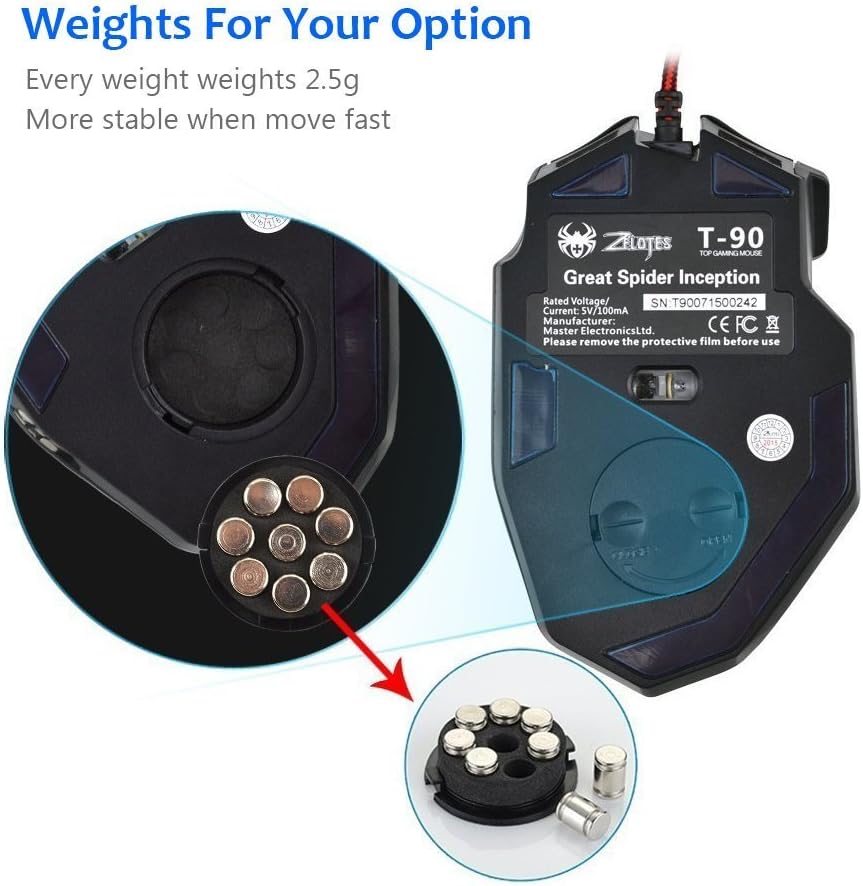
Figure 4: Location of the weight tuning system on the underside of the Zelotes T90 mouse.
การซ่อมบำรุง
การทำความสะอาด
- ใช้ผ้าแห้งเนื้อนุ่มทำความสะอาดพื้นผิวของเมาส์
- สำหรับสิ่งสกปรกฝังแน่น ให้เช็ดออกเล็กน้อยampชุบผ้าด้วยน้ำหรือน้ำยาทำความสะอาดอ่อนๆ หลีกเลี่ยงสารเคมีรุนแรง
- ห้ามจุ่มเมาส์ลงในน้ำหรือของเหลวใดๆ
พื้นที่จัดเก็บ
ควรเก็บเมาส์ไว้ในที่แห้งและเย็น หลีกเลี่ยงแสงแดดโดยตรงและอุณหภูมิที่สูงหรือต่ำเกินไป เมื่อไม่ได้ใช้งานเป็นเวลานาน
การแก้ไขปัญหา
| ปัญหา | สาเหตุที่เป็นไปได้ | สารละลาย |
|---|---|---|
| เมาส์ไม่ตอบสนอง | การเชื่อมต่อ USB หลวม, พอร์ต USB ชำรุด, ระบบมีข้อผิดพลาด | ตรวจสอบให้แน่ใจว่าเสียบสาย USB เข้ากับคอมพิวเตอร์แน่นดีแล้ว ลองเสียบเข้ากับพอร์ต USB อื่นดู รีสตาร์ทคอมพิวเตอร์ของคุณ |
| ไฟ LED ไม่ทำงาน | Lights turned off, software issue. | Short press the Light Mode Switch button to cycle through modes. Long press the Light Mode Switch button for more than 2 seconds to turn lights on if they were off. |
| การตั้งค่า DPI ไม่เปลี่ยนแปลง | ไม่ได้กดปุ่ม DPI อย่างถูกต้อง | Ensure you are pressing the dedicated DPI button. Observe the light flashes to confirm DPI changes. |
| เคอร์เซอร์เมาส์ไม่แน่นอนหรือกระตุก | เซ็นเซอร์ออปติคอลสกปรก พื้นผิวแผ่นรองเมาส์ไม่เหมาะสม | ทำความสะอาดเซ็นเซอร์รับภาพที่อยู่ด้านล่างของเมาส์ ใช้แผ่นรองเมาส์ที่มีพื้นผิวเรียบและสะอาด |
| Mouse settings reset | Accidental factory reset. | Press the left and right buttons simultaneously for more than 2 seconds to restore factory settings. If settings are reset, reconfigure them as desired. |
ข้อมูลจำเพาะ
| แบบอย่าง | T90 |
| ขนาด (กxยxส) | 130 มม. x 81 มม. x 40 มม. (5.12 x 3.19 x 1.57 นิ้ว) |
| น้ำหนัก | 145g ± 5g (excluding cable) |
| น้ำหนักถ่วง | 8 x 2.5 Gram tuning weights |
| การตั้งค่า DPI | 1000/1600/2400/3200/5500/9200 DPI |
| เฟรมต่อวินาที | 6666 |
| การเร่งความเร็ว | 23จี |
| อัตราการสำรวจความคิดเห็น | 500เฮิรตซ์ |
| สวิตซ์ชีวิต | 800 ล้านครั้ง |
| ปุ่ม | 8 |
| ความยาวสาย USB | 1.8M braided-fiber cable |
| อินเทอร์เฟซ | ยูเอสบี |
| ประเภทออปติคอล | Red wave |
| ความเข้ากันได้ | Windows 98/ 2000/ ME/ NT / XP/ win 7/ win 8/ win 10/ Mac OS and other OS |
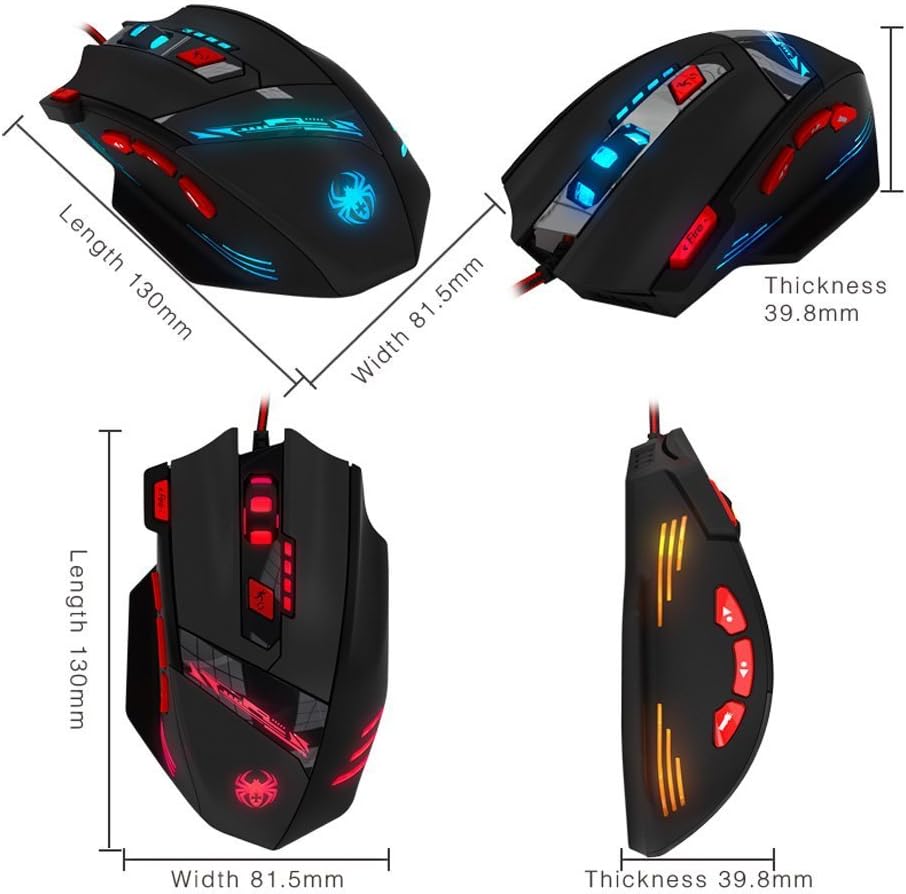
Figure 5: Detailed dimensions of the Zelotes T90 Professional Gaming Mouse.
การออกแบบตามหลักสรีรศาสตร์
The Zelotes T90 mouse is designed with ergonomics in mind, providing a comfortable fit for both fingertip and claw-style grips. This design aims to reduce fatigue during long periods of use.

Figure 6: Ergonomic design of the Zelotes T90 mouse, showing a comfortable hand grip.
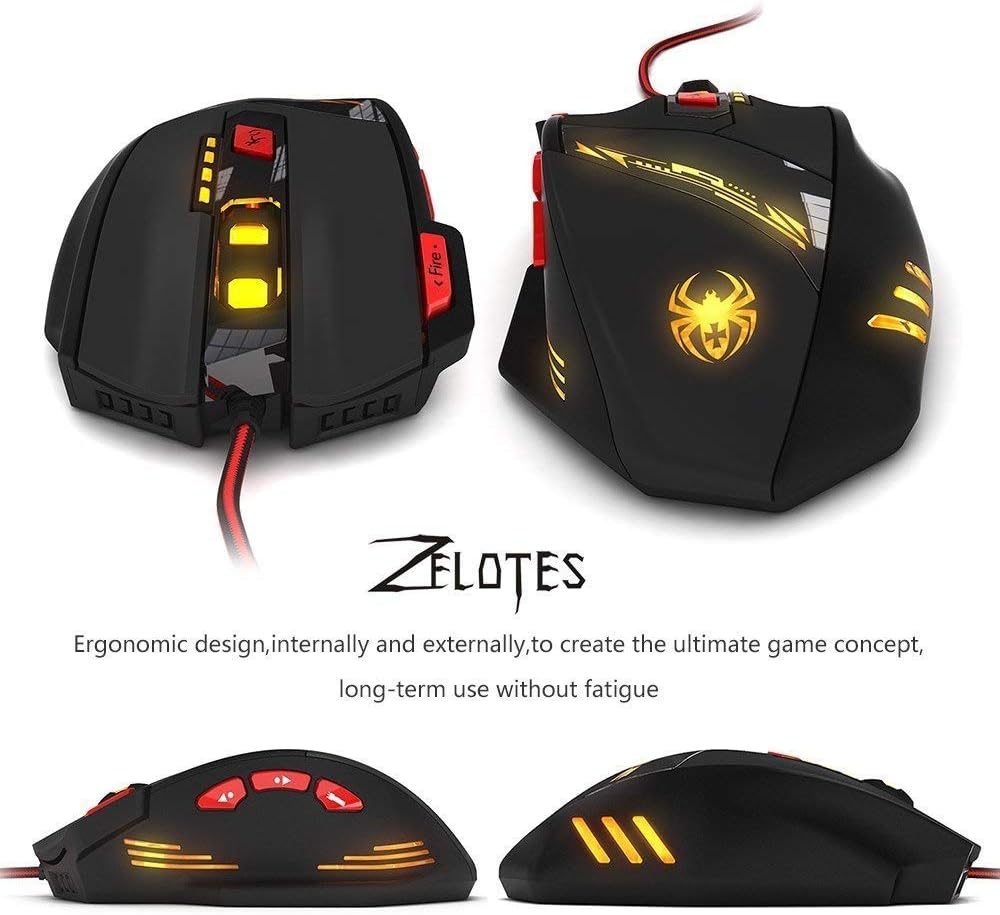
รูปที่ 7 : ต่างๆ views highlighting the ergonomic contours of the Zelotes T90 mouse.
หมายเหตุสำคัญ
- Always remove the foot pad protective film before using the mouse.
- To restore the mouse to factory settings, press and hold the left and right mouse buttons simultaneously for more than 2 seconds.