
1. สินค้าหมดview
The FSP300-60FAG is an industrial-grade switching power supply designed for reliable performance. It delivers a total power capacity of up to 300 Watts and features a unique active Power Factor Correction (PFC) circuit. This design, combined with high-load electrical components, makes it suitable for industrial environments, servers, workstations, communication systems, and other automation applications. The power supply supports a full range of input and output electrical features and complies with the latest safety and EMC standards globally.
คุณสมบัติหลัก
- 80 PLUS Gold Certified 300W PSU for high energy efficiency.
- Supports AMD/INTEL CPU Systems.
- High quality single, 40mm ball-bearing fan provides controlled airflow.
- Vacuum-impregnated transformer for enhanced durability.
- Heavy-duty protections, including Over Voltage Protection (OVP), Line input fuse protection, and resettable power shut down.
- Global Safety Certifications: CE, FCC, cUL, CCC, TUV, CB.

Image 1.1: The FSP FSP300-60FAG 300W Flex ATX 80 Plus Gold Power Supply. This image shows the overall appearance of the power supply unit.
2. คำแนะนำด้านความปลอดภัยที่สำคัญ
Please read and follow these safety instructions carefully to prevent injury or damage to the product and other components.
- ห้ามเปิดฝาครอบหน่วยจ่ายไฟ ปริมาณสูงtages are present inside, which can cause severe electric shock. There are no user-serviceable parts inside.
- Ensure the power supply is installed in a well-ventilated area. Do not block any ventilation openings.
- Use only the power cord provided or a suitable replacement that meets local electrical standards.
- เชื่อมต่อแหล่งจ่ายไฟเข้ากับเต้ารับไฟฟ้าที่มีสายดิน
- Avoid operating the power supply in environments with high humidity, extreme temperatures, or excessive dust.
- If the power supply is damaged, emits smoke, or makes unusual noises, immediately disconnect it from the power outlet and contact customer support.
- Keep the power supply away from liquids and heat sources.
3. เนื้อหาบรรจุภัณฑ์
ตรวจสอบว่ามีรายการทั้งหมดอยู่ในแพ็คเกจ:
- FSP300-60FAG 300W Flex ATX Power Supply
- สายไฟ AC
- Mounting Screws (typically included with PC cases or PSU)

Image 3.1: Contents of the FSP300-60FAG package, showing the power supply, power cord, and various cables alongside the packaging box.
4. การตั้งค่าและการติดตั้ง
มิติทางกายภาพ
The FSP300-60FAG is a Flex ATX form factor power supply. Ensure your computer case supports this form factor and has adequate space for installation.
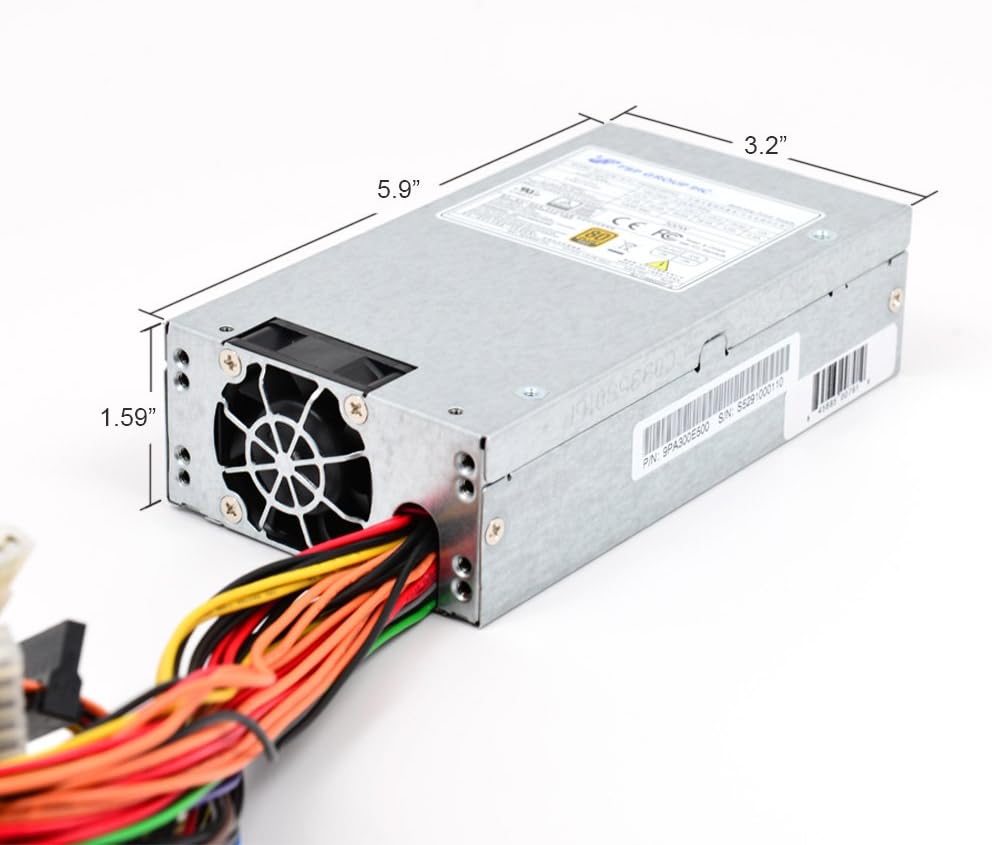
Image 4.1: Dimensions of the FSP300-60FAG power supply, measuring approximately 5.9 inches (L) x 3.2 inches (W) x 1.59 inches (H).
ขั้นตอนการติดตั้ง
- เตรียมระบบของคุณ: Turn off your computer and disconnect the AC power cord from the wall outlet. Open your computer case.
- Remove old PSU (if applicable): Disconnect all cables from the old power supply to the motherboard and other components. Unscrew and remove the old PSU from the case.
- Install the FSP300-60FAG: Carefully slide the new FSP300-60FAG power supply into the designated Flex ATX bay in your computer case. Align the screw holes and secure the PSU with the provided mounting screws.
- เชื่อมต่อสายไฟ AC: Ensure the power supply is securely mounted before connecting the AC power cord to the PSU's input socket.
การเชื่อมต่อสายเคเบิล
Connect the power supply cables to your motherboard and other components. Refer to your motherboard manual for specific connector locations.
- 20+4 Pin ATX Main Power Connector: Connect this to the main power socket on your motherboard. Ensure both sections (20-pin and 4-pin) are securely latched.
- 4-Pin 12V CPU Power Connector: Connect this to the CPU power socket on your motherboard, usually located near the CPU socket.
- ขั้วต่อไฟ SATA: Use these to power SATA hard drives, SSDs, and optical drives.
- Molex (4-Pin Peripheral) Connectors: ใช้ปลั๊กเหล่านี้สำหรับอุปกรณ์ต่อพ่วงรุ่นเก่าหรือพัดลมเคสที่ต้องการไฟเลี้ยงแบบ Molex

ภาพที่ 4.2: จบแล้วview of the FSP300-60FAG's various power cables and connectors for motherboard and peripheral connections.

Image 4.3: Rear panel of the FSP300-60FAG, featuring the AC power input and exhaust fan grille.
5. Operating Your Power Supply
Once all connections are made and verified, close your computer case. Connect the AC power cord to a wall outlet and turn on your computer. The FSP300-60FAG will automatically provide stable power to your system. Its 80 PLUS Gold certification ensures high energy efficiency, reducing wasted heat and electricity consumption.
6. การบำรุงรักษาและการดูแล
การบำรุงรักษาอย่างถูกต้องจะช่วยให้แหล่งจ่ายไฟของคุณมีอายุการใช้งานยาวนานและมีประสิทธิภาพเหมาะสมที่สุด
- รักษาช่องระบายอากาศให้โล่ง: Ensure that the intake and exhaust vents of the power supply are not obstructed by dust, cables, or other objects. Blocked vents can lead to overheating.
- การทำความสะอาดฝุ่น: Periodically clean the exterior of the power supply and its fan grille using compressed air. Do not open the power supply unit for internal cleaning.
- สภาพแวดล้อม : Operate the power supply within recommended temperature and humidity ranges. Avoid direct sunlight or placement near heat sources.
7. คำแนะนำการแก้ไขปัญหา
หากคุณพบปัญหาเกี่ยวกับแหล่งจ่ายไฟ โปรดดูปัญหาทั่วไปและวิธีแก้ไขต่อไปนี้:
| ปัญหา | สาเหตุที่เป็นไปได้ | สารละลาย |
|---|---|---|
| ระบบเปิดไม่ติด | Loose power connections, faulty power cord, PSU switch off, insufficient power. | Check all power cable connections (AC cord, 20+4 pin, 4-pin 12V). Ensure the PSU's main power switch is ON. Verify wall outlet functionality. |
| ระบบเปิดใช้งานได้ แต่ปิดตัวลงโดยไม่คาดคิด | Overheating, overloaded PSU, component short circuit. | Ensure proper ventilation and clear PSU fan. Reduce system load if possible. Check for any loose components or short circuits. |
| มีเสียงผิดปกติจากแหล่งจ่ายไฟ (PSU) | Fan obstruction, faulty fan bearing. | Inspect the fan for any obstructions and carefully remove them if present. If the noise persists, contact customer support. |
| Peripherals (HDD/SSD) not detected. | Loose SATA power cable. | Ensure SATA power cables are securely connected to both the PSU and the peripheral device. |
8. ข้อมูลจำเพาะทางเทคนิค
Detailed specifications for the FSP300-60FAG power supply:
| คุณสมบัติ | ข้อมูลจำเพาะ |
|---|---|
| ชื่อรุ่น | FSP300-60FAG |
| ยี่ห้อ | FSP |
| ฟอร์มแฟกเตอร์ | เฟล็กซ์ เอทีเอ็กซ์ |
| เอาท์พุต วัดtage | 300 วัตต์ |
| ประสิทธิภาพ | รับรอง 80 PLUS Gold |
| อินพุตไฟฟ้ากระแสสลับ | 100-240V~, 4-2A, 60-50Hz |
| เอาท์พุท DC | +3.3V@14.0A, +5V@16.0A, +12V1@16.0A, +12V2@16.0A, +5Vsb@3.0A, -12V@0.5A |
| วิธีการทำความเย็น | Air (1x 40mm Ball-Bearing Fan) |
| ขนาด (กว้าง x ยาว x สูง) | 5.9 x 3.2 x 1.6 นิ้ว (150 x 81.5 x 40.5 มม.) |
| น้ำหนักสินค้า | 1.8 ปอนด์ |
| อุณหภูมิในการทำงาน | สูงถึง 50 องศาเซลเซียส |
| การคุ้มครอง | OVP (มากกว่าVoltage Protection), Line input fuse protection, Resettable power shut down |
| การรับรองความปลอดภัย | CE, FCC, cUL, CCC, TUV, CB |
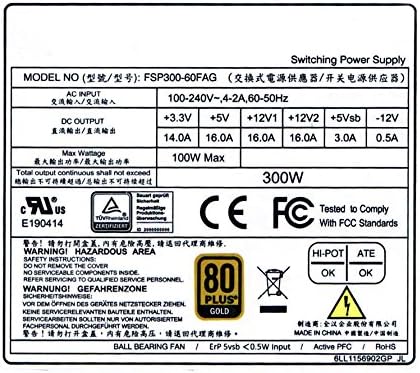
Image 8.1: The FSP300-60FAG specification label, showing detailed electrical ratings and compliance marks.
9. การรับประกันและการสนับสนุนลูกค้า
ข้อมูลการรับประกัน
The FSP300-60FAG power supply comes with a รับประกัน 3 ปี นับจากวันที่ซื้อ การรับประกันนี้ครอบคลุมถึงความบกพร่องของวัสดุและฝีมือการผลิตภายใต้การใช้งานปกติ โปรดเก็บหลักฐานการซื้อไว้เพื่อขอรับสิทธิ์การรับประกัน
การสนับสนุนลูกค้า
For technical assistance, troubleshooting beyond this guide, or warranty inquiries, please contact FSP customer support. You can find more information and contact details on the official FSP webไซต์หรือผ่านทางหน้าร้านค้า Amazon ของพวกเขา
Visit the FSP Store: FSP Group USA Amazon Store