
Fatek FBs-20MAT2-AC (FBs-20MAT)
คู่มือผู้ใช้คอนโทรลเลอร์ PLC Fatek FBs-20MAT2-AC
รุ่น: FBs-20MAT2-AC (FBs-20MAT)
1. บทนำ
The Fatek FBs-20MAT2-AC Programmable Logic Controller (PLC) is an advanced industrial control device designed for automation tasks. It features a user-friendly and readable multi-input/multi-output function structure, allowing for complex functionalities with fewer instructions compared to other PLC brands. This manual provides essential information for the proper installation, operation, and maintenance of your FBs-20MAT2-AC controller.
2. สินค้าหมดview
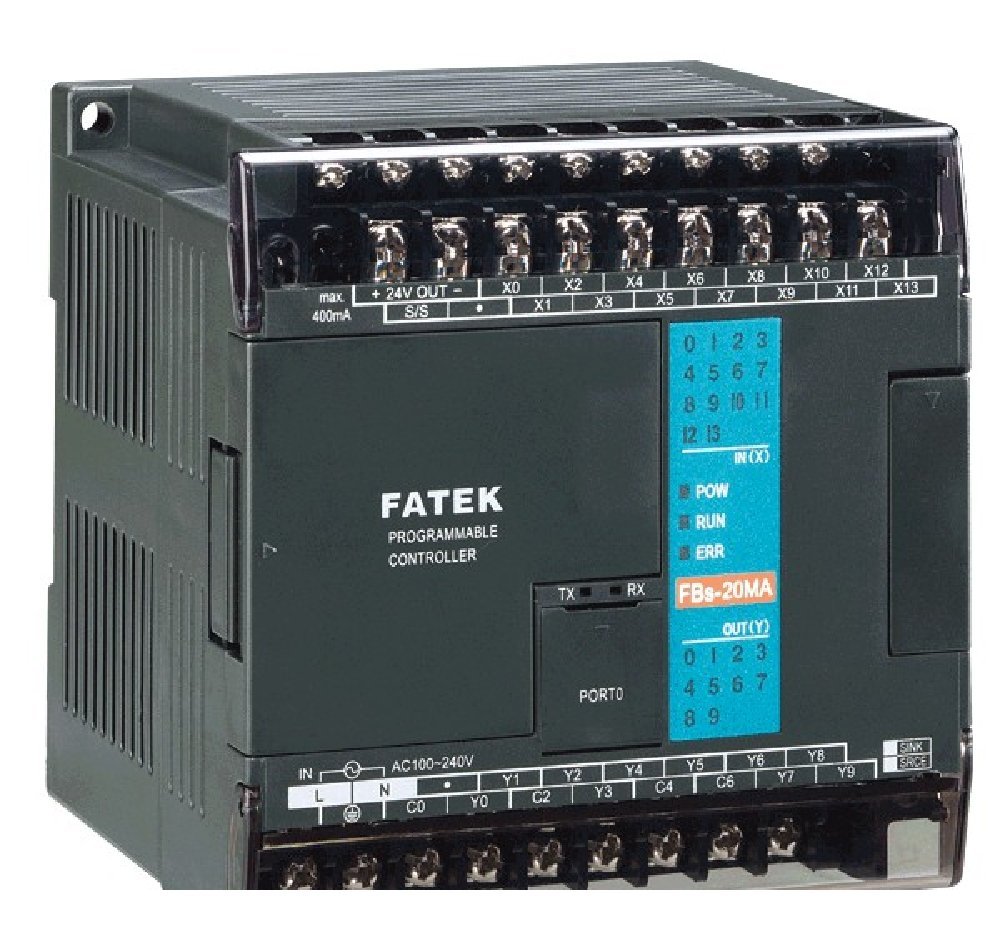
This image displays the Fatek FBs-20MAT2-AC Programmable Logic Controller. It features clearly labeled input (X) and output (Y) terminals, power input (AC100-240V), and status indicator LEDs for Power, Run, and Error. The model number FBs-20MA is visible on the front panel, along with TX/RX indicators for communication.
3. การตั้งค่าและการติดตั้ง
3.1 การเชื่อมต่อแหล่งจ่ายไฟ
The FBs-20MAT2-AC controller operates on a 100~240VAC power supply. Ensure the power source matches these specifications before connecting. Connect the AC power lines to the designated 'L' and 'N' terminals on the controller. Always ensure power is disconnected during wiring to prevent electrical shock.
3.2 การเดินสายสัญญาณอินพุต/เอาต์พุตดิจิทัล
The controller features 12 points of 24VDC digital input (up to 10KHz in 4 points) and 8 points of Sink (NPN) transistor digital output (4 points 10KHz output). Refer to the terminal labels (X0-X13 for inputs, Y0-Y9 for outputs) for correct wiring. Ensure all connections are secure and follow industrial wiring standards.
3.3 พอร์ตสื่อสาร
The FBs-20MAT2-AC includes 1 built-in RS-232 port, which can be expanded up to 3 ports. This port is used for programming and communication with other devices. Connect your programming cable or communication device to the RS-232 port (labeled 'PORTO').
3.4 การติดตั้ง
Mount the PLC in a stable, well-ventilated enclosure, away from excessive heat, moisture, and electromagnetic interference. Ensure adequate space for wiring and heat dissipation.
4. คู่มือการใช้งาน
4.1 ซอฟต์แวร์การเขียนโปรแกรม
The PLC is programmed using the WinProladder ladder programming tool. This software can be downloaded from the official Fatek website at no extra charge. Install the software on your computer and connect to the PLC via the RS-232 port to upload or download programs.
4.2 การทำงานพื้นฐาน
- เปิดเครื่อง: After connecting the power supply, the 'POW' indicator LED should illuminate.
- โหมดรัน: Once a program is loaded and the PLC is set to run mode, the 'RUN' indicator LED will illuminate, indicating active program execution.
- บ่งชี้ข้อผิดพลาด: If an error occurs, the 'ERR' indicator LED will illuminate. Refer to the troubleshooting section for common error resolutions.
- การสื่อสาร: The 'TX' and 'RX' LEDs indicate data transmission and reception activity on the communication port.
5. การบำรุงรักษา
Regular maintenance ensures the longevity and reliable operation of your PLC. Always disconnect power before performing any maintenance.
- การทำความสะอาด: Keep the PLC and its enclosure clean and free from dust and debris. Use a soft, dry cloth for cleaning. Avoid using liquid cleaners or solvents.
- การควบคุมสิ่งแวดล้อม: Ensure the operating environment adheres to the specified temperature and humidity ranges. Protect the unit from excessive vibrations and corrosive gases.
- การตรวจสอบการเชื่อมต่อ: ตรวจสอบการเชื่อมต่อสายไฟทั้งหมดเป็นระยะๆ เพื่อดูว่ามีความแน่นหนาและมีสัญญาณของการกัดกร่อนหรือความเสียหายหรือไม่
- อัพเดตเฟิร์มแวร์: Check the Fatek webไซต์สำหรับการอัปเดตเฟิร์มแวร์ที่มีอยู่ซึ่งอาจช่วยปรับปรุงประสิทธิภาพหรือแก้ไขปัญหาได้
6 การแก้ไขปัญหา
ส่วนนี้ให้คำแนะนำสำหรับปัญหาทั่วไป สำหรับปัญหาที่ซับซ้อน โปรดติดต่อฝ่ายสนับสนุนด้านเทคนิค
- No Power (POW LED Off):
- Check the AC power supply connection and ensure it is within the 100~240VAC range.
- Verify the power cable is securely connected to the PLC and the power outlet.
- ตรวจสอบฟิวส์ในวงจรไฟฟ้าว่ามีขาดหรือไม่
- PLC Not Running (RUN LED Off, POW LED On):
- Ensure a valid program is loaded into the PLC.
- Check if the PLC is in 'STOP' mode. Use WinProladder to switch to 'RUN' mode.
- Verify there are no critical errors indicated by the 'ERR' LED.
- Error Indication (ERR LED On):
- Connect to the PLC using WinProladder software to view the error code and description.
- Common errors include program syntax errors, I/O module faults, or memory issues.
- Consult the WinProladder software manual for specific error code interpretations.
- Communication Issues (TX/RX LEDs Inactive):
- Verify the RS-232 cable connection is secure and correct.
- Check the communication settings (baud rate, data bits, parity, stop bits) in WinProladder and ensure they match the PLC's settings.
- Ensure the correct COM port is selected on your computer.
- การทำงานผิดปกติของอินพุต/เอาต์พุต:
- Verify wiring for the specific input/output points.
- Check the status of the input devices (sensors, switches) and output devices (relays, indicators).
- Use WinProladder to monitor the real-time status of I/O points to diagnose the issue.
7. ข้อมูลจำเพาะ
| คุณสมบัติ | ข้อมูลจำเพาะ |
|---|---|
| หมายเลขรุ่น | FBs-20MAT2-AC (FBs-20MAT) |
| อินพุตดิจิตอล | 12 points, 24VDC (up to 10KHz in 4 points) |
| เอาท์พุตดิจิตอล | 8 points, Sink (NPN) transistor (4 points 10KHz output) |
| พอร์ตการสื่อสาร | พอร์ต RS-232 ในตัว 1 พอร์ต (สามารถขยายได้สูงสุด 3 พอร์ต) |
| แหล่งจ่ายไฟ | 100~240VAC |
| การรับรอง | ได้รับการรับรองจาก UL |
| ขนาดแพ็คเกจ | 4.5 x 4 x 4 นิ้ว |
| น้ำหนักสินค้า | 1.01 ปอนด์ |
| ประเทศต้นกำเนิด | ไต้หวัน |
| เล่มที่tage | 240 โวลต์ (AC) |
| ประเภทจอภาพ | LCD หรือ LED |
| อุณหภูมิในการทำงาน | 20 องศาเซลเซียส |
| ยูพีซี | 687965401068 |
8. การรับประกันและการสนับสนุน
For information regarding product warranty, technical support, or service, please refer to the documentation provided with your purchase or contact the manufacturer directly. The seller for this product is Fatek USA. You may also visit the official Fatek webเว็บไซต์สำหรับแหล่งข้อมูลเพิ่มเติมและข้อมูลการติดต่อ
Ask a question about this manual
Ask about setup, troubleshooting, compatibility, parts, safety, or missing instructions. Manuals+ will review the question and use this page’s manual context to help answer it.