
การแนะนำ
ขอบคุณสำหรับการซื้อasing the F&D F3000U 5.1 Home Theatre Speakers. This manual provides essential information for the proper setup, operation, and maintenance of your speaker system. Please read this manual thoroughly before using the product to ensure optimal performance and safety.
สินค้าเกินview
The F&D F3000U is a 5.1 channel home theatre speaker system designed to deliver immersive audio. It features a powerful subwoofer and five satellite speakers, along with convenient connectivity options.
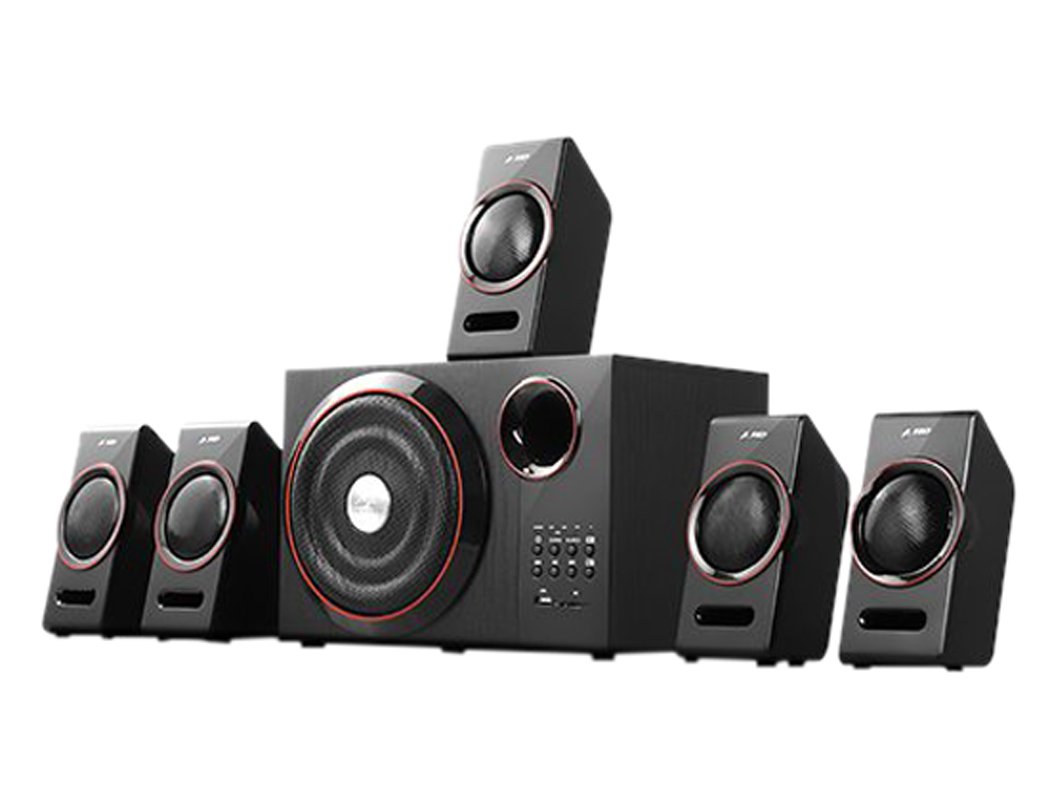
This image displays the main subwoofer unit of the F&D F3000U 5.1 Home Theatre Speakers. The front panel features a large, circular speaker grille with a red accent ring, a bass reflex port, and a control panel on the right. The control panel includes various buttons, indicator lights, a USB port, and an SD card slot.
คุณสมบัติหลัก:
- USB reader supporting MP3/WMA dual formats decoding.
- Heavy duty metal grill with red ring decoration.
- การเชื่อมต่อไร้สาย Bluetooth
การตั้งค่า
- การแกะกล่อง: Carefully remove all components from the packaging. Ensure all parts are present: 1 subwoofer unit, 5 satellite speakers, audio cables, and remote control.
- ตำแหน่งลำโพง:
- Place the subwoofer on the floor, preferably near your TV or audio source.
- Position the front left and right satellite speakers equidistant from your listening position, typically on either side of your TV.
- Place the center speaker directly above or below your TV.
- Position the surround left and right satellite speakers behind or to the sides of your main listening area.
- การเชื่อมต่อลำโพงแซทเทิลไลท์: Connect each satellite speaker to the corresponding output terminals on the rear of the subwoofer unit. Ensure correct polarity (+ to + and - to -).
- การเชื่อมต่อกับแหล่งเสียง: Connect the audio input cable from your TV, DVD player, or other audio source to the appropriate input jacks on the subwoofer unit.
- การเชื่อมต่อไฟฟ้า: Plug the power cord into the subwoofer unit and then into a standard AC power outlet.
- เปิดเครื่องครั้งแรก: Turn on the main power switch on the subwoofer unit. The system should power on, and an indicator light will illuminate.
การดำเนินงาน
- เปิด/ปิดเครื่อง: Use the power button on the front panel of the subwoofer or the remote control to turn the system on or off.
- การควบคุมระดับเสียง: Adjust the master volume using the main volume knob on the subwoofer or the volume buttons on the remote control. Individual channel volumes (e.g., center, surround, subwoofer) may also be adjustable via the remote.
- การเลือกอินพุต: Press the 'Input' or 'Source' button on the subwoofer or remote to cycle through available audio inputs (e.g., AUX, USB, SD, Bluetooth).
- การเล่น USB/SD:
- Insert a USB drive or SD card into the respective slot on the front panel.
- Select 'USB' or 'SD' input mode.
- The system will automatically detect and play MP3/WMA audio files. Use the playback controls (Play/Pause, Next, Previous) on the unit or remote.
- การเชื่อมต่อบลูทูธ:
- Select 'Bluetooth' input mode. The system will enter pairing mode.
- On your mobile device, search for Bluetooth devices and select "F&D F3000U" (or similar name).
- เมื่อจับคู่แล้ว คุณสามารถสตรีมเสียงแบบไร้สายจากอุปกรณ์ของคุณไปยังลำโพงได้
การซ่อมบำรุง
- การทำความสะอาด: Use a soft, dry cloth to clean the surfaces of the speakers. Do not use liquid cleaners or abrasive materials, as they may damage the finish.
- การระบายอากาศ : Ensure that the subwoofer unit has adequate ventilation. Do not block any ventilation openings.
- สิ่งแวดล้อม: Avoid exposing the speakers to direct sunlight, high temperatures, humidity, or dusty environments.
- หมดแรง: Always turn off the speaker system when not in use for extended periods.
การแก้ไขปัญหา
| ปัญหา | วิธีแก้ปัญหาที่เป็นไปได้ |
|---|---|
| ไม่มีไฟฟ้า | Check if the power cord is securely plugged into the wall outlet and the subwoofer. Ensure the main power switch is ON. |
| ไม่มีเสียง | Verify the audio input cable is correctly connected. Ensure the correct input source is selected. Increase the volume. Check if speakers are properly connected to the subwoofer. |
| เสียงเพี้ยน | Reduce the volume. Check audio source quality. Ensure speaker wires are not damaged or short-circuited. |
| ไม่สามารถอ่าน USB/SD ได้ | Ensure the USB drive or SD card contains supported MP3/WMA audio files. Reinsert the device. Try a different USB drive or SD card. |
| การจับคู่บลูทูธล้มเหลว | Ensure the speaker system is in Bluetooth mode. Make sure your device's Bluetooth is on and within range. Forget previous pairings on your device and try again. |
ข้อมูลจำเพาะ
- แบบอย่าง: F3000U
- ประเภทลำโพง: 5.1 Home Theatre System
- การเชื่อมต่อ: ยูเอสบี, บลูทูธ
- Supported Audio Formats (USB/SD): MP3, WMA
- คุณสมบัติพิเศษ: การชาร์จ USB
- เทคโนโลยีการสื่อสารไร้สาย: บลูทูธ
- ขนาดแพ็คเกจ: 49 x 39.7 x 24.1 ซม.
- น้ำหนักสินค้า: 7 กก. 400 ก.
การรับประกันและการสนับสนุน
For warranty information, please refer to the documentation provided at the time of purchase or contact your retailer. Keep your purchase receipt as proof of purchase.
การปฏิเสธความรับผิดทางกฎหมาย: All matters are subject to Agra Jurisdiction Only.
If you encounter issues not covered in the troubleshooting section, please contact F&D customer support or your authorized service center for assistance.