
1. บทนำ
The Sony SBH54 is a versatile Stereo Bluetooth Headset designed for wireless communication and audio playback. It offers both handset and headset functionalities, allowing you to take and make calls, view messages, listen to music, and tune into FM radio directly from its display. Crafted from premium metal with a splash-proof design, it combines elegance with durability.
Key features include Bluetooth Wireless 3.0, NFC technology for easy pairing, an OLED display, and built-in noise cancellation for clear audio during calls. The headset supports A2DP profile and can connect to two devices simultaneously.
2. สินค้าหมดview
The SBH54 features a compact design that fits comfortably in your hand. It includes an OLED display for information at a glance and physical controls for media and call management.
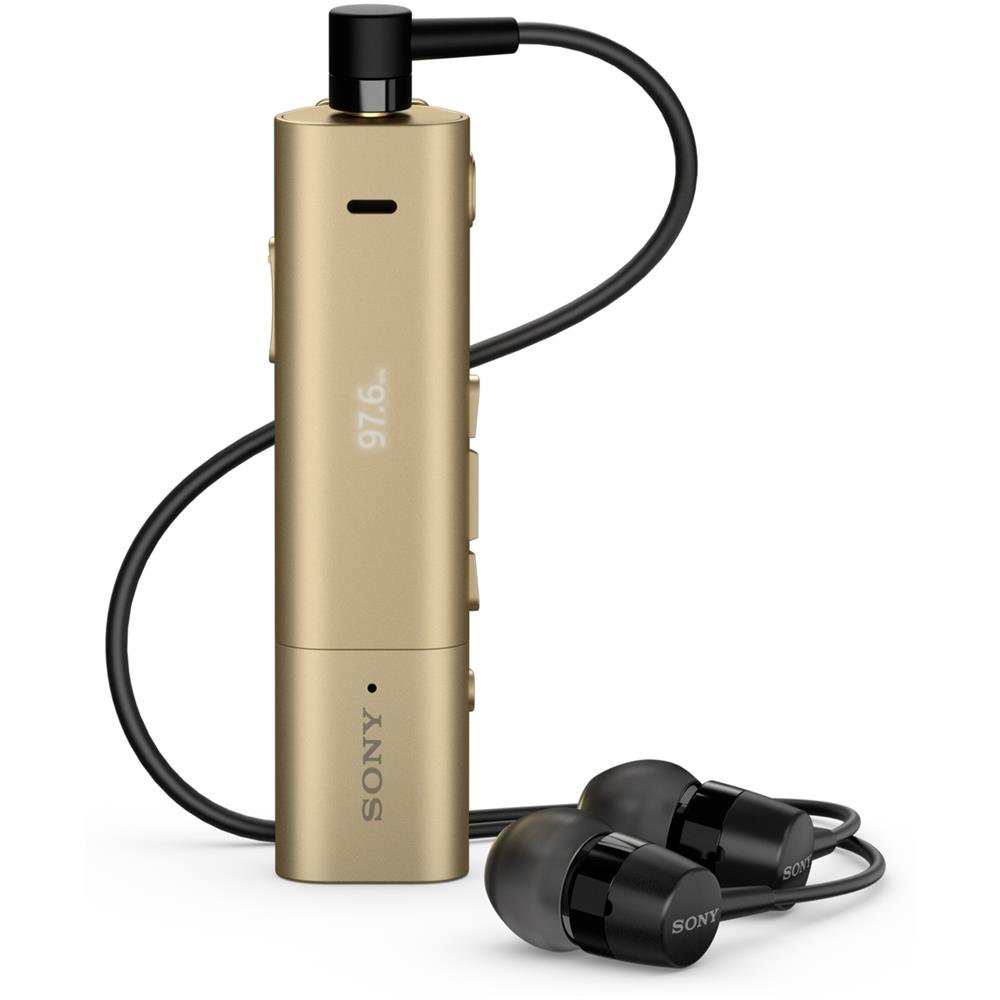
Image: Sony SBH54 Gold Stereo Bluetooth Headset. This image displays the compact, gold-colored headset with its integrated clip and display screen.
การควบคุมและตัวบ่งชี้:
- จอแสดงผล OLED: Shows caller ID, messages, music track information, and FM radio frequency.
- ปุ่มมัลติฟังก์ชั่น: For call answering/ending, play/pause music.
- ปุ่มปรับระดับเสียง: ปรับระดับเสียง
- ปุ่มนำทาง: For menu navigation and track skipping.
- ไมโครโฟน: ออกแบบมาเพื่อรองรับการโทรด้วยเสียง
- แจ็คหูฟัง: 3.5mm port for connecting the included premium headphones.
- พอร์ตชาร์จ: พอร์ต Micro USB สำหรับชาร์จอุปกรณ์
3. การตั้งค่า
3.1 การชาร์จชุดหูฟัง
- Connect the supplied USB cable to the headset's charging port and to a USB power adapter or a computer's USB port.
- ไฟแสดงสถานะแบตเตอรี่บนจอแสดงผลจะแสดงสถานะการชาร์จ
- ชาร์จชุดหูฟังให้เต็มก่อนใช้งานครั้งแรก
3.2 การจับคู่กับอุปกรณ์ (บลูทูธ)
- ตรวจสอบให้แน่ใจว่าชุดหูฟังได้รับการชาร์จและปิดอยู่
- Press and hold the power button until the headset enters pairing mode (indicated by a specific light pattern or message on the display).
- บนสมาร์ทโฟนหรืออุปกรณ์ที่รองรับบลูทูธ ให้เปิดใช้งานบลูทูธและค้นหาอุปกรณ์ที่ใช้งานได้
- Select "SBH54" from the list of found devices.
- หากระบบถาม ให้ป้อนรหัสผ่าน "0000" (เลขศูนย์สี่ตัว)
- เมื่อจับคู่แล้ว ชุดหูฟังจะระบุว่าการเชื่อมต่อสำเร็จ
3.3 Pairing with a Device (NFC)
For devices with NFC (Near Field Communication):
- Ensure NFC is enabled on your smartphone and the screen is unlocked.
- Touch the NFC detection area of your smartphone to the NFC detection area on the SBH54 headset.
- ปฏิบัติตามคำแนะนำบนหน้าจอเพื่อดำเนินการจับคู่ให้เสร็จสมบูรณ์
4. การใช้งานชุดหูฟัง
4.1 เปิด/ปิดเครื่อง
- การเปิดเครื่อง: กดปุ่มเปิด/ปิดค้างไว้จนกว่าจอแสดงผลจะสว่างขึ้น
- วิธีปิดเครื่อง: กดปุ่มเปิด/ปิดค้างไว้จนกว่าจอแสดงผลจะดับลง
4.2 การโทรออกและรับสาย
- รับสาย: When a call comes in, press the multi-function button.
- การวางสาย: During a call, press the multi-function button.
- การปฏิเสธสาย: Press and hold the multi-function button when a call comes in.
- การโทร: Dial the number on your phone. The call will automatically route to the headset. You can also use voice commands if supported by your phone.
- ฟังก์ชั่นโทรศัพท์มือถือ: The compact SBH54 can be used as an unobtrusive handset for calls.
- ตัดเสียงรบกวน: The headset features echo, wind, and noise cancellation for clear voice transmission.
- เสียงความละเอียดสูง: Enhances voice clarity for both parties during a call.
4.3 การเล่นเพลง
- เล่น/หยุดชั่วคราว: กดปุ่มมัลติฟังก์ชัน
- เพลงถัดไป: Press the forward navigation button.
- แทร็กก่อนหน้า: Press the backward navigation button.
- การควบคุมระดับเสียง: ใช้ปุ่มเพิ่ม/ลดระดับเสียง
4.4 วิทยุ FM
- เปิดใช้งานวิทยุ FM: Navigate through the headset menu to select the FM Radio function.
- สถานีจูน: Use the navigation buttons to scan or manually tune to FM frequencies.
- บันทึกการตั้งค่าล่วงหน้า: The headset may allow saving favorite stations (refer to on-screen prompts).
5. การบำรุงรักษา
- การทำความสะอาด: เช็ดหูฟังด้วยผ้านุ่มและแห้ง หลีกเลี่ยงการใช้สารเคมีรุนแรงหรือวัสดุที่มีฤทธิ์กัดกร่อน
- ความต้านทานน้ำ: The SBH54 has a splash-proof design. This means it can withstand light splashes of water but should not be submerged or exposed to heavy rain. Ensure the charging port cover is securely closed.
- พื้นที่จัดเก็บ: เก็บหูฟังไว้ในที่แห้งและเย็น หลีกเลี่ยงแสงแดดโดยตรงและอุณหภูมิที่สูงหรือต่ำเกินไป
- การดูแลแบตเตอรี่ เพื่อยืดอายุการใช้งานแบตเตอรี่ ควรหลีกเลี่ยงการปล่อยประจุแบตเตอรี่จนหมดบ่อยๆ ควรชาร์จแบตเตอรี่เป็นประจำ
6 การแก้ไขปัญหา
ปัญหาทั่วไปและวิธีแก้ไข:
- หูฟังไม่เปิดเครื่อง: ตรวจสอบให้แน่ใจว่าแบตเตอรี่ชาร์จเต็มแล้ว เสียบปลั๊กเข้ากับแหล่งจ่ายไฟแล้วลองอีกครั้ง
- ไม่สามารถจับคู่กับอุปกรณ์ได้:
- ตรวจสอบให้แน่ใจว่าชุดหูฟังอยู่ในโหมดจับคู่
- ตรวจสอบให้แน่ใจว่าได้เปิดใช้งานบลูทูธบนอุปกรณ์ของคุณแล้ว
- ขยับชุดหูฟังให้เข้าใกล้อุปกรณ์ของคุณมากขึ้น
- รีสตาร์ททั้งชุดหูฟังและอุปกรณ์ของคุณ
- ล้างการเชื่อมต่อบลูทูธก่อนหน้าบนอุปกรณ์ของคุณและลองจับคู่ใหม่อีกครั้ง
- ไม่มีเสียงหรือคุณภาพเสียงไม่ดี:
- ตรวจสอบระดับเสียงทั้งบนชุดหูฟังและอุปกรณ์ที่เชื่อมต่อของคุณ
- ตรวจสอบให้แน่ใจว่าชุดหูฟังอยู่ในระยะที่สามารถเชื่อมต่อกับอุปกรณ์ของคุณได้
- ตัดการเชื่อมต่อและเชื่อมต่อการเชื่อมต่อ Bluetooth ใหม่
- Ensure the headphones are properly plugged into the 3.5mm jack.
- วิทยุ FM ใช้งานไม่ได้: ตรวจสอบให้แน่ใจว่าคุณอยู่ในพื้นที่ที่มีการรับสัญญาณ FM ได้ดี
7. ข้อมูลจำเพาะ
| คุณสมบัติ | รายละเอียด |
|---|---|
| ยี่ห้อ | โซนี่ |
| หมายเลขรุ่น | SBH54GD |
| สี | ทอง |
| การวางตำแหน่งหู | ในหู |
| ฟอร์มแฟกเตอร์ | ในหู |
| การควบคุมเสียงรบกวน | ระบบตัดเสียงรบกวนแบบแอคทีฟ |
| น้ำหนักสินค้า | 0.1 กิโลกรัม |
| ประเภทไดร์เวอร์เสียง | ไดร์เวอร์แบบไดนามิก |
| ช่วงความถี่ | 20 เฮิรตซ์ - 20,000 เฮิรตซ์ |
| วัสดุของตู้หุ้ม | โลหะ |
| อุปกรณ์ที่รองรับ | สมาร์ทโฟน, แล็ปท็อป, แท็บเล็ต, อุปกรณ์ที่รองรับบลูทูธ |
| ระดับความต้านทานต่อน้ำ | กันน้ำ (กันละอองน้ำ) |
| เทคโนโลยีการเชื่อมต่อ | บลูทูธ, เอ็นเอฟซี |
| เทคโนโลยีไร้สาย | บลูทูธ, เอ็นเอฟซี |
| เวอร์ชันบลูทูธ | 3.0 |
| ประเภทการควบคุม | การควบคุมสื่อ |
| วิธีการควบคุม | ระยะไกล |
8. การรับประกันและการสนับสนุน
For warranty information and customer support, please refer to the documentation included with your purchase or visit the official Sony support webไซต์ เงื่อนไขการรับประกันเฉพาะอาจแตกต่างกันไปตามภูมิภาคและผู้ค้าปลีก
การสนับสนุนทางออนไลน์: www.sony.com/electronics/support