
1. บทนำ
This manual provides detailed instructions for installing, configuring, and maintaining your GIGABYTE GA-B150M-D3H Micro ATX motherboard. The GA-B150M-D3H is designed to support 6th Generation Intel Core Processors and features Dual Channel DDR4 memory, PCIe Gen3 x4 M.2 connector, SATA Express, and 8-channel HD audio with Audio Noise Guard.
Please read this manual thoroughly before beginning installation to ensure proper setup and operation.
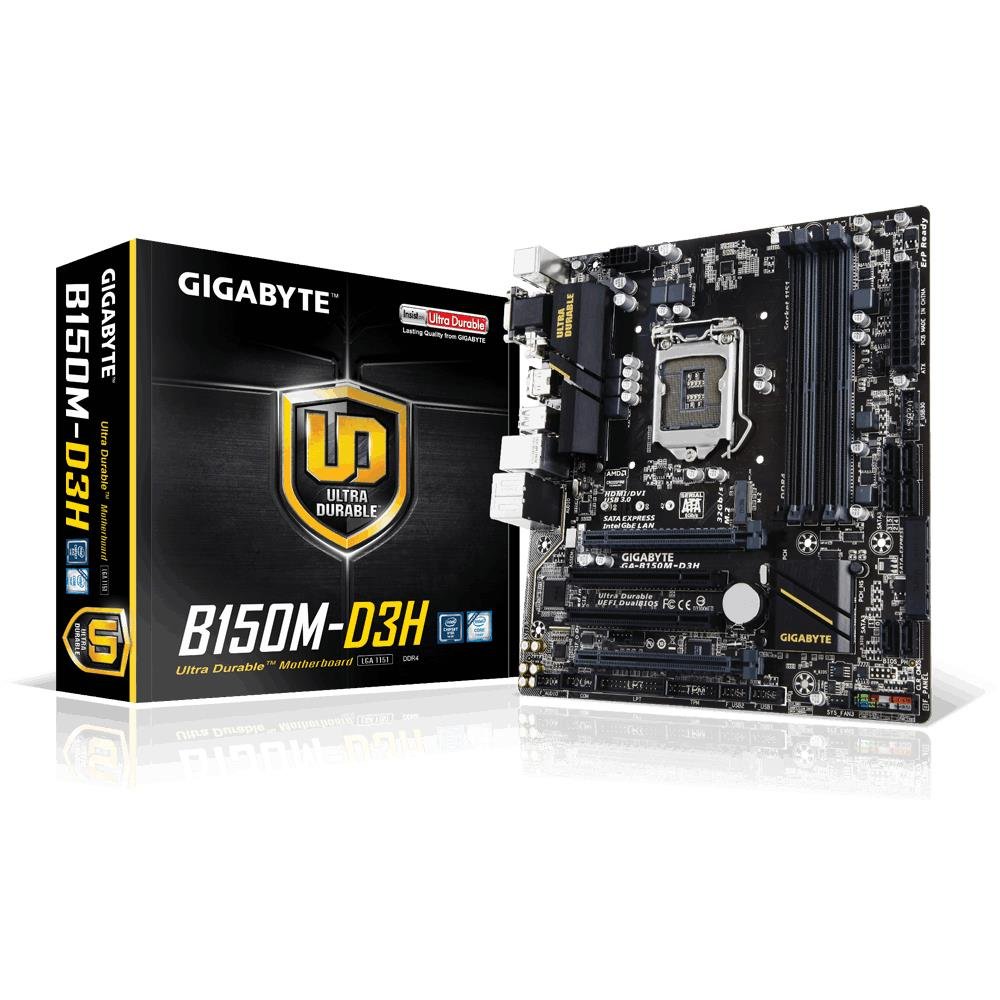
Image 1.1: GIGABYTE GA-B150M-D3H Micro ATX Motherboard. This image displays the overall layout of the motherboard, highlighting its compact Micro ATX form factor and various component slots.
2. ข้อมูลด้านความปลอดภัย
โปรดปฏิบัติตามข้อควรระวังด้านความปลอดภัยต่อไปนี้เพื่อป้องกันความเสียหายต่อเมนบอร์ดและการบาดเจ็บต่อตัวคุณเอง:
- ควรถอดสายไฟออกจากเต้ารับที่ผนังทุกครั้งก่อนสัมผัสชิ้นส่วนใดๆ
- สวมสายรัดข้อมือป้องกันไฟฟ้าสถิตย์หรือสัมผัสวัตถุโลหะที่มีสายดินบ่อยๆ เพื่อระบายไฟฟ้าสถิตย์
- จับที่ขอบของเมนบอร์ดเพื่อหลีกเลี่ยงการสัมผัสชิ้นส่วนที่บอบบาง
- เก็บเมนบอร์ดให้ห่างจากความชื้นและอุณหภูมิที่สูงหรือต่ำเกินไป
- ตรวจสอบให้แน่ใจว่ามีการระบายอากาศที่เหมาะสมภายในเคสคอมพิวเตอร์เพื่อป้องกันความร้อนสูงเกินไป
3. เนื้อหาบรรจุภัณฑ์
ตรวจสอบว่ามีรายการทั้งหมดอยู่ในแพ็คเกจเมนบอร์ดของคุณ:
- GIGABYTE GA-B150M-D3H Motherboard
- คู่มือการใช้งาน
- I / O Shield
- สาย SATA
- ไดร์เวอร์ซีดี/ดีวีดี
หมายเหตุ: เนื้อหาอาจแตกต่างกันเล็กน้อยขึ้นอยู่กับภูมิภาคหรือฉบับแก้ไข
4. เค้าโครงเมนบอร์ด
Familiarize yourself with the various components and connectors on the GA-B150M-D3H motherboard.
Image 4.1: GIGABYTE GA-B150M-D3H Motherboard Layout. This image provides a visual reference for the location of key components such as the CPU socket, DIMM slots, PCIe slots, SATA ports, and M.2 connector.
ส่วนประกอบหลัก:
- ซ็อกเก็ต CPU LGA 1151: For 6th Generation Intel Core Processors.
- DDR4 DIMM Slots (4): Supports Dual Channel DDR4 memory up to 2133 MHz.
- สล็อต PCIe: Includes PCIe Gen3 x16 for graphics cards and PCIe x1 slots for expansion.
- ขั้วต่อ M.2: Supports PCIe NVMe & SATA SSDs with up to 32Gb/s data transfer.
- SATA Express Connector: For up to 16Gb/s data transfer.
- พอร์ต SATA 6Gb/s: สำหรับเชื่อมต่ออุปกรณ์จัดเก็บข้อมูล SATA แบบดั้งเดิม
- 24-Pin ATX Power Connector: ช่องเสียบไฟหลัก
- 8-Pin ATX 12V Power Connector: CPU power input.
- ส่วนหัวแผงด้านหน้า: For power button, reset button, LED indicators, and USB ports.
- ตัวเชื่อมต่อเสียง: 8-channel HD Audio with high quality capacitors and Audio Noise Guard.
5. การตั้งค่าและการติดตั้ง
โปรดทำตามขั้นตอนเหล่านี้เพื่อติดตั้งเมนบอร์ดและส่วนประกอบต่างๆ อย่างถูกต้อง
5.1. การติดตั้งซีพียู
- Locate the LGA 1151 CPU socket.
- เปิดคันโยกซ็อกเก็ต CPU และยกแผ่นโหลดขึ้น
- วางซีพียูให้ตรงกับซ็อกเก็ตอย่างระมัดระวัง ตรวจสอบให้แน่ใจว่าสามเหลี่ยมสีทองบนซีพียูตรงกับสามเหลี่ยมบนซ็อกเก็ต อย่าฝืนดันซีพียูเข้าไปในซ็อกเก็ต
- ลดแผ่นโหลดลงและยึดด้วยคันโยก
5.2. การติดตั้งตัวระบายความร้อน CPU
Refer to your CPU cooler's instruction manual for specific installation steps. Ensure thermal paste is applied correctly between the CPU and cooler base.
5.3. การติดตั้งหน่วยความจำ (RAM)
- เปิดคลิปที่ปลายทั้งสองด้านของสล็อต DIMM DDR4
- จัดตำแหน่งโมดูลหน่วยความจำให้ตรงกับช่อง โดยให้แน่ใจว่ารอยบากบนโมดูลตรงกับกุญแจในช่อง
- กดปลายทั้งสองข้างของโมดูลหน่วยความจำให้แน่นจนกระทั่งคลิปล็อคเข้าที่
- For dual-channel performance, install memory modules in matching colored slots (e.g., DIMM1 and DIMM2).
5.4. Installing Expansion Cards
- ถอดแผ่นโลหะยึดออกจากช่อง PCIe ที่ต้องการบนเคสคอมพิวเตอร์ของคุณ
- วางการ์ดขยายให้ตรงกับช่อง PCIe แล้วกดลงไปให้แน่นจนกว่าจะเข้าที่อย่างถูกต้อง
- ยึดการ์ดเข้ากับเคสคอมพิวเตอร์ด้วยสกรู
5.5. การเชื่อมต่ออุปกรณ์จัดเก็บข้อมูล
- อุปกรณ์ SATA: Connect one end of the SATA data cable to a SATA 6Gb/s port on the motherboard and the other end to your hard drive or SSD. Connect the SATA power cable from your power supply to the device.
- M.2 SSD: ใส่ SSD แบบ M.2 ลงในช่อง M.2 โดยให้เอียงเล็กน้อย จากนั้นค่อยๆ กดลงและยึดให้แน่นด้วยสกรูที่ให้มา
- SATA Express: If using a SATA Express device, connect it to the designated SATA Express connector.
5.6. การเชื่อมต่อขั้วต่อแผงด้านหน้า
Connect the cables from your computer case's front panel (power button, reset button, HDD LED, power LED, front USB, front audio) to the corresponding headers on the motherboard. Refer to the motherboard layout diagram for exact locations and pin assignments.
5.7. การเชื่อมต่อแหล่งจ่ายไฟ
- Connect the 24-pin ATX main power connector from your power supply to the 24-pin power socket on the motherboard.
- Connect the 8-pin ATX 12V CPU power connector to the 8-pin socket near the CPU.
- ตรวจสอบให้แน่ใจว่าการเชื่อมต่อสายไฟทั้งหมดแน่นหนาดีแล้ว
6. คู่มือการใช้งาน
6.1. การบูตครั้งแรก
After assembling all components, connect your monitor, keyboard, and mouse. Power on the system. The system should display the GIGABYTE splash screen and then enter the BIOS/UEFI setup or attempt to boot from a connected storage device.
6.2. การตั้งค่า BIOS/UEFI
ในการเข้าสู่การตั้งค่า BIOS/UEFI ให้กดปุ่ม เดล key repeatedly during the boot process when the GIGABYTE logo appears. Here you can configure system settings, boot order, and monitor hardware status. The GA-B150M-D3H features GIGABYTE UEFI Dual BIOS for enhanced reliability.
6.3. การติดตั้งไดร์เวอร์
After installing your operating system, install the necessary drivers for the motherboard components. These can be found on the included driver CD/DVD or downloaded from the official GIGABYTE website. Key drivers include chipset, audio (Realtek ALC892 codec), LAN, and any integrated graphics drivers.
6.4. การติดตั้งระบบปฏิบัติการ
Insert your operating system installation media (USB drive or DVD) and configure the boot order in the BIOS/UEFI to boot from it. Follow the on-screen instructions to install your preferred operating system (e.g., Windows 8.1, Windows 10).
7. การบำรุงรักษา
7.1. การทำความสะอาด
ทำความสะอาดภายในเคสคอมพิวเตอร์เป็นประจำเพื่อป้องกันฝุ่นสะสม ซึ่งอาจทำให้เครื่องร้อนเกินไป ใช้ลมเป่าเพื่อกำจัดฝุ่นจากพัดลม ฮีทซิงค์ และส่วนประกอบต่างๆ บนเมนบอร์ด ตรวจสอบให้แน่ใจว่าได้ปิดเครื่องและถอดปลั๊กออกก่อนทำความสะอาด
7.2. การอัปเดต BIOS
GIGABYTE periodically releases BIOS updates to improve system stability, compatibility, and performance. Visit the official GIGABYTE website for your motherboard model (GA-B150M-D3H) to check for the latest BIOS version and follow the provided instructions for updating. Exercise caution during BIOS updates, as an interruption can render the motherboard inoperable.
8 การแก้ไขปัญหา
หัวข้อนี้จะกล่าวถึงปัญหาทั่วไปที่คุณอาจพบเจอ
8.1. No Power / System Does Not Turn On
- ตรวจสอบว่าแหล่งจ่ายไฟเชื่อมต่อกับเมนบอร์ดอย่างถูกต้องหรือไม่ (ขั้วต่อ 24 พินและ 8 พิน)
- ตรวจสอบให้แน่ใจว่าสวิตช์แหล่งจ่ายไฟอยู่ในตำแหน่งเปิด
- ตรวจสอบให้แน่ใจว่าสายเคเบิลปุ่มเปิดปิดด้านหน้าเชื่อมต่อกับหัวต่อบนเมนบอร์ดอย่างถูกต้องแล้ว
- ทดสอบแหล่งจ่ายไฟด้วยระบบอื่นหรือเครื่องทดสอบแหล่งจ่ายไฟ
8.2. ไม่มีการแสดงผล
- Ensure the monitor is connected to the correct graphics output (either integrated graphics on the motherboard or a dedicated graphics card).
- ติดตั้งการ์ดจอและโมดูลหน่วยความจำใหม่
- Try booting with only one memory module installed.
- ตรวจสอบว่าจอภาพเปิดอยู่และตั้งค่าแหล่งอินพุตที่ถูกต้อง
8.3. ความไม่เสถียรของระบบ / การขัดข้อง
- ตรวจสอบอุณหภูมิ CPU และ GPU เพื่อให้แน่ใจว่าอยู่ในขีดจำกัดการทำงานที่ปลอดภัย
- Verify that all drivers are installed and up to date.
- เรียกใช้เครื่องมือวินิจฉัยหน่วยความจำเพื่อตรวจหา RAM ที่ผิดพลาด
- Ensure the power supply provides sufficient and stable power to all components.
9. ข้อมูลจำเพาะ
Detailed technical specifications for the GIGABYTE GA-B150M-D3H motherboard:
| คุณสมบัติ | ข้อมูลจำเพาะ |
|---|---|
| ชื่อรุ่น | GA-B150M-D3H |
| ฟอร์มแฟกเตอร์ | ไมโคร ATX (24.4 ซม. x 22.5 ซม.) |
| ซ็อคเก็ตซีพียู | แอลจีเอ 1151 |
| โปรเซสเซอร์ที่เข้ากันได้ | 6th Generation Intel Core Processors |
| ชิปเซ็ต | ชิปเซ็ต Intel B150 Express |
| เทคโนโลยีหน่วยความจำ | DDR4 |
| สล็อตหน่วยความจำ | ช่องเสียบ DDR4 DIMM จำนวน 4 ช่อง (Dual Channel) |
| ความจุหน่วยความจำสูงสุด | 16GB |
| ความเร็วสัญญาณนาฬิกาหน่วยความจำ | 2133 เมกะเฮิรตซ์ |
| สล็อต PCIe | 1 x PCI Express x16, 1 x Total PCIe Ports |
| อินเทอร์เฟซการจัดเก็บข้อมูล | PCIe Gen3 x4 M.2, SATA Express, SATA 6Gb/s |
| ตัวแปลงสัญญาณเสียง | Realtek ALC892 codec, 8-channel HD Audio |
| พอร์ต USB | Total 8 USB Ports (including USB 2.0) |
| ขั้วต่อสายไฟหลัก | 24-Pin ATX |
| ขั้วต่อสายไฟของ CPU | 8-Pin ATX 12V |
| คุณสมบัติพิเศษ | GIGABYTE UEFI Dual BIOS, Audio Noise Guard with LED Trace Path Lighting, App Center (Easy Tune, Cloud Station) |
10. การรับประกันและการสนับสนุน
For warranty information, please refer to the warranty card included in your product package or visit the official GIGABYTE webไซต์ เงื่อนไขการรับประกันอาจแตกต่างกันไปในแต่ละภูมิภาค
For technical support, driver downloads, BIOS updates, and further product information, please visit the GIGABYTE official support webเว็บไซต์:
https://www.gigabyte.com/Support
When contacting support, please have your motherboard model (GA-B150M-D3H) and serial number ready.