
การแนะนำ
This manual provides detailed instructions for the Inateck Bluetooth 4.1 Sport Headset, Model P20 (BH1001). Please read this guide thoroughly before using the product to ensure proper operation and to maximize your listening experience. This headset is designed for active lifestyles, offering wireless audio with a secure fit and integrated microphone.
1. การตั้งค่า
1.1 เนื้อหาบรรจุภัณฑ์
ตรวจสอบว่ามีรายการทั้งหมดอยู่ในแพ็คเกจ:
- Inateck Bluetooth Sport Headset (P20 / BH1001)
- สายชาร์จ USB
- จุกหูฟังซิลิโคนหลายคู่ (ขนาดต่างๆ)
- กระเป๋าใส่อุปกรณ์
- คู่มือการใช้งาน (เอกสารนี้)
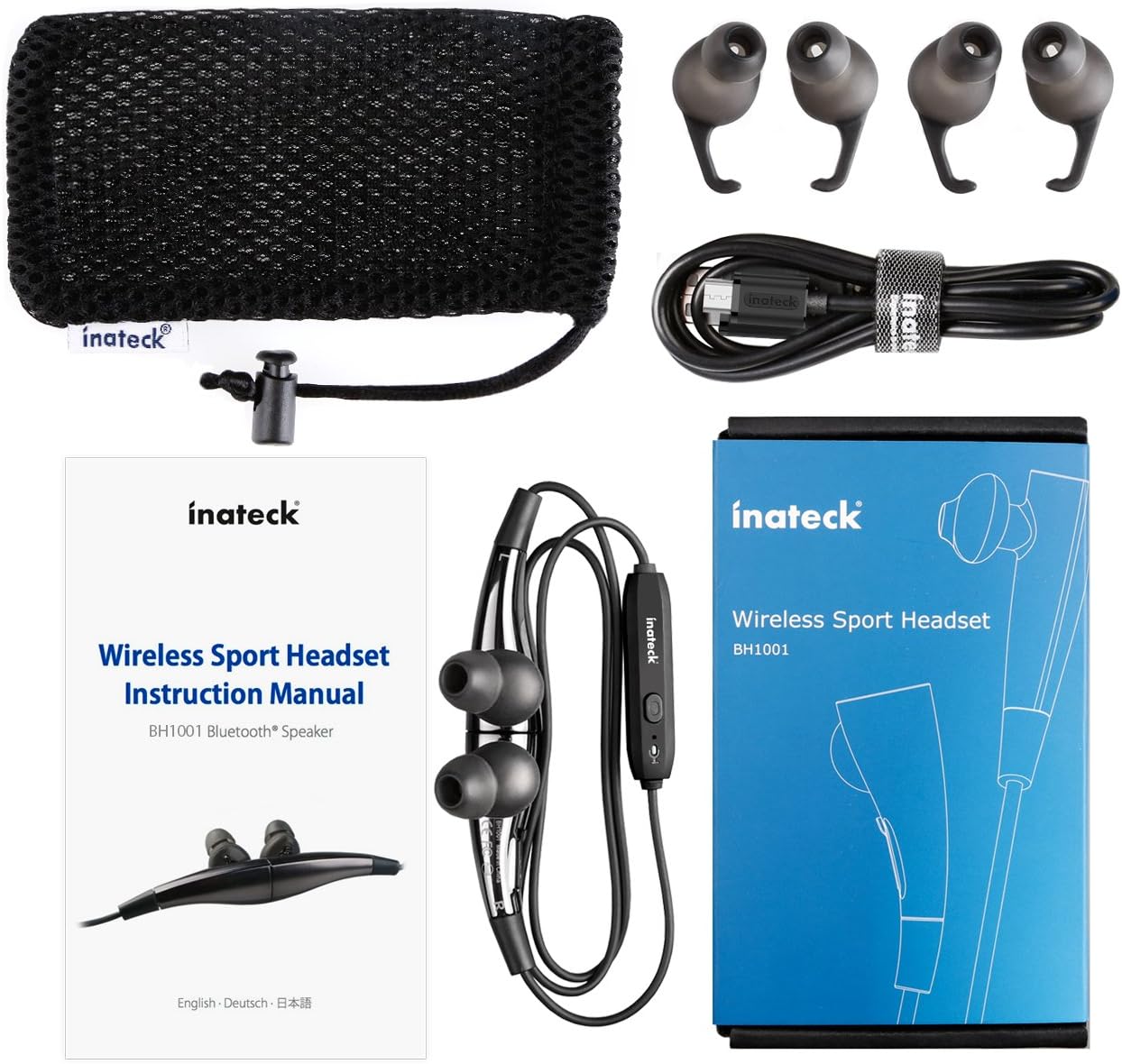
รูปที่ 1.1: Contents of the Inateck Bluetooth Sport Headset package.
1.2 การชาร์จชุดหูฟัง
Before first use, fully charge the headset. A full charge takes approximately 3 hours and provides at least 8 hours of music playback.
- ค้นหาพอร์ตชาร์จ Micro USB บนชุดหูฟัง
- Connect the small end of the provided USB charging cable to the headset's Micro USB port.
- ต่อปลายสาย USB ด้านที่ใหญ่กว่าเข้ากับแหล่งจ่ายไฟ USB (เช่น พอร์ต USB ของคอมพิวเตอร์ อะแดปเตอร์ติดผนัง USB)
- The status indicator light will illuminate during charging. It will change color or turn off once charging is complete.

รูปที่ 1.2: Charging the Inateck Bluetooth Sport Headset via Micro USB.
1.3 การจับคู่กับอุปกรณ์บลูทูธ
วิธีเชื่อมต่อชุดหูฟังกับสมาร์ทโฟนหรืออุปกรณ์ที่รองรับบลูทูธ:
- ตรวจสอบให้แน่ใจว่าชุดหูฟังปิดอยู่
- Press and hold the Multifunction Key (MFB) on the inline control unit for approximately 5-7 seconds until the status indicator light flashes red and blue alternately. This indicates pairing mode.
- บนอุปกรณ์บลูทูธของคุณ ให้เปิดใช้งานบลูทูธและค้นหาอุปกรณ์ใหม่
- Select "Inateck BH1001" or "Inateck P20" from the list of available devices.
- Once paired, the status indicator light on the headset will flash blue slowly, and you may hear an audible confirmation.
- The headset will automatically attempt to reconnect to the last paired device when turned on.

รูปที่ 1.3: Inateck Headset paired with a mobile device for music playback.
2. คู่มือการใช้งาน
2.1 การควบคุมชุดหูฟัง
The inline control unit provides easy access to various functions:

รูปที่ 2.1: เกินview of the Inateck Headset control unit.
- Multifunction Key (MFB):
- Press and hold (5-7s): Power On/Off, Enter Pairing Mode
- กดสั้น: เล่น/หยุดเพลง, รับสาย/วางสาย
- Long press (during incoming call): Reject call
- เพิ่มเสียง (+) / เพลงถัดไป:
- กดสั้น: เพิ่มระดับเสียง
- กดยาว: ข้ามไปยังเพลงถัดไป
- ลดเสียง (-) / เพลงก่อนหน้า:
- กดสั้น: ลดระดับเสียง
- Long press: Go to previous track
- พอร์ตไมโครยูเอสบี: สำหรับการชาร์จชุดหูฟัง
- ตัวบ่งชี้สถานะ: แสดงสถานะพลังงาน การจับคู่ และการชาร์จ
- ไมโครโฟน: สำหรับการโทรแบบแฮนด์ฟรี
2.2 การสวมชุดหูฟัง
Select the ear tips that provide the most comfortable and secure fit for your ears. The headset is designed to be worn with the cable behind your neck, ensuring stability during physical activity.

รูปที่ 2.2: Proper wearing of the Inateck Sport Headset for active use.
2.3 Magnetic Earbuds Feature
The earbuds feature integrated magnets. When not in use, you can connect the two earbuds together, forming a necklace around your neck. This action automatically pauses music playback and prevents the headset from falling off.

รูปที่ 2.3: Magnetic earbuds feature for secure wearing around the neck.

รูปที่ 2.4: Headset worn as a necklace using the magnetic feature.
3. การบำรุงรักษา
- การทำความสะอาด: เช็ดหูฟังด้วยผ้าแห้งนุ่มๆ ห้ามใช้สารทำความสะอาดที่มีฤทธิ์กัดกร่อนหรือตัวทำละลาย
- เคล็ดลับหู: ควรถอดและทำความสะอาดจุกหูฟังซิลิโคนเป็นประจำด้วยสบู่และน้ำอ่อนๆ ตรวจสอบให้แน่ใจว่าแห้งสนิทก่อนใส่กลับเข้าไปใหม่
- พื้นที่จัดเก็บ: When not in use, store the headset in the provided carrying pouch to protect it from dust and damage. Avoid extreme temperatures.
- ความต้านทานน้ำ: The headset is designed to be water-resistant for sports and exercise (e.g., sweat, light rain). Do not submerge it in water or expose it to heavy rain.
4 การแก้ไขปัญหา
4.1 ไม่สามารถเปิดเครื่องได้
Ensure the headset is fully charged. Connect it to a power source using the USB cable and allow it to charge for at least 30 minutes before attempting to power on again.
4.2 ไม่สามารถจับคู่กับอุปกรณ์ได้
- Ensure the headset is in pairing mode (status indicator flashing red and blue alternately).
- Make sure Bluetooth is enabled on your device and it is within range (typically 10 meters or 33 feet).
- ปิดและเปิดฟังก์ชันบลูทูธบนอุปกรณ์ของคุณใหม่อีกครั้ง
- If previously paired, try "forgetting" or "unpairing" the headset from your device's Bluetooth settings and then re-pair.
- ตรวจสอบให้แน่ใจว่าไม่มีอุปกรณ์บลูทูธอื่นใดรบกวนการเชื่อมต่อ
4.3 ไม่มีเสียงหรือคุณภาพเสียงไม่ดี
- ตรวจสอบระดับเสียงทั้งบนชุดหูฟังและอุปกรณ์ที่เชื่อมต่อของคุณ
- Ensure the headset is properly paired and connected to your device.
- Move closer to your device to reduce potential interference or range issues.
- Ensure the ear tips are correctly seated in your ears for optimal sound delivery.
- Reboot both the headset and your connected device.
4.4 การเชื่อมต่อที่ไม่ต่อเนื่อง
- ตรวจสอบให้แน่ใจว่าไม่มีสิ่งกีดขวางทางกายภาพระหว่างชุดหูฟังและอุปกรณ์ของคุณ
- Avoid placing your device in areas where the signal might be blocked (e.g., deep pockets, behind thick walls).
- ลดการรบกวนจากอุปกรณ์ไร้สายอื่นๆ (เราเตอร์ Wi-Fi, อุปกรณ์ Bluetooth อื่นๆ)
- Keep the headset and your device within the recommended Bluetooth range.
5. ข้อมูลจำเพาะ
| ยี่ห้อ | อินาเท็ค |
| ชื่อรุ่น | P20 |
| หมายเลขรุ่น | BH1001 |
| เทคโนโลยีการเชื่อมต่อ | บลูทูธ 4.1 |
| ฟอร์มแฟกเตอร์ | อินเอียร์ |
| การวางตำแหน่งหู | Intra-aural |
| แจ็คหูฟัง | ยูเอสบี (สำหรับชาร์จ) |
| ระดับความต้านทานต่อน้ำ | Waterproof (suitable for sweat/light rain) |
| คุณสมบัติพิเศษ | Sports and exercise, integrated microphone, magnetic earbuds |
| น้ำหนักสินค้า | 78 กรัม |
| ประเภทการควบคุม | Volume Control, Multifunction Button |
| วัสดุ | พลาสติก |
6. ข้อมูลการรับประกัน
Inateck products typically come with a limited warranty. For specific warranty terms and conditions applicable to your Inateck Bluetooth Sport Headset, please refer to the warranty card included in your product packaging or visit the official Inateck webไซต์นี้ โปรดเก็บหลักฐานการซื้อไว้เพื่อใช้ยืนยันการรับประกัน
7. การสนับสนุนลูกค้า
If you encounter any issues not covered in this manual or require further assistance, please contact Inateck customer support. You can usually find contact information, FAQs, and additional resources on the official Inateck webเว็บไซต์:
Webเว็บไซต์: www.inatec.com
Please have your product model (P20 / BH1001) and purchase details ready when contacting support.