
1. บทนำ
This manual provides detailed instructions for the installation, operation, and maintenance of the Visionis FPC-5323 One Door Access Control Kit. This kit is designed for single-door access control in swinging door applications, utilizing a 300lbs magnetic lock and the VIS-3002 indoor keypad/reader with a mini controller. The system supports up to 1,000 users and offers multiple access methods including PIN codes, proximity cards, and keytags, ensuring enhanced security for your premises.
2. ส่วนประกอบผลิตภัณฑ์
The Visionis FPC-5323 kit includes the following components:
- (1) VIS-ML300LED: 300lbs Indoor Electric Magnetic Lock with LED Sensor.
- (1) VIS-ZL300: L and Z Bracket for 300lbs Electromagnetic Lock.
- (1) VIS-3002: Access Control Indoor Only Digital Touch Keypad + Reader Standalone with Mini Controller, Wiegand 26, No Software, EM Cards, 1000 Users.
- (1) VIS-MINI-CNTRL: 1 Door Controller for Access Control Systems with No Software. Supports up to 1,000 users.
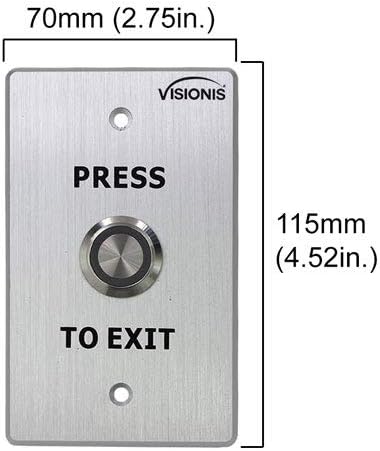
- (1) VIS-7001: Indoor + Outdoor Weather, Waterproof Rated IP65 Stainless Steel Door Bell Type Round Request To Exit Button with LED Light, NC, COM, NO Outputs.
- (1) VIS-8006: External Hardwire Doorbell for Keypad/Reader Access Control.
- (1) VISCP200: 12V 2Amp Power Supply Transformer, UL Listed.
- (10) VS-VIS-APROXCARD/26: Access Control Proximity Contactless Smart Entry Card, 1.8mm thick, 26 bit, 125khz.
- (10) VS-VIS-KEYTAG: Access Control Proximity Contactless Smart Entry Keyfob, 26 bit, 125khz.




3. การตั้งค่าและการติดตั้ง
Proper installation is crucial for the optimal performance and security of your access control system. It is recommended that installation be performed by a qualified technician. The FPC-5323 kit is designed for doors that open inwards.
3.1 แผนภาพการเดินสายไฟview
Refer to the detailed wiring diagrams provided with your kit for specific connection instructions. The VIS-3002 keypad connects to the VIS-MINI-CNTRL mini controller, which then controls the magnetic lock and integrates with the exit button and doorbell.

3.2 Magnetic Lock Installation
Ensure the magnetic lock (VIS-ML300LED) and its armature plate are correctly aligned and make full contact when the door is closed. The L and Z brackets (VIS-ZL300) are essential for proper mounting on inswinging doors.
3.3 Keypad Mounting
Mount the VIS-3002 keypad at a convenient height near the door. Ensure all wiring connections are secure and protected from environmental factors.
3.4 Video Resource
VIS-3002 Product Overview: วิดีโอนี้ให้ข้อมูลทั่วไปเกี่ยวกับview of the VIS-3002 keypad, its features, and potential applications. While not a full installation guide, it offers visual context for the product.
4. คู่มือการใช้งาน
The VIS-3002 keypad offers multiple ways to gain access:
- รหัส PIN: Enter your assigned PIN code on the keypad.
- Proximity Card/Keytag: Present your EM card or keytag to the reader area on the keypad.
- Card + PIN: For enhanced security, some configurations may require both a card/keytag presentation and a PIN code entry.
- NFC (Phone as Card): The keypad supports NFC functionality, allowing compatible phones with built-in NFC to act as a proximity card. This feature is not compatible with iOS devices.

4.1 Request to Exit Button (VIS-7001)
To exit the secured area, simply press the VIS-7001 Request to Exit button. This will momentarily release the magnetic lock, allowing the door to open.
4.2 External Doorbell (VIS-8006)
The VIS-8006 external doorbell provides an audible alert when activated from the keypad, allowing visitors to signal their presence.
5. Programming (Keypad)
The VIS-3002 keypad allows for programming of user PINs, proximity cards, and keytags. Refer to the specific programming instructions in the user manual included with the VIS-3002 keypad for detailed steps.
5.1 เข้าสู่โหมดการเขียนโปรแกรม
Typically, you will need to enter a master code to access programming mode. For many Visionis keypads, this involves pressing * followed by the master code and then #.
5.2 การเพิ่มผู้ใช้
Follow the keypad's specific menu options to add new user PINs or enroll new proximity cards/keytags. Each user will be assigned a unique identifier or PIN.
5.3 การลบผู้ใช้
To remove access for a user, enter programming mode and follow the instructions to delete their specific PIN or card/keytag from the system's memory.
6. การบำรุงรักษา
การบำรุงรักษาอย่างสม่ำเสมอจะช่วยให้ระบบควบคุมการเข้าออกของคุณมีอายุการใช้งานยาวนานและทำงานได้อย่างน่าเชื่อถือ
- การทำความสะอาด: Wipe the keypad and other components with a soft, dry cloth. Avoid abrasive cleaners or solvents.
- การตรวจสอบการเชื่อมต่อ: ตรวจสอบการเชื่อมต่อสายไฟทั้งหมดเป็นระยะ เพื่อให้แน่ใจว่าแน่นหนาและปราศจากสนิมหรือความเสียหาย
- การจัดตำแหน่งตัวล็อคแม่เหล็ก: Ensure the magnetic lock and armature plate remain properly aligned and make full contact. Any gaps can reduce holding force.
- แหล่งจ่ายไฟ: Verify the power supply (VISCP200) is functioning correctly and providing stable 12V power to the system.
7 การแก้ไขปัญหา
If you encounter issues with your Visionis access control system, refer to the following common troubleshooting steps:
- ประตูไม่ล็อก/ไม่ปลดล็อก:
- Check power supply to all components.
- Ensure the magnetic lock and armature plate are in full contact. Adjust if necessary.
- Verify wiring connections between the keypad, mini controller, and magnetic lock.
- ปุ่มกดไม่ตอบสนอง:
- Check power to the keypad.
- Ensure the keypad is securely mounted and not tampเอเรดด้วย
- บัตร/กุญแจtag Not Granting Access:
- Confirm the card/keytag is properly enrolled in the system.
- Ensure the card/keytag is presented correctly to the reader.
- ปัญหาการเขียนโปรแกรม:
- Double-check the master code and programming sequence. For many keypads, a * is needed before the master code and a # after it.
- Refer to the specific programming section of the VIS-3002 user manual.
- แอนตี้-Tampเอ้อปลุก: The VIS-3002 keypad features an anti-tamper alarm that activates if the unit is illegally removed or torn down. If this alarm sounds, inspect the keypad's mounting and connections.
8. ข้อมูลจำเพาะ
| ส่วนประกอบ | ข้อมูลจำเพาะ |
|---|---|
| VIS-3002 Keypad | |
| ความจุของผู้ใช้ | ผู้ใช้ 1,000 คน |
| อินพุต/เอาท์พุต | Wiegand 26 |
| อินพุต Voltage | กระแสตรง 12 โวลต์ |
| อุณหภูมิในการทำงาน | -45°C ~ 55°C (-49°F ~ 131°F) |
| ความชื้นในการทำงาน | 0% ~ 95% |
| Searching Time (Card) | น้อยกว่า 0.1 |
| รองรับความถี่ | 125KHz (EM cards), 13.56MHz (MFR cards) |
| VIS-ML300LED Magnetic Lock | |
| ยึดกำลัง | 300 ปอนด์ |
| แอปพลิเคชัน | การใช้ภายในอาคาร |
| VIS-MINI-CNTRL Mini Controller | |
| ความจุของผู้ใช้ | รองรับผู้ใช้งานสูงสุด 1,000 คน |
| ซอฟต์แวร์ | ไม่ต้องใช้ซอฟต์แวร์ |
| VISCP200 Power Supply | |
| เอาท์พุต | 12V 2Amp |
| การรับรอง | ได้รับการรับรองจาก UL |
9. การรับประกันและการสนับสนุน
For warranty information, technical support, or service inquiries, please contact Visionis customer support. Details can typically be found on the Visionis webเว็บไซต์หรือในบรรจุภัณฑ์ของผลิตภัณฑ์