
1. บทนำ
The Samson XPD1 Lavalier USB Digital Wireless System is designed to provide high-quality wireless audio for computer recordings, presentations, and other applications. This system includes a USB receiver, a belt pack transmitter, and a lavalier microphone, offering a convenient and reliable solution for capturing clear audio directly to your Mac or PC.
2. ส่วนประกอบมากกว่าview
Familiarize yourself with the main components of your Samson XPD1 system:
- ตัวรับสัญญาณ USB: Plugs directly into your computer's USB port. Features Status and Pair buttons, and a 3.5mm output jack for monitoring.
- Belt Pack Transmitter (PXD1): Worn by the user, it transmits audio wirelessly to the receiver. Includes a power button, gain control, and a connector for the lavalier microphone.
- Lavalier Microphone (LM5): A small, clip-on microphone designed for discreet placement and clear voice capture.
3. คำแนะนำในการตั้งค่า
3.1. การใส่แบตเตอรี่ลงในเครื่องส่งสัญญาณ
- Locate the battery compartment on the back of the PXD1 belt pack transmitter.
- เปิดฝาครอบช่อง
- ใส่แบตเตอรี่ AA ใหม่ 2 ก้อน โดยตรวจสอบให้แน่ใจว่าขั้วถูกต้อง (+/-)
- ปิดฝาช่องใส่แบตเตอรี่ให้แน่น
3.2 การเชื่อมต่อไมโครโฟนแบบหนีบปกเสื้อ
- Take the lavalier microphone. The connector is designed to securely fit the transmitter.
- Plug the microphone's connector into the input jack on the top of the PXD1 belt pack transmitter.
- Gently twist the connector to ensure it is securely fastened and will not accidentally disconnect during use.

Figure 1: Samson LM5 Lavalier Microphone. Connect this to the belt pack transmitter.
3.3. การเชื่อมต่อตัวรับสัญญาณ USB
- Plug the XPD1 USB receiver directly into an available USB-A port on your computer (Mac or PC).
- The receiver will draw power from the USB port.
- For optimal performance and to avoid interference, ensure the USB receiver has a clear, unobstructed line of sight to the transmitter.
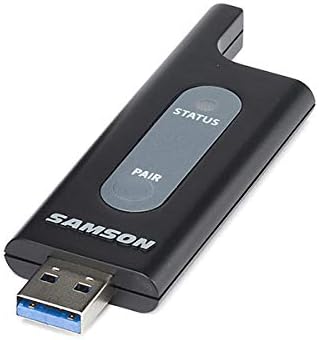
Figure 2: Samson XPD1 USB Receiver. Plug this into your computer's USB port.

Figure 3: Samson XPD1 USB Receiver connected to a mobile device (adapter not included).
3.4 การจับคู่อุปกรณ์
The XPD1 system is designed for easy pairing. Typically, the units are pre-paired from the factory. If re-pairing is necessary:
- Turn on the belt pack transmitter.
- เสียบตัวรับสัญญาณ USB เข้ากับคอมพิวเตอร์ของคุณ
- Press and hold the 'Pair' button on the USB receiver until the status indicator begins to flash.
- Press and hold the 'Pair' button on the belt pack transmitter until its status indicator also flashes.
- Once both indicators show a solid light, the devices are successfully paired.
4. คู่มือการใช้งาน
4.1. การเปิด/ปิดเครื่อง
- To power on the belt pack transmitter, slide the power switch to the 'ON' position. The status indicator will light up.
- หากต้องการปิดเครื่อง ให้เลื่อนสวิตช์เปิด/ปิดไปที่ตำแหน่ง 'ปิด'
- The USB receiver powers on automatically when plugged into a powered USB port.
4.2. การปรับเกน
The belt pack transmitter features a gain control to adjust the microphone's input sensitivity. This control is located inside the battery compartment.
- เปิดฝาช่องใส่แบตเตอรี่
- Use a small screwdriver or similar tool to adjust the 'GAIN' dial to your desired level.
- Start with a lower gain setting and increase it gradually to avoid distortion.
- ปิดฝาช่องใส่แบตเตอรี่
4.3. การตรวจสอบเสียง
The USB receiver includes a 3.5mm output jack, allowing you to monitor the audio directly from the receiver using headphones. This is useful for checking audio levels and quality during recording or live use.
4.4. ช่วงการดำเนินงาน
The Samson XPD1 system offers an operating range of up to 100 feet (approximately 30 meters), depending on environmental conditions. Maintain a clear line of sight between the transmitter and receiver for optimal performance and to minimize interference.
5. การบำรุงรักษา
5.1. การเปลี่ยนแบตเตอรี่
Regularly check and replace the AA batteries in the belt pack transmitter to ensure consistent performance. Low battery power can affect audio quality and operating range.
5.2. การทำความสะอาด
Clean the units with a soft, dry cloth. Avoid using abrasive cleaners or solvents, which can damage the finish or internal components. Keep the microphone windscreen clean for optimal sound.
5.3. การจัดเก็บ
When not in use, store the system in a cool, dry place. Remove batteries from the transmitter if storing for extended periods to prevent leakage.
6 การแก้ไขปัญหา
- ไม่มีเสียงหรือมีเสียงขาดๆ หายๆ:
- Ensure both the transmitter and receiver are powered on and successfully paired (solid status lights).
- Check battery levels in the transmitter and replace if necessary.
- Verify the lavalier microphone is securely connected to the transmitter.
- Ensure the USB receiver is plugged into a functioning USB port on your computer.
- Check your computer's audio input settings to ensure the XPD1 is selected as the input device.
- ลดระยะห่างระหว่างเครื่องส่งและเครื่องรับ
- Ensure there are no physical obstructions or other electronic devices causing interference between the transmitter and receiver.
- เสียงแตกหรือเสียงผิดเพี้ยน:
- Adjust the gain control on the transmitter. If the audio is too loud, it can cause distortion.
- Ensure the microphone is not too close to the sound source, which can lead to clipping.
- Check for potential sources of electromagnetic interference.
- Loss of Connection After Going Out of Range:
- If the connection is lost after moving out of range, you may need to restart the receiver (unplug and replug) or re-pair the devices once back within range.
7. ข้อมูลจำเพาะ
| ยี่ห้อ | แซมสัน |
| ชื่อรุ่น | ปลอกคอ |
| หมายเลขรุ่น | SWXPD1BLM5 |
| เทคโนโลยีการเชื่อมต่อ | ยูเอสบี |
| ประเภทขั้วต่อ | ยูเอสบี |
| คุณสมบัติพิเศษ | USB, ไร้สาย |
| อุปกรณ์ที่รองรับ | แล็ปท็อป, คอมพิวเตอร์ส่วนบุคคล |
| ส่วนประกอบที่รวมอยู่ | USB cable (for receiver connection) |
| รูปแบบขั้ว | รอบทิศทาง |
| น้ำหนักสินค้า | 10.4 ออนซ์ |
| ปัจจัยรูปแบบไมโครโฟน | ปลอกคอ |
| แหล่งพลังงาน | Corded Electric (for receiver), Battery (for transmitter) |
| อัตราส่วนสัญญาณต่อเสียงรบกวน | 74 เดซิเบล |
| แพลตฟอร์มฮาร์ดแวร์ | PC |
| จำนวนช่องสัญญาณ | 1 |
| ขนาดรายการ | 12 x 2.75 x 4.75 นิ้ว |
| การใช้ที่แนะนำ | Speech, Voice Recording |
8. การรับประกันและการสนับสนุน
8.1. ข้อมูลการรับประกัน
The Samson XPD1 Lavalier USB Digital Wireless System comes with a รับประกันอะไหล่และแรงงาน 2 ปีโปรดเก็บหลักฐานการซื้อไว้เพื่อใช้เรียกร้องการรับประกัน
8.2. การสนับสนุนลูกค้า
For further assistance, technical support, or service inquiries, please visit the official Samson website or contact their customer service department. Refer to the product packaging or Samson's webเว็บไซต์สำหรับข้อมูลการติดต่อล่าสุด