
1. บทนำ
ขอบคุณสำหรับการซื้อasing the Marvo G904 6D Optical Wired Gaming Mouse. This manual provides essential information for the proper setup, operation, and maintenance of your new gaming mouse. Please read this manual thoroughly before use to ensure optimal performance and longevity of the product.
2. สินค้าหมดview
The Marvo G904 is a high-performance 6D optical wired gaming mouse designed for precision and comfort. It features an AVago3050 sensor, adjustable DPI settings, and programmable buttons to enhance your gaming experience.

Figure 1: Marvo G904 Gaming Mouse with blue LED lighting, showcasing its ergonomic design and illuminated accents.

Figure 2: Marvo G904 Gaming Mouse displaying green LED lighting, indicating different lighting modes or DPI settings.
3. การตั้งค่า
Follow these steps to set up your Marvo G904 gaming mouse:
- แกะกล่องเมาส์: Carefully remove the mouse and any accessories from its packaging.
- เชื่อมต่อกับคอมพิวเตอร์: Plug the USB connector of the mouse into an available USB port on your computer. The mouse is plug-and-play for basic functionality.
- Install Driver (Optional for Advanced Features): For full functionality, including macro programming and advanced DPI settings, insert the provided CD driver into your computer's optical drive and follow the on-screen instructions to install the software. If your computer does not have an optical drive, please visit the official Marvo webเว็บไซต์สำหรับดาวน์โหลดไดรเวอร์

Figure 3: Marvo G904 Gaming Mouse packaging, which includes the driver CD.
4. คู่มือการใช้งาน
The Marvo G904 mouse features 6 buttons and adjustable DPI settings for versatile control.
4.1 ฟังก์ชันปุ่ม
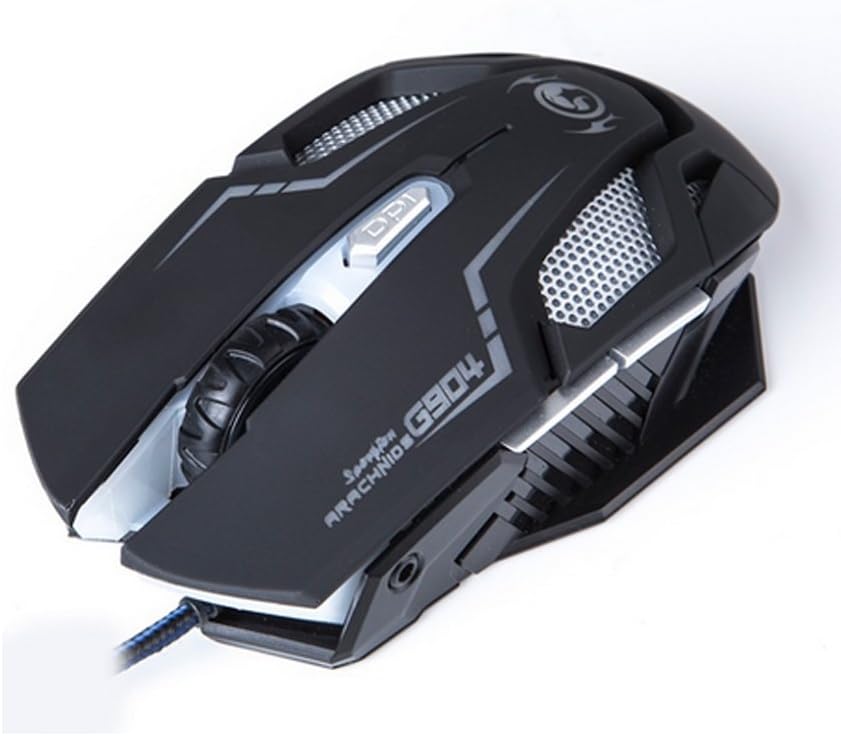
รูปที่ 4: ด้านบน view of the Marvo G904 Gaming Mouse, highlighting the placement of its 6 buttons.
- ปุ่มคลิกซ้าย: ฟังก์ชั่นคลิกหลักมาตรฐาน
- ปุ่มคลิกขวา: ฟังก์ชั่นคลิกรองมาตรฐาน
- ล้อเลื่อน: Scrolls up/down. Can also be pressed for a middle click function.
- DPI Shift Button: Cycles through DPI settings (1000, 2000, 3000, 4000).
- ปุ่มด้านข้าง (2): โดยทั่วไปแล้วจะทำหน้าที่เหมือนปุ่ม 'เดินหน้า' และ 'ถอยหลัง' ใน web เบราว์เซอร์และ file explorers. These can be programmed using the driver software.
4.2 การปรับ DPI
กดปุ่ม DPI Shift Button (located behind the scroll wheel) to cycle through the available DPI settings: 1000, 2000, 3000, and 4000 DPI. Each DPI level may be indicated by a change in the mouse's LED lighting color or pattern, depending on the current light mode.
4.3 Macro Programming (with Light Mode)
Utilize the included CD driver software to customize button functions and create macros. The software also allows you to configure the mouse's LED lighting modes. Refer to the software's help section for detailed instructions on macro creation and light mode customization.
5. การบำรุงรักษา
การบำรุงรักษาอย่างถูกต้องจะช่วยให้เมาส์สำหรับเล่นเกมของคุณมีอายุการใช้งานยาวนานและมีประสิทธิภาพเหมาะสมที่สุด
- การทำความสะอาด: ใช้ผ้านุ่มและแห้งเช็ดพื้นผิวของเมาส์ สำหรับสิ่งสกปรกฝังแน่น ให้เช็ดเบาๆampชุบผ้าด้วยน้ำหรือน้ำยาทำความสะอาดอ่อนๆ หลีกเลี่ยงการใช้สารเคมีรุนแรงหรือวัสดุที่มีฤทธิ์กัดกร่อน
- การดูแลเซ็นเซอร์: รักษาเซ็นเซอร์ออปติคัลที่ด้านล่างของเมาส์ให้สะอาด ปราศจากฝุ่นหรือเศษผง ใช้สำลีก้านหรือลมอัดหากจำเป็น
- การจัดการสายเคเบิล: หลีกเลี่ยงการโค้งงออย่างแรงหรือการดึงสาย USB มากเกินไปเพื่อป้องกันความเสียหาย
- พื้นที่จัดเก็บ: เมื่อไม่ได้ใช้งาน ให้เก็บเมาส์ไว้ในสภาพแวดล้อมที่สะอาดและแห้ง ห่างจากอุณหภูมิที่สูงหรือต่ำเกินไป
6 การแก้ไขปัญหา
If you encounter issues with your Marvo G904 mouse, refer to the following common problems and solutions:
| ปัญหา | สารละลาย |
|---|---|
| เมาส์ไม่ตอบสนอง |
|
| การตั้งค่า DPI ไม่เปลี่ยนแปลง |
|
| Buttons not functioning correctly. |
|
| การเคลื่อนที่ของเคอร์เซอร์เมาส์ผิดปกติหรือกระตุก |
|
7. ข้อมูลจำเพาะ
Detailed technical specifications for the Marvo G904 Gaming Mouse:

รูปที่ 5: ด้านล่าง view of the Marvo G904 Gaming Mouse, displaying model number, DPI range, and certification marks.
| คุณสมบัติ | รายละเอียด |
|---|---|
| แบบอย่าง | จี904 |
| ประเภทเซนเซอร์ | Optical (AVago3050) |
| การตั้งค่า DPI | 1000 / 2000 / 3000 / 4000 จุดต่อนิ้ว |
| ปุ่ม | 6D (6 ปุ่ม) |
| อัตราการรายงาน | 1000 เฮิรตซ์ |
| ความทนทานที่สำคัญ | 10 ล้านคลิก |
| ความยาวสายเคเบิล | 1.5 เมตร |
| ขนาด (กว้าง*ยาว*สูง) | 143 * 76 * 42 มม. |
| จัดอันดับVoltage | 5V |
| กระแสไฟฟ้าที่ได้รับการจัดอันดับ | 10มิลลิแอมป์ |
| ความเข้ากันได้ | PC |
| สี | สีดำ |
8. การรับประกันและการสนับสนุน
For warranty information and technical support, please refer to the documentation provided with your purchase or contact your retailer. You may also visit the official MARVO website for further assistance and updated driver software.