
Supersonic IQ3710DJBT
Supersonic IQ Sound IQ-3710DJBT Portable DJ Speaker User Manual
รุ่น: IQ-3710DJBT
คำแนะนำด้านความปลอดภัยที่สำคัญ
โปรดอ่านคำแนะนำทั้งหมดอย่างละเอียดก่อนใช้งานอุปกรณ์นี้ เก็บคู่มือนี้ไว้เพื่อใช้อ้างอิงในอนาคต
- อย่าให้เครื่องนี้โดนฝนหรือความชื้น
- ห้ามปิดกั้นช่องระบายอากาศใดๆ
- ห้ามติดตั้งใกล้แหล่งความร้อน เช่น หม้อน้ำ เครื่องทำความร้อน เตา หรืออุปกรณ์อื่น ๆ (รวมถึง ampเครื่องให้ความร้อน) ที่ผลิตความร้อน
- ป้องกันสายไฟเดินหรือถูกบีบโดยเฉพาะที่ปลั๊กเต้ารับอำนวยความสะดวกและจุดที่ออกจากเครื่อง
- ใช้เฉพาะอุปกรณ์เสริม/สิ่งที่แนบตามที่ผู้ผลิตกำหนดเท่านั้น
- ถอดปลั๊กเครื่องใช้ไฟฟ้านี้ในระหว่างพายุฝนฟ้าคะนองหรือเมื่อไม่ได้ใช้งานเป็นเวลานาน
- ส่งต่อการบริการทั้งหมดไปยังช่างบริการที่ผ่านการรับรอง จำเป็นต้องเข้ารับบริการเมื่ออุปกรณ์ได้รับความเสียหายแต่อย่างใด
สินค้าเกินview
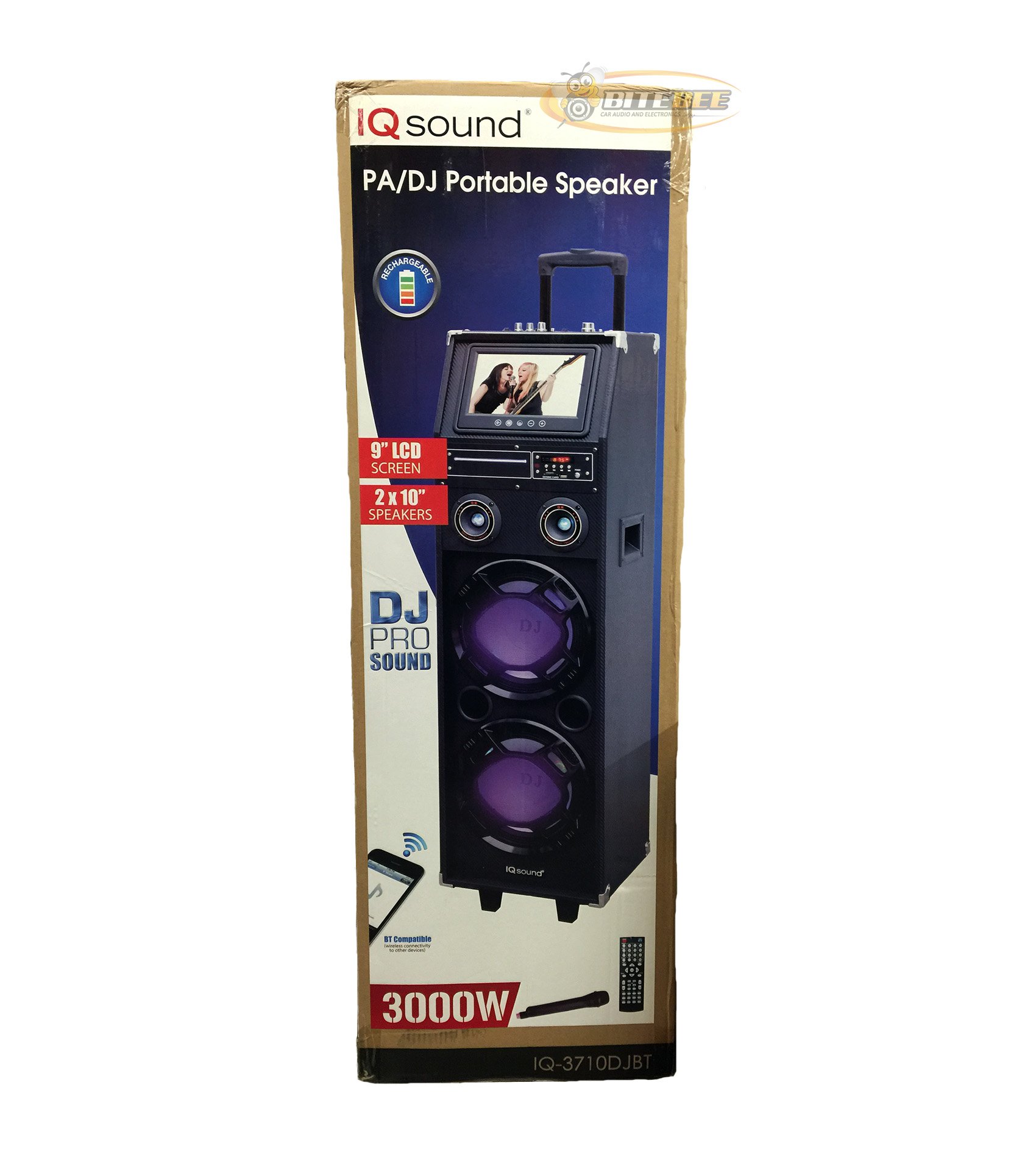
ภาพ: ด้านหน้า view of the Supersonic IQ Sound IQ-3710DJBT Portable DJ Speaker, showcasing its dual speakers, 9-inch LCD screen, and control panel.
คุณสมบัติ
- Dual 10-inch Full Range Speakers
- Built-in Bluetooth for wireless audio streaming
- FM Radio tuner
- 5-Band Equalizer for audio customization
- 9-inch LCD Display for video and menu navigation
- Built-in Rechargeable Battery for portability
- Integrated LED Lights for visual effects
- Multimedia Compatible (supports various video and music formats)
- USB Input for external audio devices
- SD Card Slot for media playback
- 1 Guitar Input
- 1 Microphone Jack (includes 1 microphone)
- รวมการควบคุมระยะไกล
- Built-in Handle and Wheels for easy transport
เนื้อหาแพ็คเกจ
- IQ-3710DJBT Portable DJ Speaker
- อะแดปเตอร์แปลงไฟ
- ไมโครโฟน
- รีโมทคอนโทรล
- คู่มือการใช้งาน (เอกสารนี้)
Controls and Connections (General)
The main control panel is located on the top or rear of the speaker, featuring buttons for power, mode selection, playback controls (play/pause, skip), volume adjustment, EQ settings, and light controls. Input ports for USB, SD card, microphone, and guitar are also present. The 9-inch LCD display provides visual feedback for media playback, FM radio tuning, and menu navigation.
การตั้งค่า
1. การชาร์จแบตเตอรี่
- Connect the included power adapter to the speaker's DC input port.
- Plug the power adapter into a standard wall outlet (AC 100-240V, 50/60Hz).
- The charging indicator light (if present) will illuminate. Allow approximately 6-8 hours for a full charge before first use.
- สามารถใช้งานลำโพงได้ขณะชาร์จไฟ
2. เปิดเครื่องครั้งแรก
- Ensure the speaker is fully charged or connected to a power source.
- Locate the Power button (usually on the control panel) and press it to turn on the speaker.
- The LCD display will illuminate, and the speaker will enter the default mode.
3. การเชื่อมต่ออุปกรณ์ต่อพ่วง
ไมโครโฟน: Insert the included microphone's cable into the Microphone Jack.
กีตาร์: Insert your guitar's cable into the Guitar Input.
คำแนะนำการใช้งาน
การเลือกโหมด
กดปุ่ม โหมด button on the control panel or remote control to switch between available modes: Bluetooth, FM Radio, USB, SD, and AUX (if applicable). The current mode will be displayed on the LCD screen.
การใช้งานบลูทูธ
- Turn on the speaker and switch to โหมดบลูทู ธ using the MODE button. The LCD will display "Bluetooth" or a similar indicator.
- บนอุปกรณ์ที่รองรับ Bluetooth ของคุณ (เช่น สมาร์ทโฟน แท็บเล็ต) ให้เปิดใช้งาน Bluetooth และค้นหาอุปกรณ์ที่มีอยู่
- เลือก "IQ-3710DJBT" จากรายการอุปกรณ์
- Once paired, the speaker will emit a confirmation sound, and you can now play audio wirelessly from your device.
- Use your device or the speaker's controls for playback (play/pause, skip tracks, volume).
การทำงานของวิทยุ FM
- สลับไปที่ โหมดวิทยุ FM โดยใช้ปุ่ม MODE
- กดปุ่ม เล่น/หยุดชั่วคราว button (or a dedicated scan button) to automatically scan and save available FM stations.
- ใช้ ก่อนหน้าถัดไป ปุ่มสำหรับนำทางไปยังสถานีที่บันทึกไว้
- Adjust the volume using the main volume knob or remote control.
การเล่นการ์ด USB/SD
- ใส่แฟลชไดรฟ์ USB ลงใน พอร์ต USB หรือเสียบการ์ด SD เข้าไป ช่องเสียบการ์ด SD.
- The speaker should automatically switch to USB or SD mode and begin playing media. If not, press the โหมด ปุ่มเพื่อเลือกอินพุตที่ถูกต้อง
- Use the playback controls (play/pause, previous/next) on the speaker or remote to manage your media.
- The 9-inch LCD display will show file information and video playback (if applicable).
การปรับอีควอไลเซอร์ (EQ)
The 5-band EQ allows you to fine-tune the audio output. Locate the EQ controls on the speaker's panel. Adjust the sliders or knobs for different frequency bands (e.g., bass, mid-range, treble) to achieve your desired sound profile.
การใช้งานไมโครโฟนและกีตาร์
Once connected, adjust the individual volume controls for the microphone and guitar (if available) on the speaker's control panel. The main volume knob controls the overall output.
การควบคุมไฟ LED
กดปุ่ม แสงไฟ button (or similar) on the control panel or remote to cycle through different light modes or to turn the lights on/off.
จอแสดงผล LCD
The 9-inch LCD display shows current mode, track information, FM frequency, and can play video files from USB or SD card. Navigate menus using the dedicated navigation buttons or remote control.
การซ่อมบำรุง
- การทำความสะอาด: Use a soft, dry cloth to clean the exterior of the speaker. Do not use abrasive cleaners or solvents. For the LCD screen, use a screen-specific cleaning solution and a microfiber cloth.
- การดูแลแบตเตอรี่ To prolong battery life, fully charge the speaker before first use and recharge it regularly, even if not in frequent use. Avoid completely draining the battery. Store in a cool, dry place.
- พื้นที่จัดเก็บ: When not in use for extended periods, store the speaker in a cool, dry environment, away from direct sunlight and extreme temperatures.
- ขนส่ง: Utilize the built-in handle and wheels for easy and safe transport of the speaker.
การแก้ไขปัญหา
| ปัญหา | สาเหตุที่เป็นไปได้ | สารละลาย |
|---|---|---|
| ลำโพงไม่เปิดเครื่อง | Battery is drained or power adapter is not connected. | Connect the power adapter and charge the speaker. Ensure the power outlet is functional. |
| ไม่มีเสียงออก | Volume is too low, incorrect mode selected, or device not properly connected. | Increase volume. Verify correct mode (Bluetooth, USB, FM). Reconnect Bluetooth device or reinsert USB/SD card. Check microphone/guitar connections. |
| การจับคู่บลูทูธล้มเหลว | Speaker not in Bluetooth mode, device too far, or interference. | Ensure speaker is in Bluetooth mode. Move device closer to speaker. Turn off and on Bluetooth on your device. Try pairing again. |
| การรับสัญญาณวิทยุ FM ไม่ดี | สัญญาณอ่อนหรือมีสัญญาณรบกวน | Relocate the speaker to an area with better reception. Perform an auto-scan again. |
| USB/SD media not playing. | ไม่ได้รับการสนับสนุน file format, corrupted media, or improper insertion. | Ensure media is inserted correctly. Check file formats (refer to specifications for supported types). Try a different USB drive or SD card. |
ข้อมูลจำเพาะ
- แบบอย่าง: IQ-3710DJBT
- ยี่ห้อ: เหนือเสียง
- ประเภทลำโพง: ลำโพงดีเจแบบพกพา
- วิทยากร: 2 x 10-inch Full Range
- แสดง: จอ LCD ขนาด 9 นิ้ว
- การเชื่อมต่อ: บลูทูธ, ยูเอสบี
- ข้อมูลอินพุต: USB, SD Card, Microphone (1), Guitar (1)
- วิทยุ: จูนเนอร์ FM
- Equalizer: EQ 5 แบนด์
- แหล่งพลังงาน: Built-in Rechargeable Battery, AC Power Adapter
- ขนาด (ยาว x กว้าง x สูง): 15 x 14 x 45 นิ้ว (โดยประมาณ)
- น้ำหนัก: 54 ปอนด์ (โดยประมาณ)
- อุปกรณ์เสริมที่รวมอยู่: Microphone, Remote Control, Power Adapter
การรับประกันและการสนับสนุน
This product comes with a standard manufacturer's warranty. For specific warranty terms and conditions, please refer to the warranty card included in your package or visit the official Supersonic webเว็บไซต์.
For technical support, service inquiries, or to purchase replacement parts, please contact Supersonic customer service. Contact information can typically be found on the product packaging or the official brand webเว็บไซต์.
การสนับสนุนทางออนไลน์: www.supersonicinc.com (ลิงก์นี้เป็นลิงก์ตัวอย่าง โปรดตรวจสอบการสนับสนุนจริงอีกครั้ง) URL.)
Ask a question about this manual
Ask about setup, troubleshooting, compatibility, parts, safety, or missing instructions. Manuals+ will review the question and use this page’s manual context to help answer it.