
1. บทนำ
This manual provides comprehensive instructions for the installation, operation, and maintenance of your Speco Technologies HT5941T Intense IR HD TVI Dome Camera. This camera is designed to deliver high-definition surveillance with advanced features such as True WDR, Intense IR, and day/night operation. Please read this manual thoroughly before installation and use to ensure proper functionality and safety.
2. ข้อมูลด้านความปลอดภัย
- แหล่งจ่ายไฟ: Use only the specified 12VDC or 24VAC power supply. Incorrect voltage may damage the camera.
- การติดตั้ง: Ensure the camera is securely mounted to prevent accidental falls. Professional installation is recommended.
- สิ่งแวดล้อม: Do not expose the camera to extreme temperatures, humidity, or corrosive environments beyond its specified operating conditions.
- การทำความสะอาด: ถอดปลั๊กไฟก่อนทำความสะอาด ใช้ผ้าแห้งนุ่มเช็ด หลีกเลี่ยงสารเคมีรุนแรง
- การบริการ: Do not attempt to disassemble or service the camera yourself. Refer all servicing to qualified personnel.
3. เนื้อหาบรรจุภัณฑ์
ตรวจสอบว่ามีรายการทั้งหมดอยู่ในแพ็คเกจของคุณ:
- HT5941T Dome Camera
- Chameleon Cover
- ฮาร์ดแวร์สำหรับติดตั้ง (สกรู, พุก)
- คู่มือเริ่มต้นใช้งานฉบับย่อ (ถ้ามี)
4. การตั้งค่าและการติดตั้ง
4.1 การติดตั้งกล้อง
The HT5941T camera supports 3-axis adjustment for both wall and ceiling mounting. Ensure the mounting surface is strong enough to support the camera's weight.
- เลือกตำแหน่งการติดตั้งที่เหมาะสม
- Use the provided mounting template (if included) or the camera base to mark drilling points.
- เจาะรูนำและใส่พุกยึดผนังหากจำเป็น
- ยึดฐานกล้องเข้ากับพื้นผิวการติดตั้งโดยใช้สกรูที่ให้มา
- ปรับมุมกล้องเพื่อให้ได้ผลลัพธ์ที่ดีที่สุด viewการไอเอ็นจี
4.2 การเดินสายไฟและการเชื่อมต่อแหล่งจ่ายไฟ
The HT5941T is an HD-TVI output only camera, providing full HD resolution over coaxial cable.
- Connect a coaxial cable (RG59 or similar) from the camera's BNC output to your HD-TVI DVR or monitor.
- Connect the power cable to the camera's power input. The camera supports dual voltage operation (12VDC or 24VAC). Ensure the power supply matches the camera's requirements.
- ตรวจสอบว่าการเชื่อมต่อทั้งหมดปลอดภัยก่อนจ่ายไฟ
4.3 Chameleon Cover Installation
The included Chameleon Cover can be painted to match your décor.
- If desired, paint the Chameleon Cover before installation. Allow it to dry completely.
- Align the cover with the camera body and snap it into place.
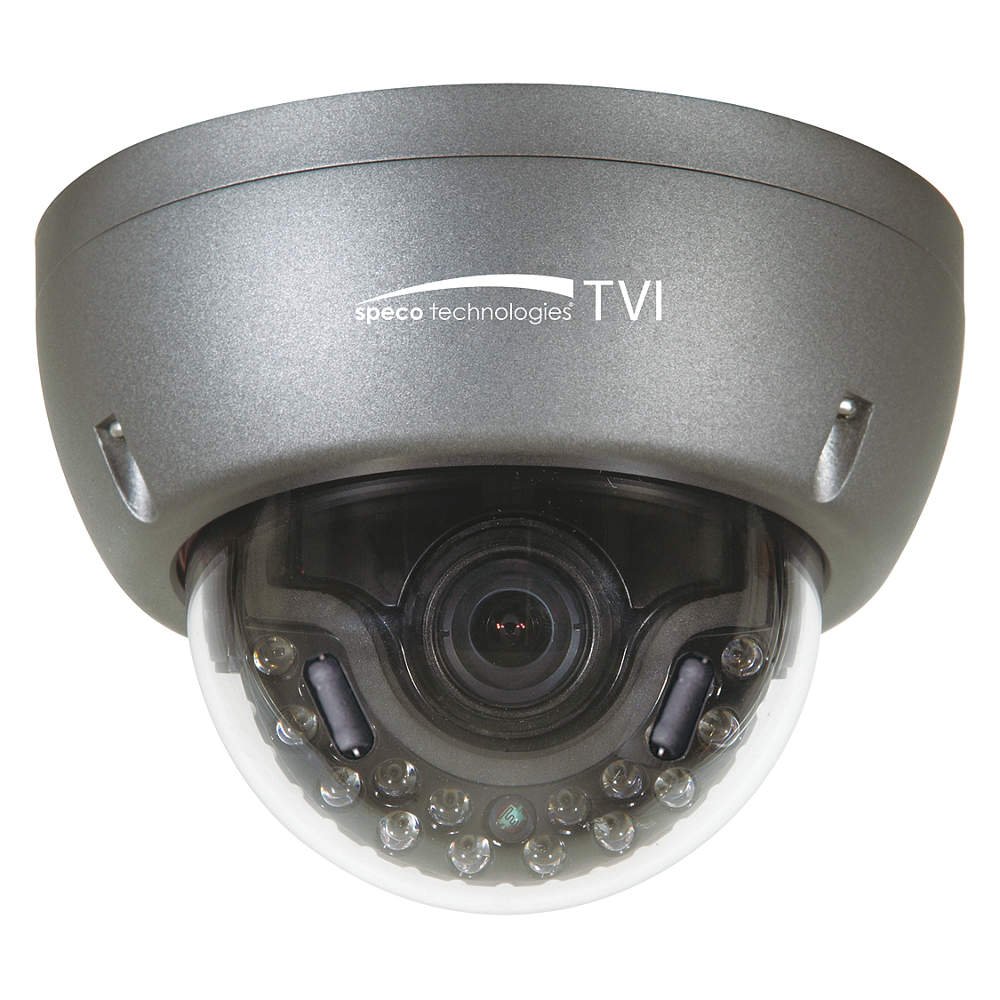
Figure 1: Speco Technologies HT5941T Dome Camera with its dark gray housing and dome design.
5. คู่มือการใช้งาน
5.1 Powering On and Initial View
Once the camera is properly wired and powered, it will automatically begin transmitting video. Connect your HD-TVI DVR or monitor to view ฟีดสด
5.2 เมนูการแสดงผลบนหน้าจอ (OSD)
The camera features a full OSD menu for configuration, accessible via on-board controls or UTC (Up The Coax) control from a compatible DVR.
- การเข้าถึง OSD: Use the joystick or buttons on the camera (if present) or the UTC control function on your DVR to bring up the OSD menu.
- การนำทาง: Use the directional controls to navigate through menu options. Select options to adjust settings such as exposure, white balance, and image enhancements.
- คุณสมบัติหลัก:
- WDR ที่แท้จริง: Wide Dynamic Range for clear images in high-contrast lighting.
- Intense IR: Adapts IR intensity to the subject, preventing saturation and providing vivid night vision.
- Day/Night Operation: Mechanical IR cut filter automatically switches between color (day) and monochrome (night) modes for optimal image quality.
6. การบำรุงรักษา
6.1 การทำความสะอาด
การทำความสะอาดอย่างสม่ำเสมอช่วยรักษาคุณภาพของภาพให้อยู่ในระดับที่ดีที่สุด
- Gently wipe the camera lens and housing with a soft, lint-free cloth.
- สำหรับสิ่งสกปรกฝังแน่น ให้เช็ดออกเล็กน้อยampen the cloth with water or a mild lens cleaning solution. Avoid abrasive cleaners.
- ตรวจสอบให้แน่ใจว่ากล้องปิดอยู่ก่อนทำความสะอาด
6.2 ข้อพิจารณาด้านสิ่งแวดล้อม
The HT5941T features heater circuitry and anti-moisture glass to reduce fog or condensation in various weather conditions. No specific user maintenance is required for these features, but ensure the camera's power supply is stable to allow these functions to operate effectively.
7 การแก้ไขปัญหา
| ปัญหา | สาเหตุที่เป็นไปได้ | สารละลาย |
|---|---|---|
| ไม่มีวิดีโอเอาท์พุต | No power; Loose cable connection; Incorrect video format (not HD-TVI compatible DVR) | Check power supply and connections; Ensure DVR supports HD-TVI input. |
| คุณภาพของภาพไม่ดี (เบลอ ผิดเพี้ยน) | Dirty lens; Improper focus; Cable interference; Insufficient lighting | Clean the lens; Adjust focus via OSD; Use shielded coaxial cable; Verify adequate lighting or IR function. |
| อินฟราเรดใช้งานไม่ได้ในเวลากลางคืน | Insufficient power; Day/Night setting incorrect; IR sensor blocked | Check power supply; Verify Day/Night mode in OSD; Ensure nothing obstructs the IR LEDs or sensor. |
| เมนู OSD ไม่ปรากฏขึ้น | Incorrect control method; DVR not compatible with UTC | Try on-board controls if available; Consult DVR manual for UTC compatibility and operation. |
8. ข้อมูลจำเพาะ
| คุณสมบัติ | ข้อมูลจำเพาะ |
|---|---|
| หมายเลขรุ่น | HT5941T |
| ยี่ห้อ | เทคโนโลยี Speco |
| ความละเอียดในการจับภาพวิดีโอ | 1080p (ฟูลเอชดี) |
| อัตราเฟรม | 30 เฟรมต่อวินาที |
| เทคโนโลยีการเชื่อมต่อ | HD-TVI (Coaxial) |
| แหล่งพลังงาน | 12VDC & 24VAC Dual Voltage |
| ประเภทการติดตั้ง | Wall Mount (3-axis adjustment) |
| ฟอร์มแฟกเตอร์ | โดม |
| เทคโนโลยีแสงน้อย | Day/Night, Intense IR |
| คุณสมบัติพิเศษ | True WDR, Heater circuitry, Anti-moisture glass, Chameleon Cover |
| การให้คะแนนการคุ้มครองระหว่างประเทศ | IP67 |
| ขนาด (กว้าง x ยาว x สูง) | 5.12 x 4.84 x 3.66 นิ้ว |
| น้ำหนักสินค้า | 1.5 ปอนด์ |
| วัสดุ | กระจก (เลนส์) |
9. การรับประกันและการสนับสนุน
For warranty information and technical support, please refer to the official Speco Technologies webหรือติดต่อฝ่ายบริการลูกค้า เก็บใบเสร็จรับเงินไว้เป็นหลักฐานการซื้อสำหรับการเคลมประกัน
Speco Technologies Official Webเว็บไซต์: www.specotech.com