
การแนะนำ
This manual provides instructions for the setup, operation, and maintenance of your Youshiko Large LCD Radio Controlled Wall and Desk Clock, Model YC8055. This clock is designed to provide accurate time, date, indoor temperature, and humidity readings. It automatically synchronizes with the MSF radio time signal from the UK, ensuring precise timekeeping and automatic adjustments for Daylight Saving Time.
ข้อมูลด้านความปลอดภัย
- Use only the specified battery type (2 x AA Mignon LR06).
- อย่าใช้แบตเตอรี่เก่าและใหม่ผสมกัน หรือแบตเตอรี่ประเภทต่างๆ
- ตรวจสอบให้แน่ใจว่าใส่แบตเตอรี่ในขั้วที่ถูกต้อง (+/-)
- ถอดแบตเตอรี่ที่หมดออกทันทีเพื่อป้องกันการรั่วไหล
- อย่าวางนาฬิกาไว้ในที่ที่มีอุณหภูมิสูงหรือต่ำเกินไป แสงแดดโดยตรง หรือความชื้นสูง
- ควรเก็บนาฬิกาให้ห่างจากสนามแม่เหล็กแรงสูง
- Clean the clock with a soft, dry cloth. Do not use abrasive cleaners or liquids.
เนื้อหาแพ็คเกจ
- Youshiko Large LCD Radio Controlled Wall and Desk Clock (Model YC8055)
- Integrated stand for desk placement
- รูยึดผนัง
Note: 2 x AA batteries are not included and must be purchased separately.
สินค้าเกินview
เค้าโครงหน้าจอ
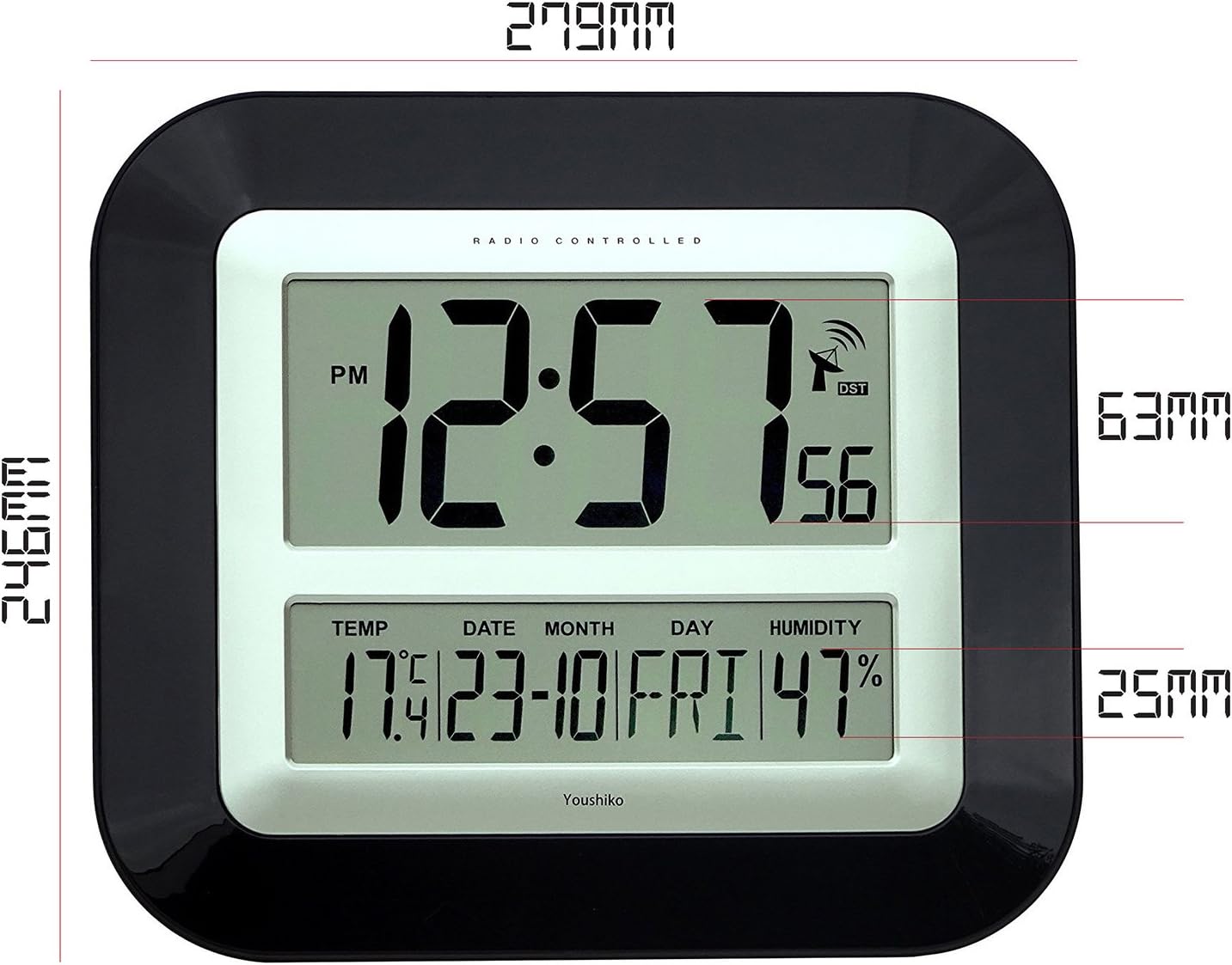
The large LCD screen provides clear visibility of time, date, temperature, and humidity. The display is designed for easy readability in various indoor environments.

ภาพ: ด้านหน้า view of the Youshiko YC8055 clock display, showing the time, date, day, temperature, humidity, and radio signal indicator. Dimensions are overlaid, indicating a height of 279mm and width of 246mm for the main unit, with display sections measuring 63mm and 25mm in height respectively.
ปุ่มและการควบคุม
The control buttons are located on the back of the unit for setting and adjusting various functions.

ภาพ: หลัง view of the Youshiko YC8055 clock, highlighting the control buttons: SET, ALARM, UP (▲), DOWN (▼), WAVE, and SNOOZE. The battery compartment is also visible at the bottom center.
Stand and Mounting Options
The clock can be placed on a desk using its integrated stand or mounted on a wall using the provided hanging holes.
ภาพ: ด้านข้าง view of the Youshiko YC8055 clock, illustrating the extended integrated stand for stable desk placement.
การตั้งค่า
1. การติดตั้งแบตเตอรี่
- เปิดฝาช่องใส่แบตเตอรี่ที่ด้านหลังของนาฬิกา
- Insert 2 x AA (LR6) batteries, ensuring correct polarity (+ and -).
- ปิดฝาช่องใส่แบตเตอรี่ให้แน่น
2. การรับสัญญาณวิทยุเบื้องต้น
Upon battery insertion, the clock will automatically attempt to receive the MSF radio time signal. This process may take a few minutes (typically less than 3 minutes). During this time, an antenna symbol will usually appear on the display, indicating it is searching for the signal. Once the signal is received, the clock will automatically set the correct time, date, and adjust for Daylight Saving Time (DST) if applicable.
If the clock does not set itself within a few minutes, try placing it near a window for better signal reception. Radio-controlled clocks can sometimes struggle to pick up signals in certain rooms or locations due to interference or building materials.
3. Radio Control Systems
This clock is designed for the UK and Ireland market, utilizing the MSF signal. For other regions, different radio control systems may be in use.

ภาพ: Diagram illustrating the two main radio control systems in Europe: MSF for the UK and Ireland (transmitters in Cumbria, UK) and DCF-77 for the rest of Europe (transmitters in Mainflingen, Germany). It advises choosing the correct system for your location.
4. Manual Time/Date Adjustment (if needed)
In rare cases where the radio signal cannot be received, or if you wish to manually adjust certain settings, follow these steps:
- To change 12h/24h display format: กดปุ่มค้างไว้ [ชุด] button until the display shows either '12h' or '24h'. Use the [] (ขึ้น)หรือ [] (Down) buttons to toggle to your desired setting. Press [ชุด] again to confirm. Continue pressing [ชุด] a few more times until the clock returns to displaying the time.
- Other manual settings (e.g., time zone, specific time/date) may be available by repeatedly pressing the [ชุด] ปุ่ม ใช้ปุ่ม [] และ [] ปุ่มเพื่อปรับค่า
การดำเนินงาน
การแสดงเวลา
The clock displays hours, minutes, and seconds. It can be set to either a 12-hour format (with AM/PM indicator) or a 24-hour format.
การแสดงวันที่และวันในสัปดาห์
The lower section of the display shows the current date (day and month) and the day of the week.
แสดงอุณหภูมิและความชื้น
The clock continuously monitors and displays the indoor temperature (in Celsius or Fahrenheit) and relative humidity. While providing a general indication, these readings are not intended for scientific accuracy.
ฟังก์ชั่นปลุก
The clock includes an alarm with a snooze function.
- การตั้งค่าสัญญาณเตือน: กดปุ่ม [เตือน] กดปุ่มเพื่อเข้าสู่โหมดตั้งค่านาฬิกาปลุก ใช้ปุ่ม... [] และ [] กดปุ่มเพื่อตั้งเวลาปลุกที่ต้องการ [เตือน] เพื่อยืนยันอีกครั้ง
- การเปิด/ปิดระบบเตือนภัย: กดปุ่ม [เตือน] button briefly outside of setting mode to toggle the alarm on or off. An alarm icon will appear on the display when activated.
- ฟังก์ชั่นเลื่อน: เมื่อเสียงปลุกดัง ให้กด [งีบหลับ] button to temporarily silence the alarm. The alarm will sound again after a short interval.
การซ่อมบำรุง
การทำความสะอาด
Wipe the clock with a soft, dry cloth. Do not use liquid cleaners, sprays, or abrasive materials, as these can damage the display or casing.
การเปลี่ยนแบตเตอรี่
When the display dims or the clock stops functioning, replace the batteries. Follow the battery installation steps in the Setup section. It is recommended to replace both batteries simultaneously.
การแก้ไขปัญหา
| ปัญหา | สาเหตุที่เป็นไปได้ | สารละลาย |
|---|---|---|
| Clock does not display time or is incorrect. | Batteries are low or incorrectly inserted. No radio signal received. | Check battery polarity and replace if necessary. Move the clock to a location near a window and allow it to search for the signal. Manually set the time if signal reception remains an issue. |
| Antenna symbol is flashing or not displayed. | Clock is searching for or has lost the radio signal. | Ensure the clock is placed in an optimal location for signal reception (e.g., near a window, away from electronic interference). Allow several minutes for synchronization. |
| การอ่านค่าอุณหภูมิ/ความชื้นดูไม่แม่นยำ | Environmental factors or general indication. | The temperature and humidity displays provide general indications and are not calibrated for scientific precision. Ensure the clock is not in direct sunlight or near heat/cold sources. |
| สัญญาณเตือนภัยไม่ดัง | สัญญาณเตือนไม่ทำงาน หรือระดับเสียงเบาเกินไป (หากสามารถปรับได้) | Ensure the alarm function is turned on (check for alarm icon on display). This model has a fixed alarm volume. |
ข้อมูลจำเพาะ
| คุณสมบัติ | รายละเอียด |
|---|---|
| ยี่ห้อ | โยชิโกะ |
| หมายเลขรุ่น | YC8055 |
| ประเภทจอภาพ | จอ LCD ระบบดิจิตอล |
| รูปแบบเวลา | 12h / 24h selectable |
| วิทยุควบคุม | MSF (UK & Ireland) 60 kHz |
| ฟังก์ชั่น | Time, Date, Day of Week, Indoor Temperature, Indoor Humidity, Alarm with Snooze |
| หน่วยอุณหภูมิ | Celsius / Fahrenheit selectable |
| แหล่งพลังงาน | แบตเตอรี่ AA จำนวน 2 ก้อน (LR6) (ไม่รวม) |
| ตัวเลือกการติดตั้ง | Wall mount or Desk stand |
| ขนาด (สูง x กว้าง x ลึก) | 27.9 ซม. x 24.6 ซม. x 3.0 ซม. (ประมาณ 11 x 9.7 x 1.2 นิ้ว) |
| วัสดุ | Plastic with clear glass lens |
| สี | สีดำ |
| การใช้งานในร่ม/กลางแจ้ง | ในร่ม |
| UPC / GTIN | 635346122354 |
การรับประกันและการสนับสนุน
For warranty information and customer support, please refer to the documentation provided with your purchase or contact Youshiko customer service directly. Keep your proof of purchase for any warranty claims.