
1. บทนำ
The SainSmart MetaPhix M2 Graphing Calculator is a versatile tool designed for students, educators, and professionals in various fields including mathematics, science, and engineering. It supports a wide range of calculations from basic arithmetic to advanced graphing functions, making it suitable for courses such as Pre-Algebra, Algebra I & II, Geometry, Trigonometry, Calculus, AP Calculus, AP Statistics, Biology, Chemistry, Physics, Finance, and Business.
This manual provides detailed instructions for setting up, operating, and maintaining your MetaPhix M2 calculator, ensuring you can utilize its full potential. The calculator features a solid cover to protect its keys and screen during transport and storage.

Figure 1: SainSmart MetaPhix M2 Graphing Calculator
2. การตั้งค่า
2.1. การติดตั้งแบตเตอรี่
The MetaPhix M2 calculator requires batteries for operation (not included). To install or replace batteries:
- ปิดเครื่องคิดเลข
- ค้นหาฝาครอบช่องใส่แบตเตอรี่ที่ด้านหลังของเครื่องคิดเลข
- เลื่อนฝาครอบออก
- ใส่แบตเตอรี่ใหม่ โดยตรวจสอบให้แน่ใจว่าขั้วบวก/ลบถูกต้องตามที่ระบุไว้ภายในช่องใส่แบตเตอรี่
- เปลี่ยนฝาครอบช่องใส่แบตเตอรี่

Figure 2: Back of the calculator with battery compartment
2.2. เปิด/ปิดเครื่อง
- หากต้องการเปิดเครื่องคิดเลข ให้กดปุ่ม ON ปุ่ม.
- หากต้องการปิดเครื่องคิดเลข ให้กดปุ่ม กะ แล้ว ปิด (usually located above the ON button).
- The calculator features an auto power-off function to conserve battery life after a period of inactivity.
3. คู่มือการใช้งาน
3.1. รูปแบบแป้นพิมพ์
The MetaPhix M2 keypad is organized into several functional areas:
- หน้าจอแสดงผล: Shows input, results, and graphs. Features a 64 x 32 pixel resolution LCD for incredible readability.
- ปุ่มฟังก์ชัน: Keys like กะ, อัลฟา, และ โหมด to access secondary functions and change calculator modes.
- แผ่นนำทาง: Arrow keys for moving the cursor on the display.
- ปุ่มกดตัวเลข: Standard digits 0-9 and decimal point.
- ตัวดำเนินการทางคณิตศาสตร์: การบวก การลบ การคูณ การหาร
- ฟังก์ชั่นทางวิทยาศาสตร์: Trigonometric (sin, cos, tan), logarithmic (log, ln), exponential, power functions.
- Graphing Keys: Dedicated keys for drawing graphs and adjusting settings.
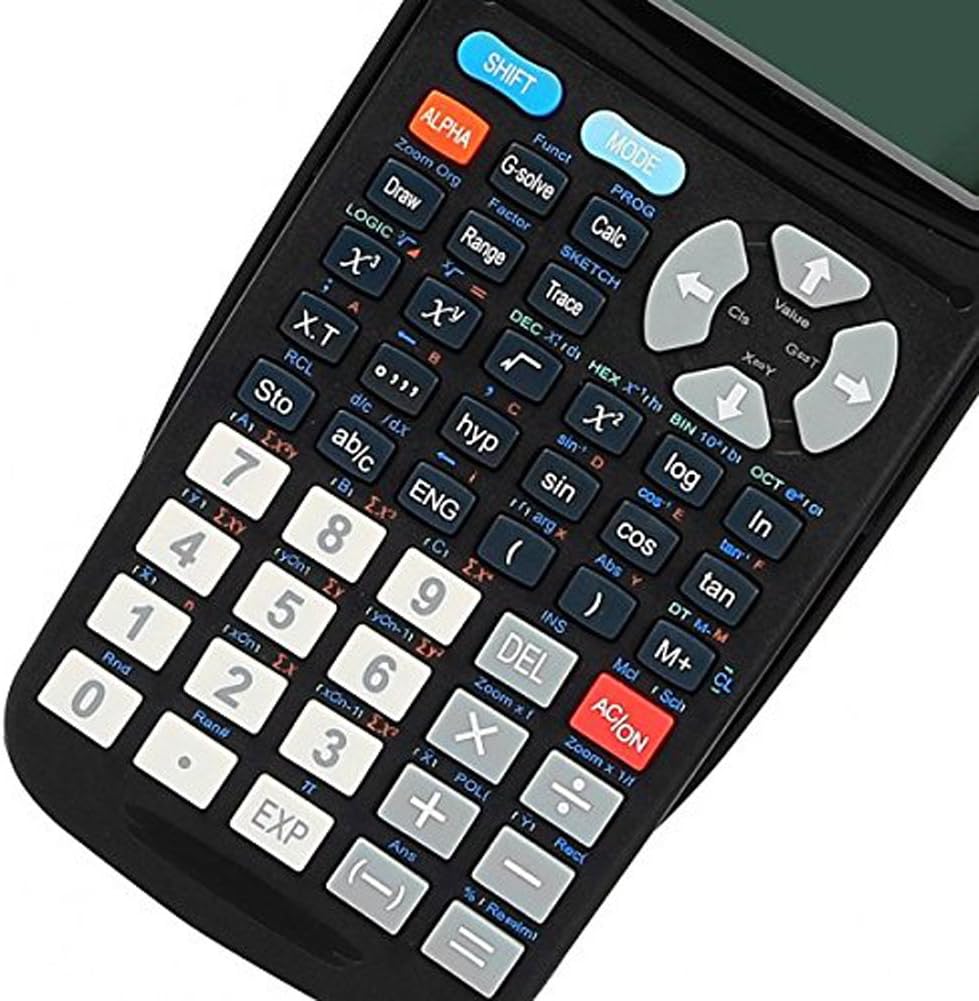
รูปที่ 3: รายละเอียด view of the calculator keypad
3.2. Basic Calculations
To perform basic arithmetic:
- ป้อนหมายเลขแรก
- Press the desired operator (+, -, ×, ÷).
- ป้อนหมายเลขที่สอง
- กด = เพื่อแสดงผล
3.3. การทำความเข้าใจตัวบ่งชี้การแสดงผล
The calculator's display shows various indicators to inform you about its current state or active functions:
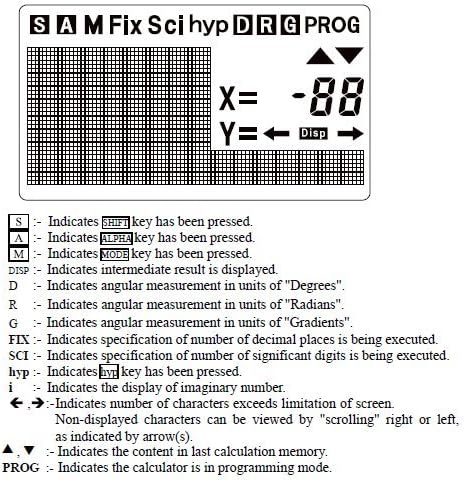
Figure 4: Display Indicators
- S: บ่งบอกถึง กะ คีย์ถูกกด
- A: บ่งบอกถึง อัลฟา คีย์ถูกกด
- M: บ่งชี้ โหมด คีย์ถูกกด
- แจกจ่าย: Indicates an intermediate result is displayed.
- D: Indicates angular measurement in units of "Degrees".
- R: Indicates angular measurement in units of "Radians".
- G: Indicates angular measurement in units of "Gradients".
- แก้ไข: Indicates specification of number of decimal places is being executed.
- วิทย์: Indicates specification of number of significant digits is being executed.
- hyp: บ่งบอกถึง ไฮป์ คีย์ถูกกด
- i: Indicates the display of an imaginary number.
- ←, →: Indicates number of characters exceeds screen limitation; content can be viewแก้ไขโดยการเลื่อน
- : Indicates the content in the last calculation memory.
- โปรแกรม: Indicates the calculator is in programming mode.
3.4. Graphing Functions
The MetaPhix M2 can generate various graphs. Ensure the calculator is in the appropriate mode (e.g., COMP mode for general calculations before graphing). The calculator features a great graphical user interface (GUI) for parametric graphing.
Example 1: Plotting a Sine Curve and y = 1/x Graph
To sketch a sine curve or a y = 1/x graph:
- Ensure the calculator is in COMP mode.
- กด [กะ] แล้ว [ฟังก์] to open the function menu.
- Select the desired function slot (e.g., "Y1").
- For a sine curve, enter "sin" (e.g., by pressing the บาป สำคัญ).
- For y = 1/x, enter "x-1" (e.g., by pressing [กะ] แล้ว [x-1]).
- กด [DRAW] to sketch the graph.
Note: The variable "x" is often implied for built-in graph functions or when using specific function keys.
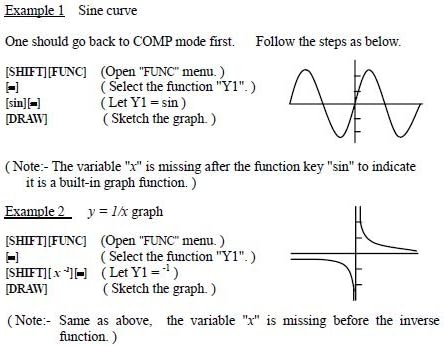
Figure 5: Sine curve and y=1/x graph exampเลส
4. ฟังก์ชั่นขั้นสูง
The MetaPhix M2 calculator offers a comprehensive suite of advanced functions, supporting a deeper understanding of mathematics:
- Generation of Parametric Graphs
- Complex, Continuous & Statistical Calculation
- Regression & Integration Capability
- Logarithmic & Exponential Functions
- Answer Storage
- Scientific Calculation
- Formula Storage in Memory
- Multistatement Input
- Zooming Functions for Graphs
- Replay & Trace Functions for Graphs
- Factor & Expand Algebraic Logic & Trigonometric Expressions
- Basic arithmetic operations using binary, octal, decimal, and hexadecimal values.
5. การบำรุงรักษา
- การทำความสะอาด: Use a soft, dry cloth to clean the calculator's exterior. Do not use abrasive cleaners or solvents.
- พื้นที่จัดเก็บ: Store the calculator in a cool, dry place away from direct sunlight and extreme temperatures. Always use the protective cover when not in use.
- การเปลี่ยนแบตเตอรี่: Replace batteries promptly when the low battery indicator appears or when the display becomes dim. Remove batteries if the calculator will not be used for an extended period to prevent leakage.
6 การแก้ไขปัญหา
- เครื่องคิดเลขไม่เปิด:
- ตรวจสอบให้แน่ใจว่าติดตั้งแบตเตอรี่อย่างถูกต้องและมีขั้วที่ถูกต้อง
- เปลี่ยนแบตเตอรี่เก่าหรือที่หมดแล้วด้วยแบตเตอรี่ใหม่
- จอแสดงผลมืดหรือว่างเปล่า:
- แบตเตอรี่อาจจะเหลือน้อย ควรเปลี่ยนแบตเตอรี่ใหม่
- Adjust display contrast if available (refer to specific key combinations in the full manual).
- ผลการคำนวณไม่ถูกต้อง:
- Check the current mode (e.g., Degree/Radian for trigonometric functions).
- Verify input values and formula syntax.
- Clear memory or reset the calculator if necessary (consult the full manual for reset procedures).
- Graphing issues:
- Ensure the calculator is in graphing mode.
- Check the function input for errors.
- ปรับแต่ง viewing window settings (Xmin, Xmax, Ymin, Ymax) to ensure the graph is within visible range.
For more detailed troubleshooting or persistent issues, please refer to the comprehensive manual available online or contact SainSmart customer support.
7. ข้อมูลจำเพาะ
- ยี่ห้อ: เซนสมาร์ท
- แบบอย่าง: MetaPhix M2
- ประเภทเครื่องคิดเลข: Business, Engineering/Scientific, Graphing
- แหล่งพลังงาน: ใช้พลังงานจากแบตเตอรี่
- ประเภทจอภาพ: LCD (64 x 32 pixel resolution)
- หน่วยความจำ: Built-in memory for storage and analysis
- ยูพีซี: 811820022215
8. การรับประกันและการสนับสนุน
The SainSmart MetaPhix M2 Graphing Calculator comes with a รับประกัน 1 ปี from the date of purchase. This warranty covers manufacturing defects and ensures technical support from SainSmart.
For technical assistance, warranty claims, or further inquiries, please contact SainSmart customer support through their official webไซต์หรือข้อมูลการติดต่อที่ให้มาพร้อมกับบรรจุภัณฑ์ผลิตภัณฑ์ของคุณ
A detailed instruction manual is also available for download from the manufacturer's website for in-depth guidance on all functions and features.