
Bravo magiko
คู่มือการใช้งานรีโมทคอนโทรลอเนกประสงค์ Bravo Magiko 1
Model: Magiko
การแนะนำ
The Bravo Magiko 1 Universal Remote Control is a self-learning rolling code device designed to operate various gate and garage door openers. It is capable of storing up to four different rolling codes, offering versatility and convenience. This manual provides detailed instructions for setup, operation, and maintenance to ensure optimal performance of your remote control.
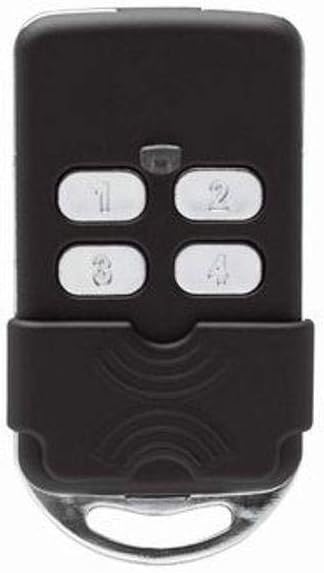
รูปที่ 1 : ด้านหน้า view of the Bravo Magiko 1 Universal Remote Control, displaying its four numbered buttons (1, 2, 3, 4) and a protective sliding cover at the bottom. The remote is black with silver buttons.
การตั้งค่า
1. การติดตั้งแบตเตอรี่
The Bravo Magiko 1 comes with a 3V CR2032 battery pre-installed. If replacement is needed, carefully open the remote control casing และใส่แบตเตอรี่ CR2032 ใหม่ โดยตรวจสอบให้แน่ใจว่าขั้วถูกต้อง
2. การตั้งโปรแกรมรีโมทคอนโทรล
The Magiko 1 is a self-learning remote control. The programming procedure typically involves a sequence of button presses on both your original remote and the Magiko 1. Please note that specific programming steps can vary depending on the brand and model of your existing gate or garage door opener.
- Clear Existing Codes (if necessary): Refer to the specific instructions provided with your Magiko 1 for clearing any pre-existing codes. This usually involves holding down two buttons simultaneously until the indicator light behaves in a specific way.
- Initiate Learning Mode: On the Magiko 1, press and hold the button you wish to program. The indicator light will typically flash slowly.
- Transmit Original Code: While holding the button on the Magiko 1, bring your original remote control close to the Magiko 1 and press the button you wish to copy. Hold it until the Magiko 1's indicator light changes its flashing pattern (e.g., flashes rapidly or becomes solid), indicating successful code learning.
- Test the Programmed Button: After programming, test the button on the Magiko 1 to ensure it operates your gate or garage door correctly.
สำคัญ: Before purchase and programming, verify compatibility with your specific gate or garage door opener brand and model. Detailed programming instructions for various systems can often be found on the manufacturer's official website or through online video tutorials. For BFT rolling codes, it is highly recommended to search for specific video tutorials online as the included instructions may not be sufficiently clear for this particular type.
คำแนะนำการใช้งาน
Once programmed, operating the Bravo Magiko 1 is straightforward:
- Activating a Device: Press the corresponding numbered button (1, 2, 3, or 4) that you have programmed for a specific gate or garage door. The indicator light will illuminate during transmission.
- อุปกรณ์หลายเครื่อง: The remote can store up to four different rolling codes, allowing you to control up to four separate devices with a single remote.
- ไฟแสดงสถานะ: The built-in indicator light provides visual feedback during programming and operation, confirming button presses and code transmission.
- ฝาครอบป้องกัน: The remote features a sliding protective cover to prevent accidental button presses when carried in a pocket or bag. Slide the cover down to reveal the buttons and up to protect them.
การซ่อมบำรุง
การเปลี่ยนแบตเตอรี่
When the remote's range decreases significantly or the indicator light becomes dim, it may be time to replace the battery. The Bravo Magiko 1 uses a 3V CR2032 battery.
- เปิดรีโมทคอนโทรลอย่างระมัดระวังasing, typically by prying it open along the seam with a small flat-head screwdriver.
- ถอดแบตเตอรี่ CR2032 เก่าออก
- Insert a new 3V CR2032 battery, ensuring the positive (+) side faces upwards.
- ปิดรีโมทคอนโทรลasinก. อย่างปลอดภัย
The remote is designed to retain programmed codes even when the battery is removed, so re-programming should not be necessary after a battery change.
การดูแลและทำความสะอาด
To ensure the longevity of your remote control:
- ควรหลีกเลี่ยงการวางรีโมทไว้ในที่ที่มีอุณหภูมิสูงหรือต่ำเกินไป แสงแดดโดยตรง หรือความชื้น
- ทำความสะอาดรีโมตด้วยผ้านุ่มและแห้ง ห้ามใช้น้ำยาทำความสะอาดหรือสารละลายที่มีฤทธิ์กัดกร่อน
- Protect the remote from physical impact, as the plastic casing, while durable, can be damaged by severe drops.
การแก้ไขปัญหา
| ปัญหา | สาเหตุที่เป็นไปได้ | สารละลาย |
|---|---|---|
| Remote does not operate the gate/garage door. |
|
|
| ระยะการใช้งานสั้น |
|
|
| ไฟแสดงสถานะไม่ติด |
|
|
For complex programming issues, especially with certain rolling code systems like BFT, searching for specific video tutorials online (e.g., on YouTube) can provide clearer visual guidance than written instructions.
ข้อมูลจำเพาะ
- ชื่อรุ่น : Magiko
- ยี่ห้อ: บราโว่
- เทคโนโลยีการเชื่อมต่อ: ความถี่วิทยุ
- จำนวนปุ่ม: 4
- ประเภทตัวควบคุม: ปุ่มควบคุม
- Maximum Supported Devices: 4
- อุปกรณ์ที่รองรับ: Garage Door Openers (Porta garage)
- สี: สีดำ
- แหล่งพลังงาน: แบตเตอรี่ CR2032 3V จำนวน 1 ก้อน (มีมาให้ในชุด)
- ขนาดสินค้า : 3 x 7 x 13 ซม. (ประมาณ 1.18 x 2.76 x 5.12 นิ้ว)
- น้ำหนักสินค้า: 299.37 กรัม (ประมาณ 10.56 ออนซ์)
- ระยะสูงสุด: 10 เมตร (ประมาณ 32.8 ฟุต)
- คุณสมบัติพิเศษ: Universal, Self-learning, Rolling Code
การรับประกัน
The Bravo Magiko 1 Universal Remote Control comes with a รับประกัน 2 ปี from the date of purchase. This warranty covers manufacturing defects and malfunctions under normal use. Please retain your proof of purchase for warranty claims. For specific terms and conditions, refer to the warranty information provided at the time of purchase or contact the manufacturer.
สนับสนุน
For further assistance, technical support, or detailed programming guides for specific gate/garage opener models, please visit the official Bravo website. Online resources, including FAQs and video tutorials, are often available to help with common issues and advanced programming techniques.
Ask a question about this manual
Ask about setup, troubleshooting, compatibility, parts, safety, or missing instructions. Manuals+ will review the question and use this page’s manual context to help answer it.