
Laney CDPA2PA
คู่มือผู้ใช้ระบบ PA Laney CDPA2PA
Model: CDPA2PA
1. บทนำ
Welcome to the user manual for your Laney CDPA2PA PA System. This comprehensive package is designed to provide a complete and easy-to-use sound reinforcement solution, ideal for various applications. This manual will guide you through the setup, operation, and maintenance of your system to ensure optimal performance and longevity.
2. สินค้าหมดview
The Laney CDPA2PA system is an all-in-one PA solution, offering everything required for immediate use. The package includes the CD200 mixer head, two dual-purpose speaker cabinets, and two dynamic microphones with their necessary cables.
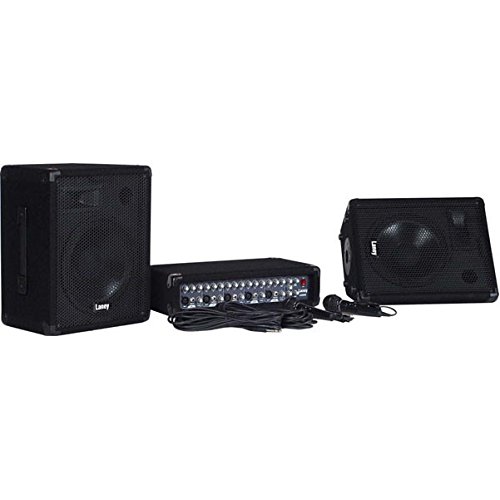
รูปที่ 2.1: Laney CDPA2PA PA System Components. This image displays the complete Laney CDPA2PA PA system. It includes the compact CD200 mixer head, two dual-purpose speaker cabinets with 10-inch woofers, and two dynamic microphones with their respective cables. The system is designed for quick and easy setup.
ส่วนประกอบหลัก:
- CD200 Mixer Head: A 5-channel mixer with 2x 80W power output.
- Speaker Cabs: Two dual-purpose (wedge/PA) speaker cabinets, each featuring 10-inch woofers and horn tweeters. Rated at 8 Ohm / 150W, constructed from composite wood with black carpet finish, steel corner protectors, and steel front grilles. Includes 35mm pole mount sockets.
- ไมโครโฟน: Two dynamic microphones with on/off switches and connecting leads.
- สาย: Two 10m professional speaker cables for connecting the mixer to the speakers.
3. คำแนะนำในการตั้งค่า
Follow these steps to set up your Laney CDPA2PA PA system:
- การจัดวาง: Position the speaker cabinets in your desired location. They can be used as traditional PA speakers or as floor wedges. Ensure stable placement.
- Mixer Connection: Place the CD200 mixer head on a stable surface.
- การเชื่อมต่อลำโพง: Connect each speaker cabinet to the CD200 mixer head using the provided 10m professional speaker cables. Use the speaker connections (4x Jack) on the mixer. Ensure a minimum impedance of 4 Ohms per side.
- การเชื่อมต่อไมโครโฟน: Plug the dynamic microphones into the XLR or unbalanced Hi-Z Jack inputs on channels 1-5 of the mixer.
- การเชื่อมต่อไฟฟ้า: Ensure all connections are secure before connecting the mixer's power cable to a suitable power outlet.
- การตั้งค่าเริ่มต้น: Before powering on, ensure all channel level controls, master volume, and FX levels are set to their minimum positions.
4. คู่มือการใช้งาน
Once your system is set up, follow these guidelines for operation:
- เปิดเครื่อง: Turn on the power switch on the CD200 mixer.
- การควบคุมช่อง: For each active channel (1-5), adjust the ระดับ ปุ่มหมุนสำหรับควบคุมระดับเสียงขาเข้า
- การปรับสมดุล: ใช้ Hi และ ต่ำ controls per channel to adjust the treble and bass frequencies for individual inputs.
- ผลกระทบ: The mixer includes a built-in delay effect. Adjust the เวลา และ ระดับ controls in the effects section to apply and mix the delay.
- อินพุตซีดี: Connect external audio sources (e.g., CD player) to the Phono (RCA) CD Input and use its dedicated การควบคุมระดับ.
- ปริมาณหลัก: ค่อยๆเพิ่มระดับขึ้น มาสเตอร์ วอลุ่ม knob to achieve the desired overall output level.
- บันทึกเสียง: The Phono (RCA) Record Out allows you to connect to a recording device.
- ระดับ Aux: Adjust the Aux Level in the Master Section for auxiliary input control.
- หมดแรง: Before powering off, reduce all volume levels to minimum to prevent sudden loud noises.
5. การบำรุงรักษา
Proper maintenance ensures the longevity and optimal performance of your PA system:
- การทำความสะอาด: Use a soft, dry cloth to clean the surfaces of the mixer and speakers. Avoid abrasive cleaners or solvents.
- พื้นที่จัดเก็บ: When not in use, store the system in a dry, dust-free environment.
- การดูแลสายเคเบิล: Handle cables carefully. Avoid sharp bends or kinks that can damage internal wiring.
- การระบายอากาศ : Ensure the mixer head has adequate ventilation to prevent overheating. Do not block ventilation openings.
- การขนส่ง: When transporting, ensure components are securely packed to prevent physical damage. The speaker cabs feature steel corner protectors for added durability.
6 การแก้ไขปัญหา
If you encounter issues with your Laney CDPA2PA system, refer to the following common troubleshooting steps:
| ปัญหา | สาเหตุที่เป็นไปได้ | สารละลาย |
|---|---|---|
| ไม่มีไฟเลี้ยงเครื่องผสมอาหาร | ไม่ได้เสียบสายไฟ; ปลั๊กไฟชำรุด; สวิตช์เปิดปิดเครื่องผสมอาหารปิดอยู่ | Check power cable connection; Test power outlet; Ensure mixer power switch is ON. |
| ไม่มีเสียงออกจากลำโพง | Speaker cables disconnected; Master volume too low; Channel level too low; Microphone/input device faulty. | Verify speaker cable connections; Increase Master Volume; Increase relevant Channel Level; Test microphone/input device. |
| เสียงเพี้ยน | Input signal too high (clipping); Speaker impedance mismatch; Damaged speaker. | Reduce input level on channel; Ensure speaker impedance is 4 Ohms minimum; Inspect speakers for damage. |
| ไมโครโฟนไม่ทำงาน | Microphone switch off; Cable faulty; Incorrect input selected. | Ensure microphone switch is ON; Test with another cable; Verify microphone is plugged into an active channel. |
7. ข้อมูลจำเพาะ
| คุณสมบัติ | รายละเอียด |
|---|---|
| หมายเลขรุ่น | CDPA2PA |
| กำลังขับ | 2x 80 วัตต์ |
| Power Handling (Speakers) | 150วัตต์ |
| ช่องทางการ | 5 |
| ข้อมูลอินพุต | Ch 1-5 Balanced Lo-Z XLR/Unbalanced Hi-Z Jack, CD Input (Phono) |
| การควบคุมช่องทาง | Level, Hi, Low, FX |
| การปรับสมดุล | การควบคุมระดับสูงและต่ำต่อช่อง |
| ผลกระทบ | Delay with time and Level controls |
| บันทึกออก | Yes (Phono) |
| การเชื่อมต่อลำโพง | แจ็ค 4x |
| อิมพีแดนซ์ | Minimum 4 Ohms per side |
| Drivers (Speakers) | 2x Dual purpose (wedge/PA) speaker cabs with 10" woofers and horn tweeters |
| Weight (Mixer) | 7.5 กก. |
| สาขาวิชาเอก | Main Level, Aux Level |
| มาสเตอร์ วอลุ่ม | ใช่ |
| Dimensions (Mixer) | ส130 x ก470 x ล261 มม. |
8. การรับประกันและการสนับสนุน
For warranty information and technical support, please refer to the documentation provided with your purchase or visit the official Laney webไซต์ เก็บหลักฐานการซื้อของคุณไว้เพื่อใช้ในกรณีเรียกร้องการรับประกัน
ผู้ผลิต: ลานีย์
เอกสารที่เกี่ยวข้องCDPA2PA


Ask a question about this manual
Ask about setup, troubleshooting, compatibility, parts, safety, or missing instructions. Manuals+ will review the question and use this page’s manual context to help answer it.