
การแนะนำ
ขอบคุณสำหรับการซื้อasing the STOGA Ubox STV040 Dual Lens Car DVR Camera. This manual provides detailed instructions for the proper installation, operation, and maintenance of your device. Please read this manual thoroughly before using the product to ensure optimal performance and safety.
เนื้อหาแพ็คเกจ
กรุณาตรวจสอบสิ่งของภายในบรรจุภัณฑ์เมื่อเปิดออก หากมีสินค้าใดสูญหายหรือเสียหาย โปรดติดต่อผู้ค้าปลีกของคุณ
- 1 x STOGA Ubox STV040 Car DVR Camera
- เครื่องชาร์จในรถยนต์ 1 ชิ้น
- 1 x Car Mount
- 1 x External GPS Module
- 1 x คู่มือผู้ใช้
สินค้าเกินview
Familiarize yourself with the components and features of your STOGA Ubox STV040 Car DVR Camera.

รูปที่ 1: ด้านหน้า view of the DVR camera with the display screen active.

รูปที่ 2: ด้านหน้า view detailing the dual wide-angle lenses and surrounding controls.
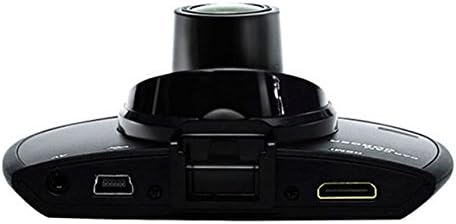
รูปที่ 3: สูงสุด view illustrating the connectivity ports (HDMI, USB, AV).
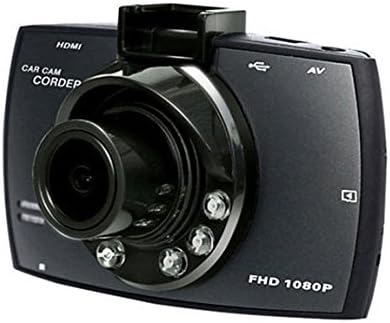
รูปที่ 4: Angled perspective of the DVR camera, showing its compact design.
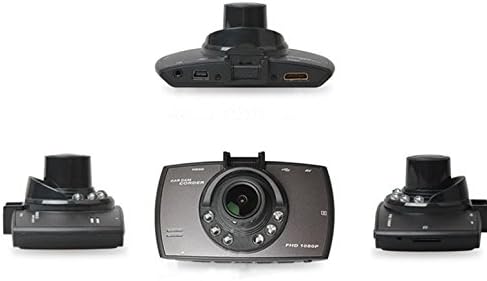
รูปที่ 5: ครอบคลุม view of the DVR camera from various angles.
การตั้งค่า
1 การติดตั้งการ์ด Micro SD
Insert a Micro SD card (Class 6 or higher, 4GB-32GB) into the designated slot on the DVR camera. Ensure the card is inserted correctly until it clicks into place. The device supports continuous loop recording and emergency event recording.
2. การติดตั้งกล้อง
- Attach the car mount to the windshield in a position that does not obstruct your view.
- Securely attach the DVR camera to the car mount.
- Adjust the camera angle to ensure both lenses capture the desired view (front and interior/side). The dual lenses are 180-degree rotatable.
3. การเชื่อมต่อไฟฟ้า
Connect the car charger to the DVR camera's power input and plug the other end into your vehicle's 12V power outlet (cigarette lighter socket). The camera will typically power on automatically when the vehicle starts and power off when the vehicle is turned off.
4. การเชื่อมต่อโมดูล GPS (ไม่บังคับ)
Connect the external GPS module to the designated GPS port on the DVR camera. This enables GPS logging, recording location data along with video footage.
คำแนะนำการใช้งาน
เปิด/ปิดเครื่อง
- อัตโนมัติ: The camera powers on and starts recording automatically when the car engine starts. It powers off automatically when the engine is turned off.
- คู่มือ: Press and hold the power button to manually turn the device on or off.
โหมดการบันทึก
- การบันทึกแบบวนซ้ำ: The camera continuously records video in segments. When the memory card is full, it automatically overwrites the oldest unlocked footage.
- การบันทึกเหตุการณ์ฉุกเฉิน (G-Sensor): The built-in G-Sensor detects sudden impacts or collisions. In such an event, the current video segment is automatically locked and protected from being overwritten.
การนำทางเมนู
Use the control buttons located on the device to navigate through the menu options on the 2.0" TFT LCD screen. Adjust settings such as video resolution, date/time stamp, language (English, Chinese, Japanese, Russian), and G-Sensor sensitivity.
การเล่นซ้ำ
- หยุดการบันทึกหากกำลังเปิดใช้งานอยู่
- Enter playback mode via the menu.
- เลือกวิดีโอที่ต้องการ file for playback on the device screen.
- Alternatively, remove the Micro SD card and insert it into a computer to view files.
การป้องกันด้วยรหัสผ่าน
The device supports password protection to prevent unauthorized access to recordings. Refer to the on-screen menu for setting up and managing this feature.
การซ่อมบำรุง
- การทำความสะอาด: Use a soft, dry cloth to clean the camera lenses and screen. Avoid abrasive cleaners or solvents.
- การ์ด Micro SD: Format the Micro SD card regularly (e.g., once a month) to ensure optimal performance and prevent data corruption. Back up important fileก่อนทำการฟอร์แมต
- อุณหภูมิ: ควรหลีกเลี่ยงการวางอุปกรณ์ไว้ในที่ที่มีอุณหภูมิสูงหรือต่ำเกินไป แสงแดดโดยตรงเป็นเวลานาน หรือความชื้นสูง
- อัพเดตเฟิร์มแวร์: ตรวจสอบของผู้ผลิต webไซต์เป็นระยะสำหรับการอัปเดตเฟิร์มแวร์ที่มีอยู่เพื่อปรับปรุงประสิทธิภาพและเพิ่มคุณสมบัติ
การแก้ไขปัญหา
| ปัญหา | สาเหตุที่เป็นไปได้ / วิธีแก้ไข |
|---|---|
| กล้องไม่สามารถเปิดได้ |
|
| การบันทึกหยุดโดยไม่คาดคิด |
|
| คุณภาพวิดีโอไม่ดี |
|
| GPS ไม่ทำงาน |
|
| แบตเตอรี่ไม่สามารถเก็บประจุได้ |
|
ข้อมูลจำเพาะ
| คุณสมบัติ | รายละเอียด |
|---|---|
| หมายเลขรุ่น | Ubox STV040 |
| แสดง | 2.0" TFT LCD (960 x 240 pixels) |
| เลนส์ | Dual 140-degree A+ wide-angle, 180-degree rotatable |
| เซ็นเซอร์ | ซีมอส |
| ความละเอียดวิดีโอ | 1280 x 480 @ 30 fps, 640 x 480 @ 30 fps |
| รูปแบบวิดีโอ | เอวีไอ |
| รูปแบบภาพ | M-JPG |
| การมองเห็นตอนกลางคืน | ฟังก์ชั่นการมองเห็นในตอนกลางคืนอินฟาเรด |
| พื้นที่จัดเก็บ | Micro TF (SD HC) card, 4GB-32GB, Class 6 and above |
| จีพีเอส | Supports external GPS module |
| จีเซนเซอร์ | Integrated, supports emergency event recording lock |
| ไมโครโฟน/ลำโพง | บูรณาการ |
| เอาท์พุต | CVBS (Video Output) |
| แบตเตอรี่ | 3.7V 700mA Lithium-Polymer battery |
| ความเข้ากันได้ของระบบปฏิบัติการ | วินโดวส์ 2000/XP/วิสต้า/วินโดวส์ 7 |
| ภาษาที่รองรับ | English, Chinese, Japanese, Russian |
การรับประกันและการสนับสนุน
For warranty information and technical support, please refer to the documentation provided with your purchase or contact your retailer. Keep your purchase receipt as proof of purchase for warranty claims.
For further assistance, you may also visit the official STOGA website (if available) or contact their customer service department.