
การแนะนำ
The Soniclean Soft Carpet Upright Vacuum Cleaner, Model SFC-7000, is specifically engineered to provide effective and gentle cleaning for all types of soft-style carpets with pile lengths less than 1 inch. This manual provides essential information for the safe and efficient operation, maintenance, and troubleshooting of your Soniclean vacuum cleaner.
Utilizing patented Sonic Carpet Cleaning Technology, the vacuum's sonic bar generates 200 vibrations per second, dislodging deeply embedded dirt. Its ultra-soft bristle brushroll ensures gentle care for carpet fibers, while the EZ-Push adjustable vent system and lightweight design (10.5 lbs) facilitate easy maneuverability across thick carpets. The hospital-grade H13 HEPA filtration system captures 99.97% of particles down to 0.3 microns, making it ideal for allergy sufferers.
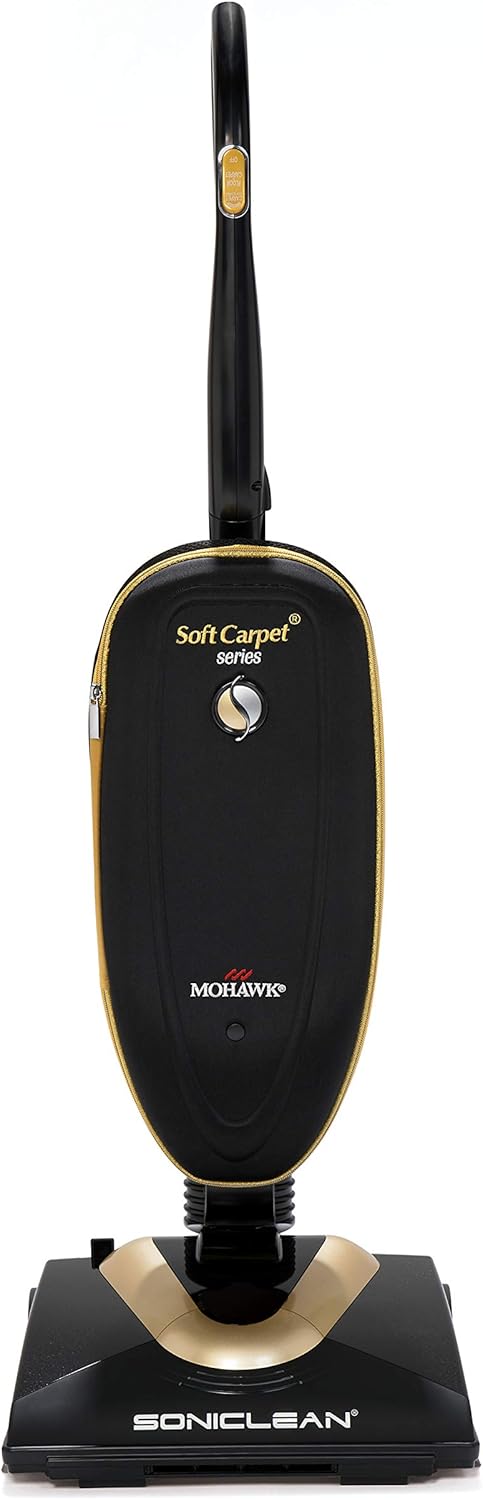
Figure 1: Soniclean Soft Carpet Upright Vacuum Cleaner
This image shows the Soniclean Soft Carpet Upright Vacuum Cleaner from the front, highlighting its sleek black and gold design and compact form factor.
ข้อมูลด้านความปลอดภัยที่สำคัญ
โปรดอ่านคำแนะนำทั้งหมดอย่างละเอียดก่อนใช้งานเครื่องใช้ไฟฟ้านี้ การไม่ปฏิบัติตามคำแนะนำเหล่านี้อาจส่งผลให้เกิดไฟฟ้าช็อต ไฟไหม้ หรือบาดเจ็บสาหัสได้
- This vacuum cleaner is designed for residential use only ในอเมริกาเหนือ
- ห้ามใช้กลางแจ้งหรือบนพื้นผิวเปียก
- ถอดปลั๊กออกจากเต้าเสียบเมื่อไม่ได้ใช้งานและก่อนซ่อมบำรุง
- ห้ามให้เด็กใช้เป็นของเล่น ควรให้เด็กดูแลอย่างใกล้ชิดเมื่อใช้งานใกล้เด็ก
- ใช้เฉพาะตามที่อธิบายไว้ในคู่มือนี้เท่านั้น ใช้เฉพาะอุปกรณ์เสริมที่ผู้ผลิตแนะนำเท่านั้น
- ห้ามใช้อุปกรณ์ที่มีสายไฟหรือปลั๊กชำรุด หากอุปกรณ์ไม่ทำงานตามปกติ ตกหล่น เสียหาย ทิ้งไว้กลางแจ้ง หรือตกน้ำ ให้ส่งคืนอุปกรณ์ไปที่ศูนย์บริการ
- ห้ามดึงหรือถือสายไฟ ห้ามใช้สายไฟเป็นที่จับ ปิดประตูทับสายไฟ หรือดึงสายไฟรอบขอบหรือมุมที่คม ห้ามวางเครื่องใช้ไฟฟ้าทับสายไฟ ห้ามวางสายไฟไว้ใกล้พื้นผิวที่ร้อน
- ห้ามถอดปลั๊กโดยดึงสายไฟ หากต้องการถอด ให้จับที่ปลั๊ก ไม่ใช่ที่สายไฟ
- ห้ามจับปลั๊กหรือเครื่องใช้ไฟฟ้าขณะที่มือเปียก
- ห้ามใส่สิ่งของใดๆ เข้าไปในช่องเปิด ห้ามใช้ในขณะที่ช่องเปิดใดๆ ถูกปิดกั้น จัดเก็บให้สะอาดปราศจากฝุ่น เศษผ้า เส้นผม และสิ่งของใดๆ ที่อาจขัดขวางการไหลเวียนของอากาศ
- ให้ผม เสื้อผ้าที่หลวม นิ้ว และส่วนต่างๆ ของร่างกายอยู่ห่างจากช่องเปิดและชิ้นส่วนที่เคลื่อนไหว
- ห้ามหยิบจับสิ่งของที่กำลังเผาไหม้หรือมีควัน เช่น บุหรี่ ไม้ขีดไฟ หรือขี้เถ้าร้อน
- ห้ามใช้โดยไม่มีถุงเก็บฝุ่นและ/หรือตัวกรอง
- ปิดการควบคุมทั้งหมดก่อนที่จะถอดปลั๊ก
- ควรระมัดระวังเป็นพิเศษเมื่อทำความสะอาดบันได
- ห้ามใช้ตักของเหลวไวไฟหรือติดไฟได้ เช่น น้ำมันเบนซิน หรือใช้ในพื้นที่ที่อาจมีของเหลวเหล่านี้อยู่
การติดตั้งและการประกอบ
Your Soniclean vacuum cleaner requires minimal assembly before first use. Please follow these steps:
- แกะส่วนประกอบ: นำชิ้นส่วนทั้งหมดออกจากบรรจุภัณฑ์อย่างระมัดระวัง ตรวจสอบให้แน่ใจว่ามีส่วนประกอบทั้งหมดตามที่ระบุไว้ในรายการบรรจุภัณฑ์ครบถ้วน
- แนบที่จับ: Insert the handle assembly into the main body of the vacuum until it clicks securely into place. Ensure the handle is firmly seated and does not wobble.
- ติดตั้งถุงกรอง: Open the front cover of the vacuum. Align and insert a new Hospital-Grade H13 HEPA Filter Bag into the bag compartment, ensuring it is properly seated and sealed. Refer to the "Maintenance" section for detailed bag installation instructions.
- สายไฟ: Unwind the power cord and plug it into a standard electrical outlet.
Once assembled, your Soniclean vacuum is ready for operation.
คำแนะนำการใช้งาน
The Soniclean Soft Carpet Upright Vacuum Cleaner is designed for optimal performance on soft-style carpets. Follow these steps for effective cleaning:
- เปิดเครื่อง: Plug the vacuum into a suitable electrical outlet. Press the power button located on the handle to turn the vacuum on.
- การทำความสะอาดพรม:

Figure 2: Vacuuming Soft Carpet
This image shows a person operating the Soniclean vacuum cleaner on a light-colored, soft carpet, demonstrating its ease of use on such surfaces.
Gently push and pull the vacuum across your soft carpet. The patented EZ-Push adjustable vent system allows the vacuum to glide smoothly without excessive effort, even on thick pile carpets. This system automatically adjusts to prevent the vacuum from sinking too deeply into the carpet, ensuring easy maneuverability.

Figure 3: EZ-Push Adjustable Vent System
This diagram illustrates the Soniclean's patented EZ-Push™ adjustable vent system, showing arrows indicating airflow that allows the vacuum to be easily pushed and pulled across soft-style carpets. Note: Not for use on shag carpets with pile lengths greater than 1 inch long.
- เทคโนโลยีการทำความสะอาดโซนิค: The integrated sonic bar produces 200 vibrations per second. This high-frequency sonic energy works to dislodge deeply embedded dirt and particulate matter from the carpet pile, enhancing cleaning effectiveness.
- Ultra-Soft Bristle Brushroll: The brushroll is designed with ultra-soft bristles to be gentle on delicate carpet fibers while effectively sweeping up debris.
- ประสิทธิภาพการทำความสะอาด:

Figure 4: Effective Dirt Pickup
This image demonstrates the Soniclean vacuum's ability to effectively pick up dirt and debris from a light-colored carpet surface.

รูปที่ 5: ด้านข้าง View of Cleaning Action
ภาพนี้แสดงด้านข้าง view of the Soniclean vacuum in action, showing it effectively collecting dirt from a carpeted surface.
- หมดแรง: When finished, press the power button again to turn off the vacuum, then unplug the power cord from the outlet.
การซ่อมบำรุง
Regular maintenance ensures optimal performance and extends the life of your Soniclean vacuum cleaner.
1. HEPA Filter Bag Replacement
The Soniclean vacuum uses Hospital-Grade H13 HEPA Filter Bags, which capture 99.97% of particles down to 0.3 microns. Replace the bag when it is full or when suction power decreases significantly.
- ปิดเครื่องและถอดปลั๊ก: Always ensure the vacuum is turned off and unplugged from the wall outlet before performing any maintenance.
- Open Bag Compartment: Locate and open the front cover of the vacuum to access the filter bag compartment.
- ถอดถุงเต็มออก: Carefully pull the handle of the full bag all the way up until it clicks, sealing the bag opening. Remove the bag from the receiver.
- ติดตั้งถุงใหม่: Align and seat a new HEPA filter bag into the receiver until it stops. Push the handle all the way down to lock the bag in place. Ensure the bag is properly aligned for optimal fit and filtration.

Figure 6: HEPA Filter Bag Replacement
This image illustrates the step-by-step process for replacing the HEPA filter bag in the Soniclean vacuum, showing how to remove the old bag and properly install a new one.
2. Brushroll Cleaning
Periodically inspect the ultra-soft bristle brushroll for tangled hair, threads, or debris. Clean as needed to maintain effective cleaning performance.

Figure 7: Ultra-Soft Brush Roll and Sonic Technology
ภาพนี้ให้รายละเอียด view of the Soniclean's ultra-soft brush roll, designed for gentle cleaning, alongside a diagram illustrating the sonic cleaning technology at work.
- ปิดเครื่องและถอดปลั๊ก: ตรวจสอบให้แน่ใจว่าเครื่องดูดฝุ่นปิดอยู่และถอดปลั๊กออกแล้ว
- Access Brushroll: Carefully turn the vacuum over to access the brushroll area.
- กำจัดเศษขยะ: Use scissors or a brush to cut and remove any tangled hair or debris from the brushroll. Ensure the bristles are free to rotate.
- Inspect Sonic Bar: While the vacuum is inverted, check the sonic bar for any obstructions.
3. Sonicfresh Fragrance Pods (Optional)
For a fresh scent during vacuuming, you can insert Sonicfresh Fragrance Pods into the designated slot.

Figure 8: Sonicfresh Fragrance Pod
This image shows a hand holding a white Sonicfresh Fragrance Pod with green beads visible inside, ready for insertion into the vacuum.
Refer to the fragrance pod packaging for specific instructions on insertion and replacement.
การแก้ไขปัญหา
This section addresses common issues you might encounter with your Soniclean vacuum cleaner. For problems not listed here, please contact customer support.
| ปัญหา | สาเหตุที่เป็นไปได้ | สารละลาย |
|---|---|---|
| เครื่องดูดฝุ่นไม่เปิด | No power to the unit; Power button not pressed; Thermal protector activated. | Check if the power cord is securely plugged into a working outlet. Press the power button firmly. If the vacuum overheats, it may shut off automatically. Unplug, wait 30 minutes for it to cool down, then plug back in. |
| แรงดูดลดลง หรือประสิทธิภาพการทำความสะอาดไม่ดี | Full filter bag; Clog in hose or nozzle; Brushroll obstructed. | Replace the HEPA filter bag if full. Check for and remove any clogs in the hose, nozzle, or brushroll area. Clean the brushroll of tangled hair or debris. |
| Vacuum is difficult to push on carpet. | EZ-Push vent system not functioning optimally; Carpet pile too high. | Ensure the EZ-Push vent system is clear of debris. This vacuum is designed for soft carpets with pile lengths less than 1 inch. It may be difficult to push on shag carpets with pile lengths greater than 1 inch. |
| เสียงรบกวนที่ผิดปกติระหว่างการทำงาน | Obstruction in brushroll or fan; Worn belt (though lifetime warranty suggests this is rare). | Turn off and unplug the vacuum. Inspect the brushroll and fan area for any foreign objects. If noise persists, contact customer support. |
ข้อมูลจำเพาะ
| คุณสมบัติ | รายละเอียด |
|---|---|
| ยี่ห้อ | Soniclean |
| หมายเลขรุ่น | เอสเอฟซี-7000 |
| คุณสมบัติพิเศษ | Bagged, Corded, HEPA Filtration, Sonic Cleaning Technology |
| ประเภทตัวกรอง | Hospital-Grade H13 HEPA Filter Bag |
| ส่วนประกอบที่รวมอยู่ | Brush, HEPA Filter |
| ไร้สาย? | เลขที่ |
| วัดtage | 1200 วัตต์ |
| รันไทม์ | 30 minutes (continuous operation) |
| การใช้ที่แนะนำ | Carpet (specifically soft-style carpets) |
| ฟอร์มแฟกเตอร์ | ตั้งตรง |
| สี | สีดำ,สีทอง |
| ขนาดสินค้า (กว้าง x ยาว x สูง) | 14" x 11.5" x 43.5" |
| ระดับเสียง | 43 โซวอน |
| ผู้ผลิต | Zenith Technologies, LLC |
| น้ำหนักสินค้า | 10.5 ปอนด์ |
| ยูพีซี | 793573920072 |
| จำเป็นต้องประกอบ | ใช่ |
| การใช้งานภายใน/ภายนอกอาคาร | ในร่ม |
การรับประกันและการสนับสนุน
ข้อมูลการรับประกัน
The Soniclean Soft Carpet Upright Vacuum Cleaner comes with the following warranty:
- Five-year motor warranty.
- One-year parts warranty.
- Lifetime belt warranty.
For more detailed warranty information and terms, please visit the official Soniclean webเว็บไซต์: www.sonicleanusa.com/warranty.
การสนับสนุนลูกค้า
If you have any questions, require assistance, or need to report an issue with your Soniclean vacuum cleaner, please contact Soniclean customer support. Contact information can typically be found on the manufacturer's webไซต์หรือภายในบรรจุภัณฑ์ผลิตภัณฑ์ของคุณ
For general inquiries or to explore other Soniclean products, you may visit the Soniclean store on Amazon: Soniclean Amazon Store.


