Franklin Spelling Ace SA-98 V1 Electronic Dictionary User Manual
Model: SA-98 V1
การแนะนำ
The Franklin Spelling Ace SA-98 V1 is a portable electronic dictionary designed to assist with spelling and word definitions. This manual provides essential information for setting up, operating, maintaining, and troubleshooting your device.
การตั้งค่า
1. การติดตั้งแบตเตอรี่
The Franklin Spelling Ace SA-98 V1 requires four (4) AAA batteries for operation.
Image: Open battery compartment of the Franklin Spelling Ace SA-98 V1. This image shows the device's back with the battery cover removed, revealing four empty slots for AAA batteries. The correct polarity markings are visible within the compartment.
2. เปิดเครื่องครั้งแรก
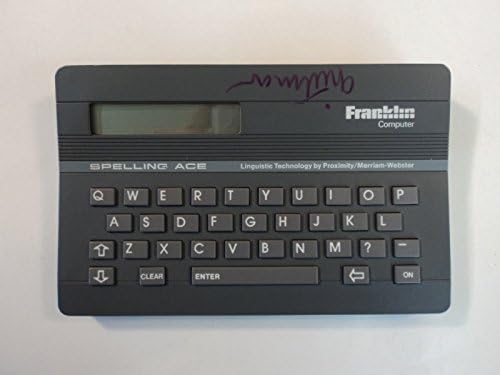
หลังจากใส่แบตเตอรี่แล้ว ให้กดปุ่ม ON button located on the keyboard to power on the device. The display should illuminate, indicating the device is ready for use.
ภาพ: ด้านหน้า view of the Franklin Spelling Ace SA-98 V1. This image displays the device from the front, highlighting its screen and the full QWERTY keyboard layout. The "ON" button is visible on the right side of the keyboard.
คำแนะนำการใช้งาน
1. Spelling Correction
To correct a misspelled word:
Type the word as you believe it is spelled using the QWERTY keyboard.
กดปุ่ม เข้า สำคัญ.
The device will display the correct spelling or a list of possible spellings. Use the arrow keys to navigate through the suggestions.
2. Word Search and Definition
To search for a word and view its definition:
Type the word you wish to look up.
กดปุ่ม เข้า สำคัญ.
If the word is found, its definition will be displayed. Use the arrow keys to scroll through longer definitions.
3. Using the Keyboard and Display
คีย์บอร์ด QWERTY: The device features a standard QWERTY keyboard layout for easy typing.
ปุ่ม CLEAR: กด ชัดเจน to erase the current input or return to the main spelling screen.
ปุ่มลูกศร: Use the directional arrow keys to navigate through lists of words, definitions, or menu options.
หน้าจอแสดงผล: The LCD screen shows typed words, spelling suggestions, and definitions. Ensure adequate lighting for optimal visibility.
ภาพ: มุมเอียง view of the Franklin Spelling Ace SA-98 V1. This image provides a slightly angled perspective of the device, showcasing its compact design, the display screen, and the complete QWERTY keyboard.
Do not allow moisture to enter the display or keyboard areas.
2. การเปลี่ยนแบตเตอรี่
When the display becomes dim or the device functions erratically, it is time to replace the batteries. Follow the battery installation steps outlined in the การตั้งค่า section. Always replace all four batteries at the same time with new AAA alkaline batteries.
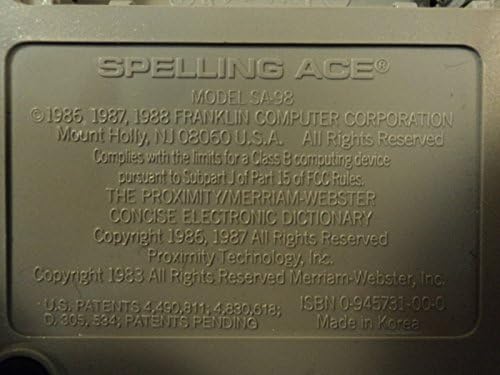
Image: Close-up of the back label of the Franklin Spelling Ace SA-98 V1. This detailed image shows the embossed label on the back of the device, clearly displaying the model number SA-98, copyright information from Franklin Computer Corporation, and manufacturing details.
การรับประกันและการสนับสนุน
ข้อมูลการรับประกัน
This product is typically covered by a limited manufacturer's warranty. Please refer to the original packaging or purchase documentation for specific warranty terms and conditions. Keep your proof of purchase for warranty claims.
การสนับสนุนลูกค้า
For technical assistance, troubleshooting beyond this manual, or warranty inquiries, please contact Franklin Computer customer support. Contact information can usually be found on the manufacturer's official webไซต์หรือบนบรรจุภัณฑ์ผลิตภัณฑ์
Ask a question about this manual
Ask about setup, troubleshooting, compatibility, parts, safety, or missing instructions. Manuals+ will review the question and use this page’s manual context to help answer it.