
1. บทนำ
The PowerDrive PD3000 is a 3000 Watt power inverter designed to convert 12V DC power from your vehicle's battery into 115V AC household power. This unit provides 3000 Watts of continuous AC power and has a high surge capacity of up to 6000 Watts to accommodate devices with high starting power requirements. It features integrated Bluetooth wireless technology for remote monitoring and control via a mobile application, along with a removable control panel for flexible placement. This manual provides essential information for the safe and efficient operation of your PowerDrive PD3000 inverter.
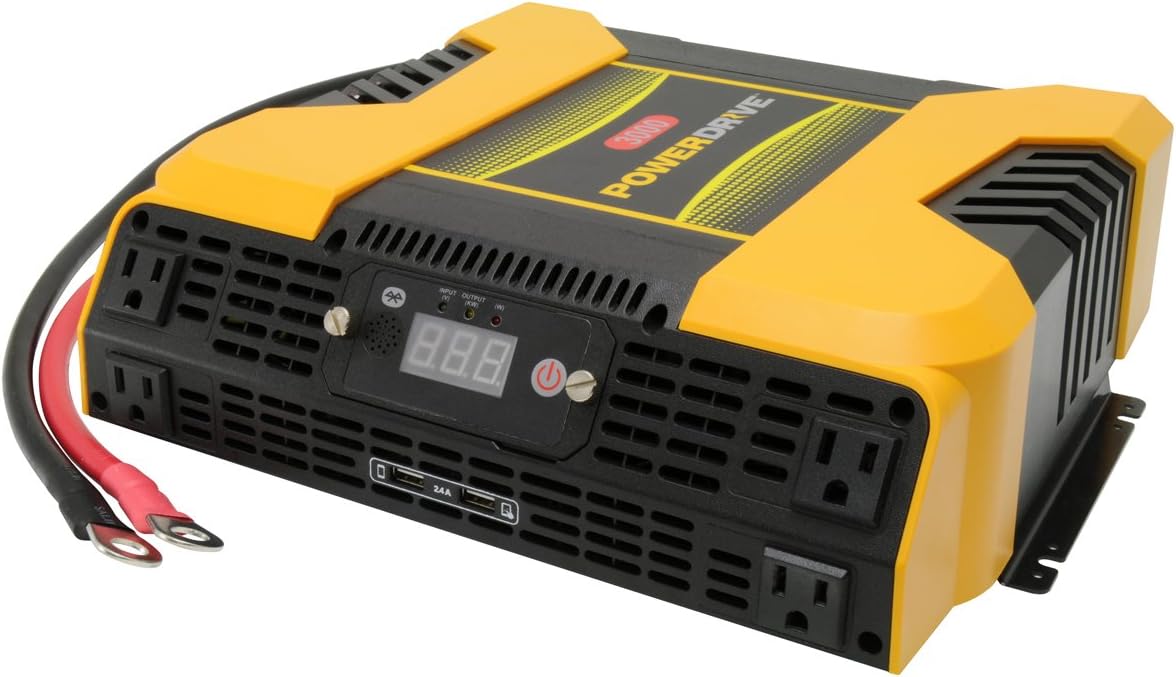
Figure 1.1: PowerDrive PD3000 3000 Watt Power Inverter, front view with outlets and display.
2. ข้อมูลด้านความปลอดภัย
Please read and understand all safety instructions before installing or operating the inverter. Failure to follow these instructions may result in electrical shock, fire, serious injury, or property damage.
- อันตรายจากไฟฟ้าช็อต: ห้ามเปิดอินเวอร์เตอร์ casinก. ไม่มีชิ้นส่วนใดที่ผู้ใช้สามารถซ่อมบำรุงเองได้ภายใน แนะนำให้ช่างผู้ชำนาญการซ่อมบำรุงนำชิ้นส่วนทั้งหมดไปซ่อม
- อันตรายจากไฟไหม้: Do not operate the inverter near flammable materials, gases, or vapors. Ensure adequate ventilation around the inverter.
- ความปลอดภัยของแบตเตอรี่: Connect the inverter only to a 12V DC battery system. Ensure battery terminals are clean and connections are secure. Wear eye protection and gloves when working with batteries.
- การระบายอากาศ : Ensure the inverter is installed in a well-ventilated area. Do not block ventilation openings.
- ระบบป้องกันการโอเวอร์โหลด: Do not exceed the inverter's continuous power rating of 3000 Watts. Overloading can damage the inverter and connected devices.
- ความชื้น: Do not expose the inverter to rain, moisture, or spray.
3. เนื้อหาบรรจุภัณฑ์
ตรวจสอบว่ามีสิ่งของทั้งหมดอยู่ครบเมื่อแกะกล่อง:
- PowerDrive PD3000 Power Inverter Unit
- คู่มือการใช้งาน
- สายแบตเตอรี่ (สีแดงและสีดำ)
- Removable Control Panel with Cable
4. คุณสมบัติของผลิตภัณฑ์
The PowerDrive PD3000 inverter offers a range of features for versatile power conversion:
- กำลังขับสูง: Delivers 3000 Watts of continuous AC power with a 6000 Watt surge capacity.
- เต้ารับไฟฟ้ากระแสสลับหลายช่อง: Equipped with four (4) 3-prong AC outlets to support various devices.
- พอร์ตชาร์จ USB: Includes two (2) USB power ports (shared 2400mA total output) for charging mobile devices.
- การเชื่อมต่อบลูทูธ: Allows remote access to features and settings via a free downloadable mobile application.
- แผงควบคุมแบบถอดได้: Detachable control panel enables remote monitoring and testing, offering installation flexibility.
- โครงสร้างทนทาน: Features a robust ABS PVC composite housing designed to protect internal electronic components.
- การป้องกันความปลอดภัย: Incorporates audible alarms and automatic shut-off triggers for low battery, high battery, and overload conditions.

Figure 4.1: Front panel of the PowerDrive PD3000 showing AC outlets, USB ports, and digital display.
5. การตั้งค่าและการติดตั้ง
การติดตั้งอย่างถูกต้องเป็นสิ่งสำคัญอย่างยิ่งต่อการทำงานที่ปลอดภัยและมีประสิทธิภาพของอินเวอร์เตอร์ของคุณ
5.1 การติดตั้งอินเวอร์เตอร์
- Choose a dry, well-ventilated location away from direct sunlight, heat sources, and flammable materials.
- Ensure there is sufficient space around the inverter for air circulation, especially around the cooling fans.
- Mount the inverter securely using appropriate hardware (not included) to prevent movement during operation.
5.2 Connecting to a 12V DC Power Source
สำคัญ: Ensure the inverter is turned OFF before making any connections.
- เชื่อมต่อ สีแดง สายแบตเตอรี่ (บวก) ไปยัง สีแดง (positive) terminal on the inverter. Tighten securely.
- เชื่อมต่อปลายอีกด้านหนึ่งของ สีแดง สายแบตเตอรี่ (บวก) ไปยัง บวก (+) ต่อขั้วแบตเตอรี่ 12V DC ของคุณให้แน่นสนิท
- เชื่อมต่อ สีดำ สายแบตเตอรี่ (ขั้วลบ) ไปยัง สีดำ (negative) terminal on the inverter. Tighten securely.
- เชื่อมต่อปลายอีกด้านหนึ่งของ สีดำ สายแบตเตอรี่ (ขั้วลบ) ไปยัง ลบ (-) ต่อขั้วแบตเตอรี่ 12V DC ของคุณให้แน่นสนิท
- Verify all connections are tight and free from corrosion. Loose connections can cause overheating and damage.

Figure 5.1: PowerDrive PD3000 Inverter showing battery cable connections.

รูปที่ 5.2: ด้านหลัง view of the PowerDrive PD3000 showing cooling fans and battery terminals.
5.3 Removable Control Panel Installation
The control panel can be used directly on the inverter or detached for remote operation.
- To use remotely, gently pull the control panel from the inverter.
- Connect the provided cable to the port on the back of the detached control panel and to the corresponding port on the inverter.
- Mount the control panel in a convenient location for monitoring and control.

Figure 5.3: PowerDrive PD3000 Inverter with its control panel detached for remote use.
6. คู่มือการใช้งาน
6.1 การเปิด/ปิดเครื่อง
- After ensuring all battery connections are secure, press and hold the power button on the inverter or the remote control panel for approximately 1-2 seconds.
- The digital display will illuminate, and the inverter will begin providing AC power.
- หากต้องการปิดเครื่อง ให้กดปุ่มเปิด/ปิดค้างไว้จนกว่าหน้าจอจะดับลง
6.2 การเชื่อมต่ออุปกรณ์ไฟฟ้ากระแสสลับ
- Plug your 115V AC devices into the 3-prong AC outlets on the front of the inverter.
- ตรวจสอบให้แน่ใจว่าวัตต์รวมtage of all connected devices does not exceed 3000 Watts.
- For devices with high starting loads (e.g., motors, compressors), ensure their surge wattage is within the inverter's 6000 Watt surge capacity.
6.3 การใช้งานพอร์ตชาร์จ USB
- Connect your USB-powered devices (e.g., smartphones, tablets) to the USB ports.
- The two USB ports share a total output of 2400mA (2.4A).
6.4 Understanding the Digital Display and Indicators
The digital display shows real-time information such as input voltage or output wattage. Indicator lights provide status feedback:
- อินพุต LED: Indicates the status of the DC input power.
- เอาต์พุต LED: Indicates the status of the AC output power.
- ไฟ LED แสดงข้อผิดพลาด: Illuminates to indicate an error condition (e.g., overload, low/high voltagจ).
7. การเชื่อมต่อบลูทูธ
The PowerDrive PD3000 features Bluetooth wireless technology, allowing you to monitor and control the inverter using a compatible smartphone application.
7.1 Downloading the Mobile App
- ค้นหา the official PowerDrive inverter app on your smartphone's app store (e.g., Apple App Store, Google Play Store).
- ดาวน์โหลดและติดตั้งแอปพลิเคชัน
7.2 Pairing with Your Inverter
- ตรวจสอบให้แน่ใจว่าได้เปิดใช้งาน Bluetooth บนสมาร์ทโฟนของคุณแล้ว
- Turn on the PowerDrive PD3000 inverter.
- Open the PowerDrive mobile app. The app should automatically detect nearby PowerDrive inverters.
- Follow the on-screen prompts within the app to pair with your PD3000 inverter.
7.3 คุณสมบัติของแอป
Once paired, the app allows you to:
- ตรวจสอบอินพุต voltage และเอาต์พุต wattage.
- View inverter status and fault codes.
- Remotely turn the inverter on or off.
- Adjust certain settings (refer to the app's help section for details).

Figure 7.1: Smartphone displaying the PowerDrive mobile application interface.
8. การบำรุงรักษา
การบำรุงรักษาอย่างสม่ำเสมอจะช่วยให้เครื่องแปลงกระแสไฟฟ้าทำงานได้อย่างมีประสิทธิภาพสูงสุดและมีอายุการใช้งานยาวนานขึ้น
- การทำความสะอาด: ควรเช็ดทำความสะอาดภายนอกของอินเวอร์เตอร์เป็นระยะด้วยผ้าแห้งเนื้อนุ่ม ห้ามใช้น้ำยาทำความสะอาดหรือสารละลายใดๆ
- การระบายอากาศ : Ensure the cooling fans and ventilation openings are free from dust and debris. Use compressed air to clear blockages if necessary.
- การเชื่อมต่อ: Regularly check battery cable connections for tightness and corrosion. Clean terminals with a wire brush if corrosion is present.
- พื้นที่จัดเก็บ: หากต้องเก็บรักษาอินเวอร์เตอร์เป็นเวลานาน ควรตัดการเชื่อมต่อจากแบตเตอรี่และเก็บไว้ในที่แห้งและเย็น
9 การแก้ไขปัญหา
This section addresses common issues you might encounter with your PowerDrive PD3000 inverter.
9.1 ปัญหาทั่วไปและแนวทางแก้ไข
- เครื่องแปลงไฟไม่ทำงาน:
- Check battery connections for tightness and proper polarity.
- ตรวจสอบให้แน่ใจว่าระดับแบตเตอรี่tage is above 10.5V DC (Low Battery Shut Down Point).
- ตรวจสอบให้แน่ใจว่าได้กดปุ่มเปิด/ปิดค้างไว้ตามระยะเวลาที่กำหนดแล้ว
- ไม่มีเอาต์พุต AC:
- Check if the inverter is powered on and the Output LED is illuminated.
- Ensure the connected AC device is functioning correctly.
- Check for an overload condition (Fault LED illuminated). Reduce the load.
- Audible Alarm / Fault LED On:
- สัญญาณเตือนแบตเตอรี่ต่ำ: Activates at 11 ± 0.3V DC. Recharge or replace the battery. The inverter will shut down at 10.5 ± 0.3V DC.
- High Battery Shut Down: Occurs at 15.5 ± 0.5V DC. Check the charging system of your vehicle.
- โอเวอร์โหลด: รวมปริมาณน้ำtage of connected devices exceeds 3000 Watts. Disconnect some devices.
- เกินอุณหภูมิ: Inverter is overheating. Ensure proper ventilation and reduce load.
- ปัญหาการเชื่อมต่อบลูทูธ:
- Ensure Bluetooth is enabled on your smartphone and the inverter is powered on.
- Restart the mobile app and try pairing again.
- Ensure your smartphone is within range of the inverter.
10. ข้อมูลจำเพาะ
| ข้อมูลจำเพาะ | ค่า |
|---|---|
| แบบอย่าง | พีดี3000 |
| Continuous AC Power Output | 3000 วัตต์ |
| พลังไฟกระชากสูงสุด | 6000 วัตต์ |
| กระแสตรงอินพุตVoltage | 12.8โวลต์ |
| กระแสไฟขาออกVoltage | 115โวลต์ |
| ความถี่เอาต์พุต AC | 58Hz-62Hz |
| เอาท์พุต USB | 5V / 2 (Shared 2400mA) |
| ประสิทธิภาพ (สูงสุด) | มากกว่า 88% |
| ประสิทธิภาพ (โหลดเต็ม) | มากกว่า 84% |
| Battery Drain (No AC Load) | <0.6ก |
| Low Battery Alarm Trigger | 11 ± 0.3V กระแสตรง |
| Low Battery Shut Down Point | 10.5 ± 0.3V กระแสตรง |
| High Battery Shut Down Point | 15.5 ± 0.5V กระแสตรง |
| Recovering Voltage after Under Voltage Turn-off | 12 ± 0.3V กระแสตรง |
| น้ำหนักสินค้า | 12.14 ปอนด์ |
| ขนาดสินค้า | 16.2 x 16.3 x 7.6 นิ้ว |
11. การรับประกันและการสนับสนุน
For warranty information or technical support, please refer to the documentation included with your purchase or visit the official PowerDrive webไซต์ เก็บหลักฐานการซื้อของคุณไว้เพื่อใช้ในกรณีเรียกร้องการรับประกัน