
1. บทนำ
Welcome to the user manual for your Walther PRO PL70R LED Flashlight. This document provides essential information for the safe and efficient operation, maintenance, and troubleshooting of your device. Please read it thoroughly before use to ensure optimal performance and longevity of your flashlight.
2. คำแนะนำด้านความปลอดภัย
Observe the following safety precautions to prevent injury or damage to the flashlight:
- Do not shine directly into eyes: The high intensity LED light can cause temporary vision impairment or permanent eye damage.
- เก็บให้พ้นมือเด็ก: สินค้านี้ไม่ใช่ของเล่น
- ความปลอดภัยของแบตเตอรี่:
- Use only recommended battery types (ICR 18650 or AAA with adapter).
- อย่าใช้แบตเตอรี่เก่าและใหม่ผสมกัน หรือแบตเตอรี่ประเภทต่างๆ
- ตรวจสอบขั้วที่ถูกต้องเมื่อใส่แบตเตอรี่
- Do not dispose of batteries in fire; they may explode.
- If the flashlight will not be used for an extended period, remove the batteries to prevent leakage.
- อุณหภูมิในการทำงาน: Avoid exposing the flashlight to extreme temperatures.
- ความต้านทานน้ำ: The flashlight is waterproof, but avoid prolonged submersion beyond its rated depth (if specified, otherwise general waterproof).
3. เนื้อหาบรรจุภัณฑ์
โปรดตรวจสอบว่ารายการทั้งหมดที่ระบุไว้ด้านล่างมีอยู่ในแพ็คเกจของคุณหรือไม่:
- Walther PRO PL70R LED Flashlight
- 1 x ICR 18650 Rechargeable Battery
- Battery Holder for 3 x AAA Batteries
- เครื่องชาร์จ USB
- สายชาร์จ USB
- USB Car Charging Adapter (12V/24V input)
- กระเป๋าใส่เข็มขัด
- สายรัดข้อมือ
- อะแดปเตอร์ AC

ภาพที่ 3.1: Included accessories for the Walther PRO PL70R flashlight, featuring the rechargeable battery, AAA battery holder, USB charger, charging cables, car adapter, belt pouch, wrist strap, and AC power adapter.
4. การตั้งค่า
4.1 การติดตั้งแบตเตอรี่
The Walther PRO PL70R can be powered by either one ICR 18650 rechargeable battery or three AAA batteries using the provided adapter.
- สำหรับแบตเตอรี่ 18650: Unscrew the tail cap of the flashlight. Insert the 18650 battery with the positive (+) terminal facing towards the flashlight head. Screw the tail cap back on securely.
- สำหรับแบตเตอรี่ AAA: Place three AAA batteries into the provided battery holder, ensuring correct polarity for each battery. Insert the loaded battery holder into the flashlight with the positive (+) end facing towards the flashlight head. Screw the tail cap back on securely.

ภาพที่ 4.1: ด้านหน้า view of the Walther PRO PL70R LED Flashlight, showing the lens and main body. This image represents the flashlight ready for battery installation.
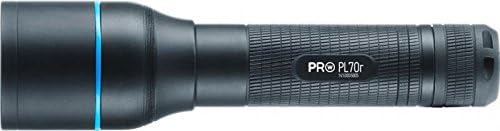
ภาพที่ 4.2: ด้านข้าง view of the Walther PRO PL70R LED Flashlight, highlighting its compact and ergonomic design. The tail cap, where batteries are inserted, is visible at the end.
4.2 Charging the 18650 Battery
To charge the included ICR 18650 rechargeable battery:
- Remove the 18650 battery from the flashlight.
- Place the battery into the USB charger.
- Connect the USB charging cable to the charger and then to either the AC power adapter (for wall outlet charging) or the USB car charging adapter (for vehicle charging).
- ไฟแสดงสถานะบนเครื่องชาร์จจะแสดงสถานะการชาร์จ (เช่น สีแดงคือกำลังชาร์จ สีเขียวคือชาร์จเต็ม)
- เมื่อชาร์จเต็มแล้ว ให้ถอดที่ชาร์จและนำแบตเตอรี่ออก
5. คู่มือการใช้งาน
5.1 เปิด/ปิดเครื่อง
กดปุ่มเปิด/ปิดที่อยู่ด้านท้ายไฟฉายเพื่อเปิดหรือปิดไฟฉาย
5.2 Light Modes (Brightness Levels)
The Walther PRO PL70R features three brightness levels: 100%, 40%, and 10%.
- With the flashlight on, lightly press the power button (without clicking) to cycle through the brightness modes.
- A full click will turn the flashlight off.
5.3 Beam Adjustment System (BAS)
The Beam Adjustment System allows you to focus the light beam from a wide floodlight to a narrow spotlight.
- To adjust the beam, simply slide the head of the flashlight forward or backward.
- Sliding forward typically narrows the beam for long-distance illumination, while sliding backward widens it for broader area lighting.
5.4 Tactical Defence Strobe (TDS) Mode
The Tactical Defence Strobe mode provides a disorienting flashing light for tactical situations.
- To activate the strobe mode, rapidly double-press the power button from the OFF position.
- Press the power button again to turn off the strobe.
6. การบำรุงรักษา
6.1 การทำความสะอาด
- เช็ดตัวไฟฉายด้วยผ้านุ่มๆamp ผ้า.
- For the lens, use a lens cleaning cloth and solution to avoid scratches.
- ห้ามใช้น้ำยาทำความสะอาดที่มีฤทธิ์กัดกร่อนหรือตัวทำละลาย
6.2 การดูแลและจัดเก็บแบตเตอรี่
- If the flashlight will not be used for an extended period, remove the batteries to prevent potential leakage and damage.
- เก็บแบตเตอรี่ไว้ในที่แห้งและเย็น
- Recharge the 18650 battery regularly, even if not in use, to maintain its lifespan.
7 การแก้ไขปัญหา
| ปัญหา | สาเหตุที่เป็นไปได้ | สารละลาย |
|---|---|---|
| ไฟฉายไม่ติด | Low or depleted battery. Incorrect battery installation. Loose tail cap. | Charge or replace battery. Ensure battery is inserted with correct polarity. Tighten tail cap securely. |
| แสงที่ออกมาสลัว | แบตเตอรี่เหลือน้อย เลนส์สกปรก | Recharge or replace battery. Clean the lens. |
| Beam adjustment is stiff. | สิ่งสกปรกหรือเศษผงติดอยู่ในกลไกการเลื่อน | Clean the sliding parts of the flashlight head. Avoid forcing the mechanism. |
| ไฟฉายกระพริบ | Loose battery connection. Low battery. | Ensure battery is securely installed. Recharge or replace battery. |
8. ข้อมูลจำเพาะ
| คุณสมบัติ | รายละเอียด |
|---|---|
| ยี่ห้อ | Walther |
| แบบอย่าง | พีแอล70อาร์ |
| แหล่งกำเนิดแสง | นำ |
| ความสว่างสูงสุด | 910 Lumens (100% mode) |
| โหมดความสว่าง | 910 lm (100%), 365 lm (40%), 90 lm (10%) |
| รันไทม์ | 1h 50min (100%), 4h 30min (40%), 18h (10%) |
| ระยะลำแสง | 205 m (100%), 150 m (40%), 85 m (10%) |
| ความยาว | 143 มม. |
| น้ำหนัก | 142 กรัม |
| วัสดุ | อลูมิเนียม |
| แหล่งพลังงาน | Battery powered (ICR 18650 or 3x AAA) |
| ประเภทแบตเตอรี่ | ลิเธียมไอออน (18650) |
| เล่มที่tage | 3.7 โวลต์ |
| ระดับการกันน้ำ | กันน้ำ |
| คุณสมบัติพิเศษ | Beam Adjustment System (BAS), Multiple Power Sources, Tactical Defence Strobe (TDS) Mode |
9. การรับประกันและการสนับสนุน
Walther products are manufactured to high-quality standards. For information regarding warranty coverage, please refer to the warranty card included with your product or visit the official Walther webเว็บไซต์.
For technical support, spare parts, or service inquiries, please contact your local authorized Walther dealer or the customer service department. Keep your purchase receipt as proof of purchase for any warranty claims.