
การแนะนำ
This manual provides essential information for the safe and efficient use of your Sharp LC-48LE653U 48-Inch 1080p 60Hz Smart LED TV. Please read these instructions thoroughly before operating the television and retain them for future reference. This television offers reliable performance with AquoMotion 120 technology for smooth motion, reduced blur, and access to SmartCentral Apps for various streaming services. It features an ultra-narrow bezel, a sleek modern design, Wallpaper Mode, three HDMI inputs (including MHL support), and built-in 20W audio.
มีอะไรอยู่ในกล่อง
ตรวจสอบว่าส่วนประกอบทั้งหมดมีอยู่ก่อนดำเนินการติดตั้ง
- Sharp LC-48LE653U 48-Inch Smart LED TV
- รีโมทคอนโทรล
- แท่นวางทีวี
- แบตเตอรี่ AA (2)
- สายไฟ
- เอกสารประกอบ (คู่มือเริ่มต้นใช้งานฉบับย่อ, ใบรับประกัน)
การตั้งค่า
1. การแกะกล่องและการจัดวาง
Carefully remove the television from its packaging. Place the TV on a stable, level surface or mount it on a wall using a compatible VESA mount (sold separately). Ensure adequate ventilation around the television.
2. การติดตั้งขาตั้ง
If using the included stand, align the stand with the mounting holes on the bottom of the TV. Secure it with the provided screws. Refer to the diagram below for proper orientation.

Figure 1: Television with stand and dimensions (10.55"D x 42.56"W x 26.28"H).
3. อุปกรณ์เชื่อมต่อ
Connect your external devices (e.g., cable box, Blu-ray player, gaming console) to the appropriate ports on the back or side of the TV. The TV features 3 HDMI inputs (one with MHL support), 1 USB port, and component/composite video inputs.

Figure 2: Detail of TV input ports.
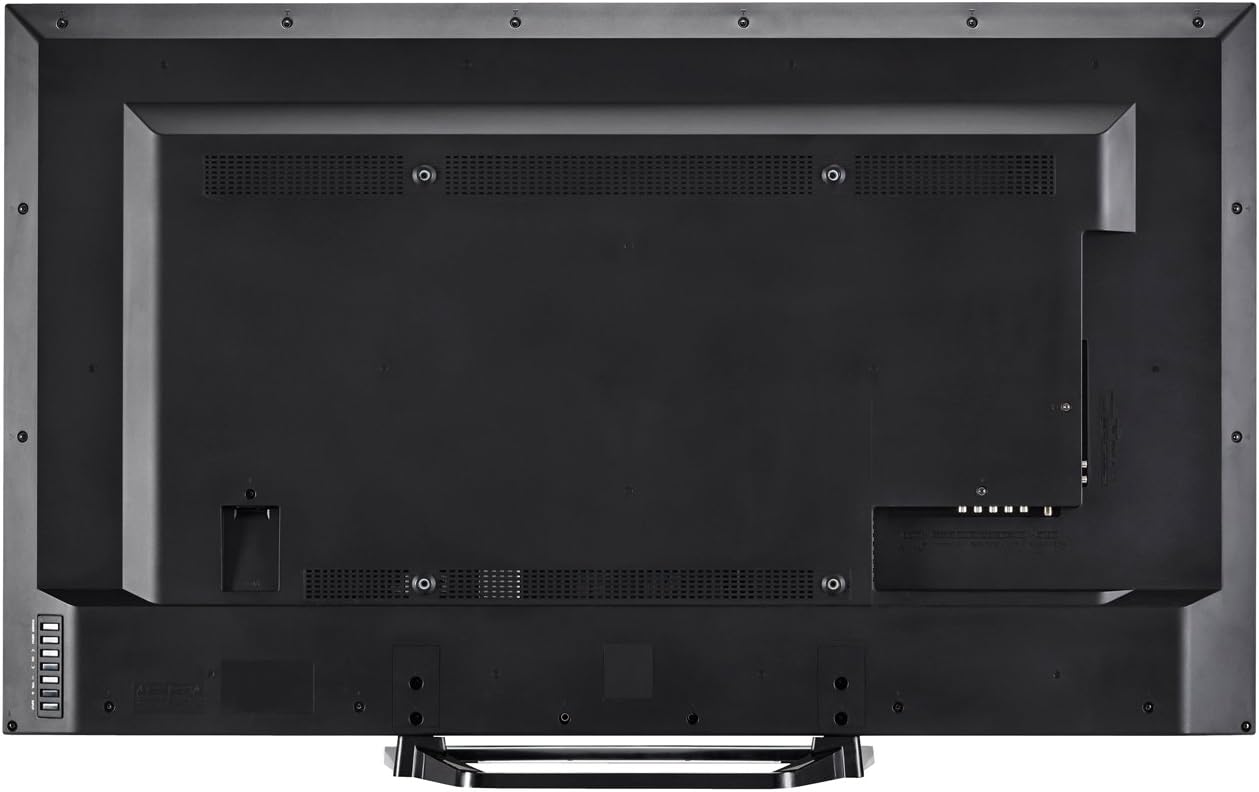
รูปที่ 3: ด้านหลัง view of the television with all connections.
4. การเชื่อมต่อไฟฟ้า
Plug the power cord into the TV's power input, then into a standard electrical outlet (110 VAC, 60 Hz).
5. ตัวช่วยเปิดเครื่องและการตั้งค่าเบื้องต้น
Press the Power button on the TV or remote control. Follow the on-screen instructions to complete the initial setup, including language selection, network connection (Wi-Fi or Ethernet), and channel scanning.
คำแนะนำการใช้งาน
1. ฟังก์ชั่นการควบคุมระยะไกล
The included remote control allows you to navigate menus, change channels, adjust volume, and access smart features. Insert the two AA batteries into the remote control, observing polarity.

รูปที่ 4: แผนผังการจัดวางรีโมทคอนโทรล
- พลัง: เปิดหรือปิดทีวี
- ป้อนข้อมูล: Selects the input source (HDMI, Component, etc.).
- ปริมาณ (+/-): ปรับระดับเสียง
- ช่องสัญญาณ (CH +/-): เปลี่ยนช่อง
- ปราดเปรื่อง: Accesses SmartCentral Apps.
- เมนู: Opens the main settings menu.
- ปุ่มนำทาง (ขึ้น/ลง/ซ้าย/ขวา/Enter): นำทางเมนูและยืนยันการเลือก
- Netflix, YouTube, Pandora, Vudu: ปุ่มเฉพาะสำหรับการเข้าถึงบริการสตรีมมิ่งเหล่านี้อย่างรวดเร็ว
2. SmartCentral Apps
Your Sharp Smart LED TV comes with built-in Wi-Fi and SmartCentral Apps, providing access to popular streaming services and a web browser. Press the 'Smart' button on your remote or select the SmartCentral Apps icon from the home screen.

Figure 5: SmartCentral Apps Interface.
- การเข้าถึงแอป: Use the navigation buttons on the remote to select and launch applications like Netflix, Hulu Plus, Pandora, Vudu, and YouTube.
- Web เบราว์เซอร์: ใช้บิวท์อิน web เบราว์เซอร์สำหรับท่องอินเทอร์เน็ตทั่วไป
- การเชื่อมต่อเครือข่าย: Ensure your TV is connected to a stable internet connection via Wi-Fi or Ethernet for optimal Smart TV functionality.
3. การตั้งค่าภาพและเสียง
Access the TV's menu to customize picture and sound settings. Adjust brightness, contrast, color, and sharpness for picture quality. For audio, select sound modes or adjust bass/treble settings.
4. Wallpaper Mode
When the TV is turned off, Wallpaper Mode allows it to display virtually any image, transforming your TV into a large-format display for photos or artwork. Configure this feature through the TV's settings menu.
การซ่อมบำรุง
1. การทำความสะอาดหน้าจอ
เช็ดหน้าจอเบาๆ ด้วยผ้านุ่ม แห้ง และไม่เป็นขุย สำหรับรอยฝังแน่น ให้เช็ดเบาๆampเช็ดผ้าด้วยน้ำหรือน้ำยาทำความสะอาดหน้าจอโดยเฉพาะ หลีกเลี่ยงสารเคมีรุนแรงหรือวัสดุที่มีฤทธิ์กัดกร่อน
2. การทำความสะอาดตู้
เช็ดตู้ทีวีด้วยผ้านุ่มและแห้ง ห้ามใช้น้ำยาทำความสะอาดกับตู้ทีวีโดยตรง
3. การอัปเดตซอฟต์แวร์
Periodically check for software updates through the TV's settings menu to ensure optimal performance and access to the latest features. A stable internet connection is required for updates.
การแก้ไขปัญหา
หากคุณประสบปัญหาเกี่ยวกับโทรทัศน์ โปรดดูวิธีแก้ไขทั่วไปต่อไปนี้:
- ไม่มีไฟฟ้า: Ensure the power cord is securely plugged into both the TV and the electrical outlet. Test the outlet with another device.
- ไม่มีภาพ/เสียง: Verify the correct input source is selected. Check all cable connections to external devices. If using an antenna, ensure it is properly connected and channels are scanned.
- No Sound (intermittent): If sound occasionally cuts out, try unplugging the TV from the power outlet for a few minutes, then plugging it back in. This can reset internal components.
- คุณภาพภาพไม่ดี: ปรับการตั้งค่าภาพ (ความสว่าง คอนทราสต์ ความคมชัด) ตรวจสอบให้แน่ใจว่าแหล่งสัญญาณอินพุตให้สัญญาณคุณภาพสูง
- ปัญหาการเชื่อมต่อเครือข่าย: Check your Wi-Fi router or Ethernet cable connection. Restart your router and the TV. Ensure Wi-Fi settings on the TV are correctly configured.
- รีโมทคอนโทรลไม่ทำงาน: เปลี่ยนแบตเตอรี่ ตรวจสอบให้แน่ใจว่าไม่มีสิ่งกีดขวางระหว่างรีโมทและเซ็นเซอร์อินฟราเรดของทีวี
หากปัญหายังคงอยู่ โปรดติดต่อฝ่ายบริการลูกค้าของ Sharp
ข้อมูลจำเพาะ
| คุณสมบัติ | ข้อมูลจำเพาะ |
|---|---|
| หมายเลขรุ่น | LC-48LE653U |
| ขนาดหน้าจอ | 48 นิ้ว |
| เทคโนโลยีการแสดงผล | จอแอลซีดีพร้อมไฟพื้นหลัง LED |
| ปณิธาน | 1080p (1920 x 1080) |
| อัตราการรีเฟรช | 60 Hz (AquoMotion 120) |
| การเชื่อมต่อ | Built-in Wi-Fi, Ethernet |
| พอร์ต HDMI | 3 (one with MHL) |
| พอร์ต USB | 1 |
| บริการอินเทอร์เน็ตที่รองรับ | Hulu Plus, Netflix, Pandora, Vudu, YouTube |
| กำลังขับเสียง | 20 วัตต์ |
| ขนาดสินค้า (ลึก x กว้าง x สูง) | 10.55" x 42.56" x 26.28" |
| น้ำหนักสินค้า | 21 ปอนด์ |
| เล่มที่tage | 110 VAC 60 เฮิร์ตซ์ |
ข้อมูลการรับประกัน
This Sharp LC-48LE653U television is covered by a รับประกันจำกัด 1 ปี from the date of purchase. This warranty covers manufacturing defects in materials and workmanship under normal use. It does not cover damage caused by misuse, accidents, unauthorized modifications, or external causes. Please retain your proof of purchase for warranty claims.
สนับสนุน
For technical assistance, troubleshooting beyond this manual, or warranty service, please contact Sharp customer support. Refer to the contact information provided in your product documentation or visit the official Sharp webเว็บไซต์.
การสนับสนุนทางออนไลน์: www.sharpusa.com/support
การสนับสนุนทางโทรศัพท์: Refer to your warranty card or Sharp's official webเว็บไซต์สำหรับหมายเลขติดต่อปัจจุบันที่สุด