
Clarity D702 + (1) D702HS
คู่มือการใช้งานโทรศัพท์ไร้สาย Clarity D702
Model: D702 + (1) D702HS
การแนะนำ
This manual provides comprehensive instructions for the setup, operation, and maintenance of your Clarity D702 Cordless Phone system. Designed for individuals with moderate hearing loss, this phone utilizes DECT 6.0 technology to deliver clear, interference-free communication. Please read this manual thoroughly before using your phone.
เนื้อหาแพ็คเกจ
ตรวจสอบว่ามีรายการทั้งหมดอยู่ในแพ็คเกจของคุณ:
- Clarity D702 Base Unit
- Clarity D702 Handset
- Clarity D702HS Expandable Handset (if included in your package)
- อะแดปเตอร์ AC
- สายโทรศัพท์
- Rechargeable Batteries (for handset)
- คู่มือการใช้งาน (เอกสารนี้)
การตั้งค่า
1. การติดตั้งแบตเตอรี่
The handset requires 4 AA batteries (included). Ensure correct polarity when inserting the batteries into the handset's battery compartment.
2. การเชื่อมต่อหน่วยฐาน
- เชื่อมต่อปลายด้านหนึ่งของสายโทรศัพท์เข้ากับแจ็ค TEL LINE บนฐานยูนิต
- ต่อปลายอีกด้านของสายโทรศัพท์เข้ากับเต้ารับโทรศัพท์ที่ผนัง
- Connect the AC power adapter to the POWER jack on the base unit.
- เสียบอะแดปเตอร์แปลงไฟ AC เข้ากับเต้ารับไฟฟ้ามาตรฐาน
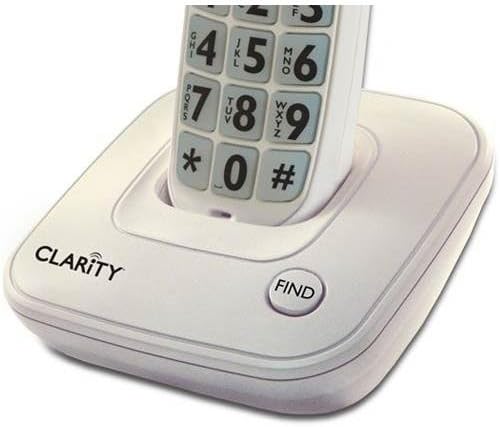 Image: The Clarity D702 cordless phone handset resting in its charging base. The base features the "CLARITY" brand logo and a "FIND" button. The handset displays large, easy-to-read numeric keypad buttons.
3. การชาร์จเครื่อง
Place the handset in the base unit. The charge indicator light on the handset should illuminate, indicating that it is charging. Allow the handset to charge for at least 12 hours before initial use to ensure optimal battery performance.
คำแนะนำการใช้งาน
การโทรออก
- ยกหูโทรศัพท์หรือกดปุ่ม พูดคุย ปุ่ม.
- Dial the desired phone number using the large, backlit keypad.
- กดปุ่ม พูดคุย button again or place the handset back in the base to end the call.
การรับสายโทรศัพท์
เมื่อโทรศัพท์ดัง ให้หยิบหูโทรศัพท์ขึ้นมาหรือกดปุ่ม พูดคุย ปุ่ม.
ปรับระดับเสียงและโทน
During a call, use the volume control buttons on the side of the handset to adjust the listening volume. The phone offers four (4) tone settings to customize your listening experience. Refer to the handset's menu for tone adjustment options.
การใช้สปีกเกอร์โฟน
หากต้องการเปิดใช้งานลำโพงระหว่างการโทร ให้กดปุ่ม ผู้พูด ปุ่มนี้ กดอีกครั้งเพื่อกลับสู่โหมดโทรศัพท์มือถือ
การระบุหมายเลขผู้โทร
The large font and high contrast caller ID screen displays incoming call information. The keypad and CID display also light up as a super bright visual ringer.
Finding a Lost Handset
หากคุณวางโทรศัพท์หาย ให้กดปุ่ม หา button on the base unit. The handset will emit a paging tone.
การซ่อมบำรุง
- Clean the phone surfaces with a soft, damp ผ้า ห้ามใช้สารทำความสะอาดที่มีฤทธิ์กัดกร่อนหรือตัวทำละลาย
- หลีกเลี่ยงการให้โทรศัพท์สัมผัสกับความชื้นมากเกินไป แสงแดดโดยตรง หรืออุณหภูมิที่สูงหรือต่ำเกินไป
- Ensure the handset's charging contacts are clean for proper charging.
การแก้ไขปัญหา
| ปัญหา | สาเหตุที่เป็นไปได้ | สารละลาย |
|---|---|---|
| ไม่มีเสียงสัญญาณโทรศัพท์ | สายโทรศัพท์ถูกตัดการเชื่อมต่อ | ตรวจสอบให้แน่ใจว่าสายโทรศัพท์เชื่อมต่อกับตัวเครื่องหลักและเต้ารับที่ผนังอย่างแน่นหนาแล้ว |
| โทรศัพท์ไม่ชาร์จ | Handset not properly seated in base; dirty charging contacts. | Reseat the handset in the base. Clean the charging contacts on both the handset and base with a dry cloth. |
| คุณภาพเสียงไม่ดี / สัญญาณรบกวน | สัญญาณรบกวนจากอุปกรณ์อิเล็กทรอนิกส์อื่นๆ; โทรศัพท์มือถืออยู่ห่างจากฐานมากเกินไป | Move the base unit away from other electronic devices. Ensure the handset is within range of the base. |
| Handset not ringing | Ringer volume is off or set too low. | Adjust the ringer volume setting on the handset. |
ข้อมูลจำเพาะ
- แบบอย่าง: D702 + (1) D702HS
- ยี่ห้อ: ความชัดเจน
- ขนาด (หน่วยฐาน): 9.1 x 7.7 x 5.8 นิ้ว
- น้ำหนักสินค้า: 2.6 ปอนด์
- ประเภทโทรศัพท์: ไร้สาย
- เทคโนโลยี: DECT6.0 ภาษาไทย
- แหล่งพลังงาน: สายไฟ
- แบตเตอรี่: 4 AA batteries (for handset)
- สี: สีขาวขุ่น
- วัสดุ: พลาสติก
- ระบบตอบรับ: ดิจิตอล