
1. บทนำ
The Aputure Amaran HR672S is a high-performance LED video light panel designed for professional photography and videography. Featuring a high Color Rendering Index (CRI) of 95+, it ensures accurate and vibrant color reproduction. This light panel operates at a fixed color temperature of 5500K, providing a daylight-balanced output. It includes a wireless remote control for convenient adjustments and can be powered by either an AC adapter or NP-F series batteries.
2. ข้อมูลด้านความปลอดภัย
- Do not operate the light panel with wet hands or in damp สภาพแวดล้อม
- ตรวจสอบแหล่งจ่ายไฟ voltagตรงตามข้อกำหนดของผลิตภัณฑ์ (110-240V)
- Avoid direct eye exposure to the LED light, as it can cause discomfort or damage.
- Keep the light panel away from flammable materials.
- Do not disassemble or modify the product. Refer servicing to qualified personnel.
- Always use the provided power adapter and recommended batteries.
- ตรวจสอบให้แน่ใจว่ามีการระบายอากาศที่เหมาะสมระหว่างการทำงานเพื่อป้องกันความร้อนสูงเกินไป
3. เนื้อหาบรรจุภัณฑ์
ตรวจสอบว่ารายการทั้งหมดที่ระบุไว้ด้านล่างนี้รวมอยู่ในแพ็คเกจของคุณ:
- 1 x Aputure Amaran HR672S LED Light Panel
- 1 x รีโมทคอนโทรลไร้สาย
- 1 x Power Adapter (AC 110-240V to DC 15V)
- 1 x Light Bracket with 1/4 to 3/8 Screw
- 1 x White Diffusion Filter
- 1 x Orange Diffusion Filter
- 1 x กระเป๋าใส่ของ
- 1 x คู่มือผู้ใช้ (ภาษาอังกฤษ)
- 2 x NP-F970 Batteries (if included in specific kit)
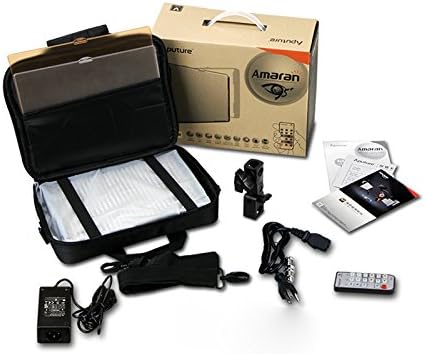
Image: All components included in the Aputure Amaran HR672S LED Video Light Panel package, neatly arranged.
4. สินค้าหมดview
4.1 ด้านหน้า View
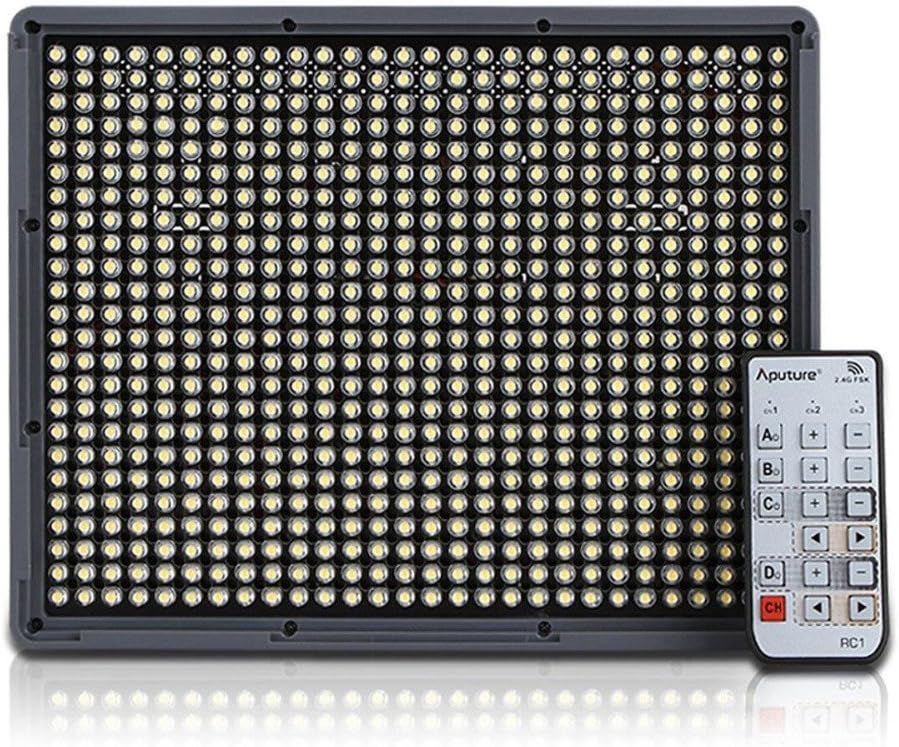
Image: The front face of the Aputure Amaran HR672S LED light panel, showing the array of 672 LED bulbs.
4.2 Back Panel Controls and Battery Slots

Image: The rear of the light panel, displaying the digital display, power switch, dimmer knob, channel/group buttons, and dual NP-F battery slots.
4.3 Diffusion Filter Installation

Image: A hand demonstrating the process of sliding a diffusion filter into the designated slot on the light panel.
5. การตั้งค่า
5.1 การติดตั้งแผงไฟ
- Attach the provided light bracket to the 1/4-inch screw thread at the bottom of the HR672S light panel.
- Secure the light bracket onto a standard light stand or tripod using the 1/4-inch or 3/8-inch screw adapter. Tighten securely.
- Adjust the angle of the light panel using the tilt mechanism on the bracket.
5.2 Powering the Light Panel
The HR672S can be powered in two ways:
- ไฟฟ้ากระแสสลับ: Connect the DC 15V power adapter to the DC input port on the back of the light panel. Plug the adapter into a suitable wall outlet (110-240V).
- พลังงานแบตเตอรี่: Insert two fully charged NP-F series batteries (e.g., NP-F970) into the battery slots on the back of the light panel. Ensure they click into place. The light will automatically draw power from the batteries when AC power is not connected or is interrupted.
5.3 Attaching Diffusion Filters
Slide either the white or orange diffusion filter into the grooves on the front of the light panel. The white filter provides softer light, while the orange filter can be used for color correction or creative effects.
6. การดำเนินการ
6.1 เปิด/ปิดเครื่อง
Locate the power switch on the back of the light panel. Flip it to the 'ON' position to power on the device. Flip it to 'OFF' to power off.
6.2 การปรับความสว่าง
Rotate the dimmer knob on the back panel to adjust the light intensity. The brightness level will be displayed on the digital screen.
6.3 การใช้งานรีโมทคอนโทรลไร้สาย
The HR672S comes with a 2.4GHz wireless remote control for convenient operation.
- การตั้งค่าช่อง: Press the 'Channel' button on the light panel to cycle through available channels (1-3). Ensure the remote control is set to the same channel.
- การตั้งค่ากลุ่ม: Press the 'Group' button on the light panel to assign it to a group (A, B, C, D). The remote control can then control lights assigned to specific groups or all groups simultaneously.
- การทำงานระยะไกล: Use the corresponding buttons on the remote to power on/off, adjust brightness, and select channels/groups.
6.4 อุณหภูมิสี
The Aputure Amaran HR672S has a fixed color temperature of 5500K. No adjustment is needed or possible for color temperature on this model.
7. การบำรุงรักษา
- การทำความสะอาด: Use a soft, dry cloth to clean the light panel. Do not use abrasive cleaners or solvents.
- พื้นที่จัดเก็บ: เมื่อไม่ใช้งาน ให้เก็บแผงไฟไว้ในกระเป๋าสำหรับพกพาในที่แห้งและเย็น หลีกเลี่ยงแสงแดดโดยตรงและความชื้น
- การดูแลแบตเตอรี่ If using batteries, remove them if the light will not be used for an extended period. Store batteries in a cool, dry place.
- การตรวจสอบสายเคเบิล: Regularly inspect power cables and connections for any signs of damage. Replace damaged cables immediately.
8 การแก้ไขปัญหา
| ปัญหา | สาเหตุที่เป็นไปได้ | สารละลาย |
|---|---|---|
| ไฟไม่ติด | No power supply; Batteries depleted; Power switch off | Check AC adapter connection; Replace/recharge batteries; Ensure power switch is 'ON' |
| รีโมตคอนโทรลไม่ทำงาน | Incorrect channel/group; Remote battery depleted; Obstruction | Match channel/group on light and remote; Replace remote battery; Ensure clear line of sight |
| ไฟกระพริบ | Unstable power; Faulty connection; Overheating | Ensure stable power source; Check all cable connections; Allow light to cool down |
| Light output is too harsh | No diffusion filter used | Attach the white diffusion filter to soften the light |
9. ข้อมูลจำเพาะ
| คุณสมบัติ | รายละเอียด |
|---|---|
| แบบอย่าง | Amaran HR672S |
| ซีอาร์ไอ | 95 ปีขึ้นไป |
| พลัง | 45วัตต์ |
| มุมลำแสง | 25 องศา |
| อุณหภูมิสี | 5500K |
| กำลังไฟเข้า | ไฟฟ้ากระแสสลับ 110-240 โวลต์ |
| แหล่งจ่ายไฟ | กระแสตรง 15 โวลต์ |
| ความถี่ระยะไกล | 2.4กิกะเฮิรตซ์ |
| ช่องสัญญาณระยะไกล | 3 |
| Remote Groups | 4 (A/B/C/D) |
| Luminous Flux (0.5m) | 18800 ลักซ์ |
| Luminous Flux (1m) | 6040 ลักซ์ |
| น้ำหนักสินค้า | 4 ปอนด์ (ประมาณ 1.81 กก.) |
| ขนาดแพ็คเกจ | 10.9 x 8.8 x 4.8 นิ้ว (ประมาณ 27.7 x 22.4 x 12.2 ซม.) |
| แบตเตอรี่ที่จำเป็น | 2 Lithium Ion (NP-F series) |
10. การรับประกันและการสนับสนุน
Aputure products are covered by a limited warranty. For specific warranty terms and conditions, please refer to the warranty card included with your product or visit the official Aputure website. For technical support, troubleshooting assistance, or service inquiries, please contact Aputure customer support through their official channels.
แหล่งข้อมูลออนไลน์:
- Official Aputure Webเว็บไซต์: www.aputure.com
- หน้าข้อมูลการสนับสนุนผลิตภัณฑ์: โปรดดูที่เว็บไซต์อย่างเป็นทางการ website for specific product support pages.