
1. สินค้าหมดview
The Mophie Powerstation Plus 2X is a portable power bank designed to provide on-the-go charging for your electronic devices. Equipped with a 5,000 mAh internal battery, it ensures your devices remain charged and ready when traditional power outlets are unavailable. This powerstation features an integrated Micro USB cable for convenient charging of compatible devices.
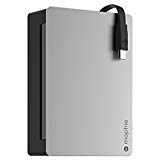
ภาพที่ 1.1: ด้านหน้า view of the Mophie Powerstation Plus 2X portable charger, showcasinด้วยดีไซน์ที่กะทัดรัดและสายเคเบิลแบบรวมอยู่ในตัว
2. เนื้อหาบรรจุภัณฑ์
โปรดตรวจสอบว่าสินค้าทั้งหมดมีอยู่ในแพ็คเกจของคุณ:
- Mophie Powerstation Plus 2X Portable Charger
- Integrated Micro USB Charging Cable
- คู่มือการใช้งาน (เอกสารนี้)
3. การตั้งค่า
3.1 การชาร์จพลังงานเบื้องต้นของสถานีไฟฟ้า
Before first use, fully charge your Mophie Powerstation Plus 2X. This ensures optimal battery performance.
- Connect the integrated Micro USB cable to a compatible USB power adapter (not included) or a computer's USB port.
- เสียบอะแดปเตอร์แปลงไฟ USB เข้ากับเต้ารับติดผนัง
- The LED indicator lights on the powerstation will illuminate, indicating the charging status. All lights will be solid when fully charged.
บันทึก: การชาร์จจนเต็มอาจใช้เวลาหลายชั่วโมง ขึ้นอยู่กับแหล่งจ่ายไฟ
4. คู่มือการใช้งาน
4.1 การชาร์จอุปกรณ์ของคุณ
To charge your mobile device using the Powerstation Plus 2X:
- Locate the integrated Micro USB cable on the Powerstation.
- Connect the Micro USB connector to your compatible device's charging port.
- The Powerstation should automatically begin charging your device. If not, press the power button on the Powerstation once to initiate charging.
- Monitor your device's screen to confirm it is charging.
บันทึก: The Powerstation is designed to provide power to devices that accept Micro USB input. For other devices, an appropriate adapter or cable (not included) may be required if the Powerstation has an additional USB-A output port.
4.2 การตรวจสอบระดับแบตเตอรี่
To check the remaining battery charge of your Powerstation:
- Press the power button on the Powerstation once.
- The LED indicator lights will illuminate, showing the current charge level.
5. ไฟ LED แสดงสถานะ
The LED lights on your Mophie Powerstation Plus 2X provide information about its battery status:
- ไฟส่องสว่างแบบทึบ: Indicate the current charge level. More solid lights mean more charge.
- ไฟกระพริบ: Indicate that the Powerstation is currently charging. The number of flashing lights corresponds to the charge level being reached.
- ไม่มีไฟ: The Powerstation is either off, fully discharged, or not actively charging/being charged.
6. การบำรุงรักษา
Proper care will extend the life of your Powerstation Plus 2X:
- การทำความสะอาด: Use a soft, lint-free cloth to wipe the surface of the Powerstation. Avoid abrasive cleaners or solvents.
- พื้นที่จัดเก็บ: Store the Powerstation in a cool, dry place away from direct sunlight and extreme temperatures. For long-term storage, ensure the battery is charged to approximately 50%.
- การดูแลแบตเตอรี่ To maintain battery health, fully charge and discharge the Powerstation at least once every three months if not in regular use.
7 การแก้ไขปัญหา
If you encounter issues with your Mophie Powerstation Plus 2X, refer to the following common solutions:
- พาวเวอร์สเตชั่นไม่ชาร์จไฟ: Ensure the charging cable is securely connected to both the Powerstation and the power source. Try a different USB power adapter or wall outlet.
- Device not charging from Powerstation: Ensure your device is compatible with Micro USB input. Check that the integrated cable is fully inserted into your device. Press the power button on the Powerstation to activate charging.
- การชาร์จช้า: Ensure you are using a high-quality USB power adapter for charging the Powerstation. For charging your device, ensure the device's charging port is clean and the cable is not damaged.
- No LED lights: The Powerstation may be fully discharged. Connect it to a power source and allow it to charge for at least 30 minutes before checking the lights again.
If problems persist, contact Mophie customer support for further assistance.
8. ข้อมูลจำเพาะ
| คุณสมบัติ | ข้อมูลจำเพาะ |
|---|---|
| หมายเลขรุ่น | 2942_PWRSTION-5C |
| ความจุของแบตเตอรี่ | 5,000 มิลลิแอมป์ |
| น้ำหนักสินค้า | 3.2 ออนซ์ (0.2 ปอนด์) |
| ขนาดแพ็คเกจ | 8.27 x 4.49 x 1.18 นิ้ว |
| เทคโนโลยีการเชื่อมต่อ | ยูเอสบี |
| อินเทอร์เฟซฮาร์ดดิสก์ | ยูเอสบี 1.1 |
| ยูพีซี | 810472029429 |
| ผู้ผลิต | โมฟี่ |
| วันที่พร้อมใช้งานครั้งแรก | วันที่ 12 ธันวาคม 2014 |
9. ข้อมูลด้านความปลอดภัย
Please read and follow these safety guidelines to prevent damage to your Powerstation Plus 2X or injury:
- Do not expose the Powerstation to extreme temperatures (above 45°C or below 0°C).
- Do not expose to moisture or immerse in water.
- Do not attempt to disassemble, open, or service the Powerstation.
- เก็บให้ห่างจากเด็ก
- Dispose of the Powerstation responsibly according to local regulations for battery disposal.
- Avoid dropping or subjecting the Powerstation to strong impacts.
10. การรับประกันและการสนับสนุน
For warranty information, technical support, or to register your product, please visit the official Mophie webหรือติดต่อฝ่ายบริการลูกค้า โปรดเก็บหลักฐานการซื้อไว้เพื่อใช้ในการเคลมประกัน
Mophie Official Webเว็บไซต์: www.mophie.com


