
1. สินค้าหมดview
The Leitz 5523 Stark NeXXt Flat Clinch Stapler is a robust and efficient office tool designed for precise stapling. It features advanced Direct Impact Technology for consistent, perfect stapling and a flat clinch mechanism that reduces staple bulk by up to 30%, optimizing space in your documents and files. This stapler is capable of binding up to 40 sheets of paper and is compatible with Leitz 24/6, 24/8, and 26/6 staples.

Image 1.1: Leitz 5523 Stark NeXXt Flat Clinch Stapler shown with compatible staple boxes.
2. การตั้งค่าและการใส่ลวดเย็บกระดาษ
Follow these steps to load staples into your Leitz 5523 stapler:
- เปิดเครื่องเย็บกระดาษ: Gently press the release button (if present) or lift the top arm of the stapler upwards until the staple magazine is exposed.
- ใส่ลวดเย็บกระดาษ: Place a strip of compatible Leitz staples (24/6, 24/8, or 26/6) into the staple magazine. Ensure the staples are facing the correct direction.
- ปิดเครื่องเย็บกระดาษ: Push the top arm back down until it securely clicks into place.
- Check Staple Level: The stapler features a staple level indicator to show when staples are running low.
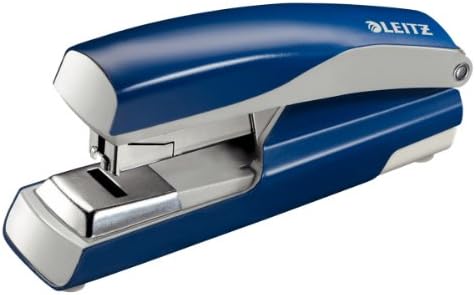
Image 2.1: The Leitz 5523 Stark NeXXt Flat Clinch Stapler in its closed position, ready for use.
3. คู่มือการใช้งาน
To staple documents with your Leitz 5523 stapler:
- เตรียมเอกสาร: Gather the papers you wish to staple and align them neatly. The stapler can handle up to 40 sheets of standard paper.
- เอกสารประกอบการสมัครงาน: Slide the aligned documents under the stapler head to the desired stapling depth. The maximum insertion depth is 40 mm.
- แก่น: Press down firmly and evenly on the stapler arm until the stapling mechanism completes its cycle. The Direct Impact Technology ensures a perfect staple every time.
- Flat Clinch: The flat clinch mechanism will fold the staple ends flat against the paper, creating a neat finish and reducing the thickness of your stapled documents.
4. การบำรุงรักษา
Proper maintenance ensures the longevity and optimal performance of your stapler:
- การทำความสะอาด: ควรเช็ดทำความสะอาดภายนอกของเครื่องเย็บกระดาษด้วยผ้าแห้งเนื้อนุ่มเป็นระยะ เพื่อกำจัดฝุ่นและสิ่งสกปรก หลีกเลี่ยงการใช้สารเคมีรุนแรงหรือน้ำยาทำความสะอาดที่มีฤทธิ์กัดกร่อน
- ความเข้ากันได้ของลวดเย็บกระดาษ: Always use genuine Leitz staples (24/6, 24/8, or 26/6) for best results and to maintain warranty validity.
- พื้นที่จัดเก็บ: ควรเก็บเครื่องเย็บกระดาษไว้ในที่สะอาดและแห้งเมื่อไม่ได้ใช้งาน
5 การแก้ไขปัญหา
If you encounter issues with your stapler, refer to the following common problems and solutions:
- แม็กติด:
- Open the stapler arm and carefully remove any jammed staples or paper fragments from the magazine.
- Ensure the staple magazine is clear before reloading with a fresh strip of staples.
- Staples Not Penetrating Paper:
- Check that you are using the correct staple size (24/6, 24/8, or 26/6) for the number of sheets.
- Ensure you are not exceeding the maximum stapling capacity of 40 sheets.
- Apply firm and even pressure when pressing the stapler arm.
- Staples Misfiring or Bending:
- Verify that the staples are loaded correctly and are not bent or damaged.
- Ensure the staple magazine is neither overfilled nor underfilled.
- Use only genuine Leitz staples for optimal performance.
6. ข้อมูลจำเพาะผลิตภัณฑ์
| หมายเลขรุ่น | 5523 |
| ความจุเย็บเล่ม | สามารถพิมพ์ได้สูงสุด 40 แผ่น (กระดาษ 80 แกรม) |
| ลวดเย็บกระดาษที่เข้ากันได้ | Leitz 24/6, 24/8, 26/6 |
| ความจุแม็กกาซีนแบบเย็บกระดาษ | 100 x 24/6, 100 x 24/8, or 140 x 26/6 |
| ความลึกของการแทรก | 40 มม. |
| วัสดุ | Metal with plastic elements and non-slip plastic feet |
| สี | สีฟ้า |
| ขนาด (แพ็คเกจ) | 14.4 x 7 x 5.8 ซม. |
| น้ำหนัก (แพ็คเกจ) | 479.99 กรัม |
7. ข้อมูลการรับประกัน
The Leitz 5523 Stark NeXXt Flat Clinch Stapler is backed by a รับประกัน 10 ปี. This warranty is valid exclusively when using genuine Leitz brand staples. The product is also GS certified, indicating compliance with German safety standards.
โปรดเก็บหลักฐานการซื้อไว้เพื่อใช้ในกรณีเรียกร้องการรับประกัน
8. การสนับสนุนลูกค้า
For further assistance, technical support, or inquiries regarding your Leitz 5523 Stark NeXXt Flat Clinch Stapler, please contact your local Leitz customer service department or visit the official Leitz webเว็บไซต์นี้เป็นแหล่งรวบรวมข้อมูลติดต่อและแหล่งข้อมูลที่ทันสมัย
Leitz is committed to providing high-quality products and excellent customer service.