
1. บทนำ
Extron DTP HDMI 230 Rx เป็นตัวรับสัญญาณดิจิทัลแบบสายคู่บิดเกลียว ออกแบบมาเพื่อขยายสัญญาณ HDMI, สัญญาณเสียง, สัญญาณ RS-232 แบบสองทิศทาง และสัญญาณ IR ใช้งานร่วมกับผลิตภัณฑ์ Extron ที่รองรับ DTP โดยส่งสัญญาณได้ไกลถึง 230 ฟุต (70 เมตร) ผ่านสาย CATx แบบมีฉนวนหุ้ม อุปกรณ์นี้เป็นโซลูชันที่มีประสิทธิภาพสำหรับการขยายสัญญาณ HDMI พร้อมเสียงหลายช่องสัญญาณในตัวจากแหล่งสัญญาณที่มี HDMI นอกจากนี้ DTP HDMI 230 Rx ยังรองรับสัญญาณเสียงสเตอริโอแบบอนาล็อกจากผลิตภัณฑ์ที่รองรับ DTP ผ่านสายคู่บิดเกลียวแบบมีฉนวนหุ้มเดียวกัน ใช้งานได้กับความละเอียดวิดีโอคอมพิวเตอร์สูงสุด 2560x1600, 1080p/60 Deep Color และความละเอียด 4K การออกแบบที่กะทัดรัดและความสามารถในการจ่ายไฟระยะไกลช่วยให้สามารถวางตำแหน่งได้อย่างยืดหยุ่น เช่น บนแท่นบรรยายหรือด้านหลังจอแสดงผลแบบแบน
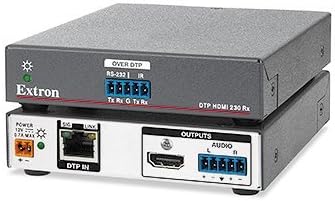
รูปที่ 1: หน่วยรับสัญญาณ Extron DTP HDMI 230 Rx ด้านบน view แสดงการเชื่อมต่อ RS-232 และ IR แบบ 'OVER DTP' ด้านล่าง view แสดงการเชื่อมต่อพอร์ต 'DTP IN', อินพุต 'POWER', เอาต์พุต 'HDMI' และเอาต์พุต 'AUDIO'
2. คุณสมบัติหลัก
- รับสัญญาณ HDMI รวมถึงการควบคุมและสัญญาณเสียงอนาล็อกได้ไกลถึง 70 เมตร ผ่านสาย CATx แบบมีฉนวนหุ้ม
- รองรับวิดีโอคอมพิวเตอร์ความละเอียดสูงสุด 2560x1600, HDTV 1080p/60 Deep Color และความละเอียด 4K
- ใช้ได้กับสายเคเบิล CATx แบบคู่บิดเกลียวหุ้มฉนวน
- ขอแนะนำอย่างยิ่งว่าสายคู่บิดเกลียวมีฉนวนหุ้ม Extron XTP DTP 24 เพื่อประสิทธิภาพสูงสุด
- รองรับสัญญาณเสียงสเตอริโออนาล็อกเพิ่มเติม
3. เนื้อหาบรรจุภัณฑ์
โปรดตรวจสอบให้แน่ใจว่าสินค้าทุกชิ้นครบถ้วนและอยู่ในสภาพดีก่อนเปิดบรรจุภัณฑ์ โดยปกติแล้ว บรรจุภัณฑ์มาตรฐานสำหรับ Extron DTP HDMI 230 Rx จะประกอบด้วย:
- หน่วยรับสัญญาณ Extron DTP HDMI 230
- คู่มือการติดตั้ง / คู่มือการใช้งาน
- ขั้วต่อเทอร์มินัลสำหรับเชื่อมต่อ RS-232/IR และสัญญาณเสียง
- อุปกรณ์สำหรับติดตั้ง (เช่น ตัวเชื่อมต่อสีฟ้าขนาดเล็ก, เคเบิลไทร์)
- แหล่งจ่ายไฟ (ไม่ได้แสดงในภาพ แต่จำเป็นสำหรับการใช้งาน)
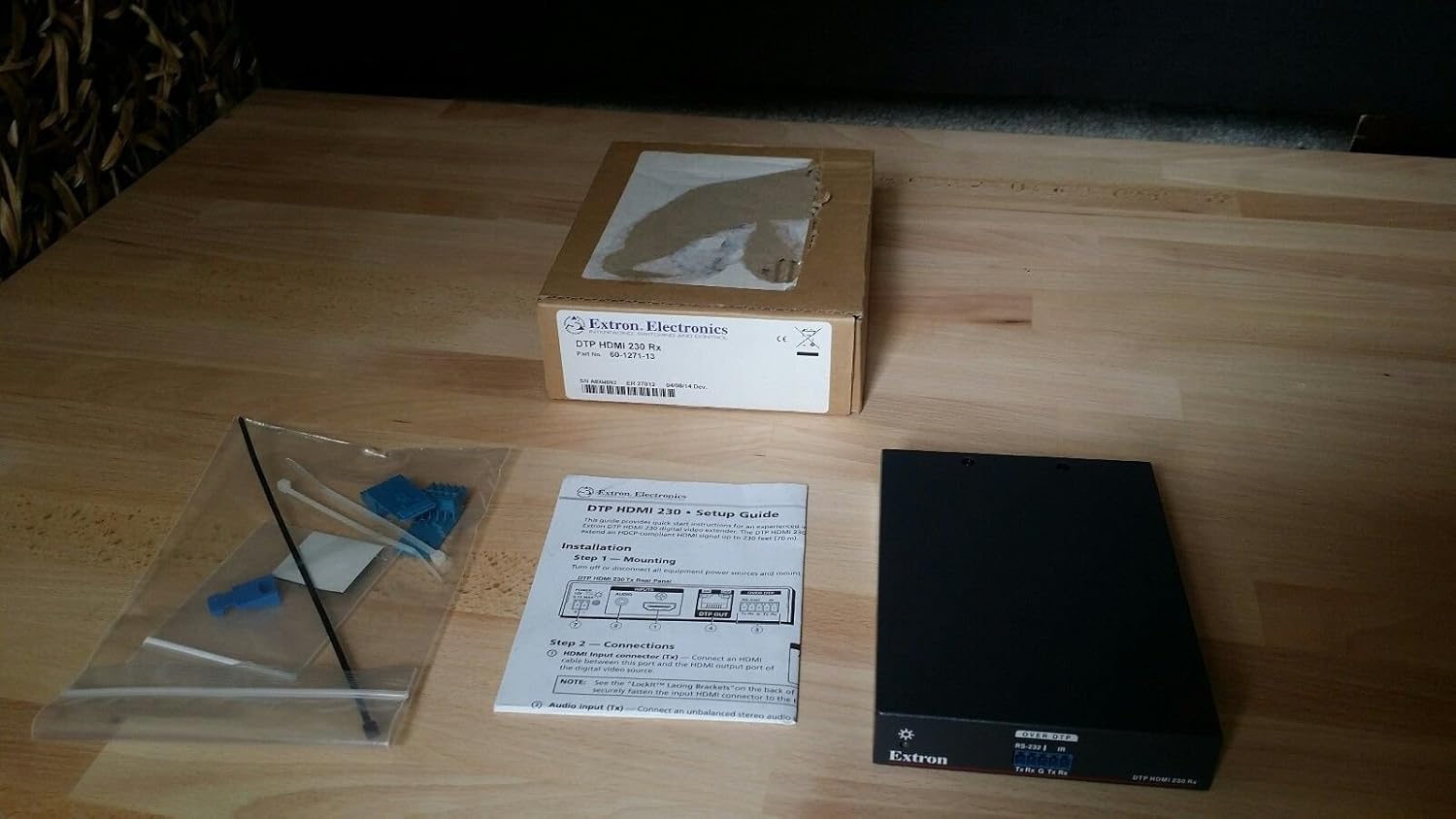
รูปที่ 2: ภาพแสดงสิ่งของภายในกล่อง Extron DTP HDMI 230 Rx ได้แก่ ตัวรับสัญญาณ คู่มือการติดตั้ง และถุงที่บรรจุตัวเชื่อมต่อขนาดเล็กและสายรัดพลาสติก
4. คำแนะนำในการตั้งค่า
ทำตามขั้นตอนต่อไปนี้เพื่อตั้งค่า Extron DTP HDMI 230 Rx ของคุณ:
- การเปิดออกและการตรวจสอบ: นำชิ้นส่วนทั้งหมดออกจากบรรจุภัณฑ์อย่างระมัดระวัง ตรวจสอบแต่ละชิ้นว่ามีร่องรอยความเสียหายหรือไม่
- การติดตั้ง: ติดตั้งอุปกรณ์ DTP HDMI 230 Rx ในตำแหน่งที่ต้องการ ขนาดกะทัดรัดช่วยให้สามารถติดตั้งได้อย่างแนบเนียนด้านหลังจอแสดงผลหรือภายในแท่นบรรยาย
- การเชื่อมต่อไฟฟ้า: เชื่อมต่อแหล่งจ่ายไฟที่ให้มาเข้ากับ... พลัง ต่อสายเข้ากับอุปกรณ์ DTP HDMI 230 Rx ตรวจสอบให้แน่ใจว่าได้เสียบอะแดปเตอร์แปลงไฟเข้ากับเต้ารับไฟฟ้าที่เหมาะสมแล้ว
- การเชื่อมต่ออินพุต DTP: เชื่อมต่อสาย CATx แบบมีฉนวนหุ้มจากตัวส่งสัญญาณ Extron ที่รองรับ DTP เข้ากับ... ดีทีพี อิน พอร์ต HDMI 230 Rx บน DTP เพื่อประสิทธิภาพสูงสุด แนะนำให้ใช้สายเคเบิล Extron XTP DTP 24 แบบคู่บิดเกลียวหุ้มฉนวน
- ช่องต่อสัญญาณ HDMI: เชื่อมต่อสาย HDMI จาก HDMI เชื่อมต่อพอร์ตเอาต์พุตของ DTP HDMI 230 Rx เข้ากับพอร์ตอินพุต HDMI ของอุปกรณ์แสดงผลของคุณ (เช่น ทีวี โปรเจ็กเตอร์)
- ช่องต่อสัญญาณเสียงออก (ไม่บังคับ): หากใช้ระบบเสียงสเตอริโอแบบอนาล็อก ให้เชื่อมต่อเอาต์พุตเสียงจาก DTP HDMI 230 Rx เข้ากับระบบเสียงของคุณโดยใช้ขั้วต่อที่ให้มา
- การเชื่อมต่อควบคุม (ตัวเลือกเสริม - RS-232/IR): หากต้องการควบคุมแบบสองทิศทาง ให้เชื่อมต่อสายควบคุม RS-232 หรือ IR เข้ากับพอร์ตที่เกี่ยวข้องบน DTP HDMI 230 Rx โดยใช้ขั้วต่อที่ให้มา
5. คู่มือการใช้งาน
เมื่อเชื่อมต่อสายทั้งหมดเรียบร้อยแล้ว ให้ใช้งาน DTP HDMI 230 Rx ดังต่อไปนี้:
- เปิดเครื่อง: ตรวจสอบให้แน่ใจว่าอุปกรณ์ที่เชื่อมต่อทั้งหมด รวมถึงแหล่งสัญญาณ ตัวส่งสัญญาณ DTP ตัวรับสัญญาณ DTP HDMI 230 Rx และจอแสดงผล เปิดใช้งานอยู่
- การส่งสัญญาณ: อุปกรณ์ DTP HDMI 230 Rx จะตรวจจับและประมวลผลสัญญาณ HDMI, สัญญาณเสียง และสัญญาณควบคุมที่ส่งมาจากตัวส่งสัญญาณ DTP โดยอัตโนมัติ
- ตัวบ่งชี้สถานะ: สังเกตไฟแสดงสถานะ LED บนตัวเครื่อง:
- SIG (สัญญาณ): ไฟจะสว่างขึ้นเมื่อตรวจพบสัญญาณ HDMI ที่ถูกต้อง
- ลิงค์: ไฟจะสว่างขึ้นเมื่อมีการเชื่อมต่อ DTP ที่เสถียรกับตัวส่งสัญญาณแล้ว
- ความละเอียดและสีสันที่คมชัด: อุปกรณ์นี้รองรับการปรับขนาดความละเอียดอัตโนมัติและการส่งผ่านสีแบบ Deep Color ได้สูงสุดตามความสามารถที่ระบุไว้
6. การบำรุงรักษา
เพื่อให้มั่นใจว่า Extron DTP HDMI 230 Rx ของคุณจะมีอายุการใช้งานยาวนานและทำงานได้อย่างมีประสิทธิภาพสูงสุด โปรดปฏิบัติตามคำแนะนำในการบำรุงรักษาดังต่อไปนี้:
- รักษาความสะอาดของเครื่องและป้องกันไม่ให้มีฝุ่นละอองสะสม ใช้ผ้าแห้งนุ่มๆ ในการทำความสะอาด
- ตรวจสอบให้แน่ใจว่ามีการระบายอากาศเพียงพอรอบๆ เครื่องเพื่อป้องกันความร้อนสูงเกินไป
- ควรหลีกเลี่ยงการวางอุปกรณ์ไว้ในที่ชื้น ของเหลว หรืออุณหภูมิที่สูงหรือต่ำเกินไป
- ตรวจสอบการเชื่อมต่อสายเคเบิลทั้งหมดเป็นประจำเพื่อให้แน่ใจว่าแน่นหนาและไม่มีความเสียหาย
- ห้ามเปิดหรือซ่อมแซมเครื่องด้วยตนเอง โปรดส่งต่อเครื่องให้กับช่างผู้ชำนาญการของ Extron เท่านั้น
7 การแก้ไขปัญหา
หากคุณพบปัญหาเกี่ยวกับ DTP HDMI 230 Rx โปรดทำตามขั้นตอนการแก้ไขปัญหาต่อไปนี้:
- ไม่มีสัญญาณภาพ/เสียงออก:
- ตรวจสอบให้แน่ใจว่าการเชื่อมต่อสายไฟทั้งหมดแน่นหนาและเครื่องได้รับพลังงานแล้ว
- ตรวจสอบความสมบูรณ์และการเชื่อมต่อของสายเคเบิล CATx แบบมีฉนวนหุ้ม DTP ระหว่างตัวส่งและตัวรับ
- ตรวจสอบให้แน่ใจว่าสาย HDMI ทุกเส้นเชื่อมต่อแน่นสนิททั้งด้านแหล่งสัญญาณ ตัวรับสัญญาณ และจอแสดงผล
- ตรวจสอบให้แน่ใจว่าอุปกรณ์ต้นทางเปิดใช้งานอยู่และส่งสัญญาณออกมา
- ตรวจสอบการเลือกอินพุตบนอุปกรณ์แสดงผลของคุณเพื่อให้แน่ใจว่าได้ตั้งค่าเป็นอินพุต HDMI ที่ถูกต้องแล้ว
- คุณภาพวิดีโอไม่ดีหรือสัญญาณขาดๆ หายๆ:
- ตรวจสอบให้แน่ใจว่า ปกป้อง กำลังใช้สาย CATx สายที่ไม่มีฉนวนหุ้มอาจทำให้คุณภาพสัญญาณลดลง
- ตรวจสอบให้แน่ใจว่าความยาวสายเคเบิลอยู่ภายในความยาวสูงสุดที่กำหนดไว้คือ 230 ฟุต (70 เมตร)
- เพื่อให้ได้ประสิทธิภาพสูงสุด ควรพิจารณาใช้สายเคเบิลแบบคู่บิดเกลียวหุ้มฉนวน Extron XTP DTP 24
- ตรวจสอบหาแหล่งกำเนิดสัญญาณรบกวนทางแม่เหล็กไฟฟ้า (EMI) ที่อาจเกิดขึ้นใกล้กับสายเคเบิล
- สัญญาณควบคุม (RS-232/IR) ไม่ทำงาน:
- ตรวจสอบการเชื่อมต่อสายเคเบิล RS-232/IR ทั้งหมด และตรวจสอบให้แน่ใจว่าได้ต่อสายอย่างถูกต้องโดยใช้ขั้วต่อเทอร์มินัลบล็อก
- ตรวจสอบให้แน่ใจว่าตัวส่งสัญญาณ DTP ได้รับการกำหนดค่าอย่างถูกต้องสำหรับการส่งผ่านสัญญาณควบคุมแล้ว
8. ข้อมูลจำเพาะ
| หมายเลขรุ่น | ดีทีพี เอชเอ็นเอช 230 เอ็กซ์อาร์ |
| ผู้ผลิต | เอ็กซ์ตรอน |
| ขนาดสินค้า | 0.39 x 0.39 x 0.39 นิ้ว |
| น้ำหนักสินค้า | 12.8 ออนซ์ |
| อุปกรณ์ที่รองรับ | โทรทัศน์ |
| การใช้งานเฉพาะของผลิตภัณฑ์ | TV |
| ประเภทขั้วต่อ | HDMI |
| วันที่พร้อมใช้งานครั้งแรก | วันที่ 5 ธันวาคม 2014 |
9. การรับประกันและการสนับสนุน
สำหรับข้อมูลการรับประกัน การสนับสนุนทางเทคนิค หรือสอบถามเกี่ยวกับการบริการสำหรับ Extron DTP HDMI 230 Rx โปรดดูที่เว็บไซต์อย่างเป็นทางการของ Extron webเยี่ยมชมเว็บไซต์หรือติดต่อฝ่ายบริการลูกค้าของ Extron โดยตรง เก็บใบเสร็จรับเงินไว้เพื่อใช้ยืนยันการรับประกัน