
การแนะนำ
This manual provides comprehensive instructions for the installation, operation, and maintenance of your Simplex 3002-26D-41 Narrow Stile Mechanical Push-Button Lock. This robust, keyless entry system is designed for narrow stile doors, offering reliable security without the need for batteries or wiring. Please read these instructions carefully before installation and use to ensure proper function and longevity of your lock.
ข้อมูลด้านความปลอดภัย
- ควรสวมอุปกรณ์ป้องกันที่เหมาะสม เช่น แว่นตาป้องกันดวงตา ทุกครั้งระหว่างการติดตั้ง
- ตรวจสอบให้แน่ใจว่าส่วนประกอบทั้งหมดถูกยึดแน่นหนาเพื่อป้องกันการหลุดออกโดยไม่ตั้งใจ
- ห้ามดัดแปลงกลไกการล็อก เนื่องจากอาจส่งผลกระทบต่อความปลอดภัยและทำให้การรับประกันเป็นโมฆะ
- เก็บชิ้นส่วนเล็ก ๆ ให้พ้นจากการเข้าถึงเด็ก
- If you are unsure about any installation step, consult a qualified locksmith or professional installer.
เนื้อหาแพ็คเกจ
ตรวจสอบว่าส่วนประกอบทั้งหมดมีอยู่ก่อนเริ่มการติดตั้ง:
- Exterior Lock Assembly (with push-buttons)
- Interior Lock Assembly (with thumbturn)
- Latch/Deadbolt Mechanism
- Strike Plate and Dust Box
- สกรูยึดและตัวยึด
- เทมเพลตการติดตั้ง
- คำแนะนำการใช้งานและการตั้งโปรแกรม
- Key(s) for Override Function (if applicable)
การติดตั้งและการตั้งค่า
Proper installation is crucial for the optimal performance of your Simplex lock. Follow these general steps. Refer to the included installation template for precise drilling instructions.
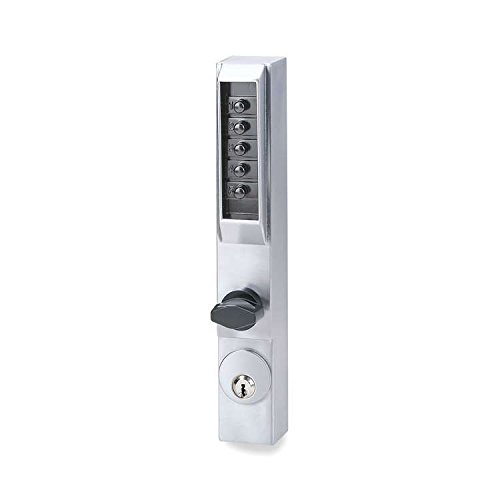
An image showing the Simplex 3002-26D-41 Narrow Stile Lock, featuring its satin chrome finish and integrated thumbturn for interior egress.
1. การเตรียมประตู
- Measure Door Dimensions: Ensure your door and frame are compatible with a narrow stile lock.
- ใช้เทมเพลต: Secure the provided installation template to the door edge and face.
- เจาะรู: Carefully drill all necessary holes for the lock body, latch, and fasteners as indicated by the template.
2. Latch Installation
- ใส่ตัวล็อค: Slide the latch mechanism into the prepared hole on the door edge.
- ตัวล็อคที่ปลอดภัย: Fasten the latch with the provided screws, ensuring it is flush with the door edge.
3. Lock Assembly Installation
- ติดตั้งชุดประกอบภายนอก: Position the exterior lock assembly (with push-buttons) onto the door, aligning the spindle with the latch mechanism.
- ติดตั้งชุดประกอบภายใน: Place the interior lock assembly (with thumbturn) onto the door, ensuring proper alignment with the exterior assembly and spindle.
- การประกอบที่ปลอดภัย: Use the through-bolts and screws to firmly attach both assemblies to the door. Do not overtighten.
4. Strike Plate Installation
- Align Strike Plate: Close the door and mark the position of the latch bolt on the door frame.
- ติดตั้งแผ่นปิดช่องลม: Mortise the frame as needed and install the strike plate and dust box, ensuring the latch bolt engages smoothly.
5. ทดสอบการทำงาน
- Test Latch: Ensure the latch retracts and extends smoothly.
- Test Thumbturn: Verify the thumbturn operates freely from the inside.
- Test Code Entry: Before closing the door, test the factory default code or your newly set code to ensure the mechanism engages.
คำแนะนำการใช้งาน
Setting/Changing the Combination
The Simplex 3002-26D-41 lock uses a mechanical combination. To set or change the combination, you typically need to remove the interior cover plate and manipulate the code tumblers according to the detailed instructions provided with your lock's programming guide. This process usually involves:
- Removing the interior cover.
- Locating the code change mechanism (e.g., tumblers or pins).
- Following the specific sequence to set your desired code.
- Testing the new code before reassembling the lock.
สำคัญ: Always record your new combination in a secure location. Do not share your combination with unauthorized individuals.
Unlocking from the Exterior (Code Entry)
- กรอกรหัส: Press the buttons corresponding to your combination in the correct sequence.
- Turn Handle/Lever: After entering the correct code, turn the exterior handle or lever to retract the latch bolt.
- เปิดประตู: The door will now open.
- ล็อคใหม่: The lock automatically relocks when the door is closed and the handle/lever returns to its original position.
Unlocking from the Interior (Thumbturn)
From the interior side, simply rotate the thumbturn to retract the latch bolt and open the door. This provides immediate egress without needing to enter a code.
Key Override Function
If your model includes a key override, insert the key into the cylinder and turn it to retract the latch bolt. This function is typically used for emergency access or by authorized personnel for management purposes.
การซ่อมบำรุง
การทำความสะอาด
- ทำความสะอาดด้านนอกของตัวล็อคด้วยผ้าเนื้อนุ่มและแห้งamp ผ้า.
- หลีกเลี่ยงการใช้สารทำความสะอาดที่มีฤทธิ์กัดกร่อน ตัวทำละลาย หรือสารเคมีรุนแรง เพราะอาจทำให้พื้นผิวเสียหายได้
การหล่อลื่น
- Periodically apply a small amount of graphite-based lubricant or a silicone spray to the latch bolt and internal moving parts.
- Do not use oil-based lubricants, as they can attract dust and debris, leading to mechanism issues.
การแก้ไขปัญหา
| ปัญหา | สาเหตุที่เป็นไปได้ | สารละลาย |
|---|---|---|
| Lock does not engage after code entry. | Incorrect code entered; internal mechanism misalignment. | Re-enter code carefully. If issue persists, verify code setting or consult installation instructions for mechanism alignment. |
| Buttons are sticky or difficult to press. | Accumulation of dirt or debris; lack of lubrication. | Clean buttons and surrounding areas. Apply a small amount of graphite lubricant. |
| สลักล็อคไม่หดกลับอย่างราบรื่น | การจัดตำแหน่งส่วนประกอบล็อคไม่ถูกต้อง มีเศษขยะอยู่ในกลไกการล็อก | Check alignment of exterior and interior assemblies. Clean and lubricate the latch bolt. |
| ปุ่มหมุนฝืดไปหน่อย | Internal friction; debris. | Apply lubricant to the thumbturn mechanism. Ensure no obstructions. |
ข้อมูลจำเพาะ
- ยี่ห้อ: ซิมเพล็กซ์
- หมายเลขรุ่น: 3002-26D-41
- ชนิดล็อค : Mechanical Push-Button Lock with Key Override (if applicable)
- วัสดุ: โครม
- เสร็จ: ซาตินโครม
- การใช้ที่แนะนำ: Door Lock for Homes, Offices, and Buildings
- ส่วนประกอบที่รวมอยู่: หมุนนิ้วโป้ง
- น้ำหนักสินค้า: 2.7 ปอนด์
- GTIN/UPC: 085194241866
การรับประกันและการสนับสนุน
For warranty information and technical support, please refer to the documentation included with your purchase or visit the official Simplex webไซต์นี้ โปรดเก็บหลักฐานการซื้อไว้เพื่อใช้ยืนยันการรับประกัน