
การแนะนำ
This manual provides detailed instructions for the installation, operation, and maintenance of your Heath Zenith Wireless Doorbell Kit, Model 3318276. Please read these instructions carefully before beginning installation to ensure proper function and to avoid damage to the unit.
ข้อมูลด้านความปลอดภัย
- ความปลอดภัยของแบตเตอรี่: Always use the correct size and type of batteries. Ensure batteries are inserted with correct polarity (+ and -). Do not mix old and new batteries or different types of batteries. Remove batteries if the device will not be used for an extended period.
- ความปลอดภัยทางไฟฟ้า: The chime unit is a plug-in device. Ensure it is plugged into a standard electrical outlet. Do not overload electrical outlets.
- สภาพแวดล้อม : Avoid exposing the doorbell push button to extreme temperatures, direct sunlight for prolonged periods, or excessive moisture.
- เด็ก: เก็บชิ้นส่วนเล็กๆ และแบตเตอรี่ให้พ้นมือเด็ก
เนื้อหาแพ็คเกจ
ตรวจสอบว่าส่วนประกอบทั้งหมดมีอยู่ก่อนดำเนินการติดตั้ง:
- Wireless Doorbell Chime Unit (Receiver)
- Wireless Push Button (Transmitter)
- Mounting Hardware (Screws, Anchors)
- Battery for Push Button (typically CR2032 or A23, check packaging)
การตั้งค่า
1. Install Battery in Push Button
- เปิดปุ่มกด casing. This usually involves prying open a small notch with a flathead screwdriver or sliding a cover.
- Insert the provided battery, ensuring the positive (+) side faces up.
- Close the push button casinก. อย่างปลอดภัย
2. Mount the Push Button
Choose a suitable location for the push button, typically on a door frame or wall near your entrance. Ensure the surface is clean and dry.
- การติดตั้งด้วยกาว: For temporary or non-drilling installation, use the adhesive strip (if provided) on the back of the push button. Press firmly onto the desired surface.
- การติดตั้งสกรู: For a more secure installation, use the provided screws and anchors. Mark the desired screw locations, drill pilot holes if necessary, and secure the push button base.
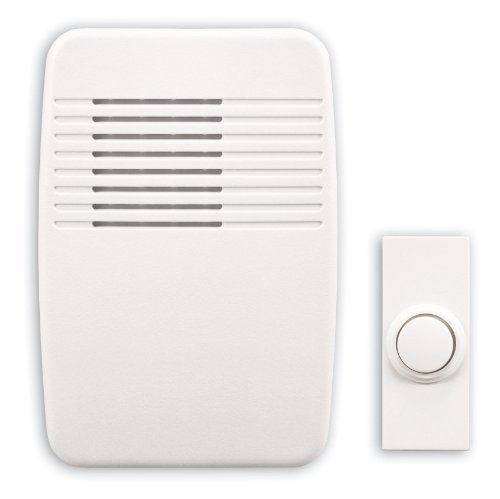
Image: Heath Zenith Wireless Doorbell Kit showing the chime unit and push button. The chime unit is white and rectangular, designed to plug into an electrical outlet. The push button is a smaller, white rectangular unit with a button in the center.
3. Plug in the Chime Unit
Select an indoor electrical outlet for the chime unit. Plug the chime unit directly into the outlet. Ensure it is within range of the push button (refer to specifications for maximum range).
4. Select a Chime Tune
Most Heath Zenith wireless doorbells offer multiple chime tunes. Locate the tune selection button on the chime unit. Press this button repeatedly to cycle through available tunes until you find your preferred sound.
5. ทดสอบระบบ
Press the push button firmly. The chime unit should sound the selected tune. If it does not, refer to the Troubleshooting section.
การดำเนินงาน
Once installed, the Heath Zenith Wireless Doorbell Kit operates automatically. When the push button is pressed, it sends a wireless signal to the chime unit, which then plays the selected tune.
การปรับระดับเสียง
If your chime unit has a volume control button, press it to cycle through different volume levels (e.g., high, medium, low, mute). Adjust to your desired loudness.
การซ่อมบำรุง
Battery Replacement (Push Button)
When the push button stops working or its range decreases significantly, it is likely time to replace the battery. Follow the steps for battery installation in the Setup section.
- ความถี่: Battery life varies depending on usage and environmental conditions, typically lasting 1-2 years.
- ประเภทแบตเตอรี่: Refer to the original battery or the push button's internal label for the correct replacement battery type (e.g., CR2032, A23).
การทำความสะอาด
Clean the exterior of both the push button and chime unit with a soft, damp cloth. Do not use abrasive cleaners or solvents. Ensure the push button is dry after cleaning to prevent water ingress.
การแก้ไขปัญหา
- เสียงระฆังไม่ดัง:
- Ensure the chime unit is securely plugged into a working electrical outlet.
- Check the battery in the push button. Replace if necessary.
- Ensure the push button and chime unit are within the specified operating range. Large metal objects or thick walls can reduce range.
- Verify that the chime unit is not set to mute.
- ช่วงการทำงานสั้น:
- Replace the push button battery.
- Relocate the chime unit or push button to reduce obstructions or interference.
- False alarms (chime sounds without button press):
- This can sometimes be caused by interference from other wireless devices. Try changing the operating frequency or code if your model supports it (refer to specific model instructions if applicable).
- Ensure the push button is not exposed to extreme weather or moisture that could trigger it.
ข้อมูลจำเพาะ
| หมายเลขรุ่น | 3318276 |
| หมายเลขชิ้นส่วน | สล-7366-02 |
| น้ำหนักสินค้า | 1.8 ปอนด์ |
| ขนาดสินค้า | 6 x 6.63 x 9.25 นิ้ว |
| สี | สีขาว |
| ผู้ผลิต | Heathco Llc |
| Power Source (Chime) | ปลั๊กไฟ AC |
| แหล่งจ่ายไฟ (ปุ่มกด) | Battery (type may vary, check unit) |
การรับประกันและการสนับสนุน
Heath Zenith products are designed for reliability and performance. For specific warranty details, please refer to the warranty card included with your product packaging or visit the official Heath Zenith website. For technical support or further assistance, please contact Heath Zenith customer service directly.
ข้อมูลติดต่อ: กรุณาอ้างอิงจากคู่มืออย่างเป็นทางการของผู้ผลิต webตรวจสอบรายละเอียดการติดต่อฝ่ายบริการลูกค้าล่าสุดได้ที่เว็บไซต์หรือบรรจุภัณฑ์ของผลิตภัณฑ์