
1. บทนำ
This manual provides detailed instructions for the installation, operation, and maintenance of your D-Link DCS-8350LH 2K QHD Indoor Wi-Fi Camera. Please read this manual thoroughly before using the product to ensure proper setup and functionality.
The D-Link DCS-8350LH is designed to provide precise and detailed surveillance for your home or small office. It features 2K QHD resolution, color night vision, AI-based detection, and two-way audio for comprehensive monitoring.
2. ข้อมูลด้านความปลอดภัย
- ตรวจสอบให้แน่ใจว่าติดตั้งกล้องในตำแหน่งที่มั่นคงเพื่อป้องกันไม่ให้ตก
- Use only the power adapter supplied with the camera.
- Do not expose the camera to water or moisture. This product is for indoor use only.
- ควรหลีกเลี่ยงการวางกล้องไว้ใกล้แหล่งความร้อนหรือในที่ที่มีแสงแดดส่องโดยตรง
- อย่าพยายามเปิดหรือซ่อมกล้องด้วยตนเอง โปรดส่งซ่อมกับช่างผู้ชำนาญการเท่านั้น
- เก็บกล้องและอุปกรณ์เสริมให้พ้นมือเด็ก
3. สินค้าหมดview
Familiarize yourself with the components of your D-Link DCS-8350LH camera.
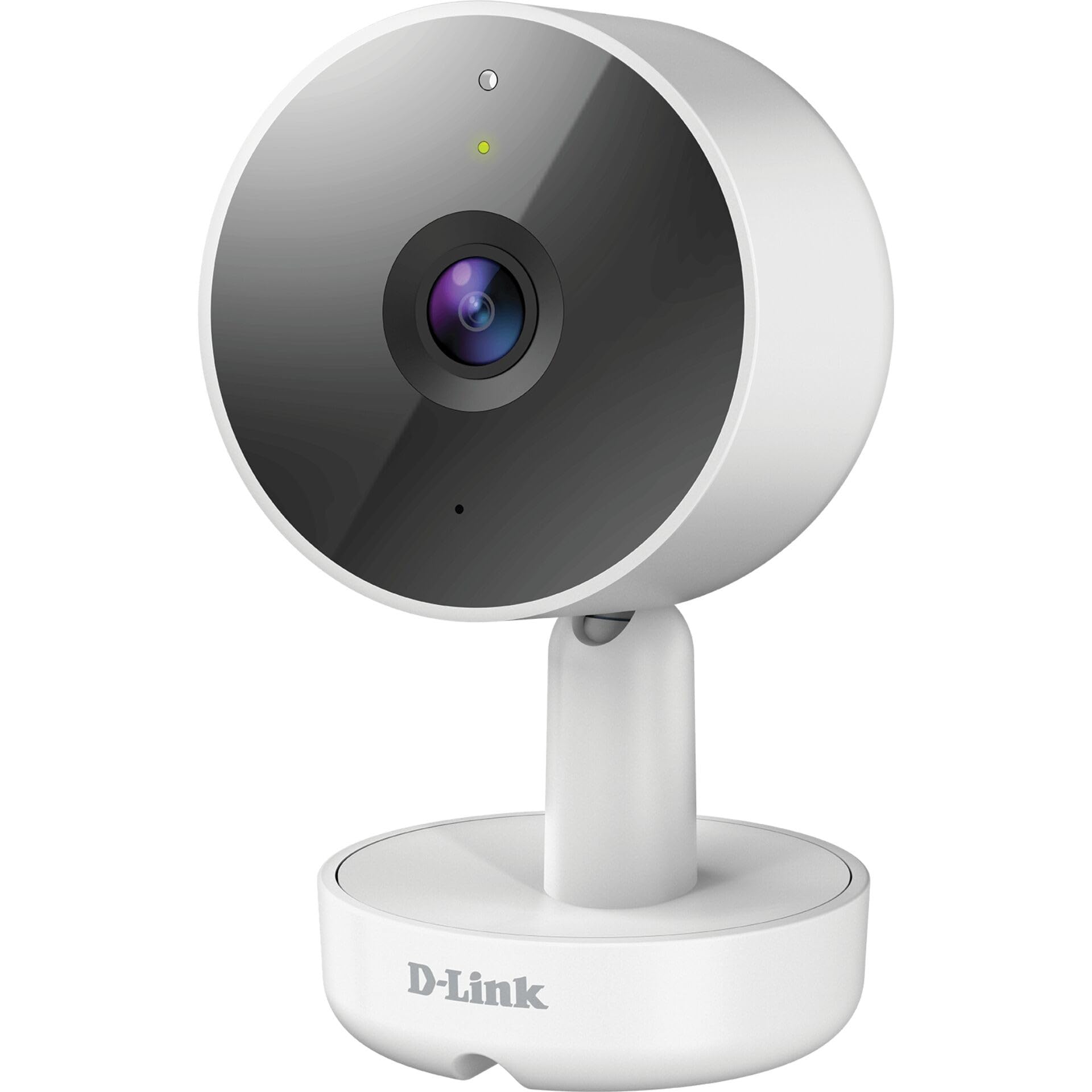
รูปที่ 3.1: ด้านหน้า View ของกล้อง
- 1. เลนส์: ถ่ายวิดีโอ
- 2. LED แสดงสถานะ: Indicates camera status (e.g., power, connection).
- 3. ไมโครโฟน: บันทึกเสียงสำหรับการสื่อสารสองทาง
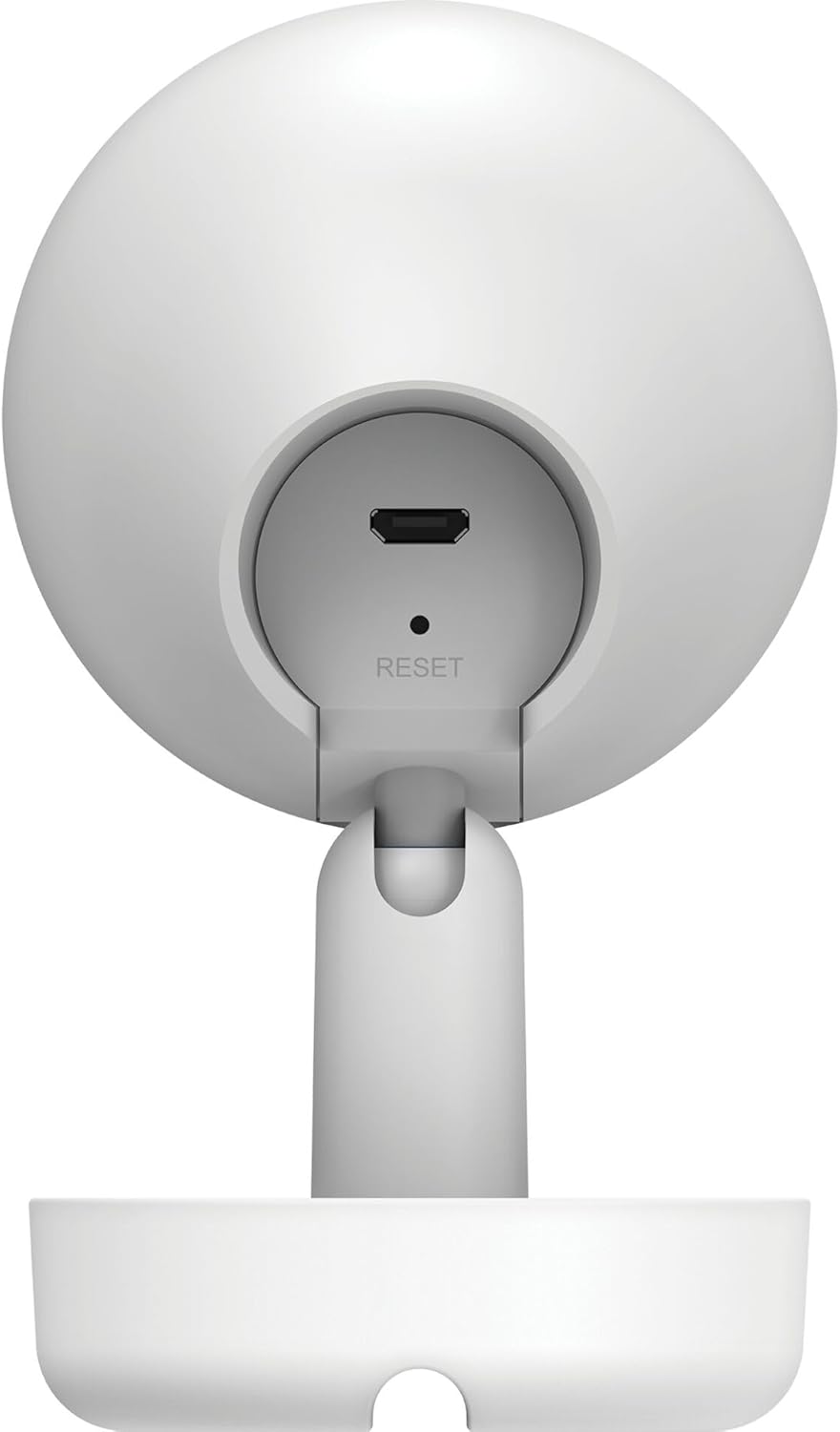
รูปที่ 3.2: หลัง View ของกล้อง
- 1. Micro USB Power Port: เชื่อมต่อกับอะแดปเตอร์ไฟ
- 2. ปุ่มรีเซ็ต: ใช้เพื่อคืนการตั้งค่าเริ่มต้นจากโรงงาน
- 3. ลำโพง: ส่งสัญญาณเสียงเพื่อการสื่อสารสองทาง
- 4. MicroSD Card Slot: For local video storage (located on the side or bottom, not visible in this specific image, but mentioned in features).
4. การตั้งค่า
Follow these steps to set up your D-Link DCS-8350LH camera:
- ดาวน์โหลดแอป mydlink: ค้นหา "mydlink" on the App Store (iOS) or Google Play (Android) and download the official mydlink app.
- Create a mydlink Account: Open the app and follow the on-screen instructions to create a new mydlink account or log in if you already have one.
- เปิดกล้อง: Connect the provided power adapter to the camera's Micro USB port and plug it into a power outlet. The status LED will begin to blink.
- เพิ่มอุปกรณ์: In the mydlink app, tap the menu icon (usually three lines) and select "Add a Device". Scan the QR code located on the camera or its packaging.
- เชื่อมต่อกับ Wi-Fi: Follow the app's instructions to connect your camera to your home Wi-Fi network. Ensure your mobile device is connected to the same Wi-Fi network during setup.
- การจัดวาง: Position your camera in the desired indoor location.

รูปที่ 4.1: Camera and mydlink App Integration
5. การติดตั้ง
The D-Link DCS-8350LH camera supports wall mounting for optimal placement.
- เลือกตำแหน่ง: เลือกสถานที่ภายในอาคารที่มีทัศนวิสัยชัดเจน view ในบริเวณที่คุณต้องการตรวจสอบและอยู่ในระยะสัญญาณของเครือข่าย Wi-Fi ของคุณ
- พื้นผิวการติดตั้ง: Ensure the wall or surface is strong enough to support the camera.
- ยึดฐานให้แน่น: Use appropriate screws and anchors (not included) to secure the camera's base to the chosen surface.
- ปรับมุม: Once mounted, adjust the camera's angle to cover the desired viewing area. The camera has a 108-degree viewมุมอิง
6. คู่มือการใช้งาน
Once set up, you can access and control your camera using the mydlink app.
6.1. สด View
Open the mydlink app and select your DCS-8350LH camera from the device list to view the live feed. The camera provides 2K QHD (1440p) resolution for clear images.
6.2. การมองเห็นสีในเวลากลางคืน
The camera automatically switches to color night vision in low-light conditions, allowing you to see detailed color video even when it's dark.
6.3. AI-based Event Detection
The camera features intelligent detection capabilities:
- การตรวจจับบุคคล: Identifies human presence, reducing false alarms from pets or moving objects.
- การตรวจจับเสียง: Alerts you to specific sounds, including carbon monoxide and smoke alarm sounds.
Configure detection zones and sensitivity settings within the mydlink app to customize alerts.
6.4. เสียงสองทาง
Use the built-in microphone and speaker to communicate with people or pets near the camera. Tap the microphone icon in the live view within the mydlink app to speak.
6.5. การบันทึกและจัดเก็บวิดีโอ
The DCS-8350LH offers multiple recording options:
- การ์ด MicroSD: Insert a microSD card (not included) into the camera's slot for local storage of recorded video clips.
- mydlink Cloud Recording: Utilize the mydlink Cloud service for secure off-site storage. Free and paid subscription plans are available.
- Smartphone Recording: Capture snapshots and video clips directly to your smartphone via the mydlink app.
7. การบำรุงรักษา
7.1. การทำความสะอาด
To clean the camera, gently wipe the lens and exterior surfaces with a soft, dry cloth. Do not use liquid cleaners or abrasive materials.
7.2. การอัปเดตเฟิร์มแวร์
Regularly check for firmware updates through the mydlink app. Keeping your camera's firmware up-to-date ensures optimal performance, security, and access to new features.
8 การแก้ไขปัญหา
If you encounter issues with your D-Link DCS-8350LH camera, refer to the following common solutions:
- Camera Offline / Wi-Fi Disconnection:
- ตรวจสอบให้แน่ใจว่ากล้องอยู่ในระยะของเราเตอร์ Wi-Fi ของคุณ
- Check your Wi-Fi network status.
- รีสตาร์ทกล้องโดยถอดปลั๊กอะแดปเตอร์ไฟแล้วเสียบใหม่
- If the issue persists, try resetting the camera to factory defaults (see below) and re-adding it to the mydlink app.
- คุณภาพวิดีโอไม่ดี:
- ตรวจสอบให้แน่ใจว่าเลนส์กล้องสะอาด
- Check your internet connection speed. A stable and fast connection is required for 2K QHD streaming.
- Adjust the camera's position to avoid glare or obstructions.
- การรีเซ็ตกล้อง:
To restore the camera to its factory default settings, use a paperclip or a thin object to press and hold the recessed รีเซ็ต button (refer to Figure 3.2) for approximately 10 seconds while the camera is powered on. The status LED will change, indicating a reset. You will then need to reconfigure the camera through the mydlink app.
9. ข้อมูลจำเพาะ
| คุณสมบัติ | รายละเอียด |
|---|---|
| ชื่อรุ่น | DCS-8350LH |
| ความละเอียดในการบันทึกวิดีโอ | 1440p (2K QHD) |
| Viewอิงแองเกิล | 108 องศา |
| โปรโตคอลการเชื่อมต่อ | ไวไฟ |
| เทคโนโลยีการสื่อสารไร้สาย | บลูทูธ (สำหรับการตั้งค่าเริ่มต้น) |
| การใช้งานภายใน/ภายนอกอาคาร | ในร่ม |
| แหล่งพลังงาน | สายไฟ |
| การใช้พลังงาน | 8 วัตต์ |
| ฟอร์มแฟกเตอร์ | โดม |
| ประเภทการติดตั้ง | ติดผนัง |
| วัสดุ | พลาสติก |
| ขนาดรายการ (ยาว x กว้าง x สูง) | 6.67 x 6.57 x 11.14 ซม. |
| น้ำหนัก | 320 กรัม |
| ส่วนประกอบที่รวมอยู่ | กล้องภายในอาคาร |
| ประเภทตัวควบคุม | อเมซอนอเล็กซา |
10. การรับประกันและการสนับสนุน
For warranty information, technical support, and further assistance, please visit the official D-Link website or contact D-Link customer service. Keep your purchase receipt as proof of purchase.
You can find the latest support resources, FAQs, and contact details at www.dlink.com.