
TECNOSWITCH TE301ME
TECNOSWITCH TE301ME Mechanical Room Thermostat with Switch User Manual
Model: TE301ME
1. บทนำ
This manual provides detailed instructions for the installation, operation, and maintenance of your TECNOSWITCH TE301ME Mechanical Room Thermostat with Switch. Please read this manual carefully before installation and use to ensure proper function and safety. Keep this manual for future reference.
The TECNOSWITCH TE301ME is a mechanical room thermostat designed to control heating or cooling systems. It features a simple on/off switch and an indicator light for ease of use.
2. ข้อมูลด้านความปลอดภัยที่สำคัญ
- การติดตั้งจะต้องดำเนินการโดยช่างไฟฟ้าที่มีคุณสมบัติตามมาตรฐานและข้อบังคับด้านไฟฟ้าในท้องถิ่น
- Always disconnect power to the heating/cooling system at the main circuit breaker before installing or servicing the thermostat.
- อย่าให้เทอร์โมสตัทโดนน้ำหรือความชื้นมากเกินไป
- Do not open the thermostat casing unless instructed to do so in this manual. There are no user-serviceable parts inside.
- ตรวจสอบให้แน่ใจว่าการเชื่อมต่อสายไฟทั้งหมดมีความปลอดภัยและมีฉนวนหุ้มอย่างเหมาะสมเพื่อป้องกันอันตรายจากไฟฟ้า
3. เนื้อหาบรรจุภัณฑ์
ตรวจสอบว่ามีรายการทั้งหมดอยู่ในแพ็คเกจ:
- TECNOSWITCH TE301ME Mechanical Room Thermostat
- สกรูยึดและปลั๊กผนัง
- คู่มือการใช้งาน (เอกสารนี้)
4. สินค้าหมดview
The TECNOSWITCH TE301ME thermostat is designed for simple and reliable temperature control. Key features include:
- On/Off switch for manual system control.
- Indicator light to show system status.
- Unipolar thermostat for straightforward operation.
- Adjustable temperature range from +5 °C to +30 °C.
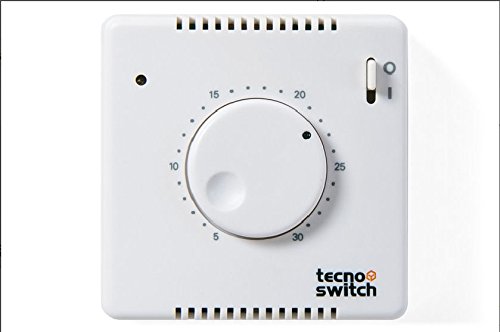
รูปที่ 1 : ด้านหน้า view of the TECNOSWITCH TE301ME Mechanical Room Thermostat, showing the temperature dial, on/off switch, and indicator light.
5. การติดตั้ง
สำคัญ: โปรดตรวจสอบให้แน่ใจว่าได้ตัดกระแสไฟที่เบรกเกอร์หลักแล้วก่อนเริ่มการติดตั้ง
5.1 การเลือกสถานที่
Select a location on an interior wall, approximately 1.5 meters (5 feet) above the floor. Avoid locations:
- Near windows, doors, or air vents.
- In direct sunlight or near heat-emitting appliances (e.g., televisions, lampส).
- On exterior walls or in areas with poor air circulation.
5.2 การติดตั้งเทอร์โมสตัท
- Carefully separate the front cover from the base of the thermostat.
- Position the thermostat base on the wall at the chosen location.
- Mark the drilling points through the mounting holes on the base.
- เจาะรูและใส่พุกยึดผนังหากจำเป็น
- ยึดฐานเทอร์โมสตัทเข้ากับผนังโดยใช้สกรูที่ให้มา
5.3 การเดินสายไฟ
The TE301ME is a unipolar thermostat. Connect the electrical wires to the terminals as shown in the wiring diagram below. Ensure all connections are tight and correct.
รูปที่ 2: อดีตample wiring diagram for the TECNOSWITCH TE301ME. Consult a qualified electrician for specific wiring configurations for your heating/cooling system. This image shows the general terminal layout.
คะแนนการติดต่อ: 2 (1) A at 250 V AC.
5.4 การติดตั้งเสร็จสมบูรณ์
- Once wiring is complete and secure, reattach the front cover to the thermostat base.
- Restore power to the heating/cooling system at the main circuit breaker.
6. การดำเนินการ
6.1 การตั้งอุณหภูมิ
To set the desired room temperature, rotate the temperature dial on the front of the thermostat. The scale indicates temperatures from +5 °C to +30 °C. Turn the dial clockwise to increase the temperature setting and counter-clockwise to decrease it.
6.2 Using the On/Off Switch
The thermostat features an On/Off switch. Use this switch to manually turn the heating/cooling system on or off, overriding the temperature setting if desired. When the switch is in the "Off" position, the system will not operate regardless of the temperature setting.
6.3 ไฟแสดงสถานะ
The indicator light illuminates when the thermostat is calling for heating or cooling, indicating that the system is active.
7. การบำรุงรักษา
The TECNOSWITCH TE301ME thermostat requires minimal maintenance.
- การทำความสะอาด: เช็ดภายนอกเทอร์โมสตัทด้วยผ้านุ่มๆamp ผ้า ห้ามใช้สารทำความสะอาดที่มีฤทธิ์กัดกร่อนหรือตัวทำละลาย
- ปัดฝุ่น: Periodically dust the thermostat to ensure proper air circulation around the temperature sensor.
- ไม่มีบริการซ่อมบำรุงภายใน: Do not attempt to open the thermostat for internal cleaning or repairs. Refer to qualified personnel for any issues beyond basic operation.
8 การแก้ไขปัญหา
| ปัญหา | สาเหตุที่เป็นไปได้ | สารละลาย |
|---|---|---|
| Thermostat not turning system On/Off. |
|
|
| Room temperature does not match setting. |
|
|
| ไฟแสดงสถานะไม่ทำงาน |
|
|
If you experience issues not covered here, or if troubleshooting steps do not resolve the problem, please contact TECNOSWITCH customer support.
9. ข้อมูลจำเพาะ
| หมายเลขรุ่น | TE301ME |
| ยี่ห้อ | TECNOSWITCH |
| พิมพ์ | Mechanical Room Thermostat with Switch |
| ขนาด (กว้าง x ยาว x สูง) | 78 x 78 x 35 มม. |
| น้ำหนัก | 120 กรัม |
| ช่วงการปรับ | +5°C ถึง +30°C |
| ความแตกต่าง | < 1 °K |
| ติดต่อเรา | 2 (1) A at 250 V AC |
| แหล่งพลังงาน | ไฟฟ้าแบบมีสาย |
| เล่มที่tage | 250 โวลต์ |
| แสงไฟแบ็คไลท์ | ใช่ |
10. การรับประกันและการสนับสนุน
TECNOSWITCH products are manufactured to high-quality standards. For information regarding warranty terms and conditions, please refer to the warranty card included with your product or visit the official TECNOSWITCH webเว็บไซต์.
For technical support, replacement parts, or service inquiries, please contact TECNOSWITCH customer service through their official channels. Have your model number (TE301ME) and purchase date ready when contacting support.
Ask a question about this manual
Ask about setup, troubleshooting, compatibility, parts, safety, or missing instructions. Manuals+ will review the question and use this page’s manual context to help answer it.