
SINGCALL SC-R10
SINGCALL Wireless Waiter Calling System User Manual
Model: SC-R10
1. บทนำ
This manual provides comprehensive instructions for the installation, operation, and maintenance of your SINGCALL Wireless Waiter Calling System, Model SC-R10. This system is designed to enhance service efficiency in various environments such as restaurants, cafes, and hotels by providing a reliable and easy-to-use communication solution between customers or staff and service personnel.
The SC-R10 receiver displays call numbers from paired call buttons, allowing for quick response and improved customer satisfaction. Please read this manual thoroughly before using the product to ensure proper function and longevity.

Figure 1.1: SINGCALL SC-R10 Wireless Receiver
2. ข้อมูลด้านความปลอดภัย
โปรดปฏิบัติตามข้อควรระวังด้านความปลอดภัยต่อไปนี้ เพื่อป้องกันความเสียหายต่อผลิตภัณฑ์และเพื่อความปลอดภัยของผู้ใช้งาน:
- อย่าให้อุปกรณ์สัมผัสกับอุณหภูมิ ความชื้น หรือแสงแดดโดยตรง
- หลีกเลี่ยงการทำอุปกรณ์หล่นหรือกระแทกอย่างรุนแรง
- เก็บอุปกรณ์ให้ห่างจากน้ำและของเหลวอื่นๆ
- อย่าพยายามถอดประกอบหรือซ่อมแซมอุปกรณ์ด้วยตนเอง โปรดติดต่อช่างผู้ชำนาญการ
- โปรดใช้อะแดปเตอร์แปลงไฟที่ระบุไว้สำหรับเครื่องรับสัญญาณเท่านั้น
- คำเตือน: อันตรายจากการสำลัก - Small parts not for children under 3 years or any individuals who have a tendency to place inedible objects in their mouths.
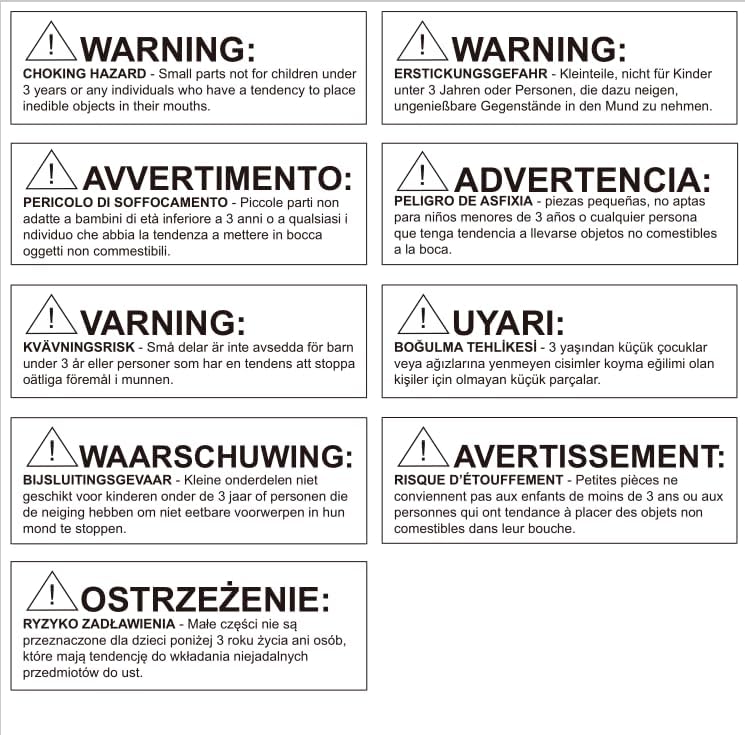
Figure 2.1: Multi-language Safety Warning
3. สินค้าหมดview
3.1 ส่วนประกอบ
The SINGCALL Wireless Waiter Calling System typically consists of the following main components:
- SC-R10 Receiver: The central unit that receives and displays call signals.
- Call Buttons (Sold Separately): Transmitters that send call signals to the receiver when pressed. These can be various types, such as table-mounted buttons or wrist pagers.
- อะแดปเตอร์ไฟฟ้า: For powering the SC-R10 receiver.

Figure 3.1: System Components (Receiver, Call Buttons)
3.2. คุณสมบัติหลัก
- Registered numbers cannot be registered again, preventing duplicate entries for the same number.
- Capable of displaying 3 groups of double-digit numbers simultaneously.
- Multiple prompt modes: Dingdong, Alarming sound, and voice report.
- Supports up to 199 call buttons.
- English letter beginning display options: A, B, C, D, E, F, H, P, L, J.
4. การตั้งค่า
4.1. การแกะกล่อง
- นำส่วนประกอบทั้งหมดออกจากบรรจุภัณฑ์อย่างระมัดระวัง
- ตรวจสอบว่ามีส่วนประกอบทั้งหมดที่ระบุไว้อยู่
- เก็บรักษาบรรจุภัณฑ์ไว้เพื่อการจัดเก็บหรือขนส่งในอนาคต
4.2. การเปิดเครื่องรับ
- Locate the power input port on the back or side of the SC-R10 receiver.
- Connect the provided power adapter to the receiver.
- Plug the power adapter into a standard electrical outlet. The receiver display should illuminate.

Figure 4.1: Receiver Back View พร้อมอินพุตพลังงาน
4.3. การจับคู่ปุ่มโทร
To enable call buttons to communicate with the SC-R10 receiver, they must be paired. The specific pairing procedure may vary slightly depending on the call button model. Generally, the process involves:
- Enter the receiver into pairing mode (refer to the call button's specific manual for details on how to initiate pairing on the receiver side, usually involving a 'SET' or 'CODE' button).
- Press the call button you wish to pair.
- The receiver will display a confirmation or the newly registered number.
- Note: A registered number cannot be registered again, preventing duplicate assignments.

Figure 4.2: Receiver Side View พร้อมปุ่มควบคุม
5. คู่มือการใช้งาน
5.1. การรับสายโทรศัพท์
When a paired call button is pressed, the SC-R10 receiver will:
- Display the corresponding call number on its LED screen.
- Activate the selected prompt mode (Dingdong, Alarming sound, or voice report) to alert staff.
- The receiver can display up to 3 groups of double-digit numbers simultaneously.
5.2. Clearing Calls
To clear a displayed call number from the receiver, typically there is a 'CLEAR' or 'DELETE' button on the receiver. Pressing this button will remove the active call from the display. Consult the specific button layout on your receiver for exact button functions.
5.3. การปรับการตั้งค่า
The SC-R10 receiver allows for adjustment of various settings, including prompt modes and display options. Use the control buttons on the side or back of the receiver to navigate through the menu options. Refer to the specific button functions for changing settings such as:
- Prompt Mode: Switch between Dingdong, Alarming sound, or voice report.
- ตัวเลือกการแสดงผล: Configure how numbers are displayed, including the use of English letter prefixes (A, B, C, D, E, F, H, P, L, J).

Figure 5.1: Receiver in a Restaurant Environment
6. การบำรุงรักษา
6.1. การทำความสะอาด
To maintain the appearance and functionality of your SC-R10 receiver:
- เช็ดภายนอกด้วยผ้านุ่มแห้ง
- สำหรับสิ่งสกปรกฝังแน่น ให้เช็ดออกเล็กน้อยampชุบน้ำหรือน้ำยาทำความสะอาดสูตรอ่อนโยนที่ไม่มีฤทธิ์กัดกร่อนบนผ้า
- ห้ามใช้สารเคมีรุนแรง ตัวทำละลาย หรือสารทำความสะอาดที่มีฤทธิ์กัดกร่อน
- ตรวจสอบให้แน่ใจว่าไม่มีของเหลวเข้าไปในช่องเปิดของอุปกรณ์
6.2. การจัดเก็บ
If the device will not be used for an extended period:
- ถอดอะแดปเตอร์ไฟออก
- Store the receiver and call buttons in a cool, dry place, away from direct sunlight and extreme temperatures.
- แนะนำให้เก็บอุปกรณ์ไว้ในบรรจุภัณฑ์เดิมเพื่อป้องกันฝุ่นละอองและความเสียหายทางกายภาพ
7 การแก้ไขปัญหา
If you encounter issues with your SINGCALL Wireless Waiter Calling System, refer to the table below for common problems and their solutions.
| ปัญหา | สาเหตุที่เป็นไปได้ | สารละลาย |
|---|---|---|
| Receiver display is off. | ไม่มีปัญหาเกี่ยวกับไฟหรืออะแดปเตอร์แปลงไฟ | Check if the power adapter is securely plugged into the receiver and the electrical outlet. Try a different outlet. |
| Call button press does not register on receiver. | Button not paired, out of range, or low battery (for button). | Ensure the call button is properly paired with the receiver. Move the call button closer to the receiver. Check and replace the battery in the call button if applicable. |
| Incorrect number displayed. | Call button incorrectly paired or interference. | Re-pair the call button to ensure correct number assignment. Check for strong interference sources nearby. |
| Sound prompt not working. | Volume too low or prompt mode disabled. | Adjust the volume using the receiver's controls. Verify that a prompt mode (Dingdong, Alarming sound, or voice report) is selected and enabled. |
| Receiver not responding to button presses. | System freeze or internal error. | Disconnect the power adapter, wait 10 seconds, then reconnect it to restart the receiver. |
8. ข้อมูลจำเพาะ
The following are the technical specifications for the SINGCALL SC-R10 Wireless Receiver:
| คุณลักษณะ | ค่า |
|---|---|
| ยี่ห้อ | ซิงคอล |
| หมายเลขรุ่น | SC-R10 |
| น้ำหนักสินค้า | 1.1 ปอนด์ (0.5 กิโลกรัม) |
| ขนาดสินค้า (กว้าง x ยาว x สูง) | 7.87 x 5.12 x 1.18 นิ้ว |
| ประเภทวัสดุ | อะคริโลไนไตรล์ บิวทาไดอีน สไตรีน (ABS) |
| Call Button Capability | Up to 199 buttons |
| ประเภทจอภาพ | LED, displays 3 groups of double-digit numbers simultaneously |
| Prompt Modes | Dingdong, Alarming sound, Voice report |
| English Letter Beginning Display | A, B, C, D, E, F, H, P, L, J |
| แหล่งพลังงาน | สายไฟ |
| ผู้ผลิต | EASTWAY INTERNATIONAL (HK) LIMITED |
| วันที่พร้อมใช้งานครั้งแรก | 10 พฤศจิกายน 2014 |
Ask a question about this manual
Ask about setup, troubleshooting, compatibility, parts, safety, or missing instructions. Manuals+ will review the question and use this page’s manual context to help answer it.