
1. บทนำ
This manual provides essential information for the proper installation, operation, and maintenance of your Master-Bilt MBCB60 Fusion Chef Stand. Please read these instructions thoroughly before operating the unit to ensure safe and efficient performance. Retain this manual for future reference.
2. ข้อมูลด้านความปลอดภัย
Observe all safety precautions to prevent injury and damage to the unit. This appliance is intended for commercial use only.
- ความปลอดภัยทางไฟฟ้า: Ensure the unit is connected to a grounded 115 Volt electrical supply. Do not use extension cords. Disconnect power before any service or cleaning.
- การระบายอากาศ : Maintain adequate clearance around the refrigeration unit for proper airflow. Blocking vents can lead to overheating and reduced efficiency.
- ความจุน้ำหนัก: Do not exceed the maximum weight capacity of the chef stand top surface. Refer to specifications for details.
- วัสดุไวไฟ: Do not store flammable or explosive materials inside or near the unit.
- การย้ายหน่วย: Use caution when moving the unit, especially on uneven surfaces. Ensure casters are locked once in position.
3. สินค้าหมดview
The Master-Bilt MBCB60 Fusion Chef Stand is a robust, stainless steel refrigerated base designed for commercial kitchens. It features two spacious drawers for cold storage and a durable top surface suitable for supporting cooking equipment.
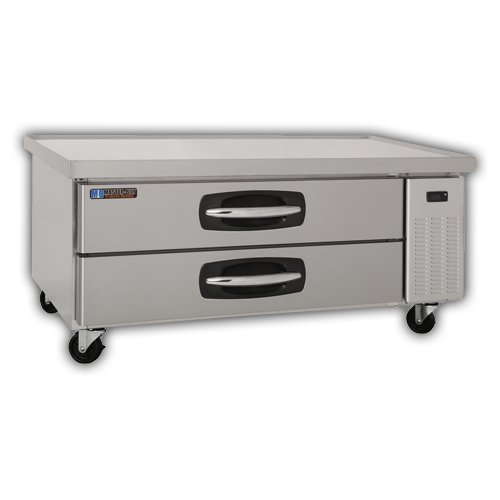
ส่วนประกอบหลัก:
- ภายนอกสแตนเลส: ทนทานและทำความสะอาดง่าย
- Refrigerated Drawers: Two pull-out drawers for organized cold storage.
- ล้อ: Four heavy-duty casters for mobility, with locking mechanisms.
- แผงควบคุม: (Typically located near the refrigeration unit) For temperature adjustment and display.
- ชุดคอนเดนเซอร์: Located on the right side, responsible for cooling.
4. การตั้งค่าและการติดตั้ง
4.1 การแกะกล่อง
- แกะวัสดุบรรจุภัณฑ์ทั้งหมดออกอย่างระมัดระวัง รวมถึงฟิล์มหรือเทปกาวที่ใช้ป้องกันด้วย
- Inspect the unit for any shipping damage. Report any damage immediately to your supplier.
4.2 การจัดวาง
- Position the chef stand on a level, sturdy surface capable of supporting its weight plus the weight of any equipment placed on top.
- Ensure adequate ventilation. Maintain a minimum of 4 inches (10 cm) clearance from walls or other equipment on all sides, especially around the condenser unit.
- Avoid direct sunlight or proximity to heat-generating appliances (ovens, fryers) to optimize performance.
- Lock the casters once the unit is in its final position.
4.3 การเชื่อมต่อไฟฟ้า
- Connect the unit to a dedicated 115 Volt, 60 Hz, single-phase grounded electrical outlet.
- อย่าใช้ปลั๊กอะแดปเตอร์หรือสายต่อพ่วง
- Verify that the power supply matches the requirements listed on the unit's data plate.
4.4 การทำความสะอาดเบื้องต้น
- ก่อนใช้งานครั้งแรก ให้ทำความสะอาดพื้นผิวด้านในและด้านนอกด้วยน้ำสบู่เจือจาง ล้างออกให้สะอาดและเช็ดให้แห้ง
5. คู่มือการใช้งาน
5.1 การเปิดเครื่อง
- After connecting to power, the unit will typically power on automatically or require a press of the power button on the control panel.
- Allow the unit to run for several hours empty to reach the desired temperature before loading with food products.
5.2 การควบคุมอุณหภูมิ
- The digital control panel allows for precise temperature adjustment. Refer to the specific controller's instructions for detailed programming.
- Recommended operating temperature for food safety is typically between 33°F and 41°F (0.5°C and 5°C).
5.3 Loading Drawers
- Load drawers evenly to ensure proper airflow and temperature distribution.
- Do not block internal air vents.
- Ensure drawers are fully closed after each use to maintain temperature and energy efficiency.
6. การบำรุงรักษาและการทำความสะอาด
Regular maintenance ensures optimal performance and extends the lifespan of your chef stand.
6.1 การทำความสะอาดรายวัน
- Wipe down interior and exterior stainless steel surfaces with a soft cloth and mild, non-abrasive cleaner.
- Clean drawer gaskets to ensure a tight seal.
6.2 การทำความสะอาดรายเดือน (หรือตามความจำเป็น)
- คอยล์คอนเดนเซอร์: Disconnect power. Carefully clean the condenser coil using a brush or vacuum cleaner to remove dust and debris. A dirty coil reduces efficiency and can lead to compressor failure.
- ถาดระบายน้ำ: Inspect and clean the drain pan to prevent blockages and odors.
7 การแก้ไขปัญหา
ก่อนติดต่อฝ่ายบริการกรุณาสอบถามview ปัญหาทั่วไปและวิธีแก้ไขเหล่านี้
| ปัญหา | สาเหตุที่เป็นไปได้ | สารละลาย |
|---|---|---|
| เครื่องไม่เย็น | ปัญหาเกี่ยวกับแหล่งจ่ายไฟ คอยล์คอนเดนเซอร์สกปรก Door/drawer not sealed การตั้งค่าเทอร์โมสตัท | ตรวจสอบการเชื่อมต่อสายไฟและเบรกเกอร์วงจร ทำความสะอาดคอยล์คอนเดนเซอร์ Ensure drawers are fully closed; check gaskets ปรับเทอร์โมสตัทไปที่ระดับต่ำลง |
| เสียงดังเกินไป | ส่วนประกอบหลวม การอุดตันของพัดลม หน่วยไม่ระดับ | Inspect for loose parts and tighten Check fan for obstructions Level the unit using caster adjustments |
| น้ำบนพื้น | ท่อระบายน้ำอุดตัน ความชื้นมากเกินไป | ท่อระบายน้ำสะอาด Ensure drawers are closed; reduce ambient humidity if possible |
8. ข้อมูลจำเพาะ
| คุณสมบัติ | รายละเอียด |
|---|---|
| แบบอย่าง | MBCB60 (02-72539) |
| ยี่ห้อ | มาสเตอร์-บิลท์ |
| ขนาดสินค้า (กว้าง x ลึก x สูง) | 60 x 31 x 25.5 นิ้ว |
| น้ำหนักสินค้า | 250 ปอนด์ |
| ความจุ | 9.8 ลูกบาศก์ฟุต |
| ข้อกำหนดด้านไฟฟ้า | 115 โวลต์ |
| วัสดุ | สแตนเลส |
| ประเภทการติดตั้ง | อิสระ |
9. การรับประกันและการสนับสนุน
For warranty information, technical support, or service inquiries, please contact Master-Bilt customer service or your authorized dealer. Keep your purchase receipt and model number (MBCB60) readily available when contacting support.
Master-Bilt Contact Information: Refer to the official Master-Bilt website or product documentation for the most current contact details.