
การแนะนำ
Thank you for choosing the iBall Nightingale K9 Portable Bluetooth Speaker. This manual provides essential information for setting up, operating, and maintaining your speaker. Please read it carefully before use to ensure proper functionality and longevity of your product.
คำแนะนำด้านความปลอดภัยที่สำคัญ
- ห้ามให้อุปกรณ์โดนฝน ความชื้น หรืออุณหภูมิที่สูงหรือต่ำเกินไป
- อย่าเปิดลำโพงasinก. ส่งต่อการบริการทั้งหมดให้กับบุคลากรที่มีคุณสมบัติเหมาะสม
- ตรวจสอบให้แน่ใจว่ามีการระบายอากาศที่เหมาะสมรอบๆ ลำโพง
- หลีกเลี่ยงแสงแดดโดยตรงและแหล่งความร้อน
- ใช้เฉพาะอุปกรณ์เสริม/สิ่งที่แนบที่ผู้ผลิตกำหนดเท่านั้น
- Charge the speaker using a compatible power adapter.
เนื้อหาแพ็คเกจ
ตรวจสอบว่ามีรายการทั้งหมดอยู่ในแพ็คเกจ:
- iBall Nightingale K9 Speaker Unit
- รีโมทคอนโทรล
- สายสัญญาณเสียง (AUX)
- สายชาร์จ (USB)
- คู่มือการใช้งาน (เอกสารนี้)
สินค้าเกินview
The iBall Nightingale K9 is a versatile portable speaker featuring Bluetooth connectivity, USB and SD card playback, FM radio, and AUX input. It comes with a built-in rechargeable battery and can be controlled via the included remote.
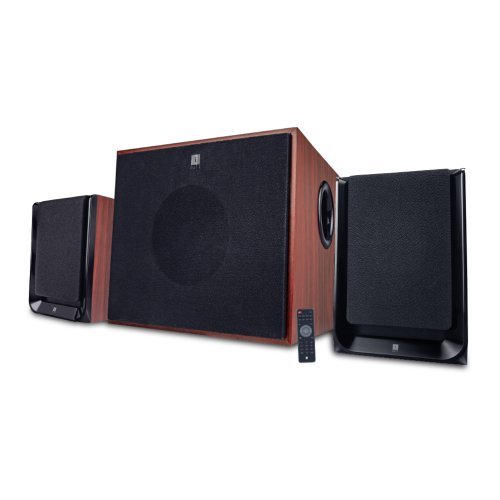
ภาพ: ด้านหน้า view of the iBall Nightingale K9 Portable Speaker, showing the main unit with controls and display.
คำแนะนำการตั้งค่า
1. ชาร์จลำโพง
- Before first use, fully charge the speaker. Connect the charging cable to the speaker's charging port and the other end to a USB power adapter (not included) or a computer's USB port.
- The charging indicator will illuminate during charging and turn off or change color when fully charged.
2. เปิดเครื่องครั้งแรก
Press and hold the Power button on the speaker or the remote control to turn the speaker on. The LED display will illuminate.
3. การตั้งค่าการควบคุมระยะไกล
Insert batteries into the remote control, ensuring correct polarity. The remote is ready for use immediately.
คำแนะนำการใช้งาน
1. เปิด/ปิดเครื่อง
Press the Power button on the remote control or the main unit to turn the speaker on or off. The LED display will illuminate when the unit is powered on.
2. การเลือกโหมด
Press the "Mode" button on the remote control or the front panel to cycle through available input modes: AUX, USB, SD, FM, Bluetooth.
3. การควบคุมระดับเสียง
Use the Volume Up (+) and Volume Down (-) buttons on the remote control or the main unit to adjust the master volume.
4. การเล่นไฟล์ผ่าน USB/การ์ด SD
- ใส่แฟลชไดรฟ์ USB หรือการ์ด SD ที่มีไฟล์เสียง MP3 files into the respective port/slot on the speaker. The system will automatically switch to USB/SD mode and begin playing compatible audio files.
- Use the "Play/Pause", "Next Track", and "Previous Track" buttons on the remote control to manage playback.
- Direct track selection is available via the numeric keypad on the remote control.
5. การใช้งานวิทยุ FM
- Switch to FM mode using the "Mode" button.
- Press and hold the "Play/Pause" button to initiate an automatic scan for FM stations. The system will save all found stations.
- Use the "Next Track" and "Previous Track" buttons to navigate between saved FM stations.
6. การจับคู่บลูทู ธ
- Switch the speaker to Bluetooth mode. The LED display will show "BT" and a pairing indicator will flash.
- บนอุปกรณ์มือถือของคุณ เปิดใช้งาน Bluetooth และค้นหาอุปกรณ์ที่มีอยู่
- Select "iBall Nightingale K9" from the list of devices.
- Once paired, the speaker will emit a confirmation tone, and the pairing indicator will stop flashing. You can now play audio wirelessly from your device.
7. อินพุต AUX
Connect one end of the provided audio cable to the AUX input port on the speaker and the other end to the audio output (e.g., headphone jack) of your device. Switch the speaker to AUX mode.
8. ฟังก์ชั่นการควบคุมระยะไกล
The remote control provides full functionality for the speaker. Ensure the remote control has working batteries and is pointed towards the speaker's IR sensor.
ภาพ: อดีตample of a remote control for the iBall Nightingale K9 Speaker, showing various function buttons.
การซ่อมบำรุง
- การทำความสะอาด: ใช้ผ้านุ่มและแห้งเช็ดทำความสะอาดพื้นผิวลำโพง ห้ามใช้น้ำยาทำความสะอาดหรือวัสดุขัดถู
- พื้นที่จัดเก็บ: If storing the speaker for an extended period, ensure it is fully charged and store it in a cool, dry place.
- แบตเตอรี่ควบคุมระยะไกล: Replace batteries in the remote control when its range decreases or it stops responding. Use the specified battery type.
การแก้ไขปัญหา
| ปัญหา | สาเหตุที่เป็นไปได้ | สารละลาย |
|---|---|---|
| ไม่มีไฟฟ้า | Battery depleted; Power button not pressed | Charge the speaker. Press and hold the power button. |
| ไม่มีเสียง | Volume too low; Incorrect input mode; Audio cable loose/faulty; Source device muted | Increase volume. Select correct input mode. Check audio cable connections. Unmute source device. |
| รีโมตคอนโทรลไม่ทำงาน | Batteries depleted/incorrectly inserted; Obstruction between remote and sensor | Replace remote control batteries. Ensure clear line of sight to the speaker's IR sensor. |
| การจับคู่บลูทูธล้มเหลว | ลำโพงไม่ได้อยู่ในโหมดจับคู่ อุปกรณ์อยู่ไกลเกินไป มีสัญญาณรบกวน | Ensure speaker is in Bluetooth pairing mode. Move device closer. Reduce interference from other wireless devices. |
| การรับสัญญาณ FM ไม่ดี | สัญญาณอ่อน; ตำแหน่งลำโพง | Adjust the position of the speaker for better reception. Perform an auto-scan again. |
ข้อมูลจำเพาะทางเทคนิค
- แบบอย่าง: Nightingale K9
- ยี่ห้อ: iBall
- ประเภทลำโพง: ลำโพงบลูทูธแบบพกพา
- การเชื่อมต่อ: Bluetooth, Auxiliary, USB, SD Card, FM Radio
- โหมดเอาต์พุตเสียง: ล้อมรอบ
- วัสดุของกล่องหุ้ม: ไม้
- วิธีการควบคุม: รีโมทคอนโทรล
- ลำโพงกำลังขับสูงสุด: 3 วัตต์ RMS
- เวอร์ชันบลูทูธ: วี2.1
- แหล่งพลังงาน: แบตเตอรี่แบบชาร์จไฟได้ในตัว
- อุปกรณ์ที่รองรับ: สมาร์ทโฟน, แท็บเล็ต
- น้ำหนักสินค้า: ประมาณ 8.22 ปอนด์
- คุณสมบัติผลิตภัณฑ์: Wireless, Microphone, Voice Prompt Alerts
การรับประกันและการสนับสนุน
For warranty information and customer support, please refer to the warranty card included with your product or visit the official iBall webไซต์นี้ โปรดเก็บใบเสร็จรับเงินที่ซื้อไว้เพื่อใช้เรียกร้องการรับประกัน
การปฏิเสธความรับผิดทางกฎหมาย: PLEASE CHECK YOUR LOCAL LAWS BEFORE PURCHASING ผลิตภัณฑ์นี้
For further assistance, you may contact iBall customer service through their official channels. Details are typically available on the product packaging or their webเว็บไซต์.