
การแนะนำ
The Fellowes Saturn 125 Thermal Laminator is designed for efficient and reliable lamination of documents up to 12.5 inches wide. Featuring InstaHeat technology for rapid warm-up and a jam-free design, this machine is suitable for home, office, or classroom use. This manual provides essential information for safe operation, setup, maintenance, and troubleshooting.
ข้อมูลด้านความปลอดภัย
- ความปลอดภัยทางไฟฟ้า: Always plug the laminator into a grounded outlet. Do not operate with a damaged power cord or plug. Keep the power cord away from heated surfaces.
- คำเตือนเรื่องความร้อน: The laminator's rollers and surrounding areas become hot during operation. Avoid touching these surfaces to prevent burns. Allow the machine to cool completely before storing.
- Proper Pouch Use: Use only laminating pouches designed for thermal laminators. Do not attempt to laminate items thicker than the maximum recommended pouch thickness (5-mil).
- การระบายอากาศ : Ensure adequate ventilation around the laminator during use. Do not block air vents.
- เด็กและสัตว์เลี้ยง: Keep the laminator out of reach of children and pets. Adult supervision is required if children are operating the device.
- การสัมผัสของเหลว: Do not expose the laminator to water or other liquids. If liquid spills on the device, unplug it immediately and contact customer support.
เนื้อหาแพ็คเกจ
ตรวจสอบว่ามีรายการทั้งหมดอยู่ในแพ็คเกจ:
- Fellowes Saturn 3i 125 Laminator
- Pouch Starter Kit (quantity may vary)
- คู่มือการใช้งาน
การตั้งค่า
- แกะ: นำเครื่องเคลือบเอกสารและอุปกรณ์เสริมทั้งหมดออกจากบรรจุภัณฑ์อย่างระมัดระวัง
- การจัดวาง: Place the laminator on a stable, flat surface with adequate space around it for proper ventilation and document feeding/exiting. Ensure it is away from heat sources and direct sunlight.
- การเชื่อมต่อไฟฟ้า: เสียบสายไฟเข้ากับเต้ารับไฟฟ้ามาตรฐาน
- เปิดเครื่อง: Locate the power switch on the back of the unit and turn it to the 'ON' position. The laminator will begin its warm-up cycle.
- การวอร์มอัพ: The InstaHeat technology allows for a rapid warm-up time of approximately 60 seconds. The indicator light will change from red to green when the machine is ready for use.

Image: Fellowes Saturn 125 Thermal Laminator ready for use.

Image: The laminator features a quick 60-second warm-up time, indicated by a green light.
คำแนะนำการใช้งาน
- เลือกความหนาของถุง: Choose the appropriate pouch thickness (3-mil, 4-mil, or 5-mil) using the control panel buttons. For self-adhesive pouches, select the 'COLD' setting (snowflake icon).
- เตรียมเอกสาร: Place your document neatly inside the laminating pouch, ensuring it is centered and there is a small border around the edges.
- กระเป๋าใส่ของ: Feed the sealed edge of the pouch into the laminator's entry slot. The machine will automatically draw the pouch through.
- กระบวนการเคลือบ: The Saturn 125 laminates at a speed of 19 inches per minute. Allow the machine to complete the process without pulling or pushing the pouch.
- ดึงเอกสารเคลือบพลาสติกออกมา: Once the pouch exits the rear of the machine, carefully remove it. The document will be warm; allow it to cool for a few moments before handling extensively.
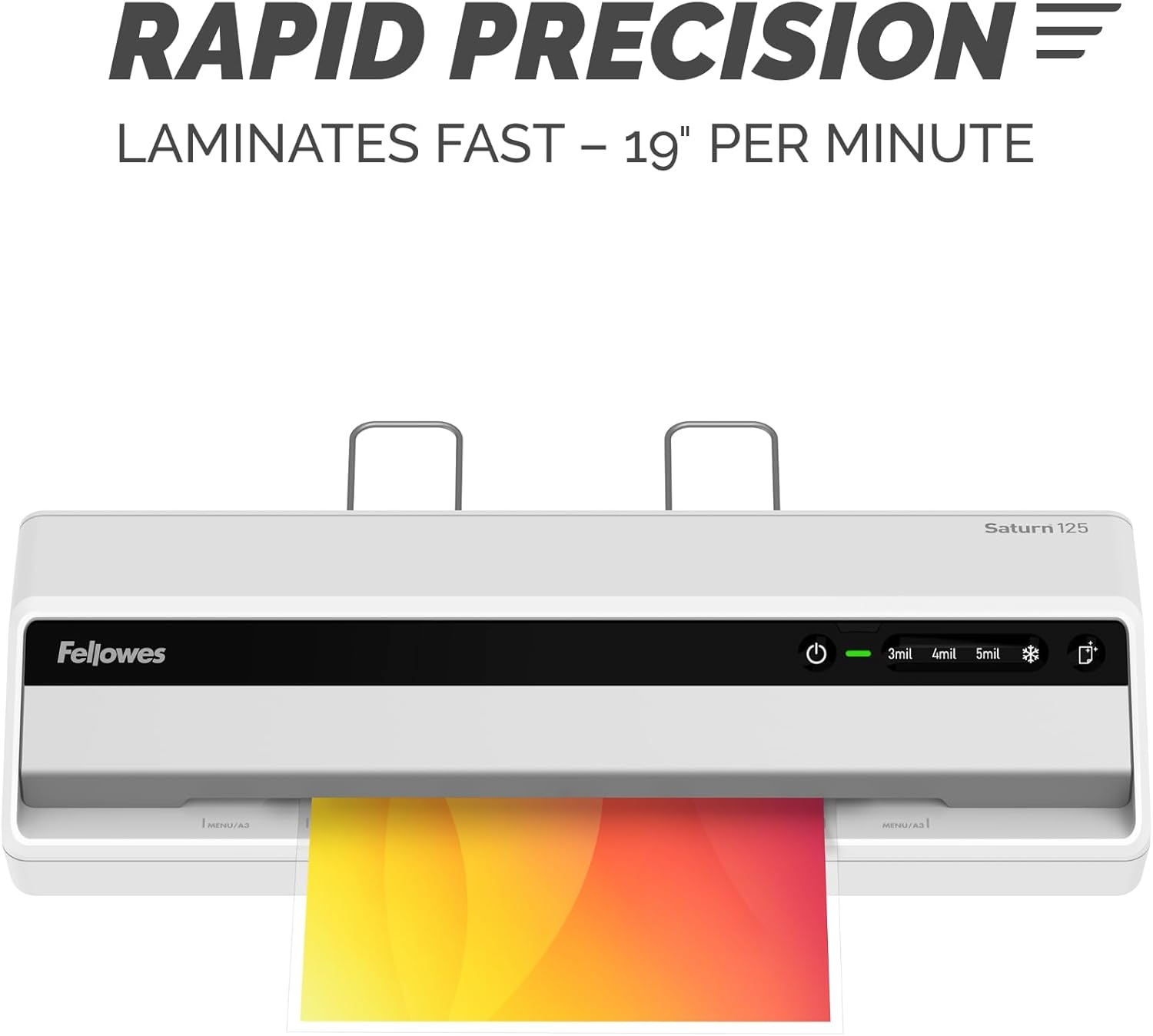
Image: The laminator processes documents quickly at 19 inches per minute.

Image: Choose from 3-mil, 4-mil, 5-mil, or cold settings for various pouch types.
Video: A quick demonstration of the Fellowes Saturn 3i 125 laminator in action, showing the ease of use and efficient lamination process.
Video: This video demonstrates how simple it is to laminate documents using the Fellowes Saturn 125, highlighting its user-friendly operation.
การซ่อมบำรุง
- การทำความสะอาด: The laminator features a CleanAlert reminder system. When activated, run a cleaning sheet through the machine to remove adhesive residue and maintain optimal performance.
- การทำความสะอาดภายนอก: เช็ดทำความสะอาดภายนอกเครื่องเคลือบด้วยผ้าแห้งเนื้อนุ่ม ห้ามใช้สารทำความสะอาดที่มีฤทธิ์กัดกร่อนหรือตัวทำละลาย

Image: The CleanAlert system provides reminders for cleaning to ensure longevity.
การแก้ไขปัญหา
- Document Jam: The Saturn 125 includes jam detection technology. If a jam occurs, use the quick release lever to free the pouch. Re-center or remove the pouch and attempt lamination again.
- Bubbles or Uneven Lamination: Ensure the correct pouch thickness setting is selected. For optimal results, use high-quality laminating pouches.
- ความร้อนสูงเกินไป: The laminator is equipped with an automatic shut-off feature that activates after 30 minutes of non-use to prevent overheating and conserve energy. If the machine feels excessively hot, unplug it and allow it to cool.

Image: The jam release lever helps clear jammed pouches for continuous productivity.
ข้อมูลจำเพาะ
| คุณสมบัติ | รายละเอียด |
|---|---|
| ยี่ห้อ | เฟลโลว์ส |
| หมายเลขรุ่น | 5736601 |
| น้ำหนักสินค้า | 5.1 ปอนด์ |
| ขนาดสินค้า | 5.75 x 20.94 x 4.13 นิ้ว |
| ประเภทวัสดุ | พลาสติก |
| Max Document Width | 12.5 นิ้ว |
| ขนาดแผ่น | จดหมาย |
| เวลาวอร์มอัพ | 60 seconds (InstaHeat) |
| ความเร็วในการเคลือบ | 19 นิ้วต่อนาที |
| Pouch Thickness Settings | 3-mil, 4-mil, 5-mil, Cold |
| ปิดเครื่องอัตโนมัติ | Yes (after 30 minutes of non-use) |
การรับประกันและการสนับสนุน
For warranty information and customer support, please refer to the official Fellowes webหรือติดต่อฝ่ายบริการลูกค้า โปรดเก็บใบเสร็จรับเงินไว้เป็นหลักฐานการซื้อสำหรับการเรียกร้องการรับประกันใดๆ
ผู้ผลิต: เฟลโลว์ส