
1. บทนำ
ขอบคุณสำหรับการซื้อasing the F&D F690 Multimedia Speaker System. This system is designed to provide high-quality audio playback from various sources, including USB drives, SD cards, FM radio, and auxiliary input. Please read this manual carefully before operating the device to ensure proper use and to maximize its performance.
2. ข้อมูลด้านความปลอดภัย
- แหล่งพลังงาน: ตรวจสอบแหล่งจ่ายไฟ voltage matches the requirements specified on the speaker unit. Use only the provided power cable.
- การระบายอากาศ : อย่าปิดกั้นช่องระบายอากาศใดๆ เว้นระยะห่างที่เหมาะสมรอบๆ เครื่องเพื่อให้มีการไหลเวียนของอากาศที่ดี
- น้ำและความชื้น: อย่าให้ตัวเครื่องโดนฝน ความชื้น หรือของเหลวที่หยด/กระเด็นใส่ อย่าวางสิ่งของที่บรรจุของเหลว เช่น แจกัน ไว้บนตัวเครื่อง
- ความร้อน: เก็บเครื่องให้ห่างจากแหล่งความร้อน เช่น หม้อน้ำ เครื่องทำความร้อน เตา หรืออุปกรณ์อื่นๆ (รวมถึง ampเครื่องให้ความร้อน) ที่ผลิตความร้อน
- การทำความสะอาด: Unplug the unit from the power outlet before cleaning. Use a dry cloth for cleaning. Do not use liquid cleaners or aerosol cleaners.
- การบริการ: อย่าพยายามให้บริการผลิตภัณฑ์นี้ด้วยตนเอง ส่งต่อการบริการทั้งหมดไปยังช่างบริการที่ผ่านการรับรอง
- การจัดวาง: วางเครื่องบนพื้นผิวที่มั่นคงและเรียบเพื่อป้องกันไม่ให้เครื่องตก
3. เนื้อหาบรรจุภัณฑ์
กรุณาทำเครื่องหมายในช่องสำหรับรายการต่อไปนี้:
- Subwoofer unit (1 pc)
- Satellite speakers (2 pcs)
- รีโมทคอนโทรล (1 ชิ้น)
- Audio input cable (RCA vs. 3.5mm stereo cable) (1 pc)
- Quick installation guide (1 pc)
- Warranty card (1 pc)
4. สินค้าหมดview
The F&D F690 system consists of a subwoofer and two satellite speakers, designed for a balanced audio experience. The subwoofer features a 6.5-inch bass driver, while each satellite speaker includes a 3-inch full-range driver and a 1-inch tweeter.
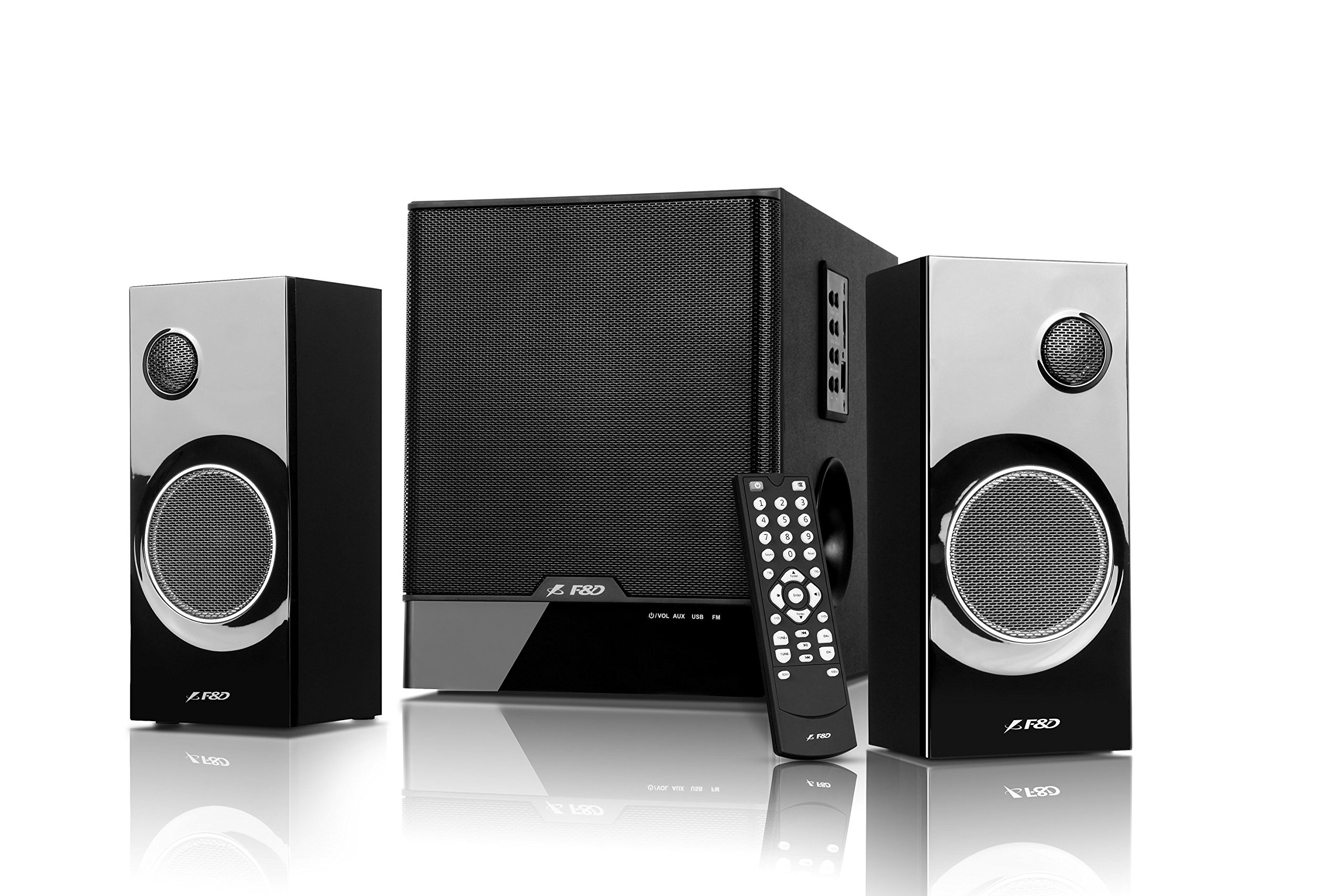
Image: The F&D F690 Multimedia Speaker System, showing the central subwoofer unit and two satellite speakers. The subwoofer has a large speaker grille, and the satellites feature smaller grilles.
4.1. Front Panel Controls (Subwoofer)
The subwoofer unit includes the following controls:
- ปุ่มสแตนด์บาย: เปิดหรือปิดเครื่อง
- ปุ่มต้นทาง: Cycles through input sources (USB, SD, FM, AUX).
- ปุ่มเสียง: Adjusts sound modes or settings.
- ปุ่มปรับระดับเสียง +/-: เพิ่มหรือลดระดับเสียงหลัก
- ปุ่มเล่น/หยุดชั่วคราว: Controls playback for USB/SD modes.
- ปุ่มก่อนหน้า/ถัดไป: Navigates tracks in USB/SD modes or stations in FM mode.
4.2. รีโมทคอนโทรล
The full-function remote control allows for convenient operation of all features from a distance, including direct numeric key input for track selection or FM station tuning.
5. การตั้งค่า
5.1. Connecting Satellite Speakers
- Locate the speaker output ports on the rear of the subwoofer unit.
- Connect the cables from the satellite speakers to the corresponding output ports. Ensure a secure connection.
5.2. การเชื่อมต่อแหล่งเสียง
- อินพุตเสริม: Use the provided RCA to 3.5mm stereo cable to connect external devices (e.g., TV, PC, MP3 player) to the AUX input ports on the subwoofer.
- ยูเอสบีไดรฟ์: Insert a USB flash drive into the USB port on the subwoofer.
- การ์ด SD: Insert an SD card into the SD card slot on the subwoofer.
5.3. การเชื่อมต่อไฟฟ้า
- Connect the power cable to the AC input on the rear of the subwoofer.
- Plug the other end of the power cable into a standard AC 220-240V~50/60Hz wall outlet.
- Press the Standby button on the subwoofer or remote control to power on the unit.
6. คู่มือการใช้งาน
6.1. การเลือกแหล่งที่มา
กดปุ่ม แหล่งที่มา button on the subwoofer or remote control repeatedly to cycle through the available input modes: AUX, USB, SD, and FM.
6.2. การเล่น USB/SD
- เสียบไดรฟ์ USB หรือการ์ด SD ที่มีไฟล์เสียง MP3/WMA files. The system will automatically switch to USB/SD mode and begin playback.
- ใช้ เล่น/หยุดชั่วคราว ปุ่มเพื่อหยุดชั่วคราวหรือเล่นต่อ
- ใช้ ก่อนหน้า/ถัดไป ปุ่มเพื่อข้ามไปยังเพลงก่อนหน้าหรือเพลงถัดไป
- For direct track selection, use the numeric keys on the remote control.
6.3. การใช้งานวิทยุ FM
- สลับไปที่โหมด FM โดยใช้ แหล่งที่มา ปุ่ม.
- The system features PLL technology for stable FM reception.
- การสแกนอัตโนมัติ: กดปุ่มค้างไว้ เล่น/หยุดชั่วคราว button (or a dedicated scan button on the remote, if available) to automatically scan and store available FM stations. The system can store up to 100 stations.
- การปรับด้วยตนเอง: ใช้ ก่อนหน้า/ถัดไป ปุ่มสำหรับนำทางไปยังสถานีที่บันทึกไว้
- อินพุตความถี่โดยตรง: Use the numeric keys on the remote control to directly enter an FM frequency.
6.4. การควบคุมระดับเสียง
ปรับระดับเสียงหลักโดยใช้ ปริมาณ +/- buttons on the subwoofer or the remote control.
7. การบำรุงรักษา
- การทำความสะอาด: Wipe the surfaces of the speakers and subwoofer with a soft, dry cloth. Do not use abrasive cleaners, waxes, or solvents.
- ฝุ่น: ควรปัดฝุ่นตะแกรงลำโพงเป็นประจำเพื่อป้องกันการสะสมของฝุ่นที่อาจส่งผลต่อคุณภาพเสียง
- พื้นที่จัดเก็บ: หากจะเก็บเครื่องไว้เป็นเวลานาน ควรถอดปลั๊กออกจากเต้ารับไฟฟ้าและเก็บไว้ในที่แห้งและเย็น
8 การแก้ไขปัญหา
| ปัญหา | สาเหตุที่เป็นไปได้ | สารละลาย |
|---|---|---|
| ไม่มีไฟฟ้า | สายไฟไม่ได้เชื่อมต่อ เต้ารับไฟฟ้าไม่ทำงาน | Ensure power cable is securely connected; Check power outlet with another device. |
| ไม่มีเสียง | Incorrect source selected; Volume too low; Audio cables not connected properly | Press Source button to select correct input; Increase volume; Check all audio cable connections. |
| USB/SD เล่นไม่ได้ | ไม่ถูกต้อง file format; USB drive/SD card corrupted; Device not inserted correctly | ทำให้มั่นใจ files are MP3/WMA format; Try another USB drive/SD card; Reinsert the device. |
| การรับสัญญาณ FM ไม่ดี | สัญญาณอ่อน; สัญญาณรบกวน | Adjust the position of the unit; Try auto-scanning again; Avoid placing near other electronic devices. |
| รีโมตคอนโทรลไม่ทำงาน | แบตเตอรี่หมด; มีสิ่งกีดขวางระหว่างรีโมทและตัวเครื่อง | Replace remote control batteries; Ensure clear line of sight to the unit's sensor. |
9. ข้อมูลจำเพาะ
| คุณสมบัติ | รายละเอียด |
|---|---|
| กำลังขับ (RMS) | 60 W (Subwoofer: 30W, Satellites: 15W x 2) |
| ไดร์เวอร์ซับวูฟเฟอร์ | 6.5-inch bass driver |
| ไดรเวอร์ดาวเทียม | 3-inch full range driver & 1-inch tweeter |
| Frequency Response (Subwoofer) | 30Hz ~ 120Hz |
| Frequency Response (Satellite) | 200Hz ~ 20kHz |
| การเชื่อมต่อ | USB, SD Card, AUX (RCA to 3.5mm stereo) |
| รูปแบบเสียงที่รองรับ | ไฟล์ MP3, WMA (ผ่าน USB/SD) |
| วิทยุเอฟเอ็ม | Digital FM with PLL technology, 100 station storage |
| แหล่งจ่ายไฟ | ไฟฟ้ากระแสสลับ 220-240V ~ 50/60Hz |
| Subwoofer Dimensions (W×D×H) | 206 x 302 x 260 มม. |
| Satellite Speaker Dimensions (W×D×H) | 93 x 91 x 213 มม. |
| น้ำหนักสุทธิ | 7.6 กก. |
| วัสดุ | พลาสติก, ไม้ |
| วิธีการควบคุม | Remote, Unit Buttons |
10. การรับประกันและการสนับสนุน
This product comes with a limited warranty. Please refer to the warranty card included in your package for detailed terms and conditions. For technical support, service, or inquiries, please contact your local F&D customer service center or authorized dealer. Keep your purchase receipt as proof of purchase for warranty claims.