
1. สินค้าหมดview
The D-Link DGS-1510-28X is a Smart Managed Switch designed for Small to Medium Enterprise (SME/SMB) networks. It features 24 Gigabit Ethernet ports and 4 10-Gigabit SFP+ ports, providing high-speed connectivity and uplink capabilities. This switch integrates advanced management and security functions, offering a balance between a fully managed switch's capabilities and ease of use. It supports physical stacking, virtual stacking, Layer 2 and Layer 3 Lite features, and various security protocols to ensure network reliability and performance.

รูปที่ 1 : ด้านหน้า view of the D-Link DGS-1510-28X switch.
2. คำแนะนำด้านความปลอดภัย
- Ensure proper grounding for the device to prevent electrical hazards.
- อย่าให้สวิตช์โดนน้ำหรือความชื้นสูงเกินไป
- Operate the device within the specified temperature and humidity ranges (23°F to 122°F).
- Use only the power cord provided with the device or a compatible replacement.
- หลีกเลี่ยงการปิดกั้นช่องระบายอากาศเพื่อป้องกันความร้อนสูงเกินไป
- ตัดการเชื่อมต่อไฟฟ้าก่อนทำความสะอาดหรือดำเนินการบำรุงรักษา
3. เนื้อหาบรรจุภัณฑ์
ตรวจสอบว่าแพ็คเกจของคุณมีรายการต่อไปนี้:
- D-Link DGS-1510-28X Switch
- ชุดแร็คเมาท์
- สายไฟ
- คู่มือการติดตั้งอย่างรวดเร็ว (QIG)
4. ฮาร์ดแวร์โอเวอร์view
4.1 แผงด้านหน้า

รูปที่ 2: ด้านหน้าทำมุม view of the DGS-1510-28X switch, showing all ports and indicators.
- พอร์ต 24 x 10/100/1000BASE-T: พอร์ต Gigabit Ethernet มาตรฐานสำหรับเชื่อมต่ออุปกรณ์เครือข่าย
- 4 x 10-Gigabit SFP+ Ports: High-speed fiber optic ports for uplinks or stacking.
- พอร์ตคอนโซล: RJ-45 port for command-line interface (CLI) access.
- ไฟ LED แสดงสถานะ: Power, Link/Activity, Speed for each port, and Stack ID indicators.
4.2 แผงด้านหลัง

รูปที่ 3: ด้านหลัง view of the DGS-1510-28X switch, showing the power input and grounding screw.
- อินพุตไฟ AC: ขั้วต่อสำหรับสายไฟ
- สกรูดิน: For connecting an earth ground cable.
- สล็อตล็อคเคนซิงตัน: เพื่อความปลอดภัยทางกายภาพ
4.3 มิติ
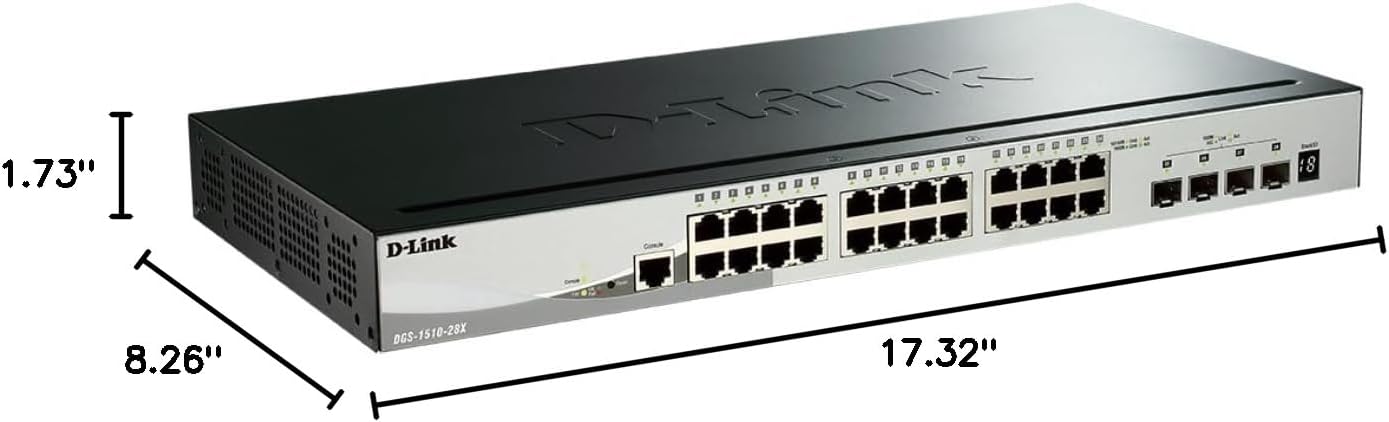
Figure 4: Dimensions of the DGS-1510-28X switch: 17.32"L x 8.26"W x 1.73"H.
5. การติดตั้งและการตั้งค่า
5.1 การติดตั้งแร็ค
The DGS-1510-28X can be installed in a standard 19-inch equipment rack. Use the provided rackmount kit to secure the switch. Attach the mounting brackets to the sides of the switch using the included screws, then secure the switch into the rack.
5.2 การเชื่อมต่อสายไฟ
- Connect the provided AC power cord to the power input on the rear panel of the switch.
- เสียบปลายอีกด้านของสายไฟเข้ากับเต้ารับไฟฟ้าที่เหมาะสม
- Ensure the power LED on the front panel illuminates, indicating the switch is receiving power.
5.3 การเชื่อมต่อเครือข่าย
- Connect your network devices (computers, servers, printers, NAS, IP cameras, wireless APs, VoIP phones) to the 10/100/1000BASE-T ports using standard Ethernet cables.
- For high-speed uplinks or connections to other network segments, insert compatible SFP+ transceivers into the 10-Gigabit SFP+ ports and connect appropriate fiber optic cables.
6. การทำงานและการกำหนดค่า
6.1 การเข้าถึงส่วนติดต่อการจัดการ
The DGS-1510-28X can be managed via a web-based graphical user interface (GUI) or a Command Line Interface (CLI).
- Web- การจัดการตาม: Connect a computer to any Gigabit Ethernet port on the switch. Configure your computer's IP address to be in the same subnet as the switch's default IP address (refer to the Quick Installation Guide for default IP). Open a web เบราว์เซอร์และป้อนที่อยู่ IP ของสวิตช์เพื่อเข้าถึงหน้าเข้าสู่ระบบ
- อินเทอร์เฟซบรรทัดคำสั่ง (CLI): Connect a console cable from your computer's serial port to the switch's console port. Use a terminal emulation program (e.g., PuTTY) with appropriate serial settings (e.g., 115200 baud rate, 8 data bits, no parity, 1 stop bit, no flow control) to access the CLI.

รูปที่ 5: อดีตample of the intuitive webอินเทอร์เฟซการจัดการตาม
6.2 Key Features Configuration
- VLAN: Configure Virtual Local Area Networks to segment network traffic and enhance security and performance. The switch supports various VLAN types, including port-based, tag-based, and protocol-based VLANs.
- การซ้อน: The DGS-1510-28X supports physical stacking of up to 6 units using the 10GbE SFP+ ports, creating a single logical unit for simplified management. Virtual stacking via D-Link's Single IP Management (SIM) allows management of up to 32 units.
- 10GbE SFP+ Ports: Utilize these ports for high-bandwidth connections to servers, storage devices, or other core network equipment.
- Surveillance Mode: This feature streamlines IP surveillance network deployment. When enabled in the web UI, it automatically detects ONVIF-compliant devices and segments them into a dedicated Auto Surveillance VLAN, optimizing video traffic.
- คุณสมบัติความปลอดภัย: The switch includes a comprehensive security suite:
- รายการควบคุมการเข้าถึง (ACL): Filters network traffic based on MAC or IP addresses.
- ARP Spoofing Prevention: Protects against attacks that can redirect network traffic.
- การผูก IP-MAC-พอร์ต: Binds specific IP and MAC addresses to switch ports for enhanced security.
- D-Link Safeguard Engine: Protects the switch's CPU from traffic flooding caused by malicious attacks.
- DoS Attack Prevention: Mitigates various Denial of Service attacks.
- Layer 3 Lite & Static Routing: Supports IPv4/IPv6 routing and IP segmentation to improve network performance and manage traffic across different subnets.

Figure 6: Illustration of 10G SFP+ stacking capabilities.

Figure 7: Screenshot of the Surveillance Mode interface, showing device detection and network topology.
7. การบำรุงรักษา
- อัพเดตเฟิร์มแวร์: Regularly check the D-Link support website for the latest firmware versions. Updating firmware can provide new features, performance improvements, and security patches. Follow the instructions provided with the firmware update package.
- การทำความสะอาด: Use a soft, dry cloth to clean the exterior of the switch. Do not use liquid or aerosol cleaners. Ensure ventilation openings are free from dust and debris.
- การสำรองข้อมูลการกำหนดค่า: Periodically back up your switch configuration to an external device to facilitate quick recovery in case of a reset or failure.
8 การแก้ไขปัญหา
- ไม่มีไฟฟ้า: Ensure the power cord is securely connected to both the switch and a working power outlet. Verify the power LED is illuminated.
- ไม่มีการเชื่อมต่อเครือข่าย: Check the Link/Activity LEDs for the connected ports. Ensure Ethernet cables are properly seated and undamaged. Verify IP address settings on connected devices and the switch.
- ประสิทธิภาพการทำงานช้า: Check for network loops (Spanning Tree Protocol should be enabled). Monitor port utilization and ensure connected devices are operating at their expected speeds. Consider upgrading cable types if necessary (e.g., for 10GbE connections).
- ไม่สามารถเข้าถึง Web ยูไอ: ตรวจสอบให้แน่ใจว่าที่อยู่ IP ของคอมพิวเตอร์ของคุณอยู่ในซับเน็ตเดียวกันกับสวิตช์ ล้างแคชของเบราว์เซอร์หรือลองใช้เบราว์เซอร์อื่น ตรวจสอบให้แน่ใจว่าไม่มีไฟร์วอลล์ปิดกั้นการเข้าถึง
- Console Access Issues: Confirm serial port settings (baud rate, data bits, parity, stop bits, flow control) match the switch's requirements. Ensure the console cable is correctly connected.
9. ข้อมูลจำเพาะทางเทคนิค
| คุณสมบัติ | ข้อมูลจำเพาะ |
|---|---|
| หมายเลขรุ่น | DGS-1510-28X |
| ขนาดสินค้า (กxยxส) | 17.32" x 8.26" x 1.73" |
| น้ำหนักสินค้า | 4.2 ปอนด์ |
| เล่มที่tage | 240 โวลต์ |
| วัสดุตัวเรือน | โลหะ |
| ช่วงอุณหภูมิในการทำงาน | 23°F ถึง 122°F |
| ประเภทอินเทอร์เฟซ | RJ45, เอสเอฟพี+ |
| อัตราการถ่ายโอนข้อมูล | 128 กิกะบิตต่อวินาที (ความสามารถในการสลับ) |
| จำนวนพอร์ต | 28 (24 Gigabit, 4 10GbE SFP+) |
| แพลตฟอร์มฮาร์ดแวร์ | PC |
| ยูพีซี | 790069406058 |
| สี | สีดำ |
| อุปกรณ์ที่รองรับ | Desktop, Printer, Router |
10. การรับประกันและการสนับสนุนทางเทคนิค
The D-Link DGS-1510-28X Smart Managed Switch is backed by D-Link's Lifetime Protection, ensuring long-term confidence in the quality and reliability of your network infrastructure. For technical assistance, product documentation, or warranty information, please visit the official D-Link support website or contact your local D-Link representative.
For further information and support, visit: D-Link Official Webเว็บไซต์