
การแนะนำ
This instruction manual provides comprehensive guidance for the Beyution Replacement Remote Control, designed for use with various SEIKI LCD and LED television models. This infrared remote control requires no programming; simply insert batteries to begin operation. It is compatible with a wide range of SEIKI TV models, ensuring seamless control over your television's functions.
การตั้งค่า
การติดตั้งแบตเตอรี่
To prepare your remote control for use, follow these steps to install the batteries:
- ค้นหาฝาปิดช่องใส่แบตเตอรี่ที่ด้านหลังของรีโมทคอนโทรล
- กดแท็บลงแล้วเลื่อนฝาลงเพื่อเปิดช่อง
- ใส่แบตเตอรี่ AAA สองก้อน (ไม่รวม) โดยให้แน่ใจว่าขั้วบวก (+) และขั้วลบ (-) ตรงกับเครื่องหมายภายในช่องอย่างถูกต้อง
- เลื่อนฝาปิดช่องใส่แบตเตอรี่กลับเข้าที่จนกระทั่งล็อคเข้าที่อย่างแน่นหนา
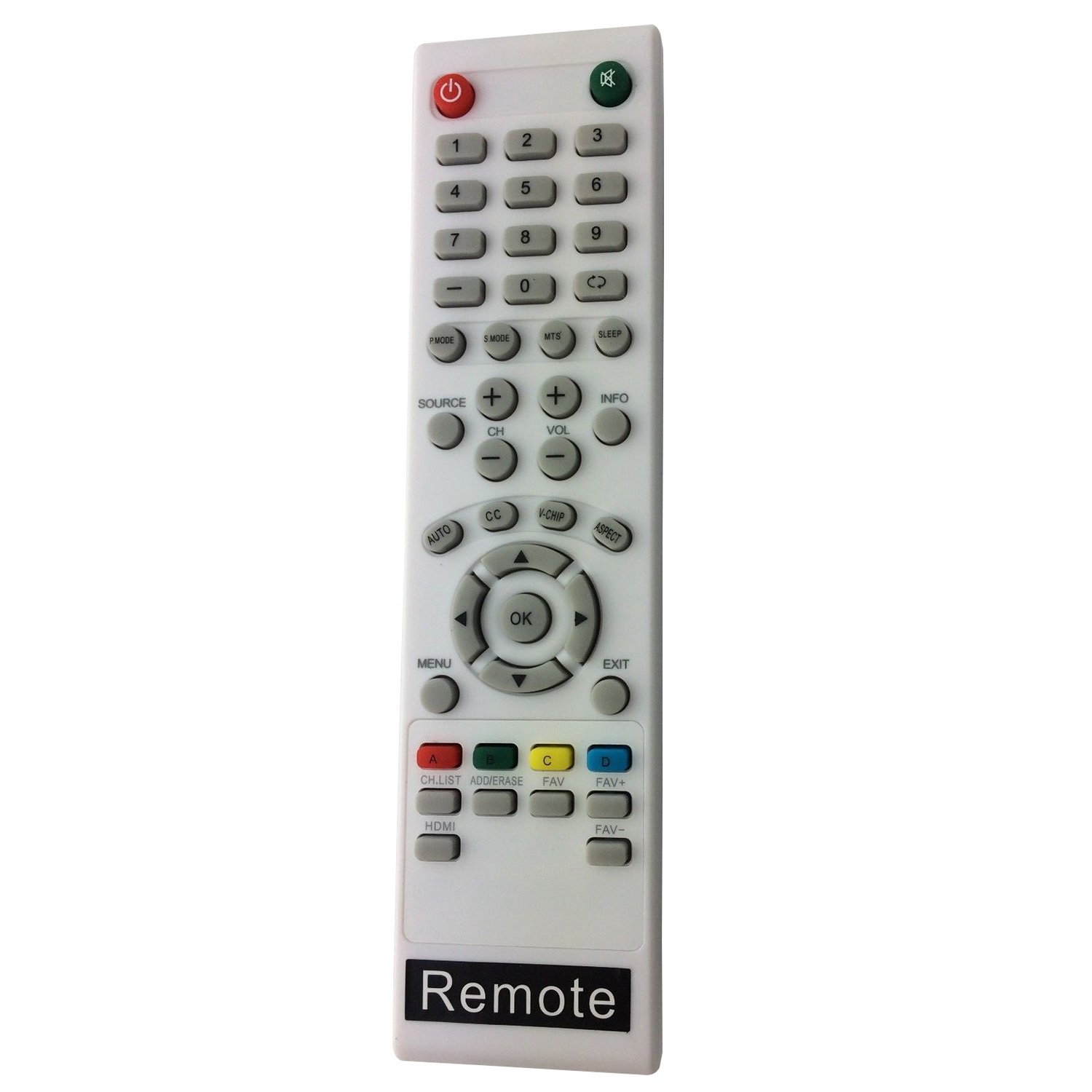
ภาพ: มุมเอียง view of the Beyution Replacement Remote Control, showing its general design.
Once batteries are installed, the remote control is ready for immediate use with your compatible SEIKI TV. No additional programming is required.
คำแนะนำการใช้งาน
This section details the functions of the buttons on your Beyution Replacement Remote Control. Refer to the image below for button identification.

ภาพ: จากบนลงล่าง view of the Beyution Replacement Remote Control, highlighting all functional buttons.
| ปุ่ม | การทำงาน |
|---|---|
| พลัง (⏻) | เปิดหรือปิดทีวี |
| MUTE (🔇) | ปิดหรือเปิดเสียงทีวี |
| 0-9 (ปุ่มตัวเลข) | เลือกช่องทีวีได้โดยตรง |
| พี.โหมด | Cycles through picture modes (e.g., Standard, Dynamic, Movie). |
| เอส.โหมด | Cycles through sound modes (e.g., Standard, Music, Movie). |
| เอ็มทีเอส | Selects Multi-channel Television Sound (e.g., Stereo, SAP). |
| นอน | Sets the TV to turn off automatically after a specified time. |
| แหล่งที่มา | Selects the input source (e.g., HDMI, AV, Component). |
| ช +/- | เปลี่ยนช่องขึ้นหรือลง |
| ฉบับ +/- | ปรับระดับเสียงขึ้นหรือลง |
| ข้อมูล | Displays current channel information or program details. |
| ออโต้ | เริ่มการปรับจูนช่องสัญญาณอัตโนมัติ |
| CC | เปิดใช้งานหรือปิดใช้งานคำบรรยายภาพ |
| วี-ชิป | Accesses V-Chip parental control settings. |
| ด้าน | เปลี่ยนอัตราส่วนภาพหน้าจอ (เช่น 16:9, 4:3) |
| เมนู | เปิดเมนูหลักของทีวี |
| ปุ่มนำทาง (ขึ้น, ลง, ซ้าย, ขวา) | นำทางผ่านตัวเลือกเมนู |
| OK | ยืนยันการเลือกในเมนู |
| EXIT | ออกจากเมนูหรือหน้าจอแสดงผลปัจจุบัน |
| ช.รายการ | แสดงรายการช่อง |
| ADD/ERASE | Adds or erases channels from the favorite list. |
| FAV+ / FAV- | เลื่อนดูช่องโปรดต่างๆ |
| HDMI | Directly selects the HDMI input source. |
| ปุ่มสี (Red, Green, Yellow, Blue) | Functions vary depending on the TV model and current menu/application. Refer to your TV's on-screen prompts. |
การซ่อมบำรุง
การดูแลรักษาอย่างถูกวิธีจะช่วยยืดอายุการใช้งานของรีโมทคอนโทรลของคุณได้
- การทำความสะอาด: Use a soft, dry cloth to clean the remote control. For stubborn dirt, lightly dampชุบผ้าด้วยน้ำหรือน้ำยาทำความสะอาดอ่อนๆ ที่ไม่กัดกร่อน หลีกเลี่ยงการใช้สารเคมีรุนแรงหรือวัสดุที่มีฤทธิ์กัดกร่อน
- การเปลี่ยนแบตเตอรี่: เปลี่ยนแบตเตอรี่เมื่อรีโมททำงานช้าลงหรือหยุดทำงาน ควรเปลี่ยนแบตเตอรี่ทั้งสองก้อนพร้อมกันด้วยแบตเตอรี่ชนิดเดียวกัน (AAA) เสมอ
- พื้นที่จัดเก็บ: If the remote control will not be used for an extended period, remove the batteries to prevent leakage and potential damage. Store the remote in a cool, dry place.
- หลีกเลี่ยงการรับสัมผัสเชื้อ: Do not expose the remote control to direct sunlight, extreme temperatures, high humidity, or liquids.
การแก้ไขปัญหา
หากคุณประสบปัญหาเกี่ยวกับรีโมทคอนโทรล โปรดดูปัญหาทั่วไปและวิธีแก้ไขต่อไปนี้:
| ปัญหา | สาเหตุที่เป็นไปได้ / วิธีแก้ไข |
|---|---|
| รีโมทคอนโทรลไม่ทำงาน. |
|
| รีโมทคอนโทรลทำงานเป็นช่วงๆ |
|
| Certain buttons do not function. |
|
ข้อมูลจำเพาะ
| คุณสมบัติ | รายละเอียด |
|---|---|
| ขนาดสินค้า | 7 x 5 x 2 นิ้ว |
| น้ำหนักสินค้า | 2.39 ออนซ์ |
| ยี่ห้อ | เบยูชั่น |
| อุปกรณ์ที่รองรับ | SEIKI LCD/LED Televisions (various models including LC-32GC12F, LC-46G68, LC-40G81, LC-40GJ15, LC-37G77B, LC-22G82, LC-24G82, LC-32G82, LE-46GCA, LE-55G77E, LE-32SCL-C, LE-55GB2A, LE-22GBR-C, LE-39GJ05, SC552GS, SC324FB, SC461TS, SC151FS, SC241FS, SC221FS, SC261FS, SC262FS, SC371TS, SC391TS, SC501TS, SC601GS, SC601US, SC601TS, SC32HT04, SC22HY07, SE20HY, SE32HG, SE43FK, SE39HC, SE50FY, SE32HY, SE24FLSE421TT, SE241TS, SE501TS, SE131FS, SE191FS, SE221FS, SE222FS, SE242TS, SE321FB, SE391TS, SE401GS, SE461TS, SE551GS, SE32HS01, SE65FY18, SE60GY24, SE65JY25, SE19HT01, SE40FY19, SE50UY04, SE39UY04, SE47FY19, SE55UY04, SE22HY01, SE55GH01, SE60GY05, SE32HY10, SE20HS04, SE65JY25, SE48FY25, SE32HY27, SE39HE02, SE40FY19T, SE70GY03, SE55GY04, SE55GY07, SE50FY10, SE50FY04, SE46FY10, SE46FT03, SE42FY08, SE40FH03, SE40GT03, SE39FH03, SE39FY09, SE32HT05, SE32HY01, SE28HT07, SE28HY10, SE28HY01, SE26HY10, SE24FT07, SE24FY10, SE24FY01, SE22FR01, SE22FT07, SE22FY01, SE19HY10, SE19HY01, SE39HE02, 845-045-03B01) |
| แหล่งพลังงาน | 2 x แบตเตอรี่ AAA (ไม่รวม) |
| เทคโนโลยีการเชื่อมต่อ | อินฟราเรด |
| คุณสมบัติพิเศษ | Ergonomic design, No programming required |
การรับประกันและการสนับสนุน
For any questions, concerns, or support regarding your Beyution Replacement Remote Control, please refer to the retailer or manufacturer's customer service channels. Specific warranty details may vary by region and retailer.