
การแนะนำ
This manual provides detailed instructions for the setup, operation, and maintenance of your iBall Tarang F5 5.1 Speakers for PC. Please read this manual thoroughly before using the product to ensure proper functionality and to prevent damage.
เนื้อหาแพ็คเกจ
ตรวจสอบว่ามีสินค้าทั้งหมดที่ระบุไว้ด้านล่างอยู่ในแพ็คเกจของคุณ:
- 1 x ยูนิตซับวูฟเฟอร์
- 5 x Satellite Speaker Units
- 1 x รีโมทคอนโทรล
- Audio Connection Cables (RCA to 3.5mm, RCA to RCA)
- คู่มือการใช้งาน (เอกสารนี้)
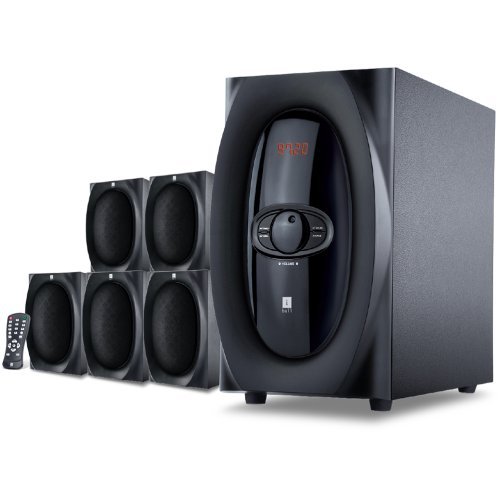
ภาพ: เหนือview of the iBall Tarang F5 5.1 Speaker System, showing the subwoofer and five satellite speakers.
คำแนะนำการตั้งค่า
- การจัดวางตำแหน่งลำโพง: Place the subwoofer on a stable surface, preferably on the floor. Arrange the five satellite speakers around your listening area for optimal 5.1 surround sound. Typically, one center speaker, two front left/right, and two rear left/right speakers.
- การเชื่อมต่อลำโพงแซทเทิลไลท์: Connect each satellite speaker to the corresponding output ports on the rear panel of the subwoofer unit. Ensure correct polarity (positive to positive, negative to negative) if applicable, or match color-coded connectors.
- เชื่อมต่อแหล่งสัญญาณเสียง:
- For PC/MP3 Player (2.1Ch or 5.1Ch input): Use the provided audio cables to connect the audio output of your device to the "Audio Input" ports on the subwoofer. For 5.1 channel input, ensure your source device supports 5.1 output and connect all relevant channels (Front L/R, Rear L/R, Center/Sub). For 2.1 channel, connect to the stereo input.
- For USB/SD/MMC Card: Insert your USB drive or SD/MMC card into the designated slot on the front panel of the subwoofer.
- การเชื่อมต่อไฟฟ้า: Connect the power cord to the subwoofer unit and then plug it into a standard AC power outlet.
- เปิดเครื่อง: Turn on the main power switch located on the rear or front panel of the subwoofer. The LED display should illuminate.

Image: Illustrative diagram of the subwoofer's rear panel, detailing connections for satellite speakers and various audio input sources.
คำแนะนำการใช้งาน
Front Panel Controls and Remote Control
The iBall Tarang F5 can be operated using the controls on the front panel of the subwoofer or via the included full-function remote control.
- เปิด/ปิดเครื่อง: กดปุ่ม พลัง button on the remote or the main power switch on the unit.
- การเลือกแหล่งสัญญาณเข้า: กดปุ่ม ป้อนข้อมูล button on the remote or front panel to cycle through available sources: 2.1Ch, 5.1Ch, USB, SD/MMC, FM Radio. The selected source will be displayed on the LED screen.
- การปรับระดับเสียง: ใช้ เล่ม+ และ ฉบับ- buttons on the remote or the master volume knob on the front panel to adjust the overall volume.
- การปรับเสียงเบส/เสียงแหลม: ใช้เฉพาะ เบส+/เบส- และ เสียงแหลม+/เสียงแหลม- buttons on the remote control to fine-tune audio output.
- ฟังก์ชั่นปิดเสียง: กดปุ่ม MUTE button on the remote to temporarily silence the audio. Press again to unmute.
USB/SD/MMC Playback
When a USB drive or SD/MMC card is inserted, the system will automatically switch to the USB/SD input mode and begin playing compatible audio files. Use the remote control for playback functions:
- เล่น/หยุดชั่วคราว: กดปุ่ม เล่น/หยุดชั่วคราว ปุ่ม.
- เพลงถัดไป / ก่อนหน้า: ใช้ ต่อไป และ ก่อนหน้า ปุ่ม
การทำงานของวิทยุ FM
การใช้ฟังก์ชันวิทยุ FM:
- Switch the input source to FM โหมดการใช้งาน ป้อนข้อมูล ปุ่ม.
- สแกนอัตโนมัติ: กดปุ่มค้างไว้ เล่น/หยุดชั่วคราว ปุ่ม (หรือปุ่มเฉพาะ) สแกน button if available on the remote) to automatically scan and save available FM stations.
- การปรับด้วยตนเอง: ใช้ ต่อไป และ ก่อนหน้า buttons to manually tune to specific frequencies or navigate through saved stations.
การซ่อมบำรุง
- การทำความสะอาด: Use a soft, dry cloth to clean the speaker surfaces. Do not use liquid cleaners, aerosols, or solvents, as these may damage the finish or internal components.
- การระบายอากาศ : ตรวจสอบให้แน่ใจว่าช่องระบายอากาศของซับวูฟเฟอร์ไม่ถูกปิดกั้น เพื่อป้องกันความร้อนสูงเกินไป
- การจัดวาง: ควรหลีกเลี่ยงการวางลำโพงไว้ในที่ที่มีแสงแดดส่องโดยตรง ใกล้แหล่งความร้อน หรือในบริเวณที่มีความชื้นสูงหรือมีฝุ่นละอองมาก
- สายไฟ: ตรวจสอบสายไฟเป็นประจำเพื่อหาความเสียหาย หากชำรุดเสียหาย ให้หยุดใช้งานและติดต่อฝ่ายบริการลูกค้า
การแก้ไขปัญหา
| ปัญหา | สาเหตุที่เป็นไปได้ | สารละลาย |
|---|---|---|
| ไม่มีไฟฟ้า | Power cord not connected; Power switch off; Power outlet faulty | Ensure power cord is securely connected. Turn on the power switch. Test the power outlet with another device. |
| ไม่มีเสียง | Incorrect input source; Volume too low; Audio cables loose/damaged; Mute function active | Select the correct input source. Increase volume. Check all audio cable connections. Deactivate mute. |
| เสียงเพี้ยน | Volume too high; Source audio quality poor; Speaker cables loose | Reduce volume. Test with a different audio source. Check satellite speaker connections. |
| รีโมตคอนโทรลไม่ทำงาน | Batteries depleted; Obstruction between remote and unit; Remote sensor blocked | Replace remote control batteries. Ensure clear line of sight to the subwoofer's IR sensor. |
| การรับสัญญาณ FM ไม่ดี | เสาอากาศไม่ได้ยืดออก/อยู่ในตำแหน่งที่ถูกต้อง; บริเวณที่มีสัญญาณอ่อน | Extend and adjust the FM antenna for better reception. Try auto-scanning again. |
ข้อมูลจำเพาะ
| คุณสมบัติ | รายละเอียด |
|---|---|
| ยี่ห้อ | iBall |
| แบบอย่าง | Tarang F5 |
| การกำหนดค่าช่อง | ระบบเสียงรอบทิศทาง 5.1 |
| ขนาดไดร์เวอร์ซับวูฟเฟอร์ | 5.25 นิ้ว |
| ขนาดไดรเวอร์ดาวเทียม | 3 Inches (each) |
| อิมพีแดนซ์ของซับวูฟเฟอร์ | 8 โอห์ม |
| อิมพีแดนซ์ดาวเทียม | 4 โอห์ม |
| อุปกรณ์ที่รองรับ | Computers, MP3 Players, SD Cards |
| เทคโนโลยีการเชื่อมต่อ | USB, RCA (for 2.1Ch/5.1Ch input) |
| คุณสมบัติพิเศษ | FM Radio, USB/SD/MMC Playback, Remote Control, LED Display, Wooden Cabinets |
| แหล่งพลังงาน | AC |
| วัสดุ | ไม้ |
| น้ำหนักสินค้า | 8 กก. |
| ขนาดบรรจุภัณฑ์ (กว้าง x สูง x ลึก) | 40.4 x 34.2 x 32.8 ซม. |
การรับประกันและการสนับสนุน
Your iBall Tarang F5 5.1 Speakers are covered by a limited warranty from the date of purchase. Please refer to the warranty card included in your package for specific terms and conditions.
For technical support, service, or warranty claims, please contact iBall customer service:
- Webเว็บไซต์: www.iball.co.in/support (Exampลิงก์ต้นฉบับอาจแตกต่างกันไป)
- อีเมล: support@iball.co.in (Exampอีเมลที่ใช้จริงอาจแตกต่างกันไป)
- โทรศัพท์: 1800-XXX-XXXX (Exampตัวเลขโดยประมาณ ตัวเลขจริงอาจแตกต่างกันไป)
Please have your product model number (Tarang F5) and proof of purchase ready when contacting support.