
1. บทนำ
This manual provides essential information for the safe and efficient use of the WERMA Kompakt 37 Signal Tower Plug, Model 698.220.75. This device is designed for industrial signaling applications, featuring green and red LED permanent light indicators. Please read this manual thoroughly before installation and operation.
2. ข้อมูลด้านความปลอดภัย
- คำเตือน: Disconnect power before installation, maintenance, or troubleshooting to prevent electric shock.
- การติดตั้งจะต้องดำเนินการโดยบุคลากรที่มีคุณสมบัติตามมาตรฐานการไฟฟ้าท้องถิ่นและระดับชาติ
- ตรวจสอบแหล่งจ่ายไฟ voltage matches the device's specified voltage (24 V AC/DC).
- Do not expose the device to excessive moisture, dust, or extreme temperatures beyond its operating range.
- Do not modify the device. Unauthorized modifications may void the warranty and create safety hazards.
- Always use appropriate personal protective equipment (PPE) during installation and maintenance.
3. สินค้าหมดview
The WERMA Kompakt 37 Signal Tower Plug (Model 698.220.75) is a compact signal tower designed for clear visual status indication. It features a green and red LED permanent light, operating on a 24 V AC/DC power supply.
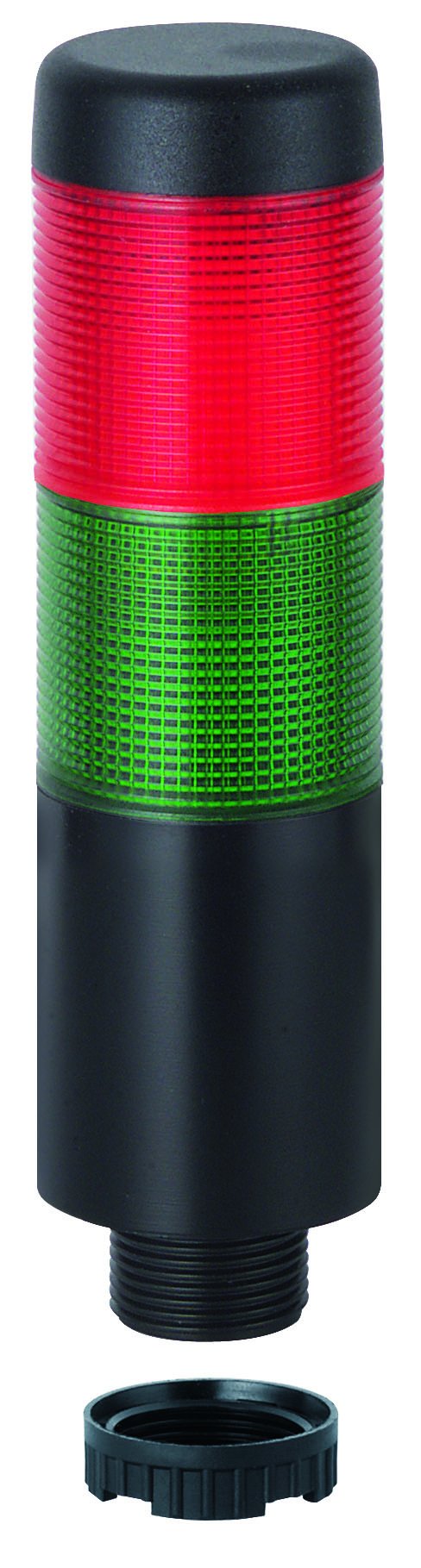
Figure 1: WERMA Kompakt 37 Signal Tower Plug. This image displays the signal tower with its distinct green and red light segments, indicating its compact design and visual signaling capabilities.
คุณสมบัติหลัก:
- Pre-assembled signal tower with max. 5 tiers (this specific model is a plug, implying it's part of a modular system).
- LED permanent light for reliable, long-lasting indication.
- Available with M12 plug or cable connection (this model is a plug type).
- Compact design with a diameter of 37.5 mm and a height of 140.5 mm.
- Operates on 24 V AC/DC.
4. การตั้งค่าและการติดตั้ง
Before proceeding, ensure all safety precautions are followed and power is disconnected.
- การแกะกล่อง: Carefully remove the signal tower plug from its packaging. Inspect for any visible damage.
- การติดตั้ง: The Kompakt 37 plug is designed to integrate into a compatible base or system. Ensure the mounting surface or connection point is stable and secure.
- การเชื่อมต่อไฟฟ้า:
- Identify the M12 plug connector on the signal tower.
- Connect the M12 plug to the corresponding M12 socket on your control unit or power supply. Ensure the connection is firm and secure.
- Verify that the power supply provides 24 V AC/DC. Incorrect voltage อาจทำให้อุปกรณ์เสียหายได้
- การตรวจสอบขั้นสุดท้าย: After connection, double-check all wiring and mounting for correctness and security before restoring power.
5. คู่มือการใช้งาน
The WERMA Kompakt 37 Signal Tower Plug operates as a visual indicator. Once properly installed and connected to a 24 V AC/DC power source, the LED permanent lights will illuminate according to the input signals from your control system.
- เปิดเครื่อง: Apply 24 V AC/DC power to the connected M12 socket.
- สัญญาณบ่งชี้: The green and red LED segments will illuminate permanently based on the control signals received. Refer to your system's documentation for specific signal assignments (e.g., green for "operational," red for "fault").
- แสงถาวร: This model provides a steady, continuous light output, suitable for constant status indication.
6. การบำรุงรักษา
The WERMA Kompakt 37 Signal Tower Plug is designed for low maintenance. Regular inspection and cleaning will ensure optimal performance and longevity.
- การทำความสะอาด:
- ตัดการเชื่อมต่อไฟฟ้าก่อนทำความสะอาด
- Wipe the exterior of the signal tower with a soft, damp ผ้า.
- Do not use abrasive cleaners, solvents, or harsh chemicals, as these can damage the housing.
- การตรวจสอบ:
- Periodically check the M12 connection for tightness and signs of corrosion.
- Inspect the housing for any cracks or damage.
- Ensure the signal tower is securely mounted.
- อายุการใช้งานยาวนานของ LED: The LED lights are designed for long operational life and typically do not require replacement.
7 การแก้ไขปัญหา
If you encounter issues with your WERMA Kompakt 37 Signal Tower Plug, refer to the following common problems and solutions:
| ปัญหา | สาเหตุที่เป็นไปได้ | สารละลาย |
|---|---|---|
| Signal tower does not illuminate. | ไม่มีแหล่งจ่ายไฟ ปริมาตรไม่ถูกต้องtage. Loose M12 connection. สัญญาณควบคุมผิดพลาด | Check power supply to the M12 socket. Verify power supply is 24 V AC/DC. Ensure M12 plug is securely connected. Check control system output for correct signaling. |
| Only one color illuminates. | Control signal issue. ความผิดปกติภายใน (พบน้อย) | Verify the control signals for both green and red indicators. If signals are correct and one color still fails, contact WERMA support. |
| Intermittent illumination. | การเชื่อมต่อหลวม แหล่งจ่ายไฟฟ้าไม่เสถียร | Check M12 connection for tightness. Ensure power supply is stable and within specifications. |
If the problem persists after attempting these solutions, please contact WERMA customer support.
8. ข้อมูลจำเพาะ
- หมายเลขรุ่น: 698.220.75
- ประเภทสินค้า : Kompakt 37 Signal Tower Plug
- ประเภทแสง: ไฟ LED ถาวร
- สี: สีเขียว/สีแดง
- ปฏิบัติการฉบับที่tage: 24 โวลต์ AC / DC
- เส้นผ่านศูนย์กลาง : 37.5 มม.
- ความสูง: 140.5 มม.
- ขนาดสินค้า : 19.69 x 19.69 x 11.02 นิ้ว (ขนาดบรรจุภัณฑ์/การจัดส่ง)
- น้ำหนักสินค้า: 0.16 ออนซ์
- ผู้ผลิต: Werma (Shanghai) Co., Ltd.
- ASIN: B00LGDP6UO
- วันที่เข้าใช้งานครั้งแรก: วันที่ 12 มิถุนายน 2014
9. การรับประกันและการสนับสนุน
For warranty information, technical support, or service inquiries regarding your WERMA Kompakt 37 Signal Tower Plug, please contact WERMA customer service or your authorized distributor. Keep your purchase receipt as proof of purchase.
ผู้ผลิต: Werma (Shanghai) Co., Ltd.
For further assistance, visit the official WERMA website or consult your local WERMA representative.