
Intermatic DT121K
Intermatic DT121K Digital Indoor Timer Instruction Manual
Model: DT121K
ยี่ห้อ: Intermatic
1. บทนำ
The Intermatic DT121K is an indoor 7-day digital plug-in timer designed for automated control of electrical devices. It offers flexible programming options, including 24-hour or 7-day schedules, and can manage up to 7 on/off events. Key features include an astronomic function for automatic sunrise/sunset adjustments, automatic daylight saving time correction, and a random mode to enhance home security by varying light activation times. This timer is equipped with a single 2-prong receptacle and is suitable for various indoor applications, such as controlling Christmas tree lights or seasonal decorations.
2. ข้อมูลด้านความปลอดภัย
- Read all instructions before use to ensure proper operation and to prevent damage to the timer or connected devices.
- This timer is designed for indoor use only. Do not expose to water or moisture.
- Do not exceed the electrical ratings of the timer (15A, 125VAC, 60Hz, 1/2 HP Motor Load, 1000W Tungsten, 500VA Electronic Ballast, 120VAC 8.3A Standard Ballast). Overloading can cause overheating and potential fire hazards.
- Ensure the timer is securely plugged into a properly grounded outlet.
- ห้ามถอดประกอบหรือซ่อมแซมตัวตั้งเวลาด้วยตนเอง โปรดส่งซ่อมโดยช่างผู้ชำนาญการเท่านั้น
- เก็บให้พ้นจากมือเด็ก
3. สินค้าหมดview และคุณสมบัติ
The DT121K timer features an intuitive interface with a digital display and control buttons for easy programming. Its compact design allows it to plug directly into a standard wall outlet.

รูปที่ 3.1 : ด้านหน้า view of the DT121K timer, showing the digital display and control buttons (PROGRAM, TIME, RESUME, MODE, +, -).
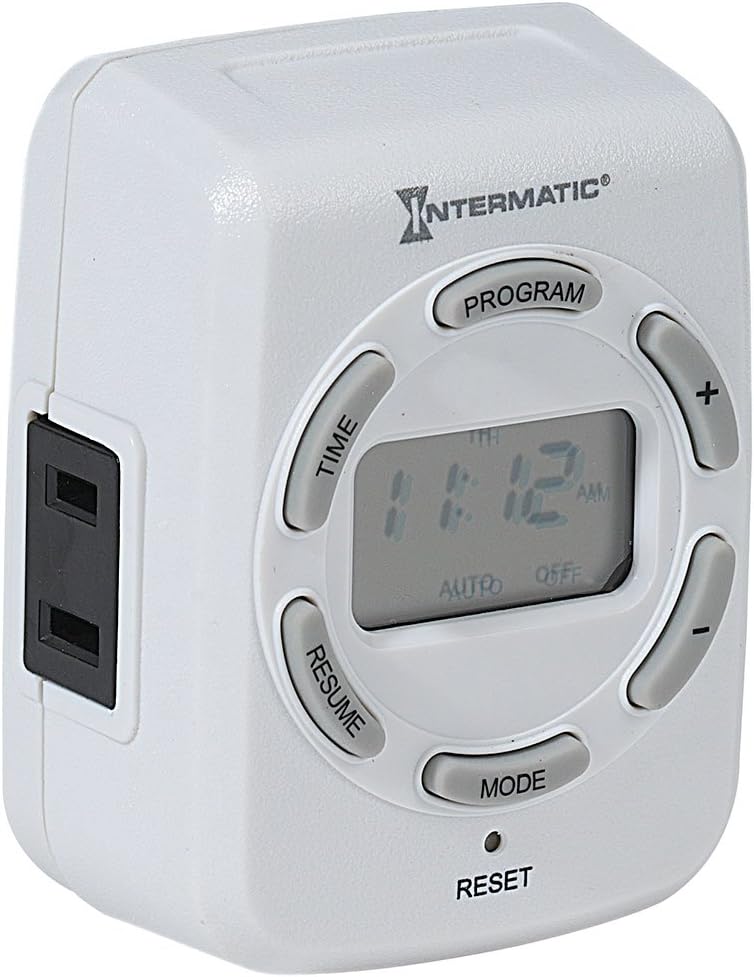
รูปที่ 3.2: ด้านข้าง view of the DT121K timer, highlighting the single 2-prong receptacle for connecting devices.
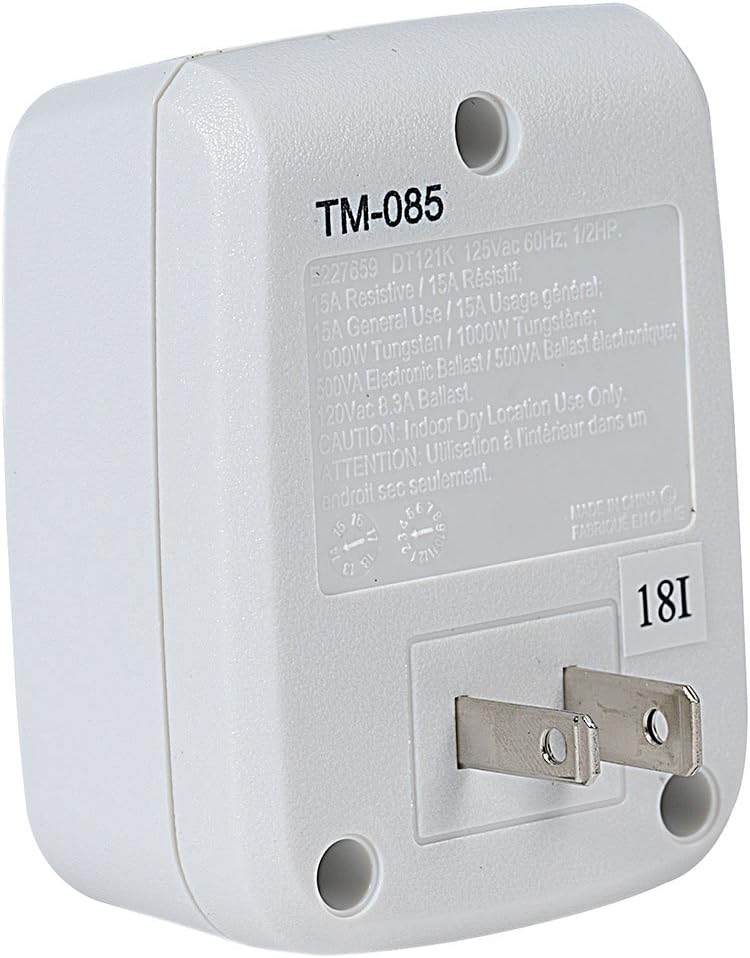
รูปที่ 3.3: ด้านหลัง view of the DT121K timer, displaying the 2-prong plug for wall outlet insertion and the product specification label.
คุณสมบัติหลัก:
- 7-Day/24-Hour Programming: Allows for flexible scheduling of connected devices throughout the week.
- 7 ON/OFF Events: Program up to seven distinct on and off times per day or week.
- Astronomic Feature: Automatically adjusts ON/OFF times based on daily sunrise and sunset changes, ideal for outdoor lighting simulation.
- Automatic Daylight Saving Time Adjustment: Simplifies time management by automatically adjusting for DST changes.
- Random Feature: Varies programmed ON/OFF times by a few minutes to create a "lived-in" appearance, enhancing security.
- แบตเตอรี่สำรองแบบชาร์จไฟได้: Maintains programmed settings and current time during power outagใช่
- Single 2-Prong Receptacle: Provides a convenient outlet for controlling a single device.
4. การตั้งค่า
4.1 การเปิดเครื่องและการชาร์จครั้งแรก
- Plug the DT121K timer into a standard 125VAC wall outlet.
- Allow the timer to charge for at least 30 minutes before initial programming. The internal rechargeable battery will charge automatically when plugged in.
- If the display is blank or dim, press the รีเซ็ต button (located at the bottom of the timer, may require a pointed object like a pen tip) to clear all settings and restart the timer.
4.2 การตั้งเวลาและวันปัจจุบัน
- กดปุ่มค้างไว้ เวลา กดปุ่มค้างไว้จนกว่าหน้าจอจะกะพริบ
- ใช้ + และ - buttons to adjust the current hour. Pay attention to AM/PM indicators.
- กดปุ่ม เวลา กดปุ่มอีกครั้งเพื่อเปลี่ยนเป็นนาที จากนั้นใช้ + และ - ที่จะปรับเปลี่ยน
- กดปุ่ม เวลา button again to select the current day of the week (MO, TU, WE, TH, FR, SA, SU). Use + และ - ที่จะเลือก
- กดปุ่ม เวลา button one last time to save the settings and exit time setting mode.
5. คู่มือการใช้งาน
5.1 การตั้งโปรแกรมเหตุการณ์เปิด/ปิด
The timer allows for up to 7 ON and 7 OFF programmed events. Each event can be set for specific days or groups of days.
- กดปุ่ม โปรแกรม กดปุ่ม หน้าจอจะแสดง "1 ON" และเวลาจะกะพริบ
- ใช้ + และ - ปุ่มสำหรับตั้งเวลาเปิดใช้งานที่ต้องการสำหรับโปรแกรมที่ 1
- กดปุ่ม โปรแกรม button again. The display will show "1 OFF" and the time will flash.
- ใช้ + และ - ปุ่มสำหรับตั้งเวลาปิดที่ต้องการสำหรับโปรแกรมที่ 1
- กดปุ่ม โปรแกรม button again to select the days for Program 1. Use + และ - to cycle through day options (e.g., MO-SU, MO-FR, SA-SU, individual days).
- ทำซ้ำขั้นตอนที่ 1-5 สำหรับโปรแกรมเปิด/ปิดเพิ่มเติม (สูงสุด 7 โปรแกรม)
- หากต้องการออกจากโหมดการตั้งโปรแกรม ให้กดปุ่ม ประวัติย่อ button or wait approximately 30 seconds for the timer to automatically return to normal operation.
5.2 Using Astronomic (Dusk-to-Dawn) Feature
The astronomic feature allows the timer to turn ON at sunset and OFF at sunrise, or at a set time relative to them.
- When setting an ON or OFF program, cycle through the time options using the + or - buttons until "DUSK" or "DAWN" appears on the display.
- You can also set an offset (e.g., DUSK + 30 minutes, DAWN - 15 minutes) by continuing to press + or - after DUSK/DAWN appears.
- Save the program as usual by pressing โปรแกรม.
5.3 Activating Random Mode
The random mode varies the programmed ON/OFF times by a few minutes (typically +/- 30 minutes) to simulate occupancy.
- กดปุ่ม โหมด button repeatedly until "RDM" (Random) appears on the display.
- The timer will now operate in random mode, slightly adjusting your programmed ON/OFF times.
- To deactivate random mode, press โหมด until "RDM" disappears.
5.4 การแทนที่ด้วยตนเอง
To temporarily override the current program without deleting it:
- กดปุ่ม โหมด button to cycle through ON, OFF, and AUTO modes.
- Selecting ON will keep the connected device on until the next programmed OFF event or until manually changed.
- Selecting OFF will keep the connected device off until the next programmed ON event or until manually changed.
- Selecting AUTO returns the timer to its programmed schedule.
6. การบำรุงรักษา
- เช็ดทำความสะอาดตัวจับเวลาด้วยผ้าแห้งเนื้อนุ่ม ห้ามใช้สารทำความสะอาดที่มีฤทธิ์กัดกร่อนหรือตัวทำละลาย
- ตรวจสอบให้แน่ใจว่าได้ถอดปลั๊กตัวตั้งเวลาออกก่อนทำความสะอาด
- The internal battery is rechargeable and designed for long life. No user maintenance is required for the battery.
7 การแก้ไขปัญหา
| ปัญหา | สาเหตุที่เป็นไปได้ | สารละลาย |
|---|---|---|
| จอแสดงผลว่างเปล่าหรือมืดลง | แบตเตอรี่ไม่ได้ชาร์จหรือต้องรีเซ็ต | Plug timer into an active outlet for at least 30 minutes. Press the รีเซ็ต ปุ่ม. |
| อุปกรณ์ไม่เปิด/ปิดตามเวลาที่ตั้งโปรแกรมไว้ | Incorrect programming, timer in manual override mode, or power outage. | Verify programmed ON/OFF times and days. Ensure timer is in AUTO mode. Check power to the outlet. |
| โหมดสุ่มไม่ทำงาน | โหมดสุ่มไม่ได้เปิดใช้งาน | กดปุ่ม โหมด button until "RDM" appears on the display. |
| เวลาไม่ถูกต้องหลังจากไฟดับtage. | แบตเตอรี่สำรองหมดหรือชาร์จไม่เต็ม | Ensure timer is regularly plugged in to keep the battery charged. Reset and reprogram time if necessary. |
8. ข้อมูลจำเพาะ
- แบบอย่าง: DT121K
- อินพุต Voltage: 125 VAC, 60 เฮิร์ตซ์
- โหลดสูงสุด: 15 Amps Resistive, 1000W Tungsten, 500VA Electronic Ballast, 1/2 HP Motor Load
- จำนวนโปรแกรม: Up to 7 ON/OFF events
- ประเภทเต้ารับ: 2 แฉก
- แบตเตอรี่: แบตเตอรี่ลิเธียมไอออนแบบชาร์จได้ (มีมาให้ในชุด)
- ขนาด : 6.75 x 5 x 2.5 นิ้ว
- น้ำหนัก: 4.6 ออนซ์
- วัสดุ: เรซิน,พลาสติก
- สี: Black (Note: Product images show white, but specification lists black. Please refer to product packaging for exact color.)
- ใบรับรอง: ได้รับการรับรองจาก UL
- ยูพีซี: 078275143388
9. การรับประกันและการสนับสนุน
For warranty information and technical support, please refer to the official Intermatic webหรือติดต่อฝ่ายบริการลูกค้าโดยตรง โปรดเก็บใบเสร็จรับเงินไว้เป็นหลักฐานการซื้อสำหรับการเรียกร้องการรับประกันใดๆ
ฝ่ายบริการลูกค้าของ Intermatic:
- Webเว็บไซต์: www.intermatic.com
- Contact information can typically be found in the "Support" or "Contact Us" section of their webเว็บไซต์.
Ask a question about this manual
Ask about setup, troubleshooting, compatibility, parts, safety, or missing instructions. Manuals+ will review the question and use this page’s manual context to help answer it.