
1. บทนำ
This manual provides comprehensive instructions for the installation, operation, and maintenance of your Intermatic EC210WK Countdown Timer. This device is designed to provide silent, timed control for various electrical loads, enhancing energy savings and convenience in your home or office.
The EC210WK offers selectable countdown times of 10, 20, 30, and 60 minutes, along with a "HOLD" function for continuous operation. It is suitable for controlling indoor and outdoor lighting, bathroom and exhaust fans, and other energy-consuming appliances.
2. ข้อมูลด้านความปลอดภัยที่สำคัญ
คำเตือน: Risk of electric shock. Improper installation can lead to serious injury or death. Always turn off power at the circuit breaker or fuse box before installing or servicing this device. Installation should be performed by a qualified electrician or in accordance with local electrical codes.
- ถอดสายไฟที่เซอร์กิตเบรกเกอร์ก่อนทำการติดตั้ง
- ตรวจสอบให้แน่ใจว่าการเชื่อมต่อสายไฟทั้งหมดมีความปลอดภัย
- อุปกรณ์นี้มีไว้สำหรับใช้ภายในอาคารเท่านั้น
- อย่าเกินขีดจำกัดการรับน้ำหนักสูงสุดที่ระบุไว้ในส่วนข้อมูลจำเพาะ
- A neutral wire is required for operation.
3. เนื้อหาบรรจุภัณฑ์
ตรวจสอบว่าส่วนประกอบทั้งหมดมีอยู่ก่อนเริ่มการติดตั้ง:
- Intermatic EC210WK Countdown Timer (1 unit)
- คู่มือการใช้งาน (เอกสารนี้)
Note: A wall plate is sold separately and is not included with this unit.
4. การติดตั้ง
4.1 เครื่องมือที่จำเป็น
- ไขควง (แบบฟิลิปส์และ/หรือแบบแบน)
- คีมปอกสายไฟ
- เทปพันสายไฟ (ไม่จำเป็น)
- เล่มที่tagเครื่องทดสอบอิเล็กทรอนิกส์ (แนะนำ)
4.2 แผนผังสายไฟและการเชื่อมต่อ
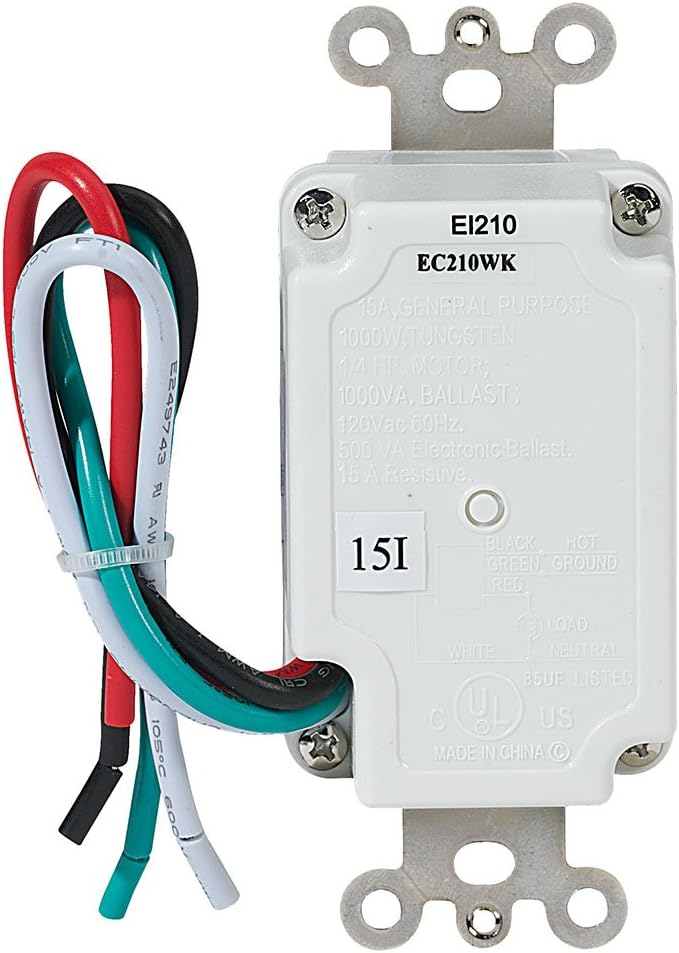
The EC210WK timer requires a neutral wire for proper operation. Ensure your electrical box has a neutral wire available. Refer to the wiring diagram below for correct connections.
- ปิดเครื่อง: หาตำแหน่งเบรกเกอร์ที่ควบคุมสวิตช์ที่คุณกำลังจะเปลี่ยน แล้วปิดเบรกเกอร์นั้น ตรวจสอบให้แน่ใจว่าไฟดับแล้วโดยใช้เครื่องวัดแรงดันไฟฟ้าtagอีผู้ทดสอบ
- ถอดสวิตช์เก่าออก: Carefully remove the existing wall plate and unscrew the old switch from the electrical box. Disconnect the wires from the old switch.
- ระบุสายไฟ:
- สายสีดำ: Connects to the incoming 120 VAC HOT line.
- ลวดขาว: Connects to the NEUTRAL line.
- สายสีแดง: Connects to the LOAD (the appliance or light fixture).
- ลวดสีเขียว: Connects to the GROUND wire.
- เชื่อมต่อตัวจับเวลาใหม่: Using wire nuts (not included), connect the wires from the EC210WK timer to the corresponding wires in the electrical box.
- Timer's Black wire to House Hot wire.
- Timer's White wire to House Neutral wire.
- Timer's Red wire to House Load wire.
- Timer's Green wire to House Ground wire.
- ตัวตั้งเวลาติดตั้ง: Carefully fold the wires into the electrical box, ensuring no wires are pinched. Secure the timer to the electrical box using the provided screws.
- ติดตั้งแผ่นผนัง: Attach a standard decorator-style wall plate (not included) over the timer.
- คืนค่าพลัง: เปิดไฟอีกครั้งที่เบรกเกอร์
5. การดำเนินการ
The Intermatic EC210WK timer features five push buttons for selecting countdown durations and a "HOLD" function.

- การเลือกเวลานับถอยหลัง: Press the desired time button (10 MIN, 20 MIN, 30 MIN, or 60 MIN). The corresponding LED indicator will illuminate, and the connected load will turn ON for the selected duration. The load will automatically turn OFF when the countdown expires.
- "HOLD" Function: Press the "HOLD" button to keep the connected load ON continuously. The "HOLD" LED indicator will illuminate. To exit the "HOLD" function, press any of the countdown time buttons, or press the "HOLD" button again to turn the load OFF.
- การยกเลิกการนับถอยหลัง: To turn OFF the connected load before the countdown expires, press the currently active countdown button again, or press the "HOLD" button (which will then require a second press to turn off if the load was already on).
6. การบำรุงรักษา
The Intermatic EC210WK Countdown Timer requires minimal maintenance.
- การทำความสะอาด: To clean the surface of the timer, wipe with a soft, damp ผ้า ห้ามใช้น้ำยาทำความสะอาดที่มีฤทธิ์กัดกร่อนหรือตัวทำละลาย ตรวจสอบให้แน่ใจว่าปิดเครื่องก่อนทำความสะอาด
- การตรวจสอบ: Periodically inspect the timer and wall plate for any signs of damage or loose connections. If any issues are found, turn off power at the circuit breaker and consult a qualified electrician.
7 การแก้ไขปัญหา
If you experience issues with your EC210WK timer, refer to the following common problems and solutions:
| ปัญหา | สาเหตุที่เป็นไปได้ | สารละลาย |
|---|---|---|
| Timer does not turn ON. | ไม่มีไฟไปเลี้ยงตัวตั้งเวลา; การเดินสายไฟไม่ถูกต้อง; เบรกเกอร์ตัดวงจร | Check circuit breaker. Verify wiring connections (Hot, Neutral, Load, Ground). Ensure power is restored. |
| Load does not turn OFF after countdown. | Timer is in "HOLD" mode; internal malfunction. | Press the "HOLD" button to disengage. If issue persists, contact customer support. |
| ไฟ LED แสดงสถานะไม่ติดสว่าง | ไม่มีไฟเข้า; เครื่องมีปัญหา | Check power supply and wiring. If power is present and wired correctly, the unit may be faulty. |
| Timer makes noise. | This timer is designed for silent operation. Noise indicates a potential issue. | Immediately turn off power at the circuit breaker and contact customer support. |
8. ข้อมูลจำเพาะ
Technical specifications for the Intermatic EC210WK Countdown Timer:
- แบบอย่าง: EC210WK
- สี: สีขาว
- อินพุต Voltage: 120 VAC, 60 เฮิร์ตซ์
- โหลดตัวต้านทาน: 15A,1800W
- โหลดทังสเตน: 8.3A,1000W
- Inductive Ballast: 8A, 1000 VA
- บัลลาสต์อิเล็กทรอนิกส์: 500 วีเอ
- มอเตอร์: 1 / 4 เอชพี
- Countdown Settings: 10, 20, 30, 60 minutes, and HOLD
- ประเภทการติดตั้ง: ติดผนัง
- สลับสไตล์: สปสต.
- น้ำหนักสินค้า: 5.3 ออนซ์
- ใบรับรอง: ได้รับการรับรองจาก UL
9. การรับประกันและการสนับสนุน
การรับประกัน: This Intermatic EC210WK Countdown Timer is covered by a 1-year limited warranty from the date of purchase. This warranty covers defects in materials and workmanship under normal use.
การสนับสนุนลูกค้า: For technical assistance, warranty claims, or further information, please contact Intermatic customer service. Refer to the official Intermatic webเว็บไซต์นี้ใช้สำหรับตรวจสอบรายละเอียดการติดต่อล่าสุด
โปรดเก็บหลักฐานการซื้อไว้เพื่อวัตถุประสงค์การรับประกัน