
1. บทนำ
This manual provides instructions for the safe and effective operation of the Mastech MS2108A Auto Range DC AC Current Digital Clamp Meter Multimeter. This instrument is designed for measuring AC/DC voltage and current, resistance, capacitance, frequency, duty cycle, diode, and continuity. It features an auto-ranging function, LCD backlight, clamp lighting, and data hold capabilities, making it suitable for various electrical testing applications.
2. ข้อมูลด้านความปลอดภัย
คำเตือน: To avoid electrical shock or personal injury, read all safety information before using this product. Use the product only as specified in this manual, or the protection provided by the product may be impaired.
- ควรตรวจสอบให้แน่ใจเสมอว่ามิเตอร์อยู่ในโหมดการทำงานและช่วงการวัดที่ถูกต้องก่อนทำการวัดทุกครั้ง
- ห้ามใช้เกินปริมาณที่กำหนดtagจ ตามที่ทำเครื่องหมายไว้บนมาตร ระหว่างขั้วต่อหรือระหว่างขั้วต่อใดๆ กับสายดิน
- ใช้ความระมัดระวังเมื่อทำงานกับ voltages สูงกว่า 30V AC RMS, 42V peak หรือ 60V DC ปริมาตรเหล่านี้tagอาจทำให้เกิดอันตรายจากการช็อตได้
- Before measuring current, ensure the circuit is de-energized and the clamp jaws are properly closed around the conductor.
- Do not operate the meter with the battery cover open.
- เมื่อไฟแสดงสถานะแบตเตอรี่ต่ำปรากฏขึ้น ให้เปลี่ยนแบตเตอรี่ทันที
- ถอดสายทดสอบออกจากวงจรทุกครั้งก่อนเปลี่ยนฟังก์ชันการทำงาน
- ปฏิบัติตามกฎระเบียบด้านความปลอดภัยทั้งในระดับท้องถิ่นและระดับประเทศ
3. สินค้าหมดview และคุณสมบัติ
The Mastech MS2108A is a versatile digital clamp meter designed for electrical professionals and enthusiasts. Its key features include:
- กระแสสลับ/กระแสตรงtage และการวัดกระแส
- Resistance, capacitance, frequency, and duty cycle measurement
- Diode and continuity test functions
- Clamp for non-contact AC/DC current measurement
- LCD with backlight and bar graph display
- บูรณาการamp lighting bulb
- การวัดค่าสัมพัทธ์
- Auto-ranging function
- Data hold, maximum (MAX), and minimum (MIN) value measuring
- Automatic power off and low battery indication
- Full overload protection and dual insulation
- Durable over-molding rubber case for shake-proof and skid-proof handling
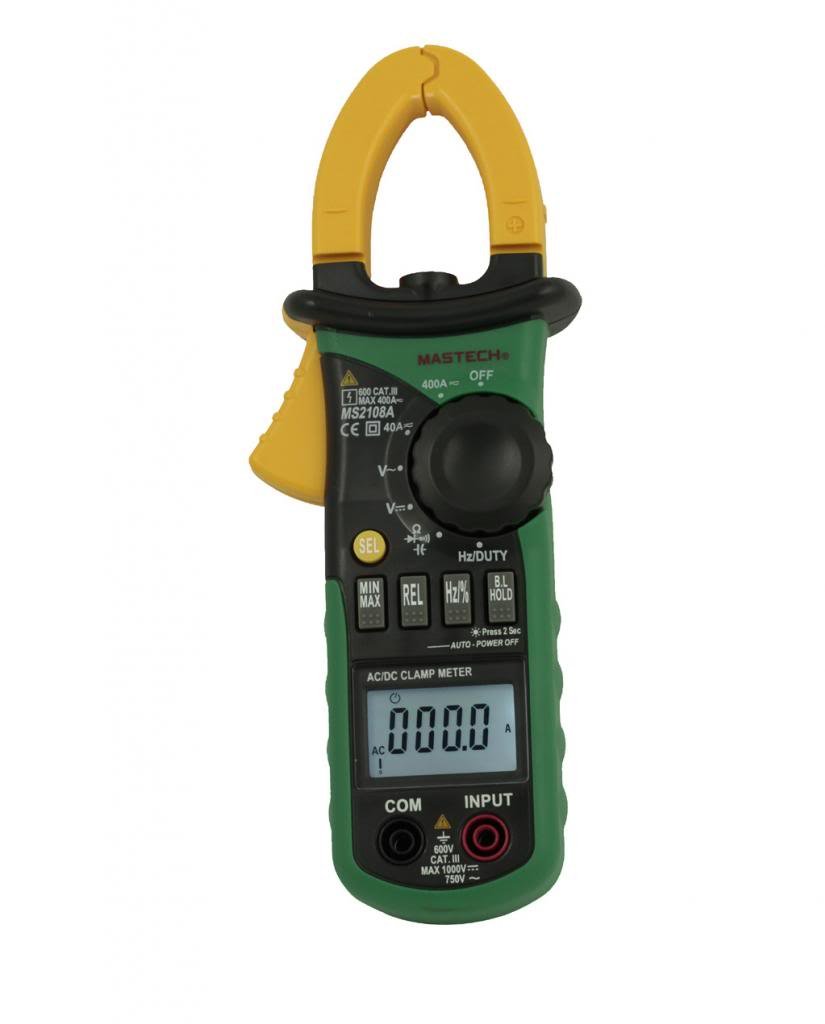
รูปที่ 3.1 : ด้านหน้า view of the Mastech MS2108A Digital Clamp Meter, showing the display, function dial, and clamp ขากรรไกร
4. เนื้อหาบรรจุภัณฑ์
ตรวจสอบว่าสินค้าทั้งหมดมีอยู่และอยู่ในสภาพดีเมื่อเปิดบรรจุภัณฑ์:
- Mastech MS2108A Digital CLamp เมตร
- สายทดสอบ (สีแดง 1 เส้น สีดำ 1 เส้น)
- กระเป๋าใส่อุปกรณ์
- คู่มือการใช้งาน (เอกสารนี้)

Figure 4.1: The Mastech MS2108A Clamp Meter, test leads, and carrying case.
5. การตั้งค่า
5.1 การติดตั้งแบตเตอรี่
- โปรดตรวจสอบให้แน่ใจว่ามิเตอร์ปิดอยู่
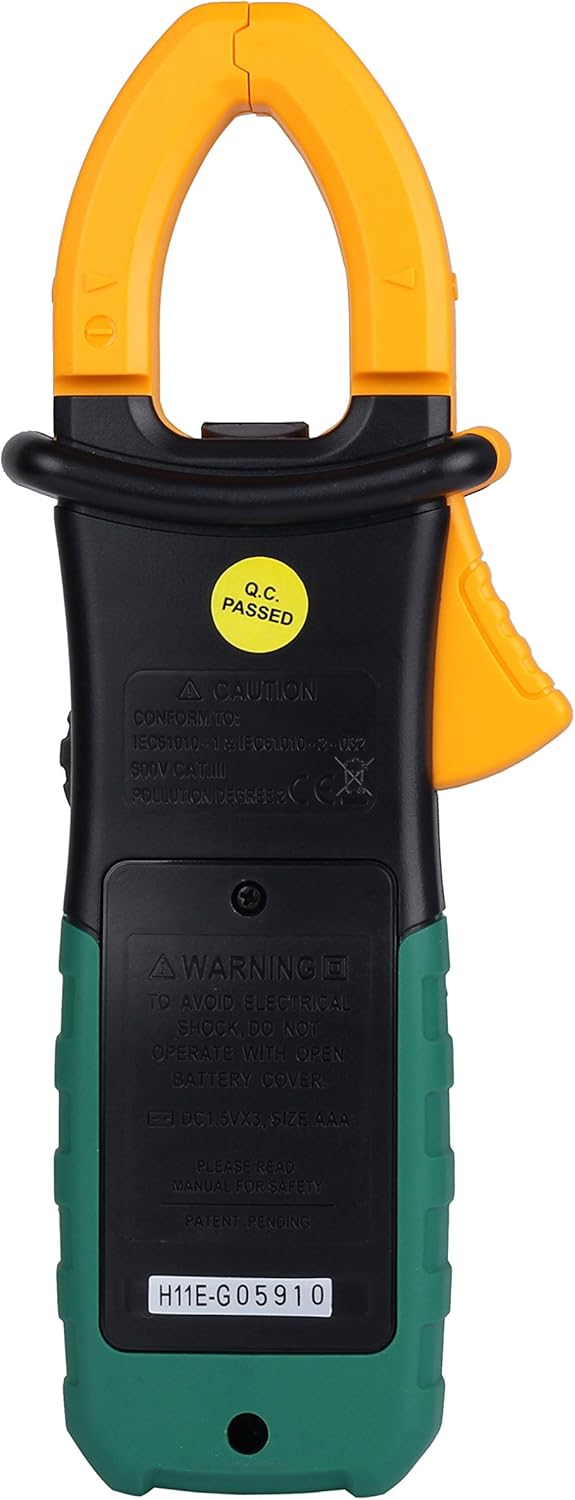
- ค้นหาฝาครอบช่องใส่แบตเตอรี่ที่ด้านหลังของมิเตอร์
- ใช้ไขควงคลายสกรูที่ยึดฝาครอบแบตเตอรี่ออก
- ถอดฝาครอบแบตเตอรี่ออก
- Insert three AAA 1.5V batteries, observing the correct polarity (+ and -).
- ปิดฝาครอบแบตเตอรี่และขันสกรูให้แน่น
รูปที่ 5.1: ด้านหลัง view ของclamp meter, indicating the battery compartment location.
5.2 การเชื่อมต่อสายทดสอบ
สำหรับเล่มtage, resistance, capacitance, frequency, duty cycle, diode, and continuity measurements:
- Insert the red test lead into the "INPUT" terminal.
- Insert the black test lead into the "COM" (common) terminal.
6. คู่มือการใช้งาน
6.1 เปิด/ปิดเครื่อง
Rotate the function dial from the "OFF" position to any desired measurement function to turn the meter ON. To turn OFF, rotate the dial back to the "OFF" position.
6.2 การเลือกฟังก์ชัน
The large rotary dial allows selection of various measurement functions. Some positions on the dial may have multiple functions (e.g., AC voltage และ DC voltagจ). กด "SEL" button to cycle through these functions.

รูปที่ 6.1: ด้านข้าง view ของclamp meter, highlighting the function dial and control buttons.
6.3 การวัดกระแสไฟฟ้ากระแสสลับ/กระแสตรง (Cl)amp)
- หมุนแป้นเลือกฟังก์ชันไปที่ "A~" (กระแสไฟฟ้าสลับ) หรือ "A=" ตำแหน่ง (กระแสไฟฟ้าตรง)
- กดปุ่ม clamp กดไกเพื่อเปิดขากรรไกร
- Enclose a single conductor (not a power cord with multiple wires) within the clamp ขากรรไกร ตรวจสอบให้แน่ใจว่าขากรรไกรปิดสนิทแล้ว
- อ่านค่าปัจจุบันบนจอ LCD
- For DC current, observe the polarity indicated on the display.

รูปที่ 6.2: clamp jaws of the meter, showing the integrated work light for illuminating the measurement area.
6.4 โวลต์ AC/DCtagอีการวัด
- เชื่อมต่อสายทดสอบสีแดงเข้ากับขั้วต่อ "INPUT" และสายทดสอบสีดำเข้ากับขั้วต่อ "COM"
- หมุนแป้นเลือกฟังก์ชันไปที่ "V~" (AC เล่มtagจ) หรือ "V=" (DC เล่มtagง) ตำแหน่ง ใช้ "SEL" ปุ่มหากจำเป็น
- ต่อสายทดสอบแบบขนานเข้ากับวงจรหรือชิ้นส่วนที่ต้องการทดสอบ
- อ่านเล่มที่tagค่า e บน LCD
6.5 Resistance, Capacitance, Frequency, Duty Cycle, Diode, and Continuity
For these measurements, connect the test leads as described in Section 5.2. Rotate the function dial to the appropriate position and use the "SEL" button to select the specific function if multiple are available on one dial position.
- ความต้านทาน (Ω): ตรวจสอบให้แน่ใจว่าวงจรถูกตัดพลังงานก่อนที่จะวัดความต้านทาน
- ความจุ (F): Discharge capacitors before measurement.
- ความถี่ (Hz) / Duty Cycle (%): Connect across the signal source.
- การทดสอบไดโอด (|): Connect the red lead to the anode and black lead to the cathode.
- การทดสอบความต่อเนื่อง (-): A built-in buzzer will sound if the resistance is below approximately 50Ω.
6.6 ฟังก์ชั่นพิเศษ
- "HOLD" Button: Press to freeze the current reading on the display. Press again to release.
- "MAX/MIN" Button: Press to enter MAX/MIN recording mode. The meter will display the maximum or minimum value measured since entering the mode. Press again to cycle between MAX, MIN, and current reading. Hold to exit.
- "REL" (Relative) Button: Press to store the current reading as a reference value. Subsequent measurements will be displayed as the difference from this reference. Press again to exit.
- Backlight/Clamp แสงสว่าง: The backlight and clamp light can be activated for improved visibility in low-light conditions. Refer to the specific button on the meter (often combined with another function or a dedicated light button).
7. การบำรุงรักษา
7.1 การทำความสะอาด
เช็ดเคสด้วยโฆษณาamp cloth and mild detergent. Do not use abrasives or solvents. Keep the terminals free of dirt and moisture.
7.2 การเปลี่ยนแบตเตอรี่
When the low battery indicator appears on the display, replace the batteries as described in Section 5.1. Always use three new AAA 1.5V batteries.
7.3 พื้นที่จัดเก็บ
If the meter is not used for an extended period, remove the batteries to prevent leakage and damage. Store the meter in its carrying case in a cool, dry place.
8 การแก้ไขปัญหา
| ปัญหา | สาเหตุที่เป็นไปได้ | สารละลาย |
|---|---|---|
| มิเตอร์ไม่เปิดใช้งาน | แบตเตอรี่เสียหรือติดตั้งไม่ถูกต้อง | ตรวจสอบขั้วแบตเตอรี่ เปลี่ยนแบตเตอรี่ |
| แสดงข้อความ "OL" (Overload) | Input exceeds selected range or meter's maximum capacity. | Select a higher range (if manual ranging) or ensure input is within meter's specifications. |
| การอ่านที่ไม่ถูกต้อง | Poor test lead connection, incorrect function selected, or external interference. | Ensure leads are firmly connected; verify function selection; move away from strong electromagnetic fields. |
| ไม่มีเสียงบี๊บแสดงความต่อเนื่อง | Circuit resistance is too high. | Check the circuit for breaks or high resistance points. |
9. ข้อมูลจำเพาะ
The following are general specifications for the Mastech MS2108A. Detailed ranges and accuracies can be found in the full technical datasheet.
- ยี่ห้อ: Mastech
- หมายเลขรุ่น: MS2108A
- ประเภทการวัด: มัลติมิเตอร์ Clamp เมตร
- แหล่งพลังงาน: Battery Powered (3 x AAA 1.5V)
- ส่วนประกอบที่รวมอยู่: Case, Test Leads
- ระดับความปลอดภัย: IEC 61010-1, CAT III 600V
- แสดง: LCD with Backlight and Bar Graph
- ปิดเครื่องอัตโนมัติ: ใช่
- การเก็บข้อมูล: ใช่
- การวัดสูงสุด/นาที: ใช่
- การวัดแบบสัมพันธ์: ใช่
10. การรับประกันและการสนับสนุน
Mastech products are manufactured to high quality standards. For warranty information and technical support, please refer to the warranty card included with your purchase or contact your local Mastech distributor. Keep your purchase receipt as proof of purchase.