
1. บทนำ
The Ledgital Large Countdown Days Timer is designed for tracking significant events over extended periods, capable of counting up to 9999 days, 23 hours, 59 minutes, and 59 seconds. Its ultra-bright red LED characters, measuring 1.8 inches high, ensure excellent visibility from a distance. This timer is ideal for various applications such as tracking retirement days, wedding countdowns, vacation anticipation, or managing time in classrooms and laboratories. The device operates on 5VDC, ensuring low power consumption, and is controlled via an infrared (IR) remote control with a range of up to 10 meters.

Figure 1.1: The Ledgital 9999-Day Countdown Timer, showing the main unit, remote control, power adapter, and wall mounting brackets.
2. เนื้อหาบรรจุภัณฑ์
โปรดตรวจสอบว่ารายการทั้งหมดที่ระบุไว้ด้านล่างมีอยู่ในแพ็คเกจของคุณหรือไม่:
- 1 x LED Countdown Clock
- 1 x Power Supply (100V-240VAC input, 5VDC output)
- 1 x คู่มือผู้ใช้ (เอกสารนี้)
- 1 x Remote Control (requires 2xAAA batteries, not included)
- 1 x Pair of Wall Mount Brackets
3. การตั้งค่า
3.1 การเชื่อมต่อสายไฟ
- Connect the provided power adapter to the DC 5V input port on the side of the LED Countdown Clock.
- Plug the power adapter into a standard electrical outlet (100V-240VAC). The clock display will illuminate.
3.2 การติดตั้งแบตเตอรี่รีโมทคอนโทรล
- ค้นหาช่องใส่แบตเตอรี่ที่ด้านหลังของรีโมทคอนโทรล
- ใส่แบตเตอรี่ AAA สองก้อน (ไม่ได้รวมอยู่ในชุด) โดยตรวจสอบให้แน่ใจว่าขั้วบวก/ลบถูกต้อง
- ปิดฝาช่องใส่แบตเตอรี่ให้แน่น

Figure 3.1: The remote control, which requires 2xAAA batteries (not included) for operation.
3.3 การติดตั้งบนผนัง
The clock comes with wall mount brackets for easy installation.
- Determine the desired mounting location on a wall.
- Use the provided brackets as a template to mark drilling points on the wall.
- เจาะรูและติดตั้งพุกยึดผนังที่เหมาะสมหากจำเป็น
- ยึดขายึดกับผนังโดยใช้สกรู
- Carefully attach the LED Countdown Clock to the mounted brackets.

Figure 3.2: The timer mounted on a wall, demonstrating the use of the included wall brackets.
4. คู่มือการใช้งาน
4.1 ฟังก์ชั่นพื้นฐาน
The timer is primarily controlled using the IR remote. Ensure the remote is pointed towards the clock for optimal response.
- เริ่ม/หยุด: Press the "Start" or "Stop" button on the remote to begin or pause the timer.
- รีเซ็ต: To reset the timer, typically there is a dedicated "Reset" button or a combination of keys. Refer to the remote's specific button layout for this function.
4.2 Setting Countdown/Count-up Modes
The timer supports both countdown and count-up functionalities for days, hours, minutes, and seconds. The maximum countdown/count-up is 9999 days.
- Press the "Mode" button (or similar, depending on remote layout) to cycle through different operating modes (e.g., Countdown, Count-up, Real-time Clock).
- Once the desired mode is selected, use the numeric keys and navigation buttons (e.g., Up/Down, Left/Right) to set the target time or date.
- Confirm your settings by pressing "Enter" or "Set".
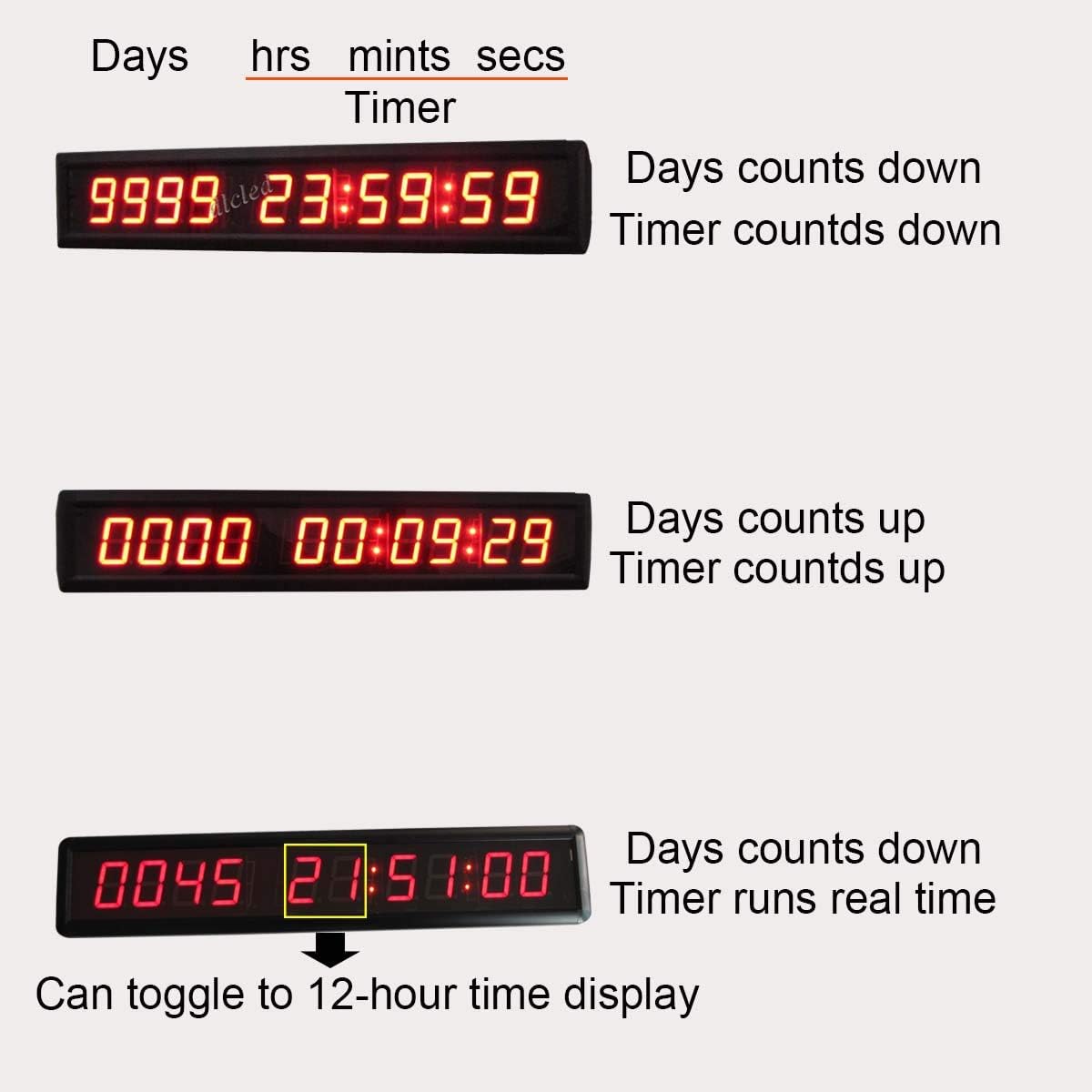
รูปที่ 4.1: อดีตamples of the timer displaying countdown (top) and count-up (middle) modes, and a real-time clock display (bottom) with 12-hour toggle capability.
4.3 Time Display Toggle
When in real-time clock mode, the display can be toggled between 12-hour and 24-hour formats. Refer to your remote control for the specific button (e.g., "12/24H" or "Time Format") to switch between these display options.
5. การบำรุงรักษา
- การทำความสะอาด: ใช้ผ้าแห้งนุ่มๆ เช็ดทำความสะอาดหน้าจอและasing. Avoid abrasive cleaners or solvents that may damage the surface.
- พลัง: Ensure the clock is connected to a stable 5VDC power source. Disconnect power during extended periods of non-use.
- รีโมทคอนโทรล: Replace AAA batteries in the remote control when its range or responsiveness decreases.
- สิ่งแวดล้อม: เก็บอุปกรณ์ไว้ในสภาพแวดล้อมที่แห้ง หลีกเลี่ยงแสงแดดโดยตรง อุณหภูมิที่สูงและความชื้นสูง
6 การแก้ไขปัญหา
| ปัญหา | สาเหตุที่เป็นไปได้ | สารละลาย |
|---|---|---|
| หน้าจอว่างเปล่าหรือไม่สว่างขึ้น | No power or faulty power adapter. | Check power connection. Ensure adapter is securely plugged into both the clock and the wall outlet. Test the outlet with another device. |
| รีโมทคอนโทรลไม่มีการตอบสนอง | Dead batteries, incorrect battery polarity, or obstruction. | Replace remote control batteries (2xAAA). Ensure batteries are inserted with correct polarity. Remove any obstructions between the remote and the clock's IR receiver. |
| Timer does not reset or set correctly. | Incorrect operation or temporary software glitch. | Refer to Section 4.2 for detailed setting instructions. Try unplugging the clock from power for 10 seconds and then plugging it back in to perform a soft reset. |
| Display shows incorrect time after power outage. | No internal backup battery for real-time clock. | This model does not feature a backup battery. Time/date settings must be re-entered manually after a power interruption. |
| Timer freezes or malfunctions. | Software issue or unstable power. | Unplug the clock for a few minutes, then plug it back in. Ensure the power supply is stable. If the issue persists, contact customer support. |
7. ข้อมูลจำเพาะ
| คุณสมบัติ | รายละเอียด |
|---|---|
| หมายเลขรุ่น | IN10T1.8R |
| ยี่ห้อ | เลดจิทัล |
| สี | Red (Ultra brightness, high contrast characters) |
| วัสดุ | Aluminum case, black painting, 1.2mm aluminum extrusion |
| ขนาดสินค้า (กxยxส) | 53cm x 10cm x 4cm (20.87"W x 3.94"H x 4"D) |
| ความสูงของตัวเลข | 1.8 นิ้ว (4.57 ซม.) |
| น้ำหนักสินค้า | 1.4 กิโลกรัม (3.08 ปอนด์) |
| กำลังไฟเข้า | 100 โวลต์ -240VAC |
| ปฏิบัติการฉบับที่tage | 5VDC |
| วิธีการควบคุม | IR Remote Control (Max 10 meters distance) |
| จำนวนสูงสุด | 9999 Days, 23 Hours, 59 Minutes, 59 Seconds |
| ความแม่นยำของเวลา | 2-3 minutes tolerance per year |
| ยูพีซี | 721821324211, 701806778994 |

Figure 7.1: Product dimensions and digit height details.
8. การรับประกันและการสนับสนุน
The Ledgital Countdown Timer comes with a one-year limited warranty from the date of purchase. Additionally, a 30-day return and refund service is available.
For technical support, warranty claims, or further assistance, please contact Ledgital customer service through the retailer where the product was purchased or visit the official Ledgital webเว็บไซต์สำหรับข้อมูลการติดต่อ
บันทึก: การรับประกันไม่ครอบคลุมความเสียหายที่เกิดจากการใช้งานผิดวิธี อุบัติเหตุ การดัดแปลงโดยไม่ได้รับอนุญาต หรือการไม่ปฏิบัติตามคำแนะนำในคู่มือนี้